పరిచయం
ధన్యవాదాలు, ధన్యవాదాలు.asing the Modern Projection Clock DS-3605. This device combines modern elegance with smart functionality, serving as an ideal desk organizer and stylish home accessory. It features time, date, alarm, temperature display, and a unique projection function. Please read this manual carefully before use to ensure proper operation and longevity of your device.
ఉత్పత్తి లక్షణాలు
- సొగసైన డిజైన్: The DS-3605 clock features a sleek box-shaped design, perfect for modern offices or homes.
- ధ్వని నియంత్రణ: Approach it and gently clap your hands or tap your desk, and the backlight will activate, making it easy to check the time at night.
- Projection Magic: Clap your hands again or tap your desk, and watch as the projected light illuminates the time on your walls or ceiling, adding a touch of elegance to your space.
- బహుళ-ఫంక్షనల్: This clock offers everything you need - time, date, alarm, temperature display, countdown feature, and even a 200-year calendar memory.
- Easy Alarm Setup: Choose from 8 different alarm sounds and enjoy the snooze function for a few extra minutes of sleep.
- ప్రపంచ సమయం: Display world time and local time on the same screen, making it ideal for global travelers.
- ఉష్ణోగ్రత ప్రదర్శన: Get automatic temperature readings for a comfortable environment.
- Sound-Activated Backlight: Gently press the light button to turn on the backlight or use the projection for nighttime convenience.
- సర్దుబాటు చేయగల ప్రొజెక్షన్ కోణం: Customize the projection angle to your preference.
- Standard and Military Time: Easily switch between standard and military time formats.
ప్యాకేజీ విషయాలు
- 1 x DS-3605 Modern Projection Clock
- 1 x పవర్ అడాప్టర్ (కార్డెడ్ ఎలక్ట్రిక్)
- 1 x యూజర్ మాన్యువల్ (ఈ పత్రం)
ఉత్పత్తి ముగిసిందిview

మూర్తి 1: ముందు view of the DS-3605 Projection Clock with time projection.

Figure 2: Detail of the adjustable projection lens.
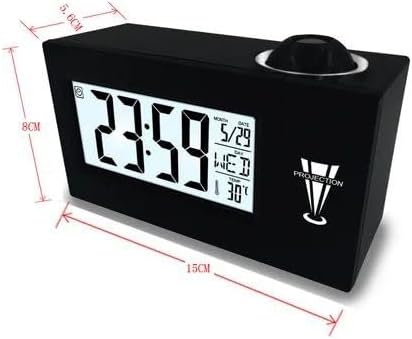
Figure 3: Product dimensions for the DS-3605 Projection Clock.
సెటప్
- అన్ప్యాకింగ్: ప్యాకేజింగ్ నుండి గడియారం మరియు అన్ని ఉపకరణాలను జాగ్రత్తగా తీసివేయండి.
- పవర్ కనెక్షన్: Connect the provided power adapter to the DC input port on the clock and then plug it into a standard electrical outlet. The display should light up.
- ప్రారంభ సమయం/తేదీ సెట్టింగ్: Upon first power-up, the clock may display a default time. Refer to the "Operating Instructions" section to set the correct time, date, and year.
- ప్లేస్మెంట్: Place the clock on a stable, flat surface. For optimal projection, ensure there is a clear wall or ceiling surface above the clock.
ఆపరేటింగ్ సూచనలు
సమయం మరియు తేదీని సెట్ చేయడం
- నొక్కండి మోడ్ button to cycle through time, date, and alarm settings.
- When the desired setting (e.g., time) is blinking, use the UP మరియు డౌన్ విలువను సర్దుబాటు చేయడానికి బటన్లు.
- నొక్కండి సెట్ or మోడ్ again to confirm and move to the next setting (e.g., minutes after hours).
- Repeat for year, month, and day.
అలారం సెటప్
- నొక్కండి మోడ్ until the alarm time is displayed.
- ఉపయోగించండి UP మరియు డౌన్ అలారం సమయాన్ని సెట్ చేయడానికి.
- నొక్కండి సెట్ నిర్ధారించడానికి.
- To activate/deactivate the alarm, locate the alarm ON/OFF switch or button (refer to device specific buttons if not explicitly mentioned).
- To select alarm sound, press a dedicated sound button or cycle through options during alarm setup. There are 8 different alarm sounds available.
- The snooze function can be activated by pressing the స్నూజ్ అలారం మోగినప్పుడు బటన్.
ప్రొజెక్షన్ ఫీచర్ ఉపయోగించి

Figure 4: Time projection feature in a bedroom setting.
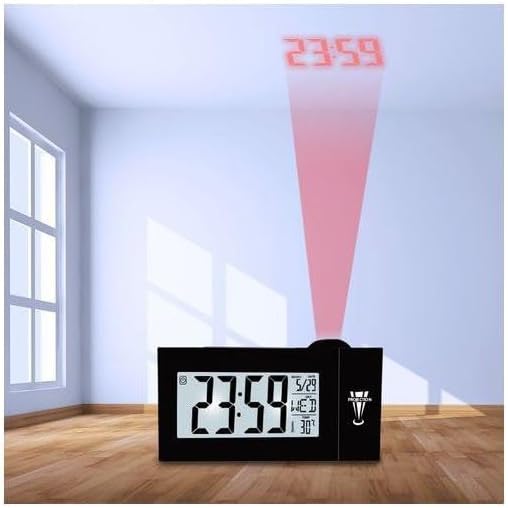
Figure 5: Projection of time onto a wall in a room.
- ప్రొజెక్షన్ను సక్రియం చేస్తోంది: The projection can be activated by sound control (clapping hands or tapping the desk) or by pressing a dedicated projection button (if available).
- సర్దుబాటు కోణం: Rotate the projection lens on top of the clock to adjust the angle of the projected time on your wall or ceiling.
- దృష్టి: Some models may have a focus ring around the projection lens. Rotate it to sharpen the projected image.
Sound-Activated Backlight
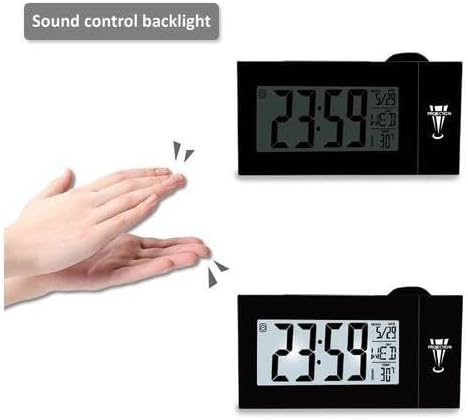
Figure 6: Demonstration of sound-activated backlight.
The clock's backlight can be activated by making a sound (like clapping your hands) or gently tapping the surface it rests on. This feature is convenient for checking the time in the dark without fumbling for buttons.
Switching Time Formats (Standard/Military)
To switch between 12-hour (AM/PM) and 24-hour (military) time formats, press and hold the సమయ నమూనా button (or a combination of buttons as indicated on the device) until the display changes.
World Time Display
The clock can display both world time and local time simultaneously. Consult the device's specific buttons for navigating and setting world time zones.
నిర్వహణ
- శుభ్రపరచడం: Use a soft, dry cloth to clean the surface of the clock. Do not use abrasive cleaners or solvents.
- దుమ్ము దులపడం: Regularly dust the projection lens to ensure clear projection.
- శక్తి: Always use the provided power adapter. Disconnect power during thunderstorms or if not in use for extended periods.
- పర్యావరణం: గడియారాన్ని ప్రత్యక్ష సూర్యకాంతి, తీవ్రమైన ఉష్ణోగ్రతలు మరియు అధిక తేమ నుండి దూరంగా ఉంచండి.
ట్రబుల్షూటింగ్
| సమస్య | సాధ్యమైన కారణం | పరిష్కారం |
|---|---|---|
| డిస్ప్లే ఖాళీగా లేదా మసకగా ఉంది. | No power or power adapter issue. | Ensure power adapter is securely connected and plugged into a working outlet. Try a different outlet. |
| ప్రొజెక్షన్ అస్పష్టంగా ఉంది. | ప్రొజెక్షన్ లెన్స్ ఫోకస్ తప్పిపోయింది లేదా మురికిగా ఉంది. | Rotate the focus ring around the projection lens (if available) until the image is clear. Clean the lens with a soft cloth. |
| Projection is not visible. | Projection feature not activated or room is too bright. | Activate projection using sound control or dedicated button. Ensure the room is sufficiently dark for visibility. |
| Sound control backlight not working. | Insufficient sound or sensor obstruction. | Ensure sound is clear and loud enough (e.g., a distinct clap). Check for any obstructions near the sound sensor. |
| అలారం మోగడం లేదు. | అలారం యాక్టివేట్ కాలేదు లేదా వాల్యూమ్ చాలా తక్కువగా ఉంది. | Verify the alarm is set to ON. Check alarm volume settings. |
స్పెసిఫికేషన్లు
| ఫీచర్ | వివరాలు |
|---|---|
| బ్రాండ్ | సాధారణమైనది |
| మోడల్ సంఖ్య | DS-3605 (a.c2) |
| రంగు | నలుపు |
| ఉత్పత్తి కొలతలు (L x W x H) | 16 x 3.81 x 6 సెం.మీ |
| వస్తువు బరువు | 100 గ్రా |
| మెటీరియల్ | పాలీ వినైల్ క్లోరైడ్ (PVC) |
| ప్రదర్శన రకం | డిజిటల్ |
| శక్తి మూలం | కార్డెడ్ ఎలక్ట్రిక్ |
| ప్రత్యేక లక్షణాలు | Large display screen, Projector clock, Temperature display |
| గది రకం | పడకగది |
| శైలి | ఆధునిక |
| ASIN | B0CH8YB4PM |
| మొదటి తేదీ అందుబాటులో ఉంది | సెప్టెంబర్ 4, 2023 |
వారంటీ మరియు మద్దతు
This product comes with a standard manufacturer's warranty. For specific warranty details, please refer to the packaging or contact your retailer. For technical support or further assistance, please contact the customer service department of the brand or your point of purchase. Keep your purchase receipt for warranty claims.


