
1. పరిచయం
This manual provides detailed instructions for the installation, operation, and maintenance of your addlon 52 Inch Smart Ceiling Fan with Light. Please read this manual thoroughly before installation and use to ensure safe and efficient operation. Keep this manual for future reference.
2. భద్రతా సమాచారం
అగ్ని ప్రమాదాలు, విద్యుత్ షాక్ మరియు వ్యక్తిగత గాయాల ప్రమాదాన్ని తగ్గించడానికి విద్యుత్ ఉపకరణాలను ఇన్స్టాల్ చేసేటప్పుడు మరియు ఆపరేట్ చేసేటప్పుడు ఎల్లప్పుడూ ప్రాథమిక భద్రతా జాగ్రత్తలను అనుసరించండి.
- ఇన్స్టాలేషన్ లేదా సర్వీసింగ్ చేసే ముందు సర్క్యూట్ బ్రేకర్ వద్ద పవర్ ఆఫ్ చేయబడిందని నిర్ధారించుకోండి.
- అన్ని వైరింగ్లు జాతీయ మరియు స్థానిక విద్యుత్ కోడ్లకు అనుగుణంగా ఉండాలి.
- వైరింగ్ విధానాల గురించి మీకు ఖచ్చితంగా తెలియకపోతే అర్హత కలిగిన ఎలక్ట్రీషియన్ను సంప్రదించండి.
- The mounting structure must be capable of supporting the weight of the fan (refer to specifications).
- ఫ్యాన్ పనిచేస్తున్నప్పుడు చేతులు, దుస్తులు మరియు ఇతర వస్తువులను ఫ్యాన్ బ్లేడ్లకు దూరంగా ఉంచండి.
- Do not use this fan with a solid-state speed control device.
3. ప్యాకేజీ విషయాలు
క్రింద జాబితా చేయబడిన అన్ని భాగాలు మీ ప్యాకేజీలో చేర్చబడ్డాయని ధృవీకరించండి:
- Smart Ceiling Fan Unit
- లైట్ కిట్
- రిమోట్ కంట్రోల్
- మౌంటు హార్డ్వేర్
- Downrods (various lengths may be included)
- ఇన్స్ట్రక్షన్ మాన్యువల్
4. స్పెసిఫికేషన్లు
| ఫీచర్ | వివరాలు |
|---|---|
| బ్రాండ్ | యాడ్లోన్ |
| మోడల్ సంఖ్య | KDM52ABS01S1 |
| ఉత్పత్తి కొలతలు | 52"డి x 52"వా x 19.68"హ |
| రంగు | నలుపు |
| మెటీరియల్ | Acrylonitrile Butadiene Styrene (Plastic Blades) |
| మోటార్ రకం | రివర్సిబుల్ DC మోటార్ |
| బ్లేడ్ల సంఖ్య | 3 |
| స్పీడ్ల సంఖ్య | 6 |
| కాంతి రకం | LED, 3CCT Dimmable (3000K, 4000K, 6000K) |
| వాట్tage | 45 వాట్స్ |
| గాలి ప్రవాహ సామర్థ్యం | నిమిషానికి 5273 క్యూబిక్ అడుగులు |
| వాల్యూమ్tage | 120 వోల్ట్లు |
| నియంత్రణ పద్ధతులు | Remote Control, App Control (Joinin home/Smartlife/Tuya Smart), Voice Control (Alexa/Google Home) |
| ఇండోర్/అవుట్డోర్ వినియోగం | Indoor, Outdoor (avoid direct rain) |
| శబ్దం స్థాయి | Low to 35dB |
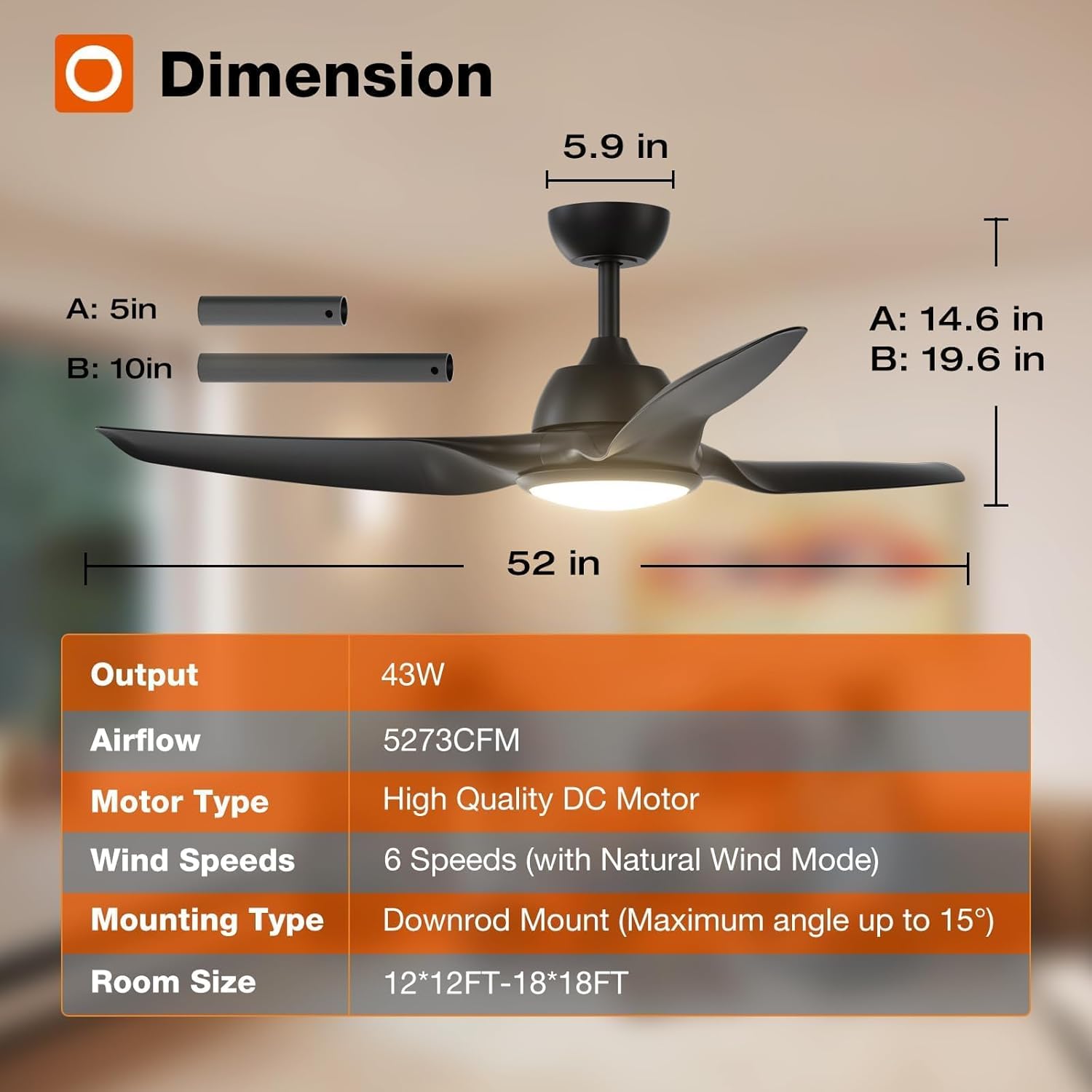
Figure 4.1: Fan Dimensions and Key Specifications
5. సంస్థాపన
The addlon 52 Inch Smart Ceiling Fan is designed for straightforward installation. Detailed instructions and diagrams are provided in the included installation guide. Ensure you have the necessary tools and follow all safety guidelines.
- ప్రీ-ఇన్స్టాలేషన్: Turn off power at the circuit breaker. Read the entire installation manual before beginning.
- మౌంటు: Securely attach the mounting bracket to a ceiling joist or an outlet box rated for fan support.
- వైరింగ్: Connect the fan's electrical wires to the household wiring according to the provided wiring diagram.
- అసెంబ్లీ: Attach the fan body, blades, and light kit as instructed.
- యాప్ కనెక్షన్: For smart features, ensure your Wi-Fi network is on the 2.4Ghz band for initial app connection.
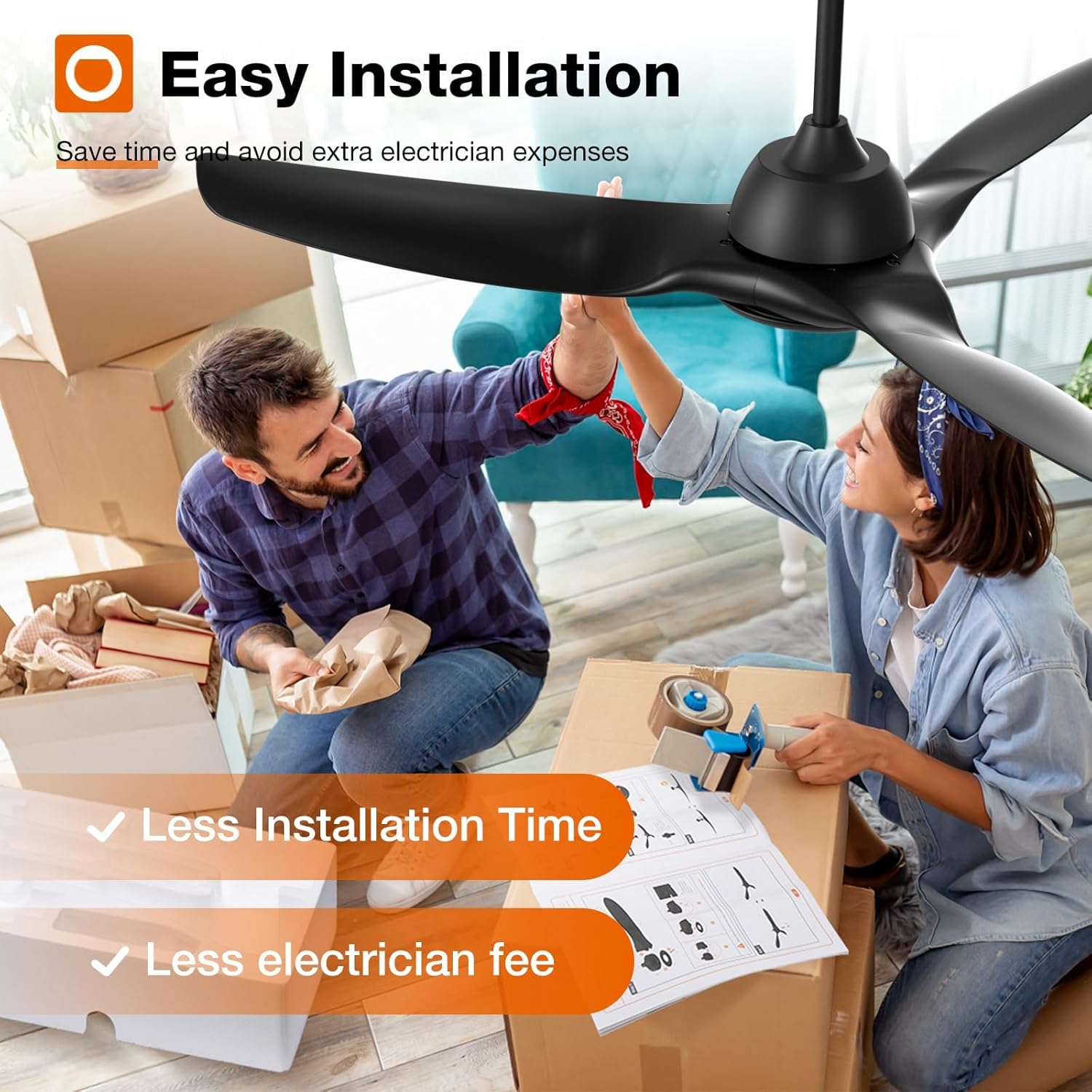
Figure 5.1: Easy Installation Process

Figure 5.2: DC Motor Design

Figure 5.3: Fan Blade Design

Figure 5.4: Downrod Mounting Options
6. ఆపరేషన్
Your addlon smart ceiling fan offers multiple control methods and features for optimal comfort.
6.1 నియంత్రణ పద్ధతులు
- రిమోట్ కంట్రోల్: Use the included remote to adjust fan speed, light settings, and set timers.
- యాప్ నియంత్రణ: Download the Joinin Home, Smart Life, or Tuya Smart app to control the fan from your smartphone.
- వాయిస్ నియంత్రణ: Integrate with Alexa or Google Home for hands-free operation.

చిత్రం 6.1: యాప్ కంట్రోల్ ఇంటర్ఫేస్

చిత్రం 6.2: రిమోట్ కంట్రోల్ ఆపరేషన్
6.2 ఫ్యాన్ స్పీడ్ సర్దుబాటు
The fan features 6 adjustable speeds, including a natural wind mode, to suit various comfort levels.
- స్థాయిలు 1-2: Low, comfortable wind for sleeping or gentle ventilation.
- స్థాయిలు 3-4: Medium, natural wind for daily use.
- స్థాయిలు 5-6: High, cooling wind for exercise or hot weather.
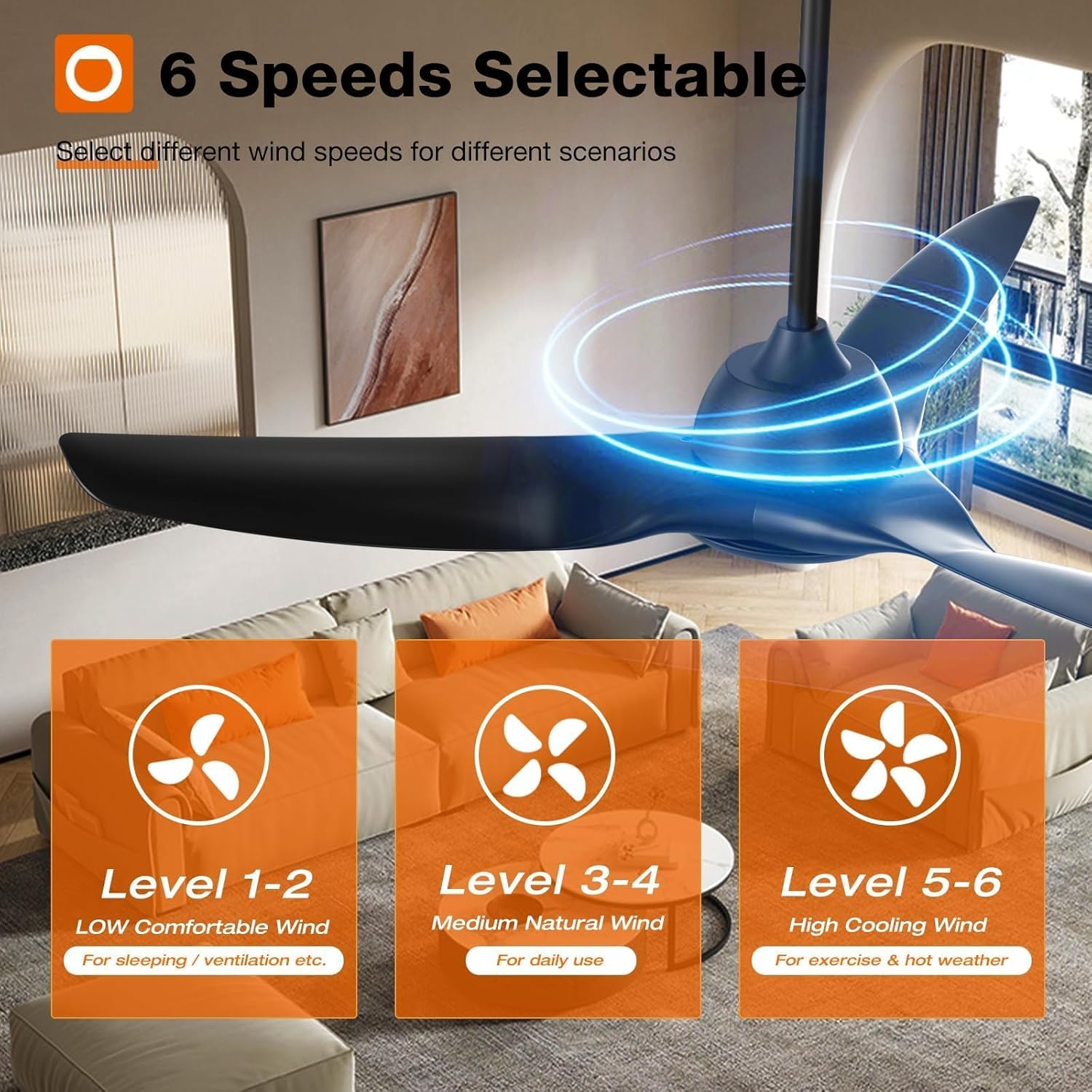
Figure 6.3: Fan Speed Settings

Figure 6.4: Visual Representation of Fan Speeds
6.3 Light Control (CCT & Dimming)
The integrated LED light is dimmable (10%-100%) and offers three color temperature options:
- 3000K: వెచ్చని తెలుపు
- 4000K: సహజ తెలుపు
- 6000K: కోల్డ్ వైట్

Figure 6.5: Customizable Light Temperatures

Figure 6.6: Light Color Temperature and Brightness Range
6.4 Reversible DC Motor
The reversible DC motor allows for year-round use, improving air circulation to keep you comfortable in both summer and winter.
- వేసవి మోడ్: Blades rotate counter-clockwise to create a downward airflow, providing a cooling effect.
- వింటర్ మోడ్: Blades rotate clockwise to create an upward airflow, recirculating warm air trapped near the ceiling.

Figure 6.7: Reversible Motor Function (Summer/Winter)

Figure 6.8: Seasonal Airflow Direction
6.5 టైమర్ ఫంక్షన్
Set the fan to automatically turn off after a specified period (2 or 4 hours) for convenience, especially during sleep.

Figure 6.9: Timer Settings
6.6 నిశ్శబ్ద ఆపరేషన్
The fan operates at a low noise level, approximately 35dB, ensuring a quiet environment.
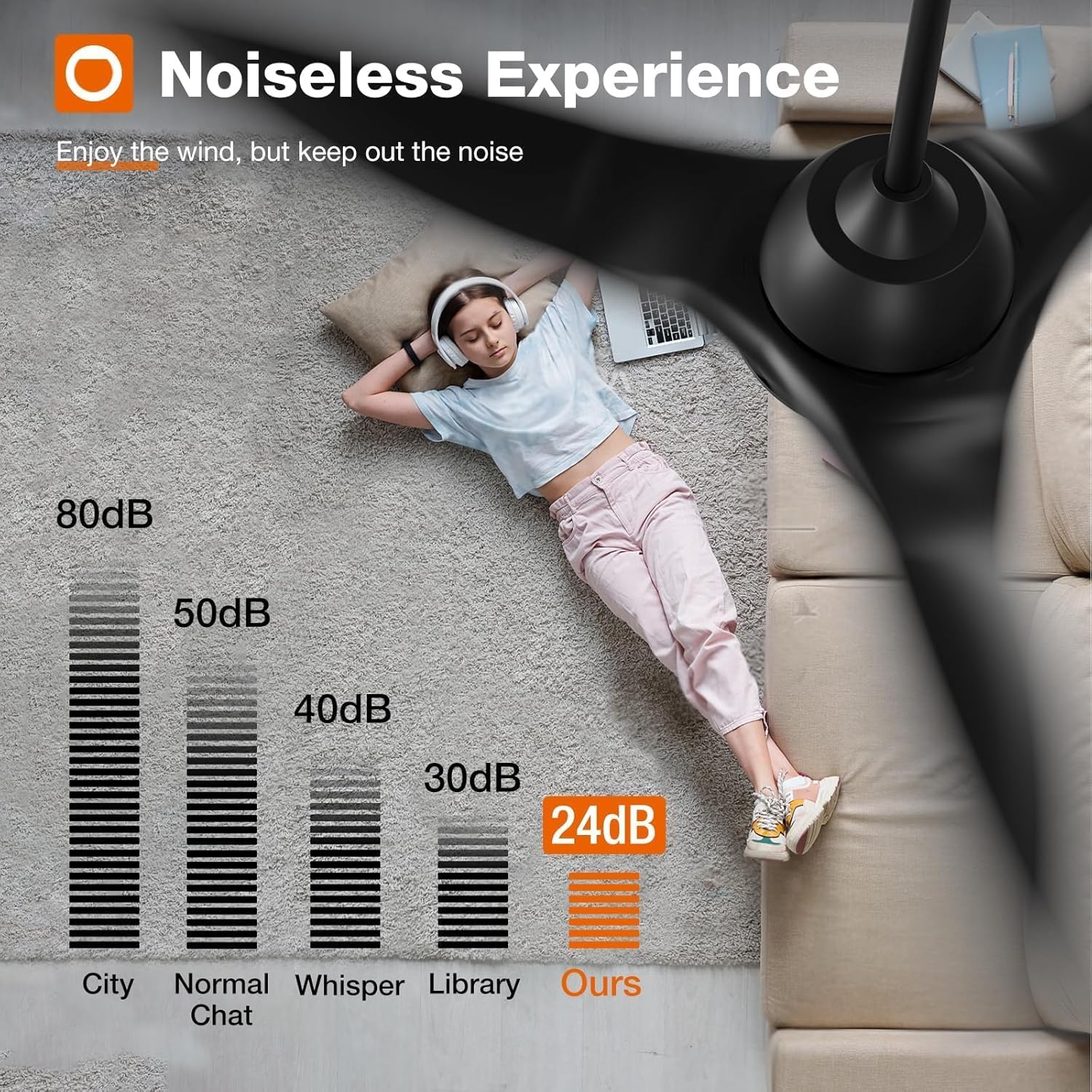
Figure 6.10: Noise Level Comparison
7. సంరక్షణ మరియు నిర్వహణ
Regular care and maintenance will prolong the life and performance of your ceiling fan.
- శుభ్రపరచడం: ఫ్యాన్ బ్లేడ్లు మరియు మోటార్ హౌసింగ్ను క్రమానుగతంగా మృదువైన, డి-క్లాసర్తో శుభ్రం చేయండి.amp గుడ్డ. రాపిడి క్లీనర్లు లేదా ద్రావకాలు ఉపయోగించవద్దు.
- తనిఖీ: Check all connections and mounting hardware annually to ensure they are secure.
- సరళత: ఫ్యాన్ మోటార్ శాశ్వతంగా లూబ్రికేట్ చేయబడుతుంది మరియు అదనపు నూనె రాయవలసిన అవసరం లేదు.
8. ట్రబుల్షూటింగ్
మీ ఫ్యాన్తో మీకు సమస్యలు ఎదురైతే, కింది సాధారణ ట్రబుల్షూటింగ్ దశలను చూడండి:
- ఫ్యాన్ స్టార్ట్ అవ్వడం లేదు: Check power supply, ensure all wiring connections are secure, and verify remote control battery.
- కాంతి పనిచేయదు: Check light kit wiring, ensure light is turned on via remote/app, and verify dimming settings.
- అధిక వొబ్లింగ్: Ensure all blade screws are tightened, check blade balance, and verify mounting bracket is securely installed.
- Remote/App/Voice Control Issues: Ensure the fan is properly paired with the remote/app. For app control, confirm your Wi-Fi is 2.4Ghz and the fan is within range. For voice control, ensure proper integration with Alexa/Google Home.
మరింత సహాయం కోసం, దయచేసి కస్టమర్ మద్దతును సంప్రదించండి.
9. వారంటీ మరియు మద్దతు
addlon stands behind the quality of its products.
- మోటార్ వారంటీ: Up to 120 months (10 years) warranty on the motor.
- ఇతర భాగాల వారంటీ: 2 years warranty on all other fan components.
- కస్టమర్ మద్దతు: 24-hour customer support is available to assist with any questions during installation or use.
Please contact addlon customer support for warranty claims or technical assistance.