
1. పరిచయం
Thank you for choosing the Xtorm Fuel Series 5 Powerbank. This manual provides essential information for the safe and efficient use of your new portable charger. Please read this manual thoroughly before using the device and keep it for future reference.
2. ఉత్పత్తి ముగిసిందిview
The Xtorm Fuel Series 5 Powerbank is a high-capacity portable charger designed to keep your devices powered on the go. It features a robust 10,000 mAh battery, multiple fast-charging ports, and a durable design made from GRS certified recycled plastic.

This image displays the Xtorm Fuel Series 5 Powerbank in its elegant dusk white color, highlighting its compact design, the integrated digital percentage display, and the various charging ports located at the bottom.
ముఖ్య లక్షణాలు:
- 10,000 mAh కెపాసిటీ: Provides multiple charges for smartphones and other small devices.
- ఫాస్ట్ ఛార్జింగ్: Equipped with a 20W USB-C Power Delivery (PD) port for rapid charging.
- బహుళ పోర్ట్లు: Includes two USB-C ports (20W PD, 18W) and one USB-A port (18W) for simultaneous charging of up to three devices.
- డిజిటల్ ప్రదర్శన: రియల్-టైమ్ శాతంtage display for remaining battery life and fast charge indication.
- స్థిరమైన పదార్థం: Constructed using GRS certified recycled plastic.

ఒక వివరణాత్మక view of the power bank's charging interface, featuring two USB-C ports and one USB-A port, indicating their respective power outputs.
3. సెటప్
పెట్టెలో ఏముంది:
- Xtorm Fuel Series 5 Powerbank
- USB-C ఛార్జింగ్ కేబుల్
- వినియోగదారు మాన్యువల్ (ఈ పత్రం)
ప్రారంభ ఛార్జ్:
Before first use, it is recommended to fully charge your Xtorm Fuel Series 5 Powerbank. Connect the included USB-C cable to the power bank's input USB-C port and plug the other end into a compatible USB wall charger (not included). The digital display will show the charging progress. A full charge takes approximately 2.5 hours.
4. ఆపరేటింగ్ సూచనలు
పవర్ బ్యాంక్ ఛార్జింగ్:
- Locate the USB-C input port on the power bank.
- Connect one end of the USB-C cable to this port.
- USB-C కేబుల్ యొక్క మరొక చివరను USB వాల్ అడాప్టర్ లేదా కంప్యూటర్ యొక్క USB పోర్ట్కు కనెక్ట్ చేయండి.
- The digital display will illuminate, showing the current charge percentage and indicating that the power bank is charging.
మీ పరికరాలను ఛార్జ్ చేస్తోంది:
The power bank can charge smartphones, tablets, and other USB-powered devices. It features two USB-C ports and one USB-A port.
- మీ పరికరం యొక్క ఛార్జింగ్ కేబుల్ను పవర్ బ్యాంక్లోని తగిన పోర్ట్కు (USB-C లేదా USB-A) కనెక్ట్ చేయండి.
- కేబుల్ యొక్క మరొక చివరను మీ పరికరానికి కనెక్ట్ చేయండి.
- పవర్ బ్యాంక్ మీ పరికరాన్ని స్వయంచాలకంగా ఛార్జ్ చేయడం ప్రారంభిస్తుంది. డిజిటల్ డిస్ప్లే పవర్ బ్యాంక్ యొక్క మిగిలిన ఛార్జ్ను చూపుతుంది.
- You can charge multiple devices simultaneously using the available ports.
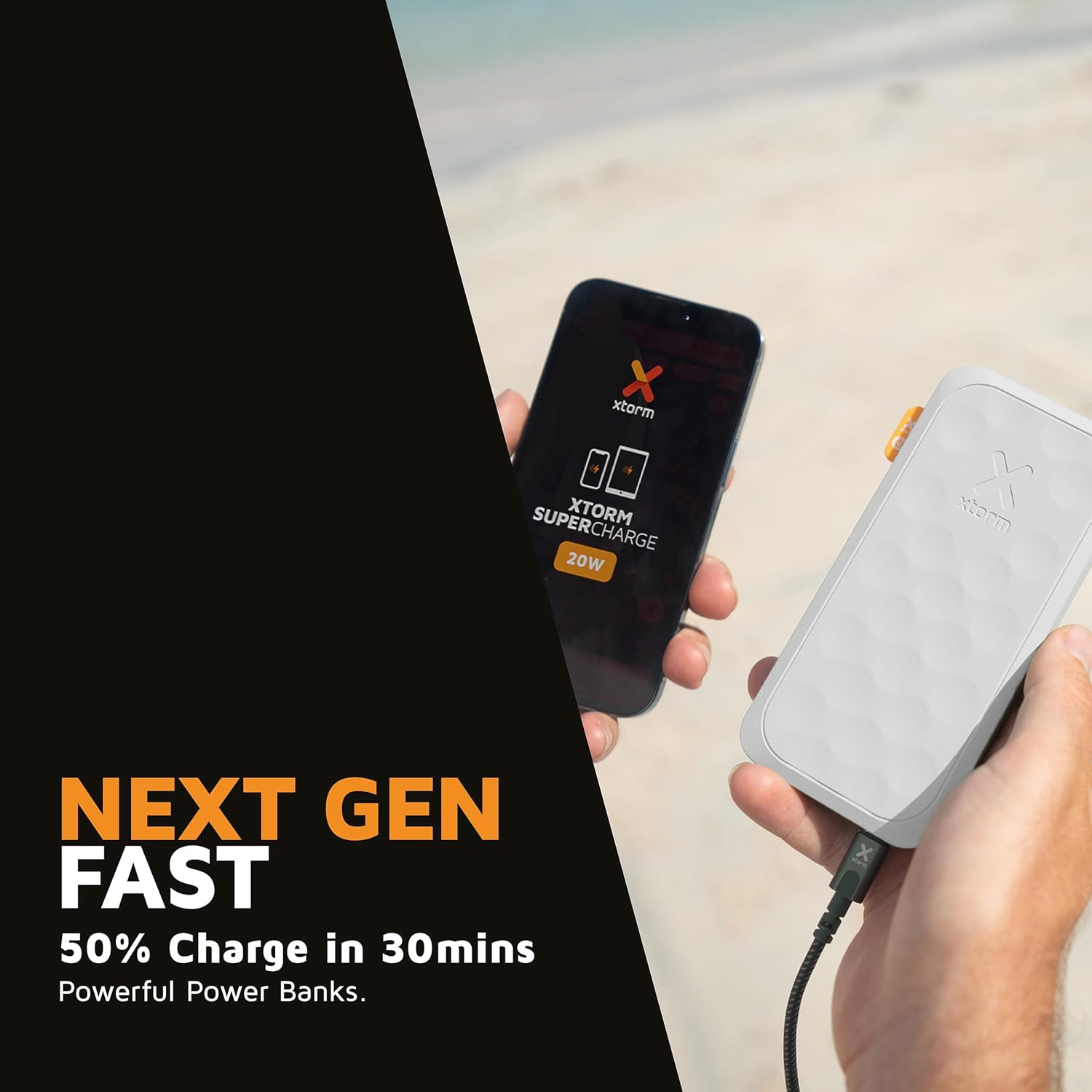
This image shows the Xtorm Fuel Series 5 Powerbank actively charging a smartphone, demonstrating its portable use case for on-the-go power.

This diagram provides a clear breakdown of the power bank's ports, showing the 20W USB-C PD output, an 18W USB-C output, and an 18W USB-A output, along with the 20W USB-C PD input.
5. నిర్వహణ మరియు సంరక్షణ
- శుభ్రపరచడం: పవర్ బ్యాంక్ను శుభ్రం చేయడానికి మృదువైన, పొడి వస్త్రాన్ని ఉపయోగించండి. కఠినమైన రసాయనాలు లేదా రాపిడి పదార్థాలను ఉపయోగించవద్దు.
- నిల్వ: పవర్ బ్యాంక్ను ప్రత్యక్ష సూర్యకాంతి మరియు తీవ్రమైన ఉష్ణోగ్రతలు లేకుండా చల్లని, పొడి ప్రదేశంలో నిల్వ చేయండి.
- బ్యాటరీ లైఫ్: బ్యాటరీ జీవితకాలాన్ని పొడిగించడానికి, సాధారణ ఉపయోగంలో లేకపోతే కనీసం మూడు నెలలకు ఒకసారి పవర్ బ్యాంక్ను పూర్తిగా ఛార్జ్ చేసి డిశ్చార్జ్ చేయండి.
- చుక్కలను నివారించండి: While designed to be robust, avoid dropping the power bank or subjecting it to strong impacts.
6. ట్రబుల్షూటింగ్
సాధారణ సమస్యలు మరియు పరిష్కారాలు:
- పవర్ బ్యాంక్ ఛార్జింగ్ లేదు:
- ఛార్జింగ్ కేబుల్ పవర్ బ్యాంక్ మరియు పవర్ సోర్స్ రెండింటికీ సురక్షితంగా కనెక్ట్ చేయబడిందని నిర్ధారించుకోండి.
- వేరే USB వాల్ అడాప్టర్ లేదా USB పోర్ట్ని ప్రయత్నించండి.
- ఛార్జింగ్ కేబుల్ దెబ్బతినలేదని ధృవీకరించండి.
- పవర్ బ్యాంక్ నుండి పరికరం ఛార్జ్ కావడం లేదు:
- పవర్ బ్యాంక్ తగినంత ఛార్జ్ కలిగి ఉందని నిర్ధారించుకోండి (డిజిటల్ డిస్ప్లేను తనిఖీ చేయండి).
- మీ పరికరానికి వేరే ఛార్జింగ్ కేబుల్ని ప్రయత్నించండి.
- Try connecting your device to a different port on the power bank. Note that one of the USB-C ports is specifically for fast charging (20W PD); if your device is older or not compatible with PD, try the other USB-C port or the USB-A port.
- మీ పరికరాన్ని పునఃప్రారంభించండి.
- నెమ్మదిగా ఛార్జింగ్:
- మీరు ఫాస్ట్ ఛార్జింగ్ అనుకూల కేబుల్ని ఉపయోగిస్తున్నారని మరియు మీ పరికరం ఫాస్ట్ ఛార్జింగ్కు మద్దతు ఇస్తుందని నిర్ధారించుకోండి.
- When charging multiple devices simultaneously, the output power per port may be reduced.
7. స్పెసిఫికేషన్లు
| మోడల్ పేరు | FS5100 |
| బ్యాటరీ కెపాసిటీ | 10,000 mAh (మిల్లీampగంటకు) |
| బ్యాటరీ కూర్పు | లిథియం-పాలిమర్ |
| ఇన్పుట్ (USB-C) | 20W USB-C Power Delivery (PD) |
| అవుట్పుట్ 1 (USB-C) | 20W USB-C Power Delivery (PD) |
| అవుట్పుట్ 2 (USB-C) | 18W USB-C |
| అవుట్పుట్ 3 (USB-A) | 18W USB-A |
| మొత్తం వాల్యూమ్tage | 20 వోల్ట్లు |
| కనెక్టర్ రకం | USB టైప్ A, USB టైప్ C |
| ప్రత్యేక లక్షణాలు | Digital Display, Fast Charge, Portable |
| సిఫార్సు ఉపయోగం | స్మార్ట్ఫోన్, టాబ్లెట్ |
8. భద్రతా సమాచారం
Your Xtorm Fuel Series 5 Powerbank is designed with multiple safety features to ensure reliable operation. Please adhere to the following safety guidelines:
- పవర్ బ్యాంక్ను తీవ్రమైన ఉష్ణోగ్రతలకు (45°C కంటే ఎక్కువ లేదా 0°C కంటే తక్కువ) బహిర్గతం చేయవద్దు.
- పరికరాన్ని విడదీయవద్దు, సవరించవద్దు లేదా రిపేర్ చేయడానికి ప్రయత్నించవద్దు.
- నీరు, తేమ మరియు మండే పదార్థాలకు దూరంగా ఉంచండి.
- పవర్ బ్యాంక్ స్పష్టంగా దెబ్బతిన్నా లేదా వాపు వచ్చినా ఉపయోగించవద్దు.
- స్థానిక నిబంధనల ప్రకారం పవర్ బ్యాంక్ను బాధ్యతాయుతంగా పారవేయండి.
- The power bank features a 6-layered safety check including temperature control, short circuit protection, overload protection, and high-efficiency components. It is also designed to be airport-proof.

An infographic detailing the comprehensive safety mechanisms built into the power bank, including temperature control, short circuit protection, overload protection, A-Class components, secured power management, and high efficiency, ensuring safe and reliable operation.
9. వారంటీ మరియు మద్దతు
వారంటీ సమాచారం మరియు కస్టమర్ మద్దతు కోసం, దయచేసి Xtorm అధికారిని చూడండి. webమీ స్థానిక రిటైలర్ను సైట్లో సంప్రదించండి లేదా సంప్రదించండి. ఏవైనా వారంటీ క్లెయిమ్ల కోసం మీ కొనుగోలు రుజువును ఉంచండి.
మరిన్ని సహాయం లేదా సాంకేతిక విచారణల కోసం, దయచేసి సందర్శించండి www.xtorm.eu.