
1. పరిచయం
This manual provides detailed instructions for the installation, operation, and maintenance of your SPORTARC SVP-688W WiFi Energy Meter. Please read this manual thoroughly before using the device to ensure safe and efficient operation. Keep this manual for future reference.
2. ఉత్పత్తి ముగిసిందిview
2.1 ముఖ్య లక్షణాలు
- LCD display for real-time viewing of current, voltage, leakage current, and total power (kWh).
- Adjustable protection settings for overvoltagఇ, అండర్వాల్tage, overcurrent, and leakage current.
- Adjustable overtemperature protection (for WiFi models only).
- Configurable reconnection time delay.
- Memory function: Retains kilowatt-hour data and protection settings even after power loss.
- Single-phase remote control capability.
- Compatible with Tuya power monitoring systems.
2.2 ఉత్పత్తి భాగాలు

మూర్తి 1: ముందు view of the SVP-688W WiFi Energy Meter. This image displays the device's LCD screen, which shows voltage, current, power, and leakage readings, along with the 'SET', 'UP', 'DOWN', 'WIFI', and 'POWER' buttons.

మూర్తి 2: కోణీయ view of the SVP-688W. This perspective provides a clearer look at the LCD interface and the tactile buttons for configuration and control.

మూర్తి 3: వైపు view of the SVP-688W. This image illustrates the side profile, typically where electrical input and output terminals are located for wiring connections.
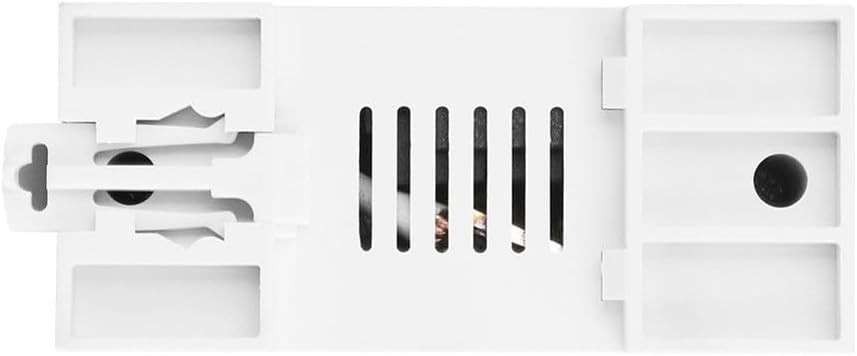
మూర్తి 4: వెనుకకు view of the SVP-688W. This view shows the mounting mechanism, such as DIN rail clips, and ventilation slots for heat dissipation.
3. సాంకేతిక లక్షణాలు
| పరామితి | విలువ/పరిధి | డిఫాల్ట్ సెట్టింగ్ |
|---|---|---|
| అండర్ వోల్tagఇ రక్షణ | 140-210 V (Adjustable) | 175 వి |
| ఓవర్వోల్tagఇ రక్షణ | 240-300 V (Adjustable) | 275 వి |
| ఓవర్ కరెంట్ రక్షణ | 1 A-63 A (Adjustable) | 63 ఎ |
| అధిక ఉష్ణోగ్రత రక్షణ | 10-85 °C (Adjustable for WiFi models, fixed 85 °C for non-WiFi) | N/A (Adjustable) |
| Reconnection Time Delay | 10s-99s (Adjustable) | 30లు |
| లీకేజ్ రక్షణ | 10-99 mA (Adjustable) | 50 mA |
| Electricity Display Range | 0-99999.9kWh | N/A |
| కొలతలు | 12 x 10 x 7 సెం.మీ | N/A |
| మోడల్ సంఖ్య | 1401882111 | N/A |
4. సెటప్ మరియు ఇన్స్టాలేషన్
ముఖ్యమైన: Installation of this device should only be performed by a qualified electrician or professional. Ensure all power is disconnected from the main supply before beginning any installation work to prevent electric shock or damage to the device.
4.1 వైరింగ్ సూచనలు
- Mount the SVP-688W device onto a standard DIN rail in your electrical panel.
- Connect the incoming live (L) and neutral (N) wires to the designated input terminals on the device.
- Connect the outgoing live (L) and neutral (N) wires to the load from the designated output terminals on the device.
- అన్ని కనెక్షన్లు సురక్షితంగా ఉన్నాయని మరియు సరిగ్గా ఇన్సులేట్ చేయబడిందని నిర్ధారించుకోండి.
The device is designed for single-phase electrical systems.
5. ఆపరేషన్
5.1 LCD డిస్ప్లే సమాచారం
The LCD screen provides real-time data:
- V: వాల్యూమ్tage (Voltmeter)
- A: Current (Ammeter)
- kWh: Total Energy Consumption (Energy Meter)
- mA: లీకేజ్ కరెంట్
- పల్స్: Indication of energy consumption pulses
- వైఫై: WiFi connection status indicator
- లీకేజ్: Leakage protection status indicator
5.2 పారామీటర్ సెట్టింగ్లు
కు view and adjust the device parameters:
- View డేటా: క్లుప్తంగా నొక్కండి సెట్ button to cycle through various data displays (e.g., voltage, current, kWh).
- కాన్ఫిగరేషన్ మోడ్ను నమోదు చేయండి: నొక్కండి మరియు పట్టుకోండి సెట్ button for 5 seconds to enter the configuration mode.
- పరామితిని ఎంచుకోండి: Once in configuration mode, press the సెట్ button again to cycle through the adjustable parameters (e.g., Undervoltagఇ, ఓవర్వాల్tage, Overcurrent, Leakage, Reconnection Time, Overtemperature).
- Adjust Setting: ఉపయోగించండి ▲ ▲ తెలుగు (పైకి) మరియు ▼ (Down) buttons to adjust the value of the selected parameter.
- పొందుపరుచు మరియు నిష్క్రమించు: The device will automatically save the settings after a few seconds of inactivity in configuration mode, or you can press and hold సెట్ మళ్ళీ నిష్క్రమించడానికి.
Refer to the 'Technical Specifications' section for default values and adjustable ranges for each parameter.
6. నిర్వహణ
The SPORTARC SVP-688W is designed for minimal maintenance. However, regular checks can ensure optimal performance and safety.
- శుభ్రపరచడం: Gently wipe the device with a dry, soft cloth. Do not use abrasive cleaners or solvents. Ensure the device is powered off before cleaning.
- కనెక్షన్ తనిఖీలు: వైరింగ్ కనెక్షన్లు గట్టిగా మరియు తుప్పు పట్టకుండా ఉండేలా వాటిని కాలానుగుణంగా తనిఖీ చేయండి.
- సాఫ్ట్వేర్ అప్డేట్లు: For WiFi-enabled features, check the associated Tuya application for any available firmware updates to ensure the device operates with the latest features and security enhancements.
6.1 kWh Data Reset
The accumulated kWh value can be reset. Refer to the device's specific menu options or the Tuya app for instructions on how to clear the kWh data.
7. ట్రబుల్షూటింగ్
- Device Not Reconnecting After Leakage Trip: If the device trips three times consecutively due to leakage protection, it will enter a manual reset state. It will not automatically reconnect. This is a safety feature. The user must manually inspect the electrical system to identify and repair the cause of the leakage before manually resetting the device. Other protection types (overvoltagఇ, అండర్వాల్tage, overcurrent) will allow automatic reconnection for more than 99,999 times.
- సరికాని రీడింగ్లు: Ensure all wiring connections are correct and secure. Verify that the device settings (e.g., current limits) are appropriate for your electrical system.
- WiFi కనెక్షన్ సమస్యలు: Check your router's internet connection. Ensure the device is within range of your WiFi network. Follow the pairing instructions in the Tuya app for reconnection.
- పరికరం ఆన్ చేయడం లేదు: Verify that the main power supply is active and correctly connected to the device's input terminals.
8. భద్రతా సమాచారం
- Always disconnect power at the main circuit breaker before installing, servicing, or cleaning the device.
- This device is intended for indoor use only. Do not expose it to moisture, direct sunlight, or extreme temperatures.
- పరికరాన్ని తెరవడానికి లేదా సవరించడానికి ప్రయత్నించవద్దు. లోపల వినియోగదారుకు సేవ చేయగల భాగాలు లేవు.
- స్థానిక విద్యుత్ కోడ్ల ప్రకారం సరైన గ్రౌండింగ్ ఉండేలా చూసుకోండి.
- పరికరాన్ని పిల్లలకు అందుబాటులో లేకుండా ఉంచండి.
- In case of malfunction, disconnect power immediately and contact a qualified technician.
9. వారంటీ మరియు మద్దతు
For technical support, warranty inquiries, or service, please contact SPORTARC customer service through your point of purchase or the official SPORTARC website. Please have your model number (SVP-688W) and purchase information ready when contacting support.