
LMT-M-F8-hei
బ్లూటూత్ ఇయర్ఫోన్ వైర్లెస్ హెడ్ఫోన్ టచ్ కంట్రోల్ M-F8 యూజర్ మాన్యువల్
Model: M-F8 (LMT-M-F8-hei)
బ్రాండ్: జెనెరిక్
పరిచయం
ధన్యవాదాలు, ధన్యవాదాలు.asing the Generic M-F8 Bluetooth Earphones. These wireless headphones are designed to provide a superior audio experience with powerful bass, clear vocals, and crisp highs, thanks to advanced chip technology and high-intensity magnetic drivers. Featuring intuitive touch controls and an ergonomic design, they offer comfort and convenience for various activities. Please read this manual carefully before using the product to ensure proper operation and to maximize its lifespan.
ముఖ్యమైన భద్రతా సమాచారం
పరికరానికి నష్టం జరగకుండా లేదా మీకు మీరే గాయం కాకుండా ఉండటానికి దయచేసి ఈ భద్రతా మార్గదర్శకాలను చదివి అనుసరించండి:
- Do not expose the earphones to extreme temperatures, humidity, or corrosive substances.
- పరికరాన్ని పడవేయడం, ప్రభావితం చేయడం లేదా విడదీయడం మానుకోండి.
- పిల్లలు మరియు పెంపుడు జంతువులకు దూరంగా ఉంచండి.
- Do not use the earphones while driving or in situations where you need to be aware of your surroundings.
- Clean the earphones with a soft, dry cloth only. Do not use liquids or abrasive cleaners.
- స్థానిక నిబంధనల ప్రకారం ఉత్పత్తిని బాధ్యతాయుతంగా పారవేయండి.
ప్యాకేజీ విషయాలు
ప్యాకేజీలో అన్ని వస్తువులు ఉన్నాయని నిర్ధారించుకోండి:
- Generic M-F8 Bluetooth Earphones (Left and Right)
- ఛార్జింగ్ కేసు
- USB ఛార్జింగ్ కేబుల్
- వినియోగదారు మాన్యువల్
- Multiple sizes of ear tips (typically 3 sizes)
ఉత్పత్తి ముగిసిందిview
The M-F8 earphones feature an ergonomic design with ear hooks for a secure and comfortable fit. Each earbud includes a touch control area and an LED indicator.

This image displays the black Generic M-F8 Bluetooth Earphone, highlighting its ear hook design for secure wear and a visible blue LED indicator on the earbud body.
సెటప్
1. ఇయర్ఫోన్లు మరియు కేస్ను ఛార్జ్ చేయడం
మొదటిసారి ఉపయోగించే ముందు, ఇయర్ఫోన్లు మరియు ఛార్జింగ్ కేసును పూర్తిగా ఛార్జ్ చేయండి.
- Connect the USB charging cable to the charging port on the case and a power source (e.g., computer USB port, wall adapter).
- ఛార్జింగ్ కేస్లోని సూచిక లైట్లు ఛార్జింగ్ స్థితిని చూపుతాయి.
- ఇయర్ఫోన్లను ఛార్జింగ్ కేసులో ఉంచండి. అవి స్వయంచాలకంగా ఛార్జింగ్ ప్రారంభమవుతాయి.
- A full charge typically takes approximately 1.5 hours for the case and earphones.

This image illustrates the M-F8 earphone and its charging case, indicating battery life and charging times: 1.5 hours for a full charge, 20 hours of continuous use, and 200 hours of standby time.
2. మీ పరికరంతో జత చేయడం
The M-F8 earphones feature one-step auto pairing for convenience.
- మీ పరికరం యొక్క బ్లూటూత్ ఆన్ చేయబడిందని నిర్ధారించుకోండి.
- Open the charging case and take out both earphones. They will automatically power on and enter pairing mode.
- On your device's Bluetooth settings, search for "M-F8" or a similar name and select it to connect.
- Once connected, you will hear a confirmation tone, and the earphone's LED indicator may change.
- ప్రారంభ జత చేసిన తర్వాత, ఇయర్ఫోన్లను కేస్ నుండి బయటకు తీసినప్పుడు అవి చివరిగా జత చేసిన పరికరానికి స్వయంచాలకంగా కనెక్ట్ అవుతాయి.

This image shows the M-F8 earphone next to a smartphone, illustrating the automatic connection process via Bluetooth after initial pairing.
ఆపరేటింగ్ సూచనలు
1. ఇయర్ఫోన్లు ధరించడం
The M-F8 earphones are designed for a secure and comfortable fit, especially during movement.
- ఎడమ (L) మరియు కుడి (R) ఇయర్ఫోన్లను గుర్తించండి.
- Gently place the earbud into your ear canal and rotate it slightly to ensure the ear hook sits comfortably and securely over your ear.
- Adjust the earphone until it feels snug and stable without causing pressure.

This image shows a person wearing the M-F8 earphone, highlighting its ergonomic design that ensures a comfortable and secure fit within the ear.

ఈ చిత్రం క్లోజప్ను అందిస్తుంది view of the M-F8 earphone's ergonomic design, emphasizing how it is shaped to fit securely around the ear and prevent accidental drops.
2. టచ్ నియంత్రణలు
Each earbud features a touch-sensitive area for easy control of music and calls.
| చర్య | ఫంక్షన్ |
|---|---|
| సింగిల్ ట్యాప్ | సంగీతాన్ని ప్లే/పాజ్ చేయండి |
| డబుల్ ట్యాప్ (కుడి ఇయర్బడ్) | తదుపరి ట్రాక్ |
| రెండుసార్లు నొక్కండి (ఎడమ ఇయర్బడ్) | సమాధానం/కాల్ ముగించు |
| ట్రిపుల్ ట్యాప్ (కుడి ఇయర్బడ్) | మునుపటి ట్రాక్ |
| ట్రిపుల్ ట్యాప్ (ఎడమ ఇయర్బడ్) | వాయిస్ అసిస్టెంట్ని యాక్టివేట్ చేయండి |
| లాంగ్ ప్రెస్ (2 సెకన్లు) | కాల్ని తిరస్కరించండి |
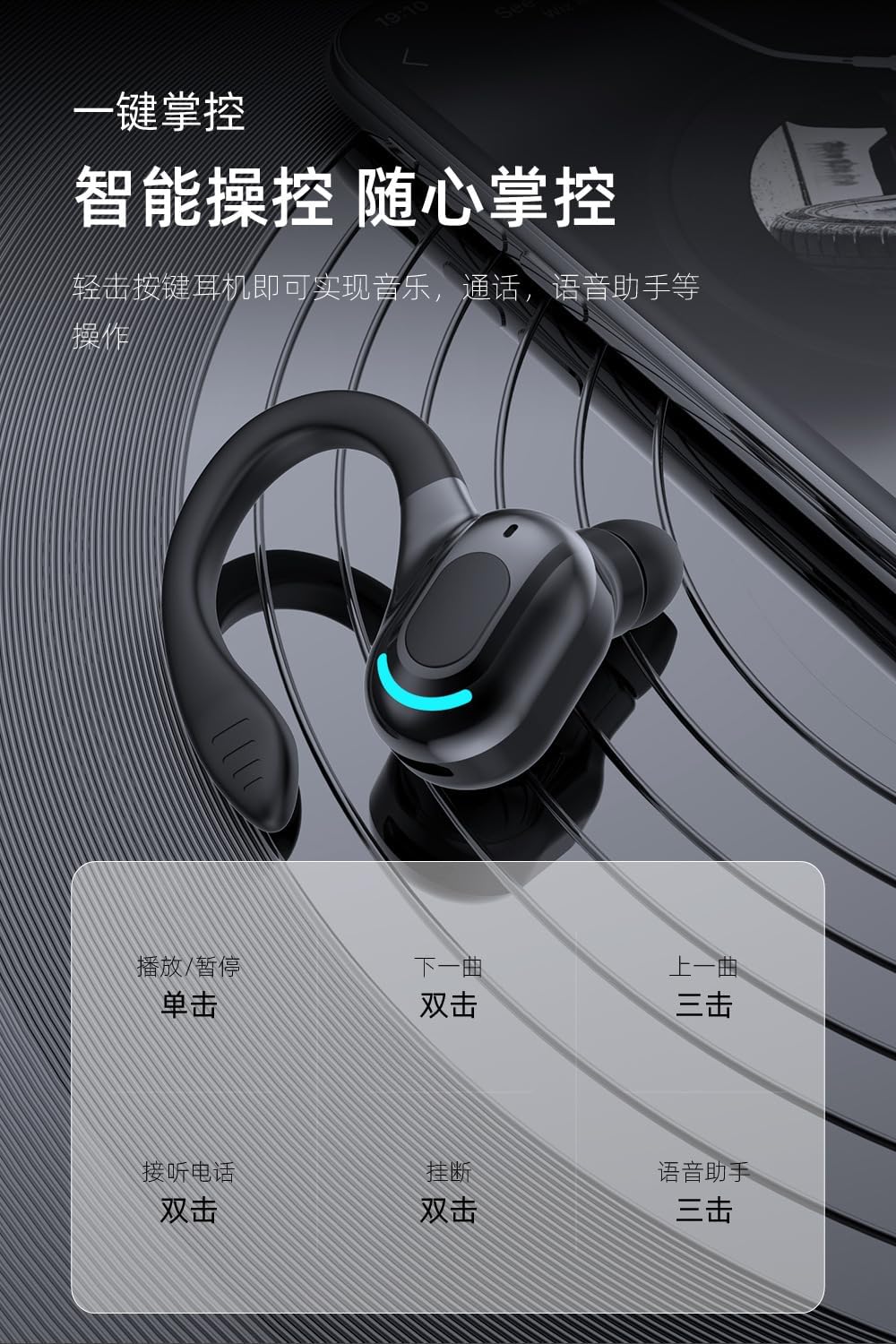
This image provides a visual guide to the M-F8 earphone's touch controls, detailing actions like single tap for play/pause, double tap for next track or answering calls, and triple tap for previous track or voice assistant activation.
నిర్వహణ
To ensure the longevity and optimal performance of your M-F8 earphones, follow these maintenance tips:
- శుభ్రపరచడం: Regularly clean the earbuds, ear tips, and charging contacts with a soft, dry, lint-free cloth. Do not use harsh chemicals or abrasive materials.
- నిల్వ: ఉపయోగంలో లేనప్పుడు, ఇయర్ఫోన్లను దుమ్ము మరియు నష్టం నుండి రక్షించడానికి వాటి ఛార్జింగ్ కేసులో నిల్వ చేయండి.
- బ్యాటరీ సంరక్షణ: Avoid fully discharging the battery frequently. Charge the earphones regularly, even if not used for extended periods, to maintain battery health.
- నీటిని నివారించండి: While designed for active use, avoid submerging the earphones in water or exposing them to heavy rain.
ట్రబుల్షూటింగ్
If you encounter issues with your M-F8 earphones, refer to the following common problems and solutions:
| సమస్య | సాధ్యమైన పరిష్కారం |
|---|---|
| ఇయర్ఫోన్లు జత కావడం లేదు | Ensure earphones are charged. Turn off and on Bluetooth on your device. Forget "M-F8" from your device's Bluetooth list and re-pair. |
| ఒక ఇయర్బడ్ మాత్రమే పని చేస్తోంది | రెండు ఇయర్బడ్లను తిరిగి ఛార్జింగ్ కేసులో ఉంచండి, మూత మూసివేసి, కొన్ని సెకన్లు వేచి ఉండి, ఆపై వాటిని మళ్ళీ బయటకు తీయండి. రెండూ ఛార్జ్ అయ్యాయని నిర్ధారించుకోండి. |
| ధ్వని లేదా తక్కువ వాల్యూమ్ లేదు | Check the volume on both your device and the earphones. Ensure the earphones are properly connected. Clean any debris from the earbud mesh. |
| ఛార్జింగ్ సమస్యలు | Ensure the charging cable is securely connected. Clean the charging contacts on both the earphones and the case. Try a different charging cable or power source. |
| Poor call quality / Noise reduction | Ensure the microphone is not obstructed. Move closer to your connected device. The earphones feature intelligent noise reduction for clearer calls. |

This image visually represents the noise reduction capabilities of the M-F8 earphone, showing a comparison of sound waves before and after noise cancellation, indicating improved clarity.
స్పెసిఫికేషన్లు
Technical specifications for the Generic M-F8 Bluetooth Earphones:
- బ్రాండ్: సాధారణమైనది
- మోడల్: M-F8 (LMT-M-F8-hei)
- కనెక్టివిటీ: బ్లూటూత్ 5.2
- వాల్యూమ్tage: 5 వోల్ట్లు (DC)
- బ్యాటరీ లైఫ్ (ఇయర్బడ్స్): Approximately 20 hours (single use)
- స్టాండ్బై సమయం: సుమారు 200 గంటలు
- ఛార్జింగ్ సమయం: సుమారు 1.5 గంటలు
- వైర్లెస్ పరిధి: 10 మీటర్లు (33 అడుగులు) వరకు
- ఫీచర్లు: Touch Control, Auto Pairing, HiFi Sound, Noise Reduction, Ergonomic Design

This image highlights the Bluetooth 5.2 upgrade for the M-F8 earphone, emphasizing low latency, stable signal, and efficient power consumption, along with a transmission distance of 25 meters.
వారంటీ మరియు మద్దతు
For warranty information or technical support, please refer to the retailer or contact the manufacturer directly. Keep your purchase receipt as proof of purchase.
For further assistance, please visit the official Generic webసైట్ లేదా వారి కస్టమర్ సేవను సంప్రదించండి.
Ask a question about this manual
Ask about setup, troubleshooting, compatibility, parts, safety, or missing instructions. Manuals+ will review the question and use this page’s manual context to help answer it.