
SecuFirst B0CKLCMRKB
SecuFirst 2K Wireless Surveillance System User Manual
Model: B0CKLCMRKB
Brand: SecuFirst
1. పరిచయం
Welcome to the SecuFirst 2K Wireless Surveillance System user manual. This comprehensive guide provides detailed instructions for setting up, operating, and maintaining your new security system. The system includes a 7-inch touch screen monitor and four 2K (3MP) wireless outdoor cameras, designed for reliable surveillance without requiring an internet connection for basic operation.
This system is versatile and can be used as a baby video monitor, pet camera, entrance door surveillance, or for elderly care monitoring. It supports up to four cameras with multi-view display on the monitor.

Image: The SecuFirst 2K Wireless Surveillance System, showing the 7-inch monitor displaying a four-camera split view, and four white outdoor cameras.
2. ప్యాకేజీ విషయాలు
Please verify that all items listed below are included in your package.
- 1x 7-inch Touch Screen Monitor
- 4x Outdoor Cameras with Multi-position Brackets
- 5x 1.8M AC Power Adapters (1 for monitor, 4 for cameras)
- 4x 1.8M Power Extension Cables
- 1x ఈథర్నెట్ కేబుల్
- 1x 64GB MicroSD Card (pre-installed in monitor)
- 1x Screws and Anchors Kit
- 1x Camera Mounting Hole Template
- 1x క్విక్ స్టార్ట్ గైడ్

Image: A 64GB MicroSD card, indicating included storage.
3. ఉత్పత్తి ముగిసిందిview
3.1. 7-inch Touch Screen Monitor
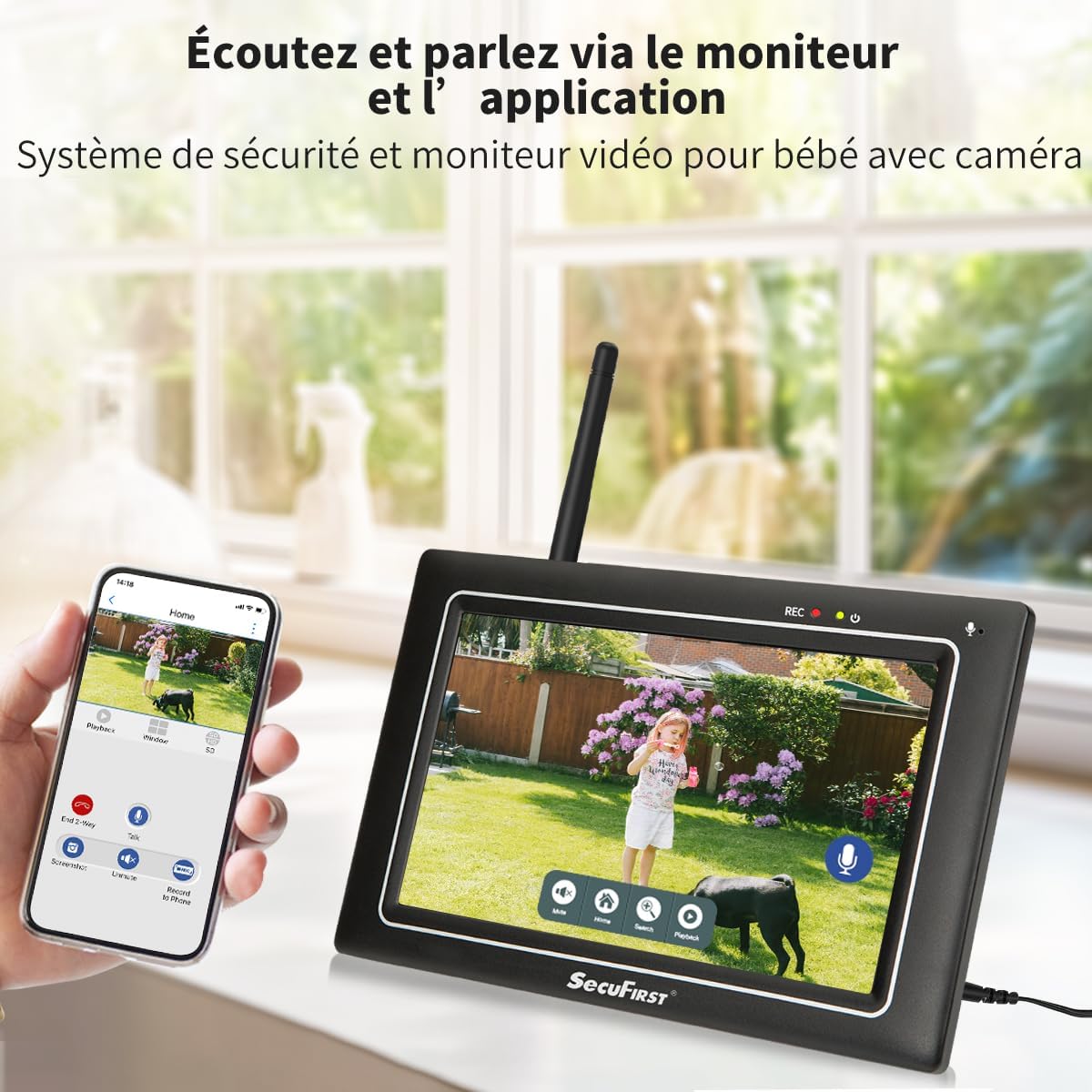
Image: Detailed diagram of the 7-inch touch screen monitor, highlighting its components such as the recording indicator, power indicator, monitor microphone, power button, antenna port, USB port, speaker, monitor stand, Ethernet port, SD card slot, power port, and reset button.
The monitor features a responsive touch screen interface, allowing for easy navigation and control. It includes a built-in microphone and speaker for two-way audio communication.
3.2. Wireless Outdoor Camera

Image: Detailed diagram of the wireless outdoor camera, showing its antenna, adjustable bracket, power cable, power status indicator, light sensor, IR LEDs, passive infrared motion sensor, audio speaker, microphone, and antenna connector.
The cameras are IP66 rated for outdoor use, featuring 2K (3MP) resolution for clear video, night vision, and AI + PIR thermal motion detection for accurate recording.
4. సెటప్
4.1. ప్రారంభ పవర్-ఆన్
- Connect the power adapter to the 7-inch monitor and plug it into a power outlet.
- Connect the power adapters to each of the four cameras and plug them into power outlets.
- The cameras are pre-paired with the monitor. Live video feeds should appear on the monitor within seconds.

Image: An icon depicting a camera with Wi-Fi signals, indicating the auto-pairing feature.
4.2. కెమెరా ప్లేస్మెంట్
Position the cameras in desired surveillance areas. Ensure they are within the 300-meter open-area range from the monitor for optimal signal. The cameras are designed for both indoor and outdoor use.

Image: A SecuFirst camera mounted outdoors, demonstrating its IP66 waterproof rating.
4.3. Optional Internet Connection (for Remote Access)
While the system functions without internet, you can enable remote access via the "Observer HD+" application by connecting the monitor to the internet.
- Connect the monitor to your router via an Ethernet cable or Wi-Fi.
- Download the "Observer HD+" application on your smartphone or tablet.
- Follow the in-app instructions to add your device for remote viewing, two-way audio, and playback of recordings.

Image: A smartphone showing the "Observer HD+" app interface, demonstrating remote access capabilities alongside the physical monitor.
5. సిస్టమ్ ఆపరేటింగ్
5.1. లైవ్ View మరియు బహుళView
The 7-inch monitor displays live feeds from all connected cameras. You can switch between single-camera view మరియు బహుళ-కెమెరా స్ప్లిట్ view directly on the touch screen.

Image: An icon showing a monitor with a four-way split screen, symbolizing the multi-view సామర్ధ్యం.
5.2. టూ-వే ఆడియో
Use the microphone icon on the monitor's touch screen or within the mobile application to activate two-way audio. This allows you to speak through the camera's speaker and hear audio from the camera's microphone.
5.3. రికార్డింగ్ మరియు ప్లేబ్యాక్
The system automatically records events triggered by motion detection to the included 64GB MicroSD card. You can also initiate manual recordings.
కు view రికార్డింగ్లు:
- On the monitor, navigate to the playback interface.
- Select the desired camera and date to review రికార్డ్ చేసిన footage.
- Recordings can also be accessed and played back via the "Observer HD+" mobile application.

Image: The monitor's screen displaying the playback menu, showing a list of recorded events with timestamps.
5.4. మోషన్ డిటెక్షన్ మరియు హెచ్చరికలు
The cameras feature AI + PIR thermal motion detection for accurate alerts.
- Configure motion detection zones directly on the monitor.
- Set up push notifications to your mobile device via the "Observer HD+" app for real-time alerts.
- Adjust alarm volume and siren settings through the monitor's interface.

Image: The monitor screen showing a house with a "PRIVACY" overlay, illustrating the privacy zone masking feature.

Image: The monitor screen showing a pathway with a "Zone" overlay, illustrating the motion detection zone configuration.
5.5. నైట్ విజన్
The cameras are equipped with infrared (IR) LEDs for clear night vision, automatically activating in low-light conditions.

Image: A comparison image showing the camera's 2K/3MP resolution in daylight (color) and its clear night vision in black and white.
6. నిర్వహణ
6.1. శుభ్రపరచడం
- Gently wipe the monitor screen and camera lenses with a soft, dry, lint-free cloth.
- మొండి మచ్చల కోసం, కొద్దిగా dampen గుడ్డను నీటితో తడిపివేయండి. కఠినమైన రసాయనాలు లేదా రాపిడి క్లీనర్లను నివారించండి.
6.2. నిల్వ
When not in use for extended periods, store the system in a cool, dry place, away from direct sunlight and extreme temperatures.
6.3. నిల్వ విస్తరణ
The system comes with a 64GB MicroSD card. Storage can be expanded by replacing the MicroSD card with up to a 128GB card, or by connecting an external hard drive or USB stick up to 2TB.
7. ట్రబుల్షూటింగ్
| సమస్య | సాధ్యమైన కారణం | పరిష్కారం |
|---|---|---|
| మానిటర్లో చిత్రం లేదు | Power issue; Camera out of range; Camera not paired | Check power connections for monitor and cameras. Ensure cameras are within range. If necessary, re-pair cameras (refer to Quick Start Guide for pairing instructions). |
| చిత్ర నాణ్యత తక్కువగా ఉంది | Dirty lens; Low light; Interference | Clean camera lens. Ensure adequate lighting or check night vision functionality. Reduce interference by moving cameras or monitor away from other electronic devices. |
| యాప్ ద్వారా రిమోట్ యాక్సెస్ లేదు | Monitor not connected to internet; Incorrect app settings | Verify monitor's internet connection (Ethernet or Wi-Fi). Check app settings and ensure correct device pairing. |
| మోషన్ డిటెక్షన్ పని చేయడం లేదు | Sensitivity too low; Incorrect zone settings | Adjust motion detection sensitivity on the monitor. Review and reconfigure motion detection zones. |
8. స్పెసిఫికేషన్లు
- బ్రాండ్: SecuFirst
- మోడల్: 1 Monitor + 4 Camera (White)
- తయారీదారు: ALC ఎలక్ట్రానిక్స్ BV
- ఉత్పత్తి కొలతలు: 28.4 x 25.8 x 19.4 సెం.మీ; 3.44 కిలోగ్రాములు
- శక్తి రకం: కార్డెడ్ ఎలక్ట్రిక్
- వాల్యూమ్tage: 12 వోల్ట్లు
- వాట్tage: 12 వాట్స్
- ప్రత్యేక లక్షణాలు: Two-way audio, local recording, night vision, app control, motion sensor, 7-inch touch screen monitor, Plug-and-play, pre-paired cameras and monitor.
- వీడియో రికార్డింగ్ రిజల్యూషన్: 2K (3MP)
- ఛానెల్ల సంఖ్య: 4
- మెమరీ స్టోరేజ్ కెపాసిటీ: Up to 2TB (via external HDD/USB), 64GB MicroSD included (expandable to 128GB)
- కనెక్టివిటీ టెక్నాలజీ: Wired (Ethernet) and Wireless (Proprietary for camera-monitor, Wi-Fi for monitor-internet)
- ఆపరేటింగ్ సిస్టమ్: యాజమాన్యం
9. వారంటీ మరియు మద్దతు
For warranty information and technical support, please contact SecuFirst directly.
విక్రేత: SecuFirst (A2JD6PPEF2M5NQ)
Return Policy: 30-day refund/replacement policy through Amazon.
For further assistance, refer to the official SecuFirst webసైట్ లేదా వారి కస్టమర్ సేవను సంప్రదించండి.
Ask a question about this manual
Ask about setup, troubleshooting, compatibility, parts, safety, or missing instructions. Manuals+ will review the question and use this page’s manual context to help answer it.