
పరిచయం
This manual provides essential instructions for setting up, operating, maintaining, and troubleshooting your Radxa RS308-D4W Rock Pi S single-board computer. Please read this manual carefully before using the device to ensure proper functionality and longevity.
The Radxa RS308-D4W Rock Pi S is a compact and versatile single-board computer designed for various embedded projects, development, and educational purposes. It features a Rockchip RK3588 chipset, 512MB DDR3 RAM, and multiple connectivity options including Bluetooth and 4 HDMI ports.
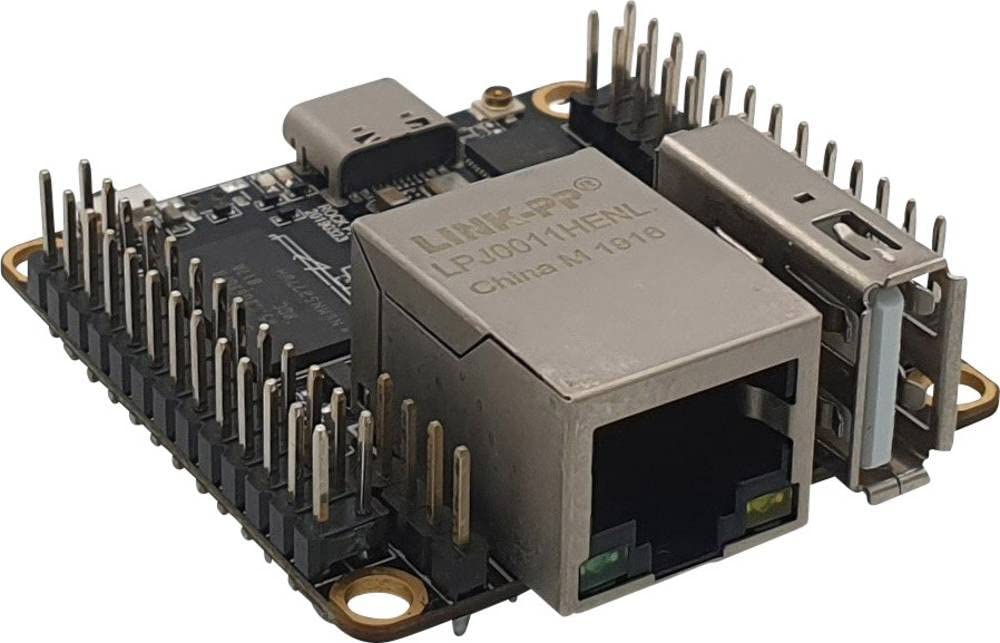
మూర్తి 1: The Radxa RS308-D4W Rock Pi S single-board computer, showcasinదాని కాంపాక్ట్ డిజైన్ మరియు వివిధ పోర్టులు.
సెటప్
1. ప్యాకేజీ విషయాలు
మీ ప్యాకేజీలో అన్ని భాగాలు ఉన్నాయని నిర్ధారించుకోండి:
- Radxa RS308-D4W Rock Pi S board
- (Optional, depending on retailer) Power adapter
- (Optional, depending on retailer) MicroSD card with pre-installed OS
2. ప్రారంభ కనెక్షన్లు
- విద్యుత్ సరఫరా: Connect a compatible 5V power supply to the board's power input. Ensure the power supply provides sufficient current for stable operation.
- నిల్వ: Insert a MicroSD card (with a compatible operating system image) into the MicroSD card slot.
- ప్రదర్శన: Connect a monitor or display device to one of the available HDMI ports using an HDMI cable.
- పెరిఫెరల్స్: Connect any necessary USB peripherals (keyboard, mouse) to the USB ports.
- నెట్వర్క్: For wired network access, connect an Ethernet cable to the Ethernet port (if available on your specific variant). For wireless, ensure Bluetooth is enabled and configured in your OS.
గమనిక: Always ensure the power supply is disconnected before making or changing any connections to prevent damage to the board or peripherals.
ఆపరేటింగ్ సూచనలు
1. పవర్ చేయడం
Once all connections are made, connect the power supply to a wall outlet. The board should automatically power on, and the operating system will begin to boot. Observe the status LEDs for boot indicators.
2. Operating System Access
Follow the on-screen prompts to complete the initial setup of your operating system. This typically involves setting up user accounts, network connections, and system preferences.
3. బ్లూటూత్ కనెక్టివిటీ
The Radxa RS308-D4W supports Bluetooth connectivity. To connect Bluetooth devices:
- మీ బ్లూటూత్ పరికరం జత చేసే మోడ్లో ఉందని నిర్ధారించుకోండి.
- Navigate to the Bluetooth settings within your operating system.
- Scan for available devices and select your device to pair.
- జత చేసే ప్రక్రియను పూర్తి చేయడానికి ఏదైనా ఆన్-స్క్రీన్ సూచనలను అనుసరించండి.
4. Using HDMI Ports
The board is equipped with 4 HDMI ports. These can be used for connecting multiple displays or for specific applications requiring multiple video outputs. Refer to your operating system's display settings for configuring multi-monitor setups.
నిర్వహణ
1. శుభ్రపరచడం
To maintain optimal performance, keep the board clean and free from dust. Use a soft, dry cloth or a can of compressed air to gently remove dust from the components and ports. Avoid using liquid cleaners directly on the board.
2. సాఫ్ట్వేర్ నవీకరణలు
Regularly update your operating system and installed software to ensure security, stability, and access to the latest features. Refer to your operating system's documentation for instructions on how to perform updates.
గమనిక: Software updates are guaranteed until an unknown date. It is recommended to check the official Radxa website for the latest information and support resources.
3. పర్యావరణ పరిగణనలు
Operate the Radxa RS308-D4W in a well-ventilated area, away from direct sunlight, excessive heat, humidity, and strong electromagnetic fields. Avoid exposing the board to liquids or corrosive substances.
ట్రబుల్షూటింగ్
- శక్తి లేదు:
- పవర్ అడాప్టర్ సరిగ్గా కనెక్ట్ చేయబడిందని మరియు పనిచేస్తుందని నిర్ధారించుకోండి.
- పవర్ అవుట్లెట్ యాక్టివ్గా ఉందో లేదో ధృవీకరించండి.
- Check the power supply specifications to ensure it meets the board's requirements.
- డిస్ప్లే అవుట్పుట్ లేదు:
- Confirm the HDMI cable is securely connected to both the board and the monitor.
- వేరే HDMI పోర్ట్ లేదా కేబుల్ని ప్రయత్నించండి.
- మానిటర్ సరైన ఇన్పుట్ సోర్స్కు సెట్ చేయబడిందని నిర్ధారించుకోండి.
- Verify that the operating system image on the MicroSD card is valid and properly installed.
- బ్లూటూత్ కనెక్టివిటీ సమస్యలు:
- Ensure Bluetooth is enabled in the operating system settings.
- Check if the Bluetooth device is in pairing mode and within range.
- Restart the board and try pairing again.
- సిస్టమ్ అస్థిరత/గడ్డకట్టడం:
- Ensure adequate cooling for the board, especially under heavy load.
- Verify the power supply is stable and provides sufficient current.
- Check for corrupted fileమైక్రో SD కార్డ్లో లు.
- Update the operating system and drivers.
స్పెసిఫికేషన్లు
| ఫీచర్ | వివరాలు |
|---|---|
| బ్రాండ్ | రాడ్క్సా |
| మోడల్ సంఖ్య | RS308-D4W |
| CPU సాకెట్ | LGA 200 |
| చిప్సెట్ రకం | రాక్చిప్ RK3588 |
| RAM టెక్నాలజీ | DDR3 |
| Maximum RAM Size | 512 MB |
| గ్రాఫిక్స్ ఇంటర్ఫేస్ | ఇంటిగ్రేటెడ్ |
| వైర్లెస్ రకం | బ్లూటూత్ |
| HDMI పోర్ట్లు | 4 |
| ప్రధాన పవర్ కనెక్టర్ | 24-పిన్ |
| అనుకూల పరికరాలు | PC |
| మొదట అందుబాటులో ఉన్న తేదీ | అక్టోబర్ 14, 2023 |
వారంటీ సమాచారం
Radxa provides a warranty for a minimum period of 2 years from the date of purchase. This warranty covers defects in materials and workmanship under normal use. Please retain your proof of purchase for warranty claims.
For detailed warranty terms and conditions, please refer to the official Radxa webసైట్ లేదా కస్టమర్ సపోర్ట్ని సంప్రదించండి.
మద్దతు
For further assistance, technical support, or to download the latest documentation and software images, please visit the official Radxa webసైట్.
Webసైట్: www.radxa.com ద్వారా మరిన్ని
When contacting support, please have your product model number (RS308-D4W) and purchase information readily available.