
పరిచయం
Thank you for choosing the Xiaomi Robot Vacuum E12. This intelligent robotic vacuum cleaner is designed to provide efficient and thorough cleaning for your home, featuring powerful suction, smart navigation, and app control. This manual provides essential information for the safe and effective operation, maintenance, and troubleshooting of your device. Please read this manual carefully before use and retain it for future reference.
ఉత్పత్తి ముగిసిందిview
కీ ఫీచర్లు
- శక్తివంతమైన చూషణ: Up to 4000 Pa suction power for effective cleaning on various surfaces.
- యాప్ నియంత్రణ: Manage and schedule cleaning tasks conveniently via the Xiaomi Home app.
- Efficient Cleaning Route: Intelligent navigation system ensures organized and comprehensive cleaning coverage.
- తెలివైన నీటి ట్యాంక్: Automatically dispenses water for effective mopping.
- సమగ్ర సెన్సార్లు: Equipped with multiple sensors for obstacle avoidance and complete area coverage.
భాగాలు
Familiarize yourself with the main components of your Xiaomi Robot Vacuum E12.

మూర్తి 1: టాప్ view of the Xiaomi Robot Vacuum E12, showing the main unit and an included mop pad.

మూర్తి 2: ముందు view of the robot vacuum, highlighting the bumper and sensor area.
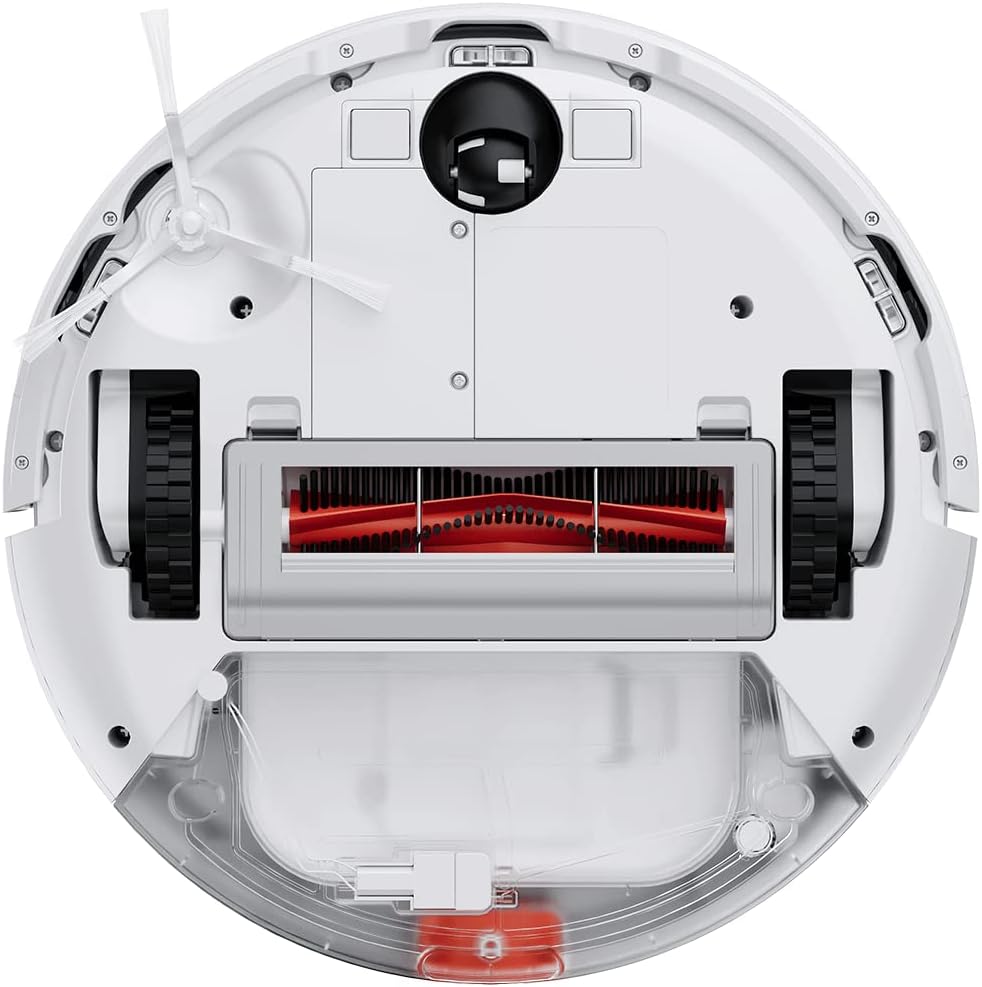
Figure 3: Underside of the robot vacuum, showing the main brush, side brushes, wheels, and dustbin/water tank compartment.

Figure 4: The robot vacuum with the mop attachment installed, ready for wet cleaning.
సెటప్
1. అన్ప్యాకింగ్
- ప్యాకేజింగ్ నుండి అన్ని భాగాలను జాగ్రత్తగా తొలగించండి.
- Remove all protective films and packaging materials from the robot and charging dock.
- Ensure all accessories listed in the packing list are present.
2. ఛార్జింగ్ డాక్ ప్లేస్మెంట్
- ఛార్జింగ్ డాక్ను గట్టి, సమతల ఉపరితలంపై గోడకు ఆనించి ఉంచండి.
- డాక్ యొక్క రెండు వైపులా కనీసం 0.5 మీటర్లు (1.6 అడుగులు) మరియు దాని ముందు 1.5 మీటర్లు (4.9 అడుగులు) ఖాళీ స్థలం ఉందని నిర్ధారించుకోండి.
- పవర్ అడాప్టర్ను ఛార్జింగ్ డాక్కి కనెక్ట్ చేయండి మరియు దానిని పవర్ అవుట్లెట్లోకి ప్లగ్ చేయండి.
- Ensure the power cable is neatly tucked away to prevent entanglement.
3. ప్రారంభ ఛార్జ్
- Place the robot vacuum onto the charging dock, ensuring the charging contacts align.
- The robot will automatically power on and begin charging. Allow it to fully charge before first use (approximately 4-6 hours).
- రోబోట్లోని సూచిక లైట్ ఛార్జింగ్ స్థితిని చూపుతుంది.
4. Xiaomi Home App Connection
- Download the "Xiaomi Home" app from your mobile device's app store (Google Play Store or Apple App Store).
- Open the app and create a Xiaomi account or log in if you already have one.
- పరికరాన్ని జోడించడానికి ఎగువ కుడి మూలలో ఉన్న "+" చిహ్నాన్ని నొక్కండి.
- Follow the on-screen instructions to connect your robot vacuum to the app. This typically involves resetting the Wi-Fi on the robot and connecting your phone to the robot's temporary Wi-Fi network.
- కనెక్ట్ అయిన తర్వాత, మీరు రోబోట్ను నియంత్రించవచ్చు, view cleaning maps, set schedules, and access additional features.
ఆపరేటింగ్ సూచనలు
3లో 3వ విధానం: శుభ్రపరిచే చక్రాన్ని ప్రారంభించడం
- రోబోట్ బటన్ల ద్వారా: Press the Power button once to start a general cleaning cycle. Press it again to pause. Press and hold to send the robot back to the charging dock.
- Xiaomi హోమ్ యాప్ ద్వారా: Open the app, select your robot vacuum, and tap the "Clean" button. You can also select specific cleaning modes (e.g., Spot Clean, Edge Clean) or adjust suction power.

Figure 5: Illustration of the robot vacuum following an efficient, organized cleaning path to cover the entire floor area.
మోపింగ్ ఫంక్షన్ ఉపయోగించి
- Fill the water tank with clean water. Do not use detergents or corrosive liquids.
- Attach the mop pad securely to the water tank module.
- Install the water tank module into the robot vacuum according to the instructions.
- Start a cleaning cycle. The robot will automatically dispense water for mopping.
- గమనిక: The mopping function is best suited for hard floors. Avoid using it on carpets or rugs.
షెడ్యూల్ క్లీనింగ్స్
Use the Xiaomi Home app to set up cleaning schedules. You can specify cleaning times, days of the week, and even cleaning modes for automated cleaning.

Figure 6: The robot vacuum's low profile allows it to clean effectively under beds and other furniture.
నిర్వహణ
Regular maintenance ensures optimal performance and extends the lifespan of your robot vacuum. Always power off the robot before performing any maintenance.
1. చెత్తబుట్టను ఖాళీ చేయడం
- డస్ట్బిన్ విడుదల బటన్ను నొక్కి, డస్ట్బిన్ను బయటకు తీయండి.
- చెత్తబుట్ట మూత తెరిచి, దానిలోని వస్తువులను చెత్తబుట్టలో వేయండి.
- Rinse the dustbin with water if necessary, ensuring it is completely dry before re-installing.
2. ఫిల్టర్ శుభ్రపరచడం
- చెత్తబుట్ట నుండి ఫిల్టర్ను తీసివేయండి.
- Tap the filter gently to remove dust. You can also rinse it under running water.
- Allow the filter to air dry completely for at least 24 hours before re-installing. Do not use a dryer or direct sunlight.
- వినియోగాన్ని బట్టి ప్రతి 3-6 నెలలకు ఒకసారి ఫిల్టర్ను మార్చండి.
3. ప్రధాన బ్రష్ను శుభ్రపరచడం
- రోబోట్ను తిప్పి, ప్రధాన బ్రష్ కవర్ను తీసివేయండి.
- ప్రధాన బ్రష్ను ఎత్తండి.
- బ్రష్ చుట్టూ చిక్కుకున్న వెంట్రుకలు లేదా చెత్తను కత్తిరించి తొలగించడానికి శుభ్రపరిచే సాధనం (అందించినట్లయితే) లేదా కత్తెరను ఉపయోగించండి.
- Re-install the main brush and cover.
4. Cleaning the Side Brush
- Gently pull the side brush to remove it.
- Remove any hair or debris.
- Re-attach the side brush, ensuring it clicks into place.
5. సెన్సార్లను శుభ్రపరచడం మరియు కాంటాక్ట్లను ఛార్జ్ చేయడం
- Wipe the cliff sensors (located on the bottom of the robot) and wall sensors (on the side bumper) with a clean, dry cloth.
- Clean the charging contacts on both the robot and the charging dock with a dry cloth.

Figure 7: Diagram illustrating the function of the cliff sensors, which prevent the robot from falling down stairs or off ledges.
ట్రబుల్షూటింగ్
If your robot vacuum encounters an issue, refer to the following common problems and solutions.
| సమస్య | సాధ్యమైన కారణం | పరిష్కారం |
|---|---|---|
| రోబోట్ పవర్ ఆన్ చేయదు. | బ్యాటరీ తక్కువగా ఉంది; సరిగ్గా ఛార్జ్ కాలేదు. | Place the robot on the charging dock and ensure it is fully charged. |
| రోబోట్ ఛార్జింగ్ డాక్కి తిరిగి రాలేదు. | Charging dock is obstructed or out of reach; low battery. | Ensure the charging dock is in an open area. Manually place the robot on the dock if needed. |
| పేలవమైన శుభ్రపరిచే పనితీరు. | చెత్తబుట్ట నిండిపోయింది; బ్రష్లు చిక్కుకుపోయాయి; ఫిల్టర్ మూసుకుపోయింది. | Empty dustbin, clean main brush and side brushes, clean or replace filter. |
| రోబో తరచుగా ఇరుక్కుపోతుంది. | అడ్డంకులు (తంతులు, తివాచీలు); మురికి సెన్సార్లు. | Clear the cleaning area of obstacles. Clean all sensors. |
| మాపింగ్ ఫంక్షన్ పనిచేయడం లేదు. | Water tank empty; mop pad not attached correctly. | Fill the water tank. Ensure the mop pad is securely attached. |
| యాప్ కనెక్షన్ సమస్యలు. | Incorrect Wi-Fi password; robot too far from router; temporary network glitch. | Ensure correct Wi-Fi details. Move robot closer to router. Restart robot and router. Try re-pairing via the app. |
For persistent issues not covered here, please refer to the Xiaomi Home app's help section or contact Xiaomi customer support.
స్పెసిఫికేషన్లు
| ఫీచర్ | వివరాలు |
|---|---|
| బ్రాండ్ | XIAOMI |
| మోడల్ సంఖ్య | BHR7331EU |
| ఉత్పత్తి కొలతలు | 12.6"లీ x 3.15"వా x 12.6"హ |
| వస్తువు బరువు | 10.14 పౌండ్లు |
| చూషణ శక్తి | 4000 Pa వరకు |
| శక్తి మూలం | బ్యాటరీ ఆధారితం (1 లిథియం అయాన్ బ్యాటరీ కూడా ఉంది) |
| నియంత్రణ పద్ధతి | App (Xiaomi Home) |
| ప్రత్యేక ఫీచర్ | ప్రోగ్రామబుల్ |
| చేర్చబడిన భాగాలు | Robot Vacuum, Charging Dock, Power Adapter, Water Tank, Mop Pad, Side Brush, Cleaning Tool |
భద్రతా సమాచారం
Please read and follow all safety instructions to prevent injury or damage.
- ఈ ఉపకరణాన్ని 8 సంవత్సరాలు మరియు అంతకంటే ఎక్కువ వయస్సు ఉన్న పిల్లలు మరియు తక్కువ శారీరక, ఇంద్రియ లేదా మానసిక సామర్థ్యాలు లేదా అనుభవం మరియు జ్ఞానం లేని వ్యక్తులు సురక్షితమైన మార్గంలో ఉపకరణాన్ని ఉపయోగించడం గురించి పర్యవేక్షణ లేదా సూచనలను అందించినట్లయితే మరియు ప్రమాదాలను అర్థం చేసుకుంటే వాటిని ఉపయోగించవచ్చు. .
- పిల్లలు ఉపకరణంతో ఆడకూడదు. పర్యవేక్షణ లేకుండా పిల్లలచే శుభ్రపరచడం మరియు వినియోగదారు నిర్వహణ చేయరాదు.
- Do not use the robot vacuum on wet surfaces or in areas with standing water.
- పెద్ద వస్తువులను, పదునైన వస్తువులను లేదా మండే/ధూమపాన పదార్థాలను తీయడానికి రోబోట్ను ఉపయోగించవద్దు.
- జుట్టు, వదులుగా ఉండే దుస్తులు, వేళ్లు మరియు శరీరంలోని అన్ని భాగాలను ఓపెనింగ్స్ మరియు కదిలే భాగాలకు దూరంగా ఉంచండి.
- Ensure the charging dock is placed in a stable location to prevent tipping.
- ఉత్పత్తితో పాటు అందించిన ఒరిజినల్ పవర్ అడాప్టర్ మరియు ఛార్జింగ్ డాక్ను మాత్రమే ఉపయోగించండి.
- Do not expose the robot to direct sunlight or extreme temperatures.
- The product contains batteries that are only replaceable by skilled persons.
- ముఖ్యమైన గమనిక: This robot vacuum is primarily designed for hard floors. It is not recommended for cleaning carpets, especially thick pile carpets, as stated in some product information.
వారంటీ మరియు మద్దతు
వారంటీ సమాచారం కోసం, దయచేసి మీ ఉత్పత్తితో చేర్చబడిన వారంటీ కార్డును చూడండి లేదా అధికారిక Xiaomi వెబ్సైట్ను సందర్శించండి. webసైట్.
If you require technical support or have questions regarding your Xiaomi Robot Vacuum E12, please contact Xiaomi customer service through their official website or the Xiaomi Home app. Provide your model number (BHR7331EU) and purchase details when contacting support.
Xiaomi అధికారికం Webసైట్: www.mi.com