
పరిచయం
Thank you for choosing the INSMART 260H Smart Body Fat Scale. This device is designed to provide a comprehensive analysis of your body composition using advanced Bio-electrical Impedance Analysis (BIA) technology. It measures 18 key body indicators, helping you track your health and fitness progress accurately. For optimal performance and longevity, please read this manual carefully before use and keep it for future reference.
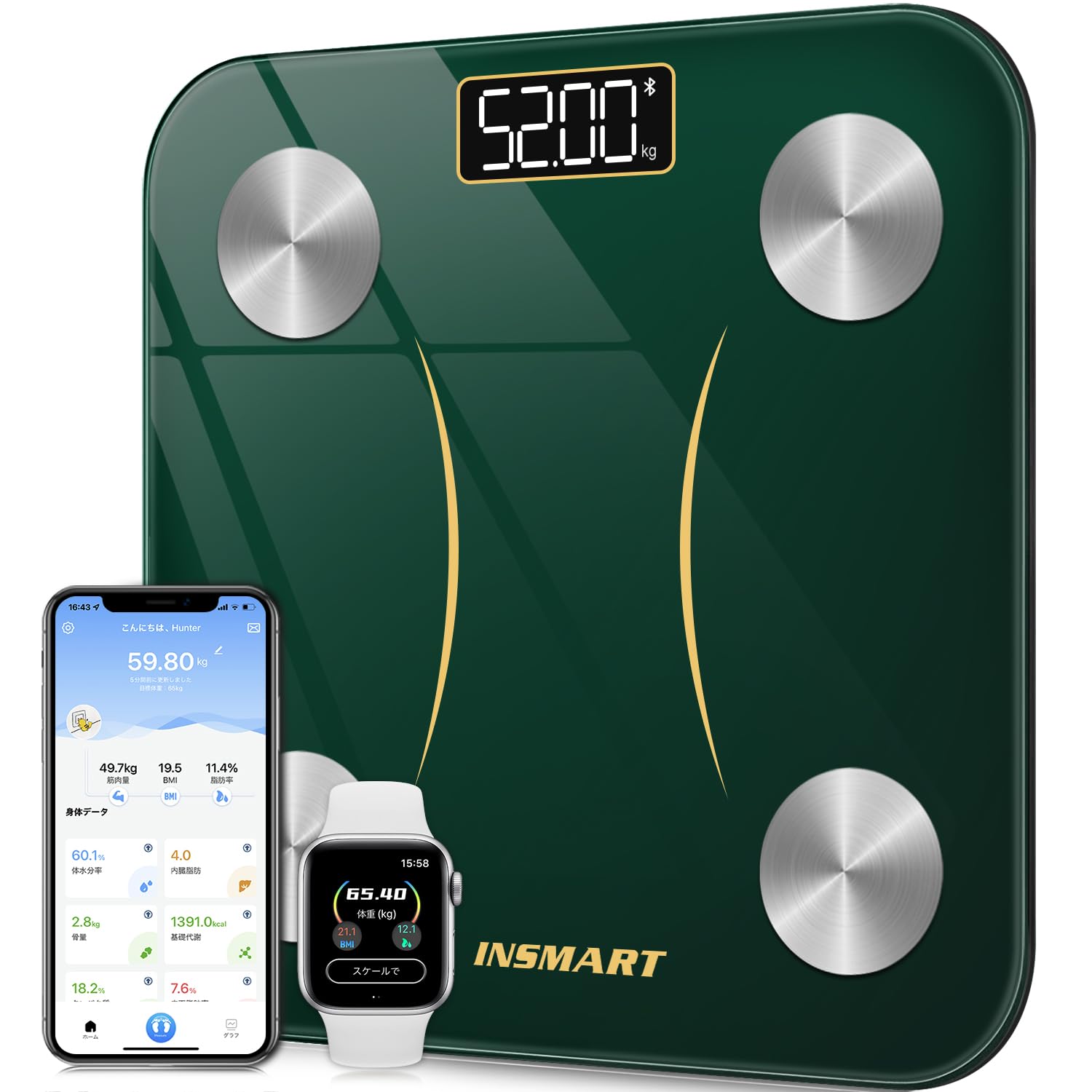
The INSMART 260H Smart Body Fat Scale, featuring a sleek design and advanced measurement capabilities.
సెటప్
1. అన్ప్యాకింగ్ మరియు బ్యాటరీ ఇన్స్టాలేషన్
- దాని ప్యాకేజింగ్ నుండి స్కేల్ను జాగ్రత్తగా తొలగించండి.
- స్కేల్ దిగువన ఉన్న బ్యాటరీ కంపార్ట్మెంట్ను తెరవండి.
- Insert the required batteries (usually AAA, check packaging for specifics) ensuring correct polarity (+/-).
- బ్యాటరీ కంపార్ట్మెంట్ను సురక్షితంగా మూసివేయండి.
2. యాప్ డౌన్లోడ్ మరియు ప్రారంభ జత చేయడం
The INSMART 260H scale connects to your smartphone via Bluetooth for comprehensive data tracking. Download the "INSMART HEALTH" app from your device's app store.
- కోసం వెతకండి "INSMART HEALTH" in the Apple App Store (for iOS) or Google Play Store (for Android).
- యాప్ను డౌన్లోడ్ చేసి, ఇన్స్టాల్ చేయండి.
- మీ స్మార్ట్ఫోన్లో బ్లూటూత్ ప్రారంభించబడిందని నిర్ధారించుకోండి.
- Open the INSMART HEALTH app and create a user profile.
- Step onto the scale to activate it. The scale will automatically attempt to pair with the app. Follow any on-screen prompts in the app to complete the pairing process.

Connect your INSMART 260H scale via Bluetooth to the INSMART HEALTH app, available for free download on iOS and Android. The app also syncs with popular health platforms like Fitbit, Google Fit, and Apple Health.

బహుళ వినియోగదారు ప్రోని సృష్టించండిfiles within the INSMART HEALTH app, allowing the entire family to track their fitness progress together.
ఆపరేటింగ్ సూచనలు
1. కొలత తీసుకోవడం
- స్కేల్ను గట్టి, చదునైన ఉపరితలంపై ఉంచండి. ఖచ్చితమైన రీడింగ్ల కోసం కార్పెట్లు లేదా అసమాన నేలలను నివారించండి.
- మీ పాదాలు శుభ్రంగా మరియు పొడిగా ఉన్నాయని నిర్ధారించుకోండి.
- Step onto the scale barefoot. Stand still with your feet evenly placed on the electrodes (metal pads).
- The scale will automatically power on and display your weight. It will then proceed to measure other body composition metrics.
- Remain on the scale until all measurements are complete and displayed on the scale's screen or synced to the app.

The INSMART 260H scale measures multiple health metrics, including BMI, BMR, and muscle mass, providing a comprehensive overview మీ శరీర కూర్పు.
2. మీ కొలతలను అర్థం చేసుకోవడం
The INSMART 260H scale measures 18 body indicators, providing a detailed insight into your health. These include:

The INSMART 260H scale provides comprehensive analysis of 18 key body indicators, offering a detailed understanding of your health and fitness.
3. Using the INSMART HEALTH App
The INSMART HEALTH app is your central hub for tracking and analyzing your health data. It allows you to:
- View all 18 body indicators in an easy-to-understand format.
- Track your progress over daily, weekly, monthly, and yearly periods.
- Set goals and monitor your achievements.
- Sync data with other popular health apps like Fitbit, Google Fit, and Apple Health.
- Manage multiple user profileకుటుంబ సభ్యులకు రు.

The INSMART HEALTH app allows you to track your body composition changes over time, providing daily, weekly, monthly, and yearly trends for metrics like weight and body fat.

The INSMART 260H scale can store measurements and display them directly on its LED screen, even without a smartphone present, after initial Bluetooth pairing. Data will sync to the app when connected again.
నిర్వహణ
1. శుభ్రపరచడం
- స్కేల్ ఉపరితలాన్ని మృదువైన, d తో తుడవండి.amp గుడ్డ.
- రాపిడి క్లీనర్లను ఉపయోగించవద్దు లేదా స్కేల్ను నీటిలో ముంచవద్దు.
- Keep the scale dry to prevent damage to electronic components.
2. నిల్వ
- స్కేల్ను చల్లని, పొడి ప్రదేశంలో నిల్వ చేయండి.
- ఉపయోగంలో లేనప్పుడు భారీ వస్తువులను స్కేల్పై ఉంచడం మానుకోండి.
3. బ్యాటరీ భర్తీ
- If the display becomes dim or shows a low battery indicator, replace the batteries.
- ఎల్లప్పుడూ అన్ని బ్యాటరీలను ఒకే సమయంలో ఒకే రకమైన కొత్త వాటితో భర్తీ చేయండి.
- స్థానిక నిబంధనల ప్రకారం పాత బ్యాటరీలను పారవేయండి.
ట్రబుల్షూటింగ్
If you encounter issues with your INSMART 260H scale, please refer to the following common problems and solutions:
1. Scale Not Turning On / No Display
- బ్యాటరీలు సరిగ్గా ఇన్స్టాల్ చేయబడ్డాయో లేదో మరియు అవి ఖాళీ కాలేదో లేదో తనిఖీ చేయండి. అవసరమైతే భర్తీ చేయండి.
- స్కేల్ గట్టి, చదునైన ఉపరితలంపై ఉంచబడిందని నిర్ధారించుకోండి.
2. Inaccurate Measurements
- స్కేల్ కఠినమైన, చదునైన మరియు సమతల ఉపరితలంపై ఉందని నిర్ధారించుకోండి.
- Make sure your feet are clean, dry, and in direct contact with the electrodes.
- Avoid moving during measurement.
- Calibrate the scale by stepping on it briefly, then stepping off, and waiting for it to display "0.0" before taking a measurement.
3. బ్లూటూత్ కనెక్షన్ సమస్యలు
If your scale is not connecting to the INSMART HEALTH app:

If you experience Bluetooth connection issues, ensure your phone's mobile data/Wi-Fi and GPS are on. Open the app, register the device, and attempt pairing. If problems persist, follow the in-app troubleshooting steps.
- మీ స్మార్ట్ఫోన్లో బ్లూటూత్ ప్రారంభించబడిందని నిర్ధారించుకోండి.
- Make sure the INSMART HEALTH app has location permissions enabled (required for Bluetooth pairing on some devices).
- Restart your smartphone and the scale (by removing and reinserting batteries).
- Try re-pairing the device within the app settings.
- Ensure no other devices are actively connected to the scale via Bluetooth.
స్పెసిఫికేషన్లు
| ఫీచర్ | స్పెసిఫికేషన్ |
|---|---|
| బ్రాండ్ | INSMART |
| మోడల్ సంఖ్య | 260H |
| కొలత పరిధి | 3 kg - 180 kg |
| కొలత ఖచ్చితత్వం | 100 గ్రా |
| Body Indicators Measured | 18 (e.g., Weight, BMI, Body Fat, Muscle Mass, BMR) |
| కనెక్టివిటీ | బ్లూటూత్ |
| ప్రదర్శన రకం | డిజిటల్ LED |
| మెటీరియల్ | టెంపర్డ్ గ్లాస్ |
| శక్తి మూలం | Batteries (not specified, typically AAA) |
| మూలం | చైనా |

The INSMART 260H features four high-precision sensors, a durable tempered glass surface, and non-slip, stable pads for accurate and safe measurements.

The scale utilizes advanced Bio-electrical Impedance Analysis (BIA) technology with four high-precision sensors for accurate body composition measurements.

Unlike traditional scales, the INSMART 260H uses advanced ITO coating technology, providing a larger sensor area for consistent and accurate measurements regardless of foot placement.
వారంటీ మరియు మద్దతు
1. వారంటీ సమాచారం
The INSMART 260H Smart Body Fat Scale comes with a 1-year warranty from the date of purchase. This warranty covers manufacturing defects and malfunctions under normal use. It does not cover damage caused by misuse, accidents, or unauthorized modifications.
2. కస్టమర్ మద్దతు
For any questions, technical assistance, or warranty claims, please contact INSMART customer support. Refer to the product packaging or the INSMART official webఅత్యంత తాజా సంప్రదింపు సమాచారం కోసం సైట్.