
1. భద్రతా సమాచారం
Please read all instructions carefully before using the iZEEKER Projector. Keep this manual for future reference.
- విద్యుత్ సరఫరా: పేర్కొన్న పవర్ అడాప్టర్ను మాత్రమే ఉపయోగించండి. వాల్యూమ్ను నిర్ధారించుకోండిtage మీ ప్రాంతానికి అనుకూలంగా ఉంటుంది.
- వెంటిలేషన్: వెంటిలేషన్ ఓపెనింగ్లను బ్లాక్ చేయవద్దు. వేడెక్కకుండా నిరోధించడానికి సరైన గాలి ప్రవాహం కోసం ప్రొజెక్టర్ చుట్టూ తగినంత స్థలం ఉండేలా చూసుకోండి.
- పర్యావరణం: Avoid exposing the projector to rain, moisture, direct sunlight, or extreme temperatures. Do not place it near heat sources.
- శుభ్రపరచడం: శుభ్రపరిచే ముందు ప్రొజెక్టర్ను అన్ప్లగ్ చేయండి. మృదువైన, పొడి వస్త్రాన్ని ఉపయోగించండి. ద్రవ లేదా ఏరోసోల్ క్లీనర్లను ఉపయోగించవద్దు.
- కంటి రక్షణ: l ఉన్నప్పుడు ప్రొజెక్టర్ లెన్స్లోకి నేరుగా చూడకండిamp is on. The iZEEKER projector utilizes diffuse reflection technology to reduce blue light exposure and eye fatigue.
- పిల్లలు: Keep the projector out of reach of small children. Supervise children when the projector is in use.
- వేరుచేయడం: ప్రొజెక్టర్ను మీరే విడదీయడానికి లేదా మరమ్మతు చేయడానికి ప్రయత్నించవద్దు. అన్ని సర్వీసింగ్లను అర్హత కలిగిన సిబ్బందికి సూచించండి.

2. ప్యాకేజీ విషయాలు
క్రింద జాబితా చేయబడిన అన్ని వస్తువులు మీ ప్యాకేజీలో చేర్చబడ్డాయని ధృవీకరించండి:
- iZEEKER Projector (Model: iPL320)
- పవర్ అడాప్టర్
- రిమోట్ కంట్రోల్
- HDMI కేబుల్
- AV కేబుల్
- వినియోగదారు మాన్యువల్
- Customized Tripod

3. ఉత్పత్తి ముగిసిందిview
3.1 ముఖ్య లక్షణాలు
- బ్లూటూత్ 5.2: For enhanced audio experience with external Bluetooth speakers or headphones. Note: Bluetooth is for audio output only, not for screen mirroring.
- High Brightness & Resolution: 12000 Lux brightness and native 1080P resolution with 100% NTSC color reproduction and 10000:1 contrast ratio for clear, realistic images.
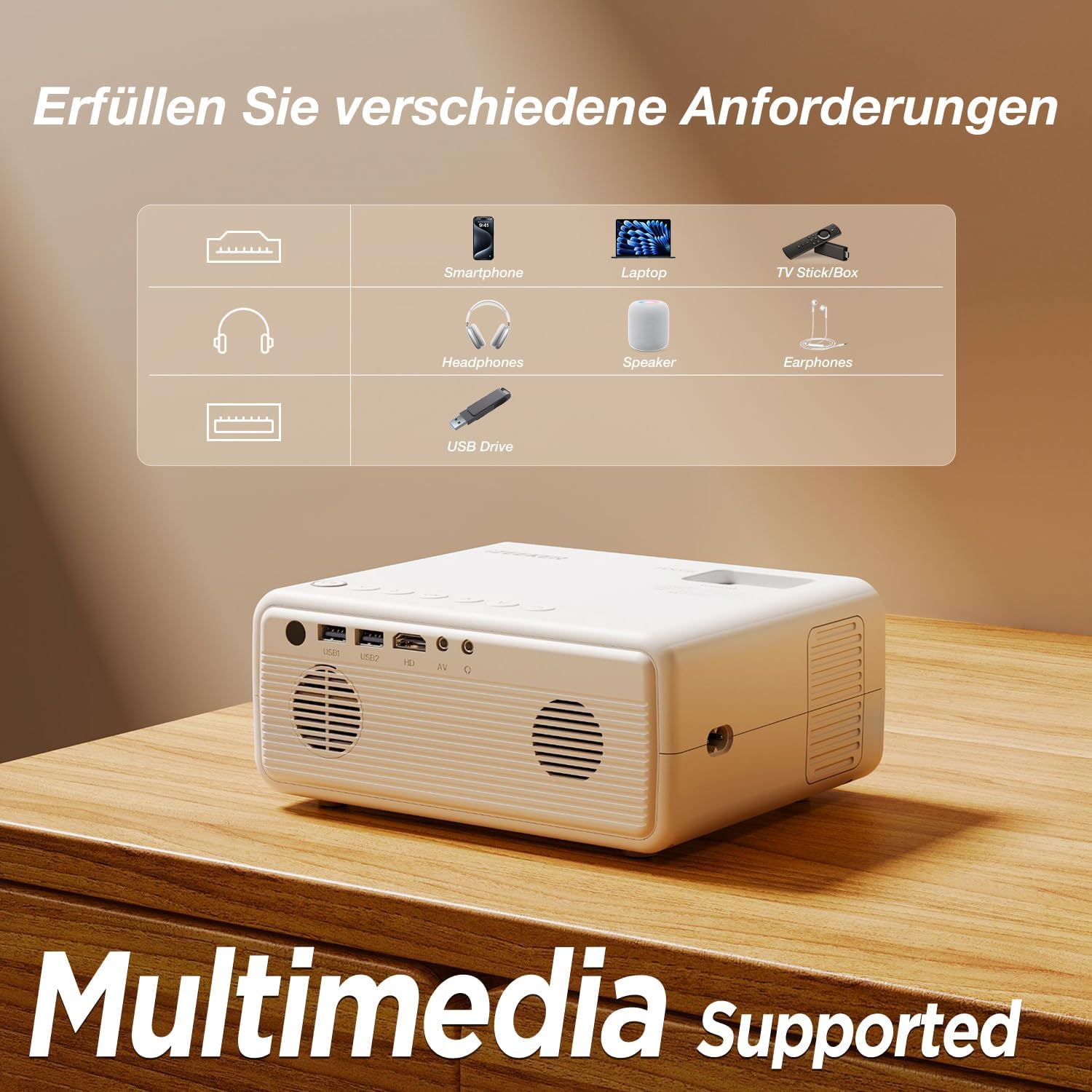
- బహుళ-పరికర కనెక్టివిటీ: Equipped with HDMI, AV, USB, and Aux ports for stable connections to smartphones, laptops, PS5, TV boxes, and DVD players.
- పెద్ద స్క్రీన్ ప్రొజెక్షన్: Supports up to a 250-inch screen size with 75% zoom function for flexible screen adjustment without moving the projector.
- కంటి రక్షణ: High-refraction lenses and diffuse reflection technology reduce blue light and eye fatigue.


4. సెటప్
4.1 ప్లేస్మెంట్
Choose a flat, stable surface for the projector. The projection distance affects the screen size. For optimal viewing, ensure the projector is perpendicular to the projection surface.
- The projector can be placed on a table, mounted on the included tripod, or ceiling-mounted.
- Adjust the distance to achieve your desired screen size, up to 250 inches.

4.2 పవర్ కనెక్షన్
Connect the power adapter to the projector's power input port, then plug the adapter into a power outlet.
4.3 ఫోకస్ మరియు కీస్టోన్ సర్దుబాటు
After powering on, adjust the focus ring on the projector lens until the image is clear. Use the keystone correction dial to adjust the image shape if it appears trapezoidal.

4.4 కనెక్ట్ చేసే పరికరాలు
The projector supports various wired connections for stable performance:
- HDMI: Connect laptops, gaming consoles (PS5), TV boxes, or DVD players using an HDMI cable.
- USB: మీడియాను ప్లే చేయడానికి USB డ్రైవ్ను చొప్పించండి fileనేరుగా లు.
- యొక్క: పాత పరికరాల కోసం AV పోర్ట్ని ఉపయోగించండి.
- Smartphones (Wired):
- iOS పరికరాలు: Requires an Apple Lightning to HDMI adapter cable (not included).
- Android పరికరాలు: Requires a Micro USB/Type-C to HDMI cable (not included).


4.5 బ్లూటూత్ ఆడియో కనెక్షన్
బాహ్య బ్లూటూత్ స్పీకర్లు లేదా హెడ్ఫోన్లను కనెక్ట్ చేయడానికి:
- మీ బ్లూటూత్ ఆడియో పరికరం జత చేసే మోడ్లో ఉందని నిర్ధారించుకోండి.
- ప్రొజెక్టర్లో, బ్లూటూత్ సెట్టింగ్ల మెనూకు నావిగేట్ చేయండి.
- జత చేయడానికి అందుబాటులో ఉన్న పరికరాల జాబితా నుండి మీ పరికరాన్ని ఎంచుకోండి.
గమనిక: The Bluetooth function is for audio output only and does not support screen mirroring from mobile devices.

5. ఆపరేటింగ్ సూచనలు
5.1 పవర్ ఆన్/ఆఫ్
- పవర్ ఆన్: ప్రొజెక్టర్ లేదా రిమోట్ కంట్రోల్లోని పవర్ బటన్ని నొక్కండి.
- పవర్ ఆఫ్: Press the power button again. Confirm shutdown if prompted.
5.2 మెనూ నావిగేషన్
Use the navigation buttons on the projector or remote control to browse the on-screen menu. The "OK" button confirms selections, and the "Back" button returns to the previous screen.
5.3 ఇన్పుట్ సోర్స్ ఎంపిక
Press the "Source" button on the remote control or projector to select the desired input (e.g., HDMI1, USB, AV).
5.4 జూమ్ ఫంక్షన్
The projector features a 75% zoom function. Access this setting in the projector's menu to adjust the screen size without physically moving the projector.


6. నిర్వహణ
6.1 లెన్స్ శుభ్రపరచడం
Use a professional lens cleaning cloth or air blower to clean the projector lens. Do not touch the lens directly with your hands or use abrasive cleaners.
6.2 ప్రొజెక్టర్ బాడీని శుభ్రపరచడం
Wipe the projector's exterior with a soft, dry cloth. Do not use liquid, abrasive, or corrosive cleaners.
6.3 నిల్వ
ఎక్కువసేపు ఉపయోగంలో లేనప్పుడు, ప్రొజెక్టర్ను చల్లని, పొడి, దుమ్ము లేని వాతావరణంలో నిల్వ చేయండి. నష్టాన్ని నివారించడానికి అసలు ప్యాకేజింగ్ లేదా రక్షణ కేసును ఉపయోగించండి.
7. ట్రబుల్షూటింగ్
| సమస్య | సాధ్యమైన కారణం | పరిష్కారం |
|---|---|---|
| చిత్రం లేదు/సిగ్నల్ లేదు | Incorrect input source selected; Cable not connected properly; Device not powered on. | Select the correct input source (HDMI, USB, AV). Check all cable connections. Ensure the connected device is powered on. |
| అస్పష్టమైన చిత్రం | Focus not adjusted; Projector too far/close; Lens dirty. | Adjust the focus ring. Adjust projection distance. Clean the projector lens. |
| ట్రాపెజోయిడల్ చిత్రం | ప్రొజెక్టర్ స్క్రీన్కు లంబంగా లేదు. | Adjust the keystone correction dial. Reposition the projector. |
| శబ్దం లేదు | వాల్యూమ్ చాలా తక్కువగా ఉంది; మ్యూట్ చేయబడింది; బాహ్య ఆడియో పరికరం కనెక్ట్ చేయబడలేదు/జత చేయబడలేదు. | Increase volume. Unmute. Check Bluetooth connection for external speakers/headphones. |
| Cannot play Netflix/Prime Video | Copyright restrictions. | These services can only be played via a TV Stick (e.g., Amazon Fire Stick) connected to the projector's HDMI port. |
8. స్పెసిఫికేషన్లు
| బ్రాండ్ | iZEEKER |
| మోడల్ సంఖ్య | iPL320 |
| ఉత్పత్తి రకం | పోర్టబుల్ ప్రొజెక్టర్ |
| ప్రకాశం | 12000 లక్స్ |
| డిస్ప్లే రిజల్యూషన్ | 1920 x 1080 (1080P Native) |
| గరిష్ట డిస్ప్లే రిజల్యూషన్ | 1920 x 1080 |
| కాంట్రాస్ట్ రేషియో | 10000:1 వరకు |
| కనెక్టివిటీ టెక్నాలజీ | Bluetooth 5.2, HDMI, USB, AV, Aux |
| Screen Size (Max) | 250 అంగుళాలు |
| జూమ్ ఫంక్షన్ | 75% |
| ఉత్పత్తి కొలతలు | 19L x 15.8W x 8.6H సెంటీమీటర్లు |
| మౌంటు రకం | ట్రైపాడ్ మౌంట్ |
| సిఫార్సు చేసిన ఉపయోగాలు | హోమ్ సినిమా |
9. వారంటీ & సపోర్ట్
iZEEKER is committed to providing excellent customer service.
- తయారీదారు వారంటీ: The iZEEKER Projector comes with a free 2-year after-sales warranty.
- సాంకేతిక మద్దతు: Professional lifetime technical support is available.
- మమ్మల్ని సంప్రదించండి: If you have any questions, issues, or require assistance, please do not hesitate to contact iZEEKER customer support. Refer to the contact information provided in your product packaging or on the official iZEEKER webసైట్.