
1. పరిచయం
This manual provides instructions for the use and maintenance of your new replacement remote control for various Hitachi Smart TV models. This remote is designed to function as a direct replacement for your original remote, offering essential control over your television.
Please note that as a replacement unit, some advanced or specific functions present on your original remote might not be fully supported. It is recommended to verify compatibility with your specific TV model.
2. ఉత్పత్తి ముగిసిందిview
The replacement remote control features a standard layout for easy navigation and control of your Hitachi Smart TV. It is typically supplied in either black or white color, chosen at random.
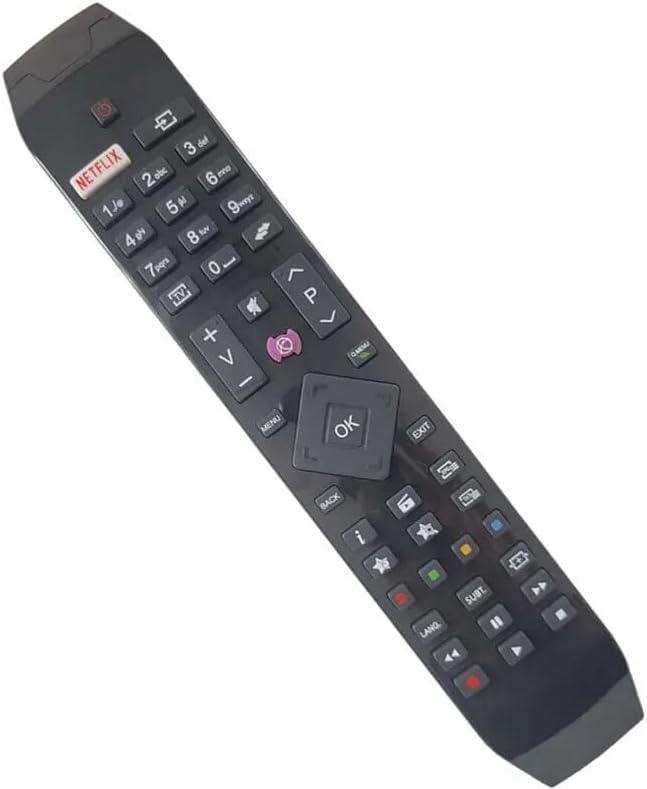
చిత్రం 2.1: కోణీయ view of the replacement remote control, highlighting its ergonomic design and button layout.

చిత్రం 2.2: ఫ్రంటల్ view of the replacement remote control, detailing the arrangement of function buttons.
The remote includes dedicated buttons for common functions such as Power, Volume Up/Down, Channel Up/Down, Mute, and a central navigation pad with an OK button. It also features quick access buttons for streaming services like Netflix and other smart TV functionalities.
3. సెటప్
3.1 బ్యాటరీ ఇన్స్టాలేషన్
- రిమోట్ కంట్రోల్ వెనుక బ్యాటరీ కంపార్ట్మెంట్ను గుర్తించండి.
- బ్యాటరీ కవర్ను స్లైడ్తో తెరవండి.
- రెండు AAA బ్యాటరీలను (చేర్చబడలేదు) చొప్పించండి, పాజిటివ్ (+) మరియు నెగటివ్ (-) టెర్మినల్స్ కంపార్ట్మెంట్ లోపల ఉన్న గుర్తులతో సరిగ్గా సమలేఖనం చేయబడ్డాయని నిర్ధారించుకోండి.
- బ్యాటరీ కవర్ను సురక్షితంగా మూసివేయండి.
3.2 ప్రారంభ ఉపయోగం
Once batteries are installed, the remote control is ready for use. Point the remote directly at your Hitachi Smart TV and press the Power button to turn on the television. No pairing or programming is typically required for this replacement remote.
4. ఆపరేటింగ్ సూచనలు
This remote control provides standard functionality for your Hitachi Smart TV. Below are common operations:
- పవర్ బటన్: టీవీని ఆన్ లేదా ఆఫ్ చేస్తుంది.
- వాల్యూమ్ బటన్లు (+/-): టీవీ వాల్యూమ్ను పెంచుతుంది లేదా తగ్గిస్తుంది.
- Channel Buttons (P+/-): టీవీ ఛానెల్ని పైకి లేదా క్రిందికి మారుస్తుంది.
- మ్యూట్ బటన్: టీవీ ఆడియోను మ్యూట్ చేస్తుంది లేదా అన్మ్యూట్ చేస్తుంది.
- నావిగేషన్ ప్యాడ్ (పైకి/క్రిందికి/ఎడమ/కుడి/సరే): టీవీ స్క్రీన్పై మెనూలను నావిగేట్ చేయడానికి మరియు ఎంపికలను నిర్ధారించడానికి ఉపయోగించబడుతుంది.
- నెట్ఫ్లిక్స్ బటన్: Direct access to the Netflix application (if supported by your TV model).
- మెనూ/హోమ్ బటన్: Accesses the TV's main menu or smart home screen.
- వెనుకకు/నిష్క్రమించు బటన్: మునుపటి స్క్రీన్కు తిరిగి వస్తుంది లేదా మెనూ నుండి నిష్క్రమిస్తుంది.
- సంఖ్య బటన్లు (0-9): For direct channel input or other numerical selections.
For specific advanced functions or smart TV features, refer to your Hitachi TV's original user manual.
5. అనుకూలత
This replacement remote control is compatible with various Hitachi Smart TV models. Known compatible models include, but are not limited to:
- 43HL15W69
- 43HL5W69
- 48HB6W62A
- 49HB5W62
- 49HB6W62H
- 32HB6T41A
- 43HB5T62
- 43HK4W64
- 43HK5W64
If your specific TV model is not listed, it is recommended to compare your original remote with the images provided or contact the seller for confirmation of compatibility.
6. నిర్వహణ
6.1 బ్యాటరీ భర్తీ
Replace batteries when the remote's response becomes sluggish or stops working. Always replace both batteries at the same time with new ones of the same type (AAA). Do not mix old and new batteries, or different types of batteries.
6.2 శుభ్రపరచడం
To clean the remote control, gently wipe it with a soft, dry cloth. For stubborn dirt, a slightly damp cloth can be used, but ensure no moisture enters the remote. Do not use abrasive cleaners or solvents.
6.3 నిల్వ
రిమోట్ను చల్లని, పొడి ప్రదేశంలో ప్రత్యక్ష సూర్యకాంతి మరియు తీవ్రమైన ఉష్ణోగ్రతలకు దూరంగా నిల్వ చేయండి. రిమోట్ను ఎక్కువ కాలం ఉపయోగించకపోతే, లీకేజీని నివారించడానికి బ్యాటరీలను తీసివేయడం మంచిది.
7. ట్రబుల్షూటింగ్
- రిమోట్ స్పందించడం లేదు:
- బ్యాటరీలు సరైన ధ్రువణతతో సరిగ్గా చొప్పించబడ్డాయో లేదో తనిఖీ చేయండి.
- బ్యాటరీలను కొత్త వాటితో భర్తీ చేయండి.
- Ensure there are no obstructions between the remote and the TV's infrared sensor.
- రిమోట్ను నేరుగా టీవీ వైపు చూపించండి.
- కొన్ని విధులు పనిచేయడం లేదు:
- As a replacement remote, certain advanced or specific functions of your original TV remote may not be supported. This is normal.
- Verify that the function you are trying to use is standard for a TV remote.
- రిమోట్ అడపాదడపా పనిచేస్తుంది:
- బ్యాటరీలు తక్కువగా ఉండవచ్చు; వాటిని మార్చండి.
- బ్యాటరీ పరిచయాలు శుభ్రంగా మరియు తుప్పు లేకుండా ఉన్నాయని నిర్ధారించుకోండి.
If issues persist after following these steps, please contact the seller for further assistance.
8. స్పెసిఫికేషన్లు
| బ్రాండ్ | సాధారణమైనది |
| తయారీదారు | సాధారణమైనది |
| అనుకూల పరికరాలు | Hitachi Smart TVs (e.g., 43HL15W69, 43HL5W69, 48HB6W62A, 49HB5W62, 49HB6W62H, 32HB6T41A, 43HB5T62, 43HK4W64, 43HK5W64) |
| ప్రత్యేక ఫీచర్ | ఎర్గోనామిక్ |
| రంగు | Black/White (randomly sent) |
| మద్దతు ఉన్న పరికరాల గరిష్ట సంఖ్య | 5 (as a universal remote, though this is a replacement for specific TVs) |
| శక్తి మూలం | 2 x AAA బ్యాటరీలు (చేర్చబడలేదు) |
| మెటీరియల్ | ABS ప్లాస్టిక్ |
9. వారంటీ మరియు మద్దతు
Specific warranty information for this replacement remote control is not provided in the product details. For any warranty claims, technical support, or further inquiries, please contact the seller directly through your purchase platform.
It is recommended to retain your purchase receipt as proof of purchase for any support requests.