
1. పరిచయం
Thank you for choosing the ZIPRO Nitro RS Home Exercise Bike. This manual provides essential information for the safe assembly, operation, and maintenance of your new fitness equipment. Please read all instructions carefully before use to ensure optimal performance and safety.

Image: The ZIPRO Nitro RS Home Exercise Bike, showcasing దాని సొగసైన డిజైన్ మరియు ముఖ్య లక్షణాలు.
2. ముఖ్యమైన భద్రతా సమాచారం
Before beginning any exercise program, consult with your physician. Failure to follow these safety instructions could result in injury or damage to the equipment.
- ప్రతి ఉపయోగం ముందు అన్ని భాగాలు సురక్షితంగా బిగించబడ్డాయని నిర్ధారించుకోండి.
- ఆపరేషన్ సమయంలో పిల్లలు మరియు పెంపుడు జంతువులను పరికరాల నుండి దూరంగా ఉంచండి.
- వ్యాయామ బైక్ను చదునైన, స్థిరమైన ఉపరితలంపై ఉంచండి.
- తగిన వ్యాయామ దుస్తులు మరియు పాదరక్షలు ధరించండి.
- గరిష్ట వినియోగదారు బరువు: 150 కిలోలు.
- Maximum user height: 200 cm.
3. ప్యాకేజీ విషయాలు
Verify that all components are present before assembly. Refer to the included assembly guide for a detailed list and diagrams.
- ప్రధాన ఫ్రేమ్ భాగాలు
- హ్యాండిల్ బార్ అసెంబ్లీ
- సీటు పోస్ట్ మరియు జీను
- పెడల్స్
- Stabilizer bars
- Computer console
- వాటర్ బాటిల్ హోల్డర్
- అసెంబ్లీ సాధనాలు మరియు హార్డ్వేర్
4. అసెంబ్లీ సూచనలు
Assembly typically requires two people. Follow the step-by-step instructions provided in the separate assembly manual for detailed diagrams and hardware identification. A general overview క్రింద ఇవ్వబడింది:
- స్టెబిలైజర్ బార్లను అటాచ్ చేయండి: అందించిన బోల్ట్లు మరియు వాషర్లను ఉపయోగించి ముందు మరియు వెనుక స్టెబిలైజర్ బార్లను ప్రధాన ఫ్రేమ్కు భద్రపరచండి.
- పెడల్స్ను ఇన్స్టాల్ చేయండి: Attach the left and right pedals to the crank arms. Note that pedals are typically threaded differently (left pedal is reverse-threaded).
- మౌంట్ సీట్ పోస్ట్ మరియు జీను: Insert the seat post into the main frame and secure it at the desired height. Attach the saddle to the seat post.
- Assemble Handlebar: Connect the handlebar post to the main frame. Attach the handlebar to the post.
- Install Computer Console: Connect the sensor cables from the main frame to the computer console. Mount the console onto the handlebar post.
- ఉపకరణాలను అటాచ్ చేయండి: Install the water bottle holder.
- తుది తనిఖీ: Ensure all bolts and nuts are securely tightened. Adjust the leveling feet on the stabilizer bars to ensure the bike is stable on your floor.

Image: The sturdy base and adjustable stabilizer feet of the ZIPRO Nitro RS, ensuring stability during workouts.
5. ఆపరేటింగ్ సూచనలు
5.1 ప్రతిఘటన సర్దుబాటు
The ZIPRO Nitro RS features 8 levels of magnetic resistance. To adjust the resistance, turn the resistance knob located on the main frame. Turn clockwise to increase resistance and counter-clockwise to decrease it.
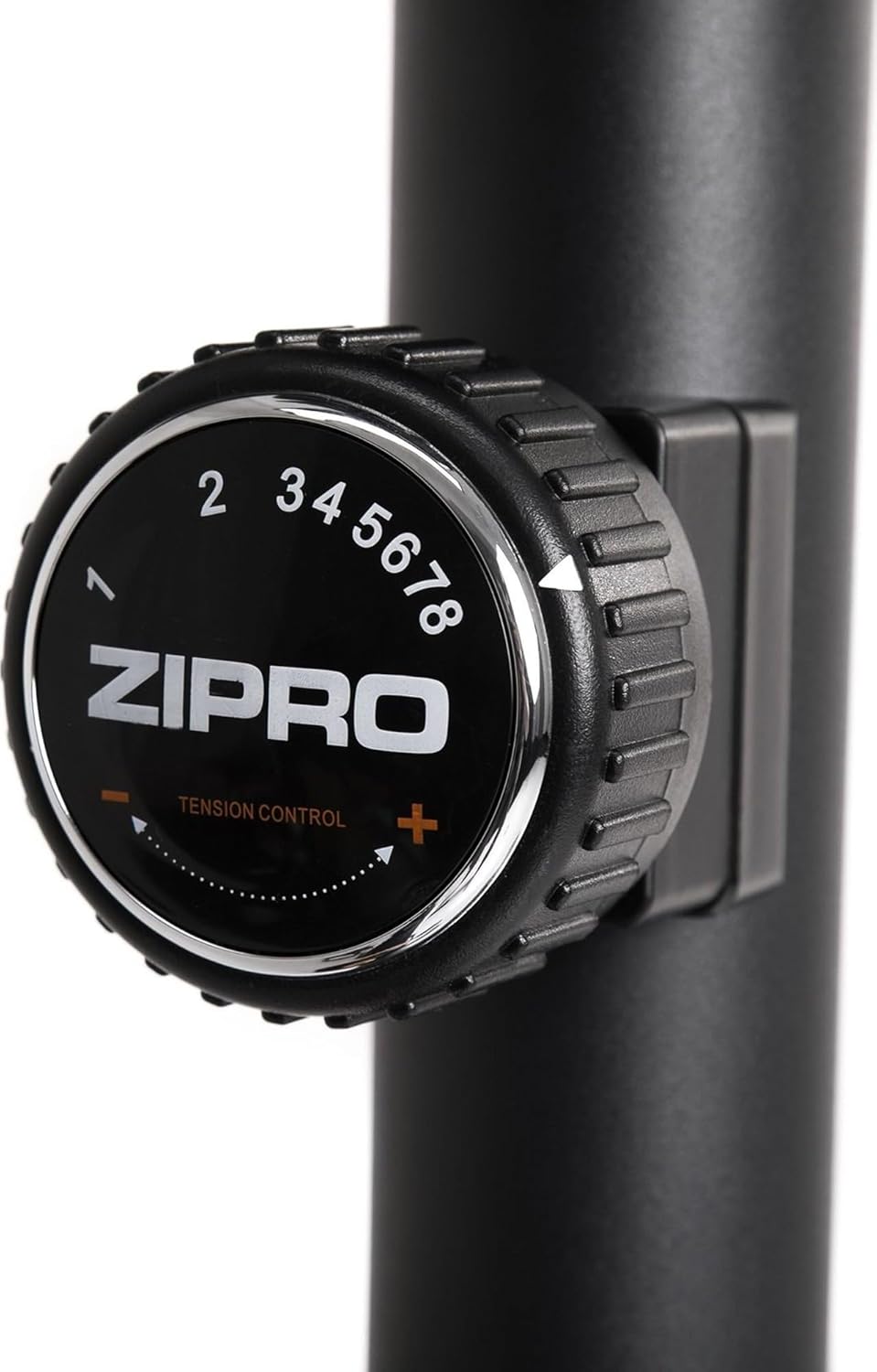
Image: Close-up of the resistance adjustment knob with levels 1-8 clearly marked.
5.2 Computer Console Functions
The advanced computer console displays key workout metrics. Insert batteries (included) into the console before first use.

Image: The computer console displaying workout data and control buttons.
- స్కాన్: అన్ని డిస్ప్లే ఫంక్షన్ల ద్వారా స్వయంచాలకంగా చక్రం తిప్పుతుంది.
- సమయం: మీ వ్యాయామం యొక్క వ్యవధిని ప్రదర్శిస్తుంది.
- వేగం: మీ ప్రస్తుత సైక్లింగ్ వేగాన్ని చూపుతుంది.
- దూరం: మీ సెషన్ సమయంలో కవర్ చేయబడిన దూరాన్ని ట్రాక్ చేస్తుంది.
- కాలరీలు: ఖర్చయ్యే కేలరీలను అంచనా వేస్తుంది.
- పల్స్: పల్స్ సెన్సార్లను హ్యాండిల్బార్లపై పట్టుకున్నప్పుడు మీ హృదయ స్పందన రేటును ప్రదర్శిస్తుంది.
- మొత్తం జిల్లా: Accumulates total distance over multiple workouts.
ఉపయోగించండి మోడ్ button to select a specific display function, రీసెట్ చేయండి to clear current workout data, and సెట్ to configure target values (if applicable).
5.3 సీటు మరియు హ్యాండిల్బార్ను సర్దుబాటు చేయడం
Proper adjustment of the seat and handlebar ensures comfort and effective training.
- సీటు ఎత్తు: Loosen the adjustment knob on the seat post, raise or lower the seat to the desired height, and re-tighten securely.
- Seat Horizontal Position: Loosen the knob beneath the saddle, slide the seat forward or backward, and re-tighten.
- హ్యాండిల్బార్ కోణం: Loosen the adjustment knob on the handlebar post, tilt the handlebar to a comfortable angle, and re-tighten.
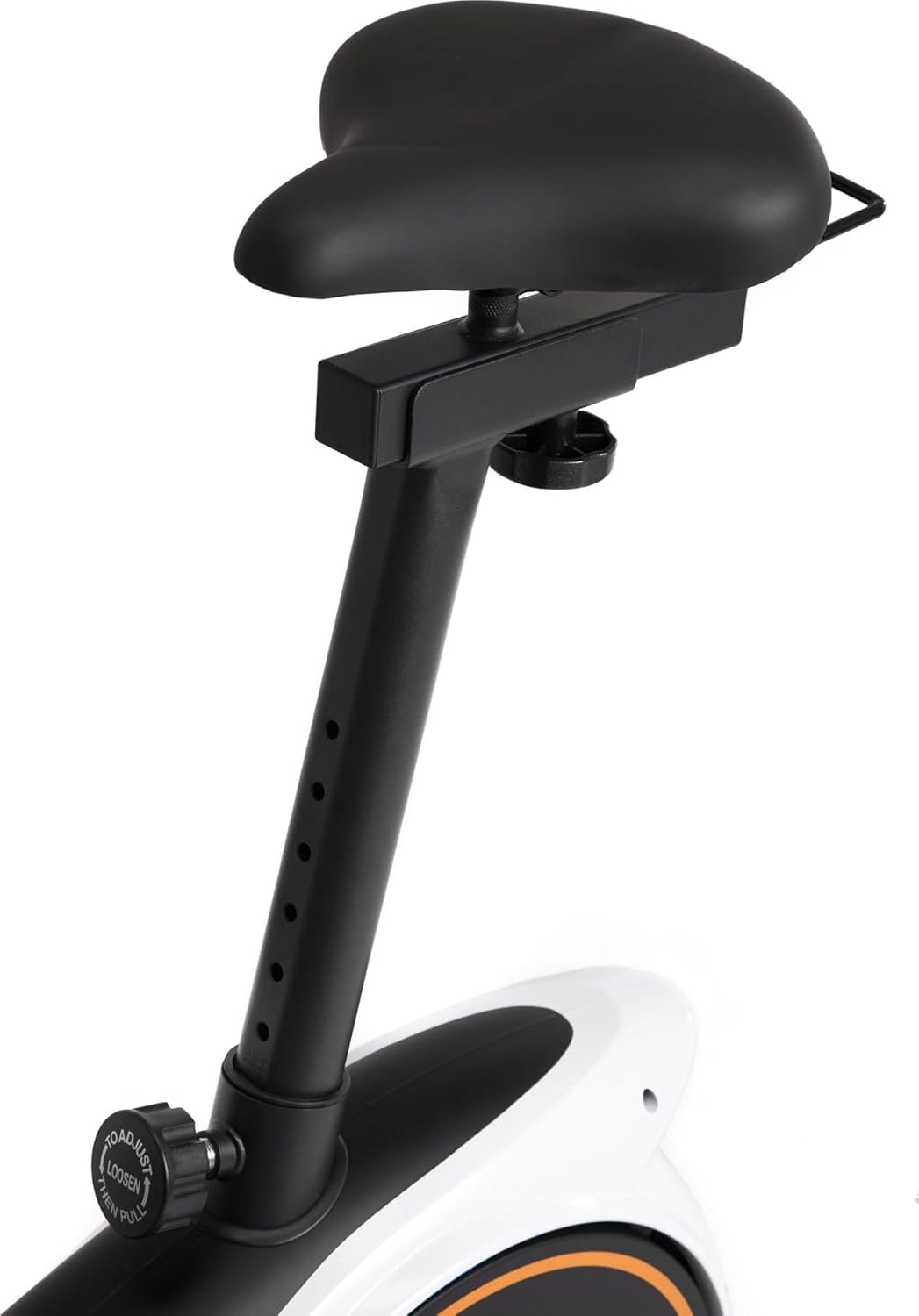
Image: Seat height adjustment mechanism.

Image: Seat horizontal adjustment mechanism.
5.4 Using the Device Holder
The console features a convenient holder for your smartphone or tablet, allowing you to enjoy entertainment or follow guided workouts during your session.

Image: A smartphone placed in the console's device holder.

Image: A tablet placed in the console's device holder.
6. నిర్వహణ
క్రమం తప్పకుండా నిర్వహణ మీ వ్యాయామ బైక్ యొక్క దీర్ఘాయువు మరియు సురక్షితమైన ఆపరేషన్ను నిర్ధారిస్తుంది.
- శుభ్రపరచడం: ప్రకటనతో బైక్ను తుడిచివేయండిamp ప్రతి ఉపయోగం తర్వాత చెమట మరియు దుమ్ము తొలగించడానికి వస్త్రాన్ని ధరించండి. రాపిడి క్లీనర్లను నివారించండి.
- తనిఖీ: ఎప్పటికప్పుడు అన్ని బోల్ట్లు, నట్లు మరియు కదిలే భాగాల బిగుతు మరియు తరుగుదల కోసం తనిఖీ చేయండి. ఏవైనా వదులుగా ఉన్న ఫాస్టెనర్లను బిగించండి.
- సరళత: The magnetic resistance system is generally maintenance-free. Refer to the full manual for any specific lubrication requirements for other moving parts.
- నిల్వ: ప్రత్యక్ష సూర్యకాంతి మరియు తీవ్రమైన ఉష్ణోగ్రతలకు దూరంగా పొడి, చల్లని ప్రదేశంలో బైక్ను నిల్వ చేయండి.
7. ట్రబుల్షూటింగ్
| సమస్య | సాధ్యమైన కారణం | పరిష్కారం |
|---|---|---|
| బైక్ అస్థిరంగా ఉంది లేదా ఊగుతోంది | Uneven floor; loose stabilizer bolts | Adjust the leveling feet on the stabilizer bars. Ensure all stabilizer bolts are tight. |
| Computer display not working | Dead batteries; loose sensor connection | Replace batteries. Check that all sensor cables are securely connected to the console. |
| ప్రతిఘటన మారదు | Resistance cable disconnected or damaged | Inspect the resistance cable connection to the knob and the flywheel mechanism. Contact customer support if damaged. |
| ఆపరేషన్ సమయంలో అసాధారణ శబ్దం | Loose parts; friction | Check all bolts and nuts for tightness. Ensure no parts are rubbing. |
8. ఉత్పత్తి లక్షణాలు
| ఫీచర్ | వివరాలు |
|---|---|
| బ్రాండ్ | ZIPRO |
| మోడల్ | నైట్రో RS |
| రంగు | నలుపు |
| రెసిస్టెన్స్ మెకానిజం | అయస్కాంత |
| ప్రతిఘటన స్థాయిలు | 8 |
| డ్రైవ్ సిస్టమ్ | బెల్ట్ |
| మెటీరియల్ | ప్లాస్టిక్ |
| గరిష్ట వినియోగదారు బరువు | 150 కిలోలు |
| గరిష్ట వినియోగదారు ఎత్తు | 200 సెం.మీ |
| ఉత్పత్తి కొలతలు (L x W x H) | 92 x 60 x 143 సెం.మీ (సుమారుగా) |
| వస్తువు బరువు | 28.6 కిలోలు |
| పవర్ సోర్స్ (కన్సోల్) | బ్యాటరీ ఆధారితమైనది |
| మోడల్ సంఖ్య | 5304090 |

Image: Dimensions of the ZIPRO Nitro RS Home Exercise Bike (115 cm length, 59 cm width, 145 cm height).
9. వారంటీ మరియు మద్దతు
Your ZIPRO Nitro RS Home Exercise Bike comes with a manufacturer's warranty. Please refer to the warranty card included with your purchase for specific terms and conditions. For technical support, spare parts, or warranty claims, please contact ZIPRO customer service through their official webమీరు ఉత్పత్తిని కొనుగోలు చేసిన సైట్ లేదా రిటైలర్.
For additional information and support, visit the official ZIPRO webసైట్: www.zipro.pl