
YOCAN 5144030072
YOCAN Verve 510 Battery User Manual
Model: 5144030072 | Brand: YOCAN
పరిచయం
The YOCAN Verve 510 Battery is a compact and discreet vaporizer designed for use with 510 standard cartridges, including full glass cartridges. Its stealth design ensures the cartridge is not visible from the outside, offering a sleek and portable vaping experience. This manual provides essential information on the product's features, setup, operation, maintenance, and safety precautions.
కీ ఫీచర్లు
- బ్యాటరీ కెపాసిటీ: 450mAh for extended use.
- 510 Standard Compatibility: Designed for 510 threaded cartridges, including full glass types.
- Stealth Design: Fully conceals the 510 cartridge for discretion.
- మన్నికైన నిర్మాణం: Made from lightweight and robust aluminum alloy.
- సర్దుబాటు వాల్యూమ్tage: Three voltage settings (2.6V, 3.2V, 3.8V) for customized vaping.
- Preheating Function: 10-second preheat mode to prepare viscous liquids.
- Auto-Puff Activation: Inhale directly from the mouthpiece to activate.
- అయస్కాంత కనెక్షన్: Strong magnetic connection for easy cartridge installation.
- USB టైప్-C ఛార్జింగ్: Convenient and fast charging (cable not included).
- కాంపాక్ట్ సైజు: Palm-sized for optimal portability.
ప్యాకేజీ విషయాలు
- YOCAN Verve 510 Battery Device
- వినియోగదారు మాన్యువల్ (ఈ పత్రం)
- Manufacturer's Warranty Card (YOCAN)
- ప్యాకేజింగ్ బాక్స్
Note: A 510 standard cartridge and USB Type-C charging cable are not included and must be purchased separately.
స్పెసిఫికేషన్లు
| స్పెసిఫికేషన్ | వివరాలు |
|---|---|
| బ్రాండ్ | YOCAN (KUSH JP) |
| మోడల్ సంఖ్య | 5144030072 |
| బ్యాటరీ కెపాసిటీ | 450mAh |
| వాల్యూమ్tagఇ సెట్టింగులు | 2.6V (Blue), 3.2V (Green), 3.8V (Red) |
| కొలతలు (L x W x D) | 90.5mm x 40.3mm x 20.49mm (approx. 2.6 x 2.6 x 10.75 cm) |
| బరువు | 45గ్రా |
| బాడీ మెటీరియల్ | అల్యూమినియం మిశ్రమం |
| ఛార్జింగ్ పోర్ట్ | USB టైప్-C |
| యాక్టివేషన్ పద్ధతి | Auto-puff (draw-activated) / Button-activated |
సెటప్
Attaching a 510 Cartridge
- కవర్ తొలగించండి: Gently remove the top cover of the battery device.
- Connect Cartridge: Screw your 510 standard cartridge clockwise onto the battery body until secure.
- కవర్ని మళ్లీ అటాచ్ చేయండి: Place the cover back onto the device. The cartridge will now be concealed.
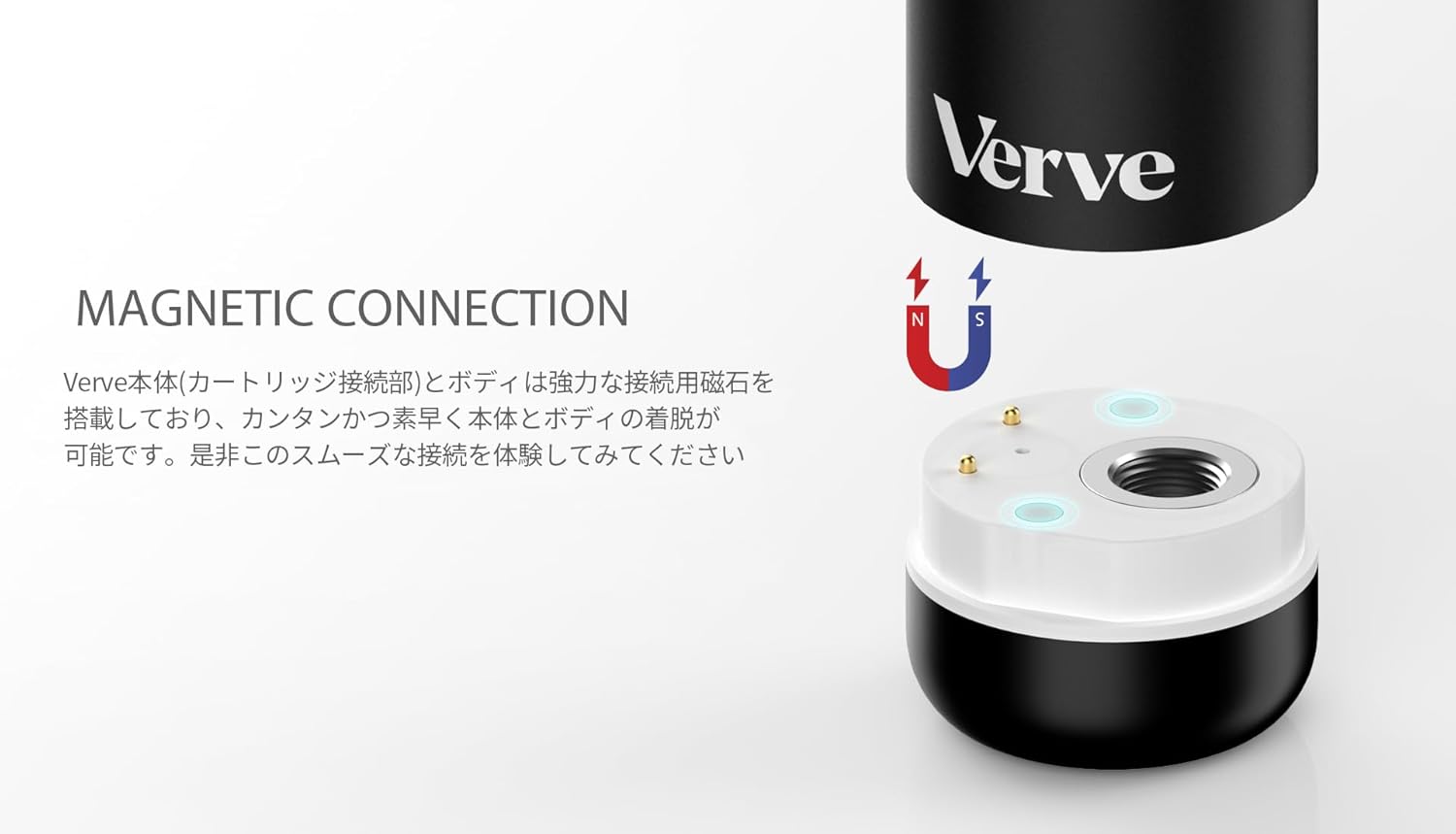
Figure 1: Magnetic Connection. The Verve battery features a strong magnetic connection for easy and secure attachment of 510 cartridges. This image illustrates the connection points between the battery and the cartridge.

Figure 2: Device Components. This diagram labels the key parts of the YOCAN Verve device, including the mouthpiece, aluminum alloy body, 450mAh battery, magnetic connection, and USB Type-C charging port.
ఆపరేటింగ్ సూచనలు
పవర్ ఆన్/ఆఫ్
- పరికరాన్ని తిప్పడానికి ON or ఆఫ్, quickly tap the button 5 times.
ప్రీహీటింగ్ ఫంక్షన్
- To activate the 10-second preheating function, quickly tap the button 2 times. This is ideal for thicker liquids.
- To stop preheating prematurely, tap the button 1 time while preheating is active.

Figure 3: 10-Second Preheat. This image highlights the 10-second preheating function of the YOCAN Verve, which helps prepare viscous liquids for optimal vaporization.
వాల్యూమ్tagఇ సర్దుబాటు
- To cycle through the voltage settings, quickly tap the button 3 times.
- The LED indicator will change color to show the current voltage:
- నీలం: 2.6V
- ఆకుపచ్చ: 3.2V
- ఎరుపు: 3.8V

Figure 4: 3 Voltage Levels. This graphic demonstrates the three adjustable voltage settings of the YOCAN Verve, allowing users to customize their vaping experience. The corresponding LED colors (Blue, Green, Red) indicate the selected voltage.
Vaping (Auto-Puff)
- Once the device is on and a cartridge is attached, simply inhale from the mouthpiece to activate the auto-puff function and begin vaping.
- The device also supports button-activated vaping if preferred.
ఛార్జింగ్
The YOCAN Verve battery is charged via a USB Type-C port located on the device. Connect a USB Type-C cable (not included) to the port and plug the other end into a suitable power source (e.g., computer USB port, wall adapter). The device will indicate charging status via its LED light.
నిర్వహణ
To ensure optimal performance and longevity of your YOCAN Verve battery, follow these general maintenance guidelines:
- రెగ్యులర్ క్లీనింగ్: Periodically wipe the device with a dry, soft cloth to remove any dust or residue. Ensure the cartridge connection area is clean.
- ద్రవాలను నివారించండి: పరికరాన్ని నీటిలో ముంచవద్దు లేదా అధిక తేమను బహిర్గతం చేయవద్దు.
- సరైన నిల్వ: పరికరాన్ని ప్రత్యక్ష సూర్యకాంతి మరియు తీవ్రమైన ఉష్ణోగ్రతలు లేకుండా చల్లని, పొడి ప్రదేశంలో నిల్వ చేయండి.
- జాగ్రత్తగా నిర్వహించండి: పరికరాన్ని వదలడం లేదా బలమైన ప్రభావాలకు గురిచేయడం మానుకోండి.
ట్రబుల్షూటింగ్
| సమస్య | సాధ్యమైన కారణం | పరిష్కారం |
|---|---|---|
| పరికరం ఆన్ చేయడం లేదు | Low battery; Incorrect power-on sequence | Charge the device; Tap the button 5 times quickly to power ON. |
| ఆవిరి ఉత్పత్తి లేదు | Cartridge not properly connected; Low battery; Cartridge empty; Preheating needed for viscous liquid | Ensure cartridge is securely attached; Charge the device; Replace cartridge; Activate preheating (2 taps). |
| Device heats up excessively | Overuse; Internal malfunction | Immediately turn off the power (5 taps) and discontinue use. Contact customer support if problem persists. |
| వాల్యూమ్tage adjustment not working | తప్పు బటన్ క్రమం | Tap the button 3 times quickly to cycle through voltagఇ సెట్టింగులు. |
భద్రతా జాగ్రత్తలు
- This product is intended for use with 510 standard cartridges only. It cannot be used as a standalone device.
- Do not use the device if it is damaged, wet, or shows any signs of malfunction.
- Store the device out of reach of children and pets.
- If the device becomes excessively hot during use or charging, immediately turn off the power and discontinue use.
- పరికరాన్ని విడదీయడానికి లేదా సవరించడానికి ప్రయత్నించవద్దు.
- Use only appropriate charging methods and cables.
వారంటీ మరియు మద్దతు
Your YOCAN Verve 510 Battery comes with a manufacturer's warranty. Please refer to the included warranty card for details regarding coverage, terms, and conditions. For technical support, troubleshooting assistance, or warranty claims, please contact YOCAN customer service or the retailer where you purchased the product.
తయారీదారు: YOCAN
ఉత్పత్తి చిత్రాలు


Ask a question about this manual
Ask about setup, troubleshooting, compatibility, parts, safety, or missing instructions. Manuals+ will review the question and use this page’s manual context to help answer it.