
Kidzone B0CM5PB88Y
Kidzone Smart Bumper Car User Manual
Model: B0CM5PB88Y
బ్రాండ్: కిడ్జోన్
1. పరిచయం
This user manual provides essential information for the safe operation, assembly, and maintenance of your Kidzone Smart Bumper Car. Designed for toddlers and kids aged 18 months to 6 years, this electric ride-on toy offers interactive features including app control, LED lights, Bluetooth connectivity, and a 360-degree spin function. Please read this manual thoroughly before use to ensure proper functionality and safety.
పెట్టెలో ఏముంది
- Ride on Car
- ఛార్జర్
- రిమోట్ కంట్రోల్
- మాన్యువల్
- DIY Sticker Sheets
2. భద్రతా మార్గదర్శకాలు
Your child's safety is paramount. Always supervise children during operation and ensure all safety features are properly utilized. This product complies with ASTM/CPSIA/CPSC/CA Prop 65/FCC safety regulations.
- వయస్సు మరియు బరువు పరిమితి: Suitable for children aged 18 months to 6 years, with a maximum weight capacity of 66 lbs.
- Seat Belt: Always ensure the adjustable 5-point seat belt is securely fastened before operation.
- పర్యవేక్షణ: అన్ని సమయాల్లో పెద్దల పర్యవేక్షణ అవసరం.
- ఉపరితలం: Use on smooth, flat surfaces. Avoid slopes, stairs, and uneven terrain.
- అడ్డంకులు: Ensure the play area is clear of obstacles, water, and other hazards.
- ఛార్జింగ్: The vehicle must be OFF and cannot be operated when charging.
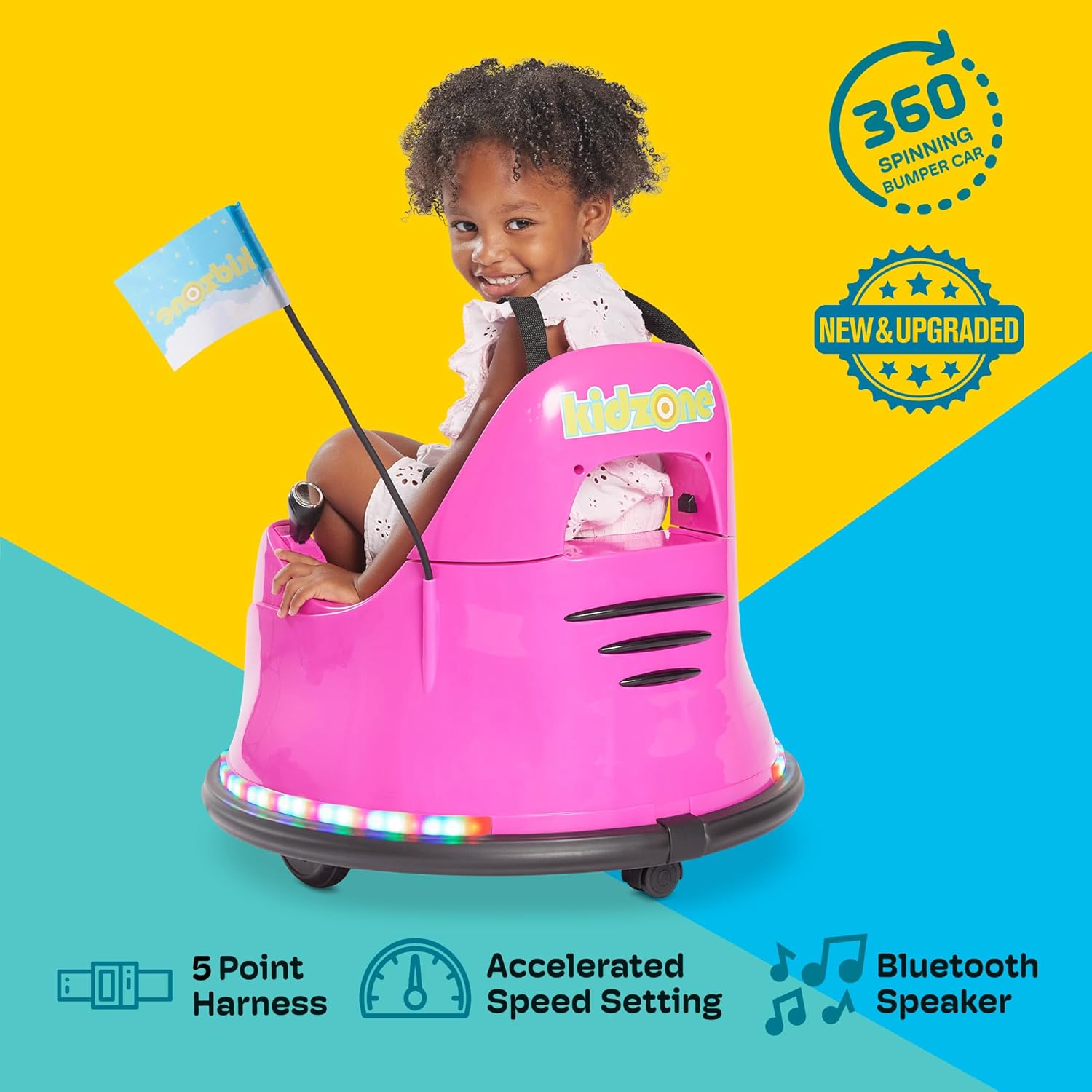
మూర్తి 2.1: Child securely fastened in the bumper car, demonstrating the 5-point harness for safety.

మూర్తి 2.2: The bumper car features a safety flag for increased visibility during play.
3. సెటప్ మరియు అసెంబ్లీ
The Kidzone Smart Bumper Car comes mostly pre-assembled. Follow these steps to prepare it for first use:
- అన్ప్యాక్: ప్యాకేజింగ్ నుండి అన్ని భాగాలను జాగ్రత్తగా తొలగించండి.
- బ్యాటరీ కనెక్షన్: The battery may come disconnected for shipping safety. Locate the battery compartment (usually under the seat) and connect the battery terminals as per the included quick start guide.
- మొదటి ఛార్జ్: Fully charge the battery for 8-12 hours before initial use. Do not charge for more than 20 hours.
- Attach Flag: Insert the racing flag into its designated slot on the rear of the bumper car.
- స్టిక్కర్లను వర్తించండి: Personalize your bumper car using the provided DIY sticker sheets.

మూర్తి 3.1: Customize your bumper car with the included DIY stickers, featuring numbers, letters, and fun designs.
4. ఆపరేటింగ్ సూచనలు
కంట్రోల్ ప్యానెల్ ఓవర్view
The main control panel is located within the seating area. It allows for power control, mode selection, speed adjustment, and light customization.

మూర్తి 4.1: The intuitive control panel for easy operation by children or parents.
- పవర్ బటన్: Press to turn the bumper car ON/OFF.
- బ్యాటరీ సూచిక: ప్రస్తుత బ్యాటరీ స్థాయిని ప్రదర్శిస్తుంది.
- మోడ్ సెలెక్టర్: Toggle between Joystick (child-driven), Remote (parental control), and APP control modes.
- స్పీడ్ సెట్టింగ్లు: Choose between Slow (0.75 mph) and Fast (1.3 mph) speeds.
- కాంతి నియంత్రణలు: Activate and cycle through various multi-colored LED light combinations for both upper and lower light strips.
డ్రైవింగ్ మోడ్లు
The Kidzone Smart Bumper Car offers three distinct driving modes:
- Joystick Input Mode: Children can drive the car independently using the two joysticks located on either side of the seat. Pushing both forward moves the car forward, pulling both back moves it backward, and pushing one forward while pulling the other back enables 360-degree spins.
- 2.4G Remote Control Mode: Parents can take full control of the bumper car's direction and speed using the included 2.4G remote control. This is ideal for younger children or for guiding the car in specific areas.
- APP Control Mode: Connect the bumper car to the free Kidzone APP (available on iOS and Android) via Wi-Fi. The app allows control over direction, speed, lights, and music. It also features "Play Mode" with games and rewards for an enhanced interactive experience.

మూర్తి 4.2: The included remote control allows parents to guide the bumper car.

మూర్తి 4.3: Control the bumper car and access interactive features via the Kidzone mobile application.
లైట్స్ మరియు సౌండ్
The bumper car features multi-colored LED lights on both the upper frame and around the base, offering 25 light combinations. It also includes Bluetooth connectivity, allowing you to play music or audio files through the car's speaker for an immersive experience.
వీడియో 4.1: Official product video demonstrating the Kidzone Smart Bumper Car's features, including app control and movement. This video is provided by the seller, Align Inc.
5. నిర్వహణ
- బ్యాటరీ సంరక్షణ: The 12V rechargeable lead-acid battery provides approximately 40 minutes of playtime on a full charge. Charge the battery at least once a month, even if not operating the vehicle, to maximize battery life. Avoid completely draining the battery.
- శుభ్రపరచడం: Wipe the bumper car with a damp గుడ్డ. కఠినమైన రసాయనాలు లేదా రాపిడి క్లీనర్లను ఉపయోగించడం మానుకోండి.
- నిల్వ: Store the bumper car in a dry, cool place away from direct sunlight and moisture.
6. ట్రబుల్షూటింగ్
If you encounter issues with your Kidzone Smart Bumper Car, refer to the following common problems and solutions:
| సమస్య | సాధ్యమైన కారణం | పరిష్కారం |
|---|---|---|
| కారు ఆన్ అవ్వదు. | Battery is low or disconnected. | Check battery connection and charge fully. |
| కారు కదలదు. | Incorrect driving mode selected or remote not paired. | Ensure correct mode (Joystick/Remote/APP) is selected. Re-pair remote if necessary. |
| లైట్లు పనిచేయడం లేదు. | Light function is turned off. | Press the light control buttons on the panel to activate. |
| యాప్ కంట్రోల్ కనెక్ట్ కావడం లేదు. | Wi-Fi issue or app not properly synced. | Ensure Wi-Fi is enabled on your device. Restart app and bumper car. |
For further assistance, please refer to the full user manual or contact Kidzone customer support.
7. ఉత్పత్తి లక్షణాలు
| ఫీచర్ | వివరాలు |
|---|---|
| ఉత్పత్తి కొలతలు | 22.4 x 22.4 x 20.3 అంగుళాలు |
| వస్తువు బరువు | 12.4 పౌండ్లు |
| తయారీదారు సిఫార్సు చేసిన వయస్సు | 18 నెలలు - 6 సంవత్సరాలు |
| బరువు సామర్థ్యం | 66 పౌండ్లు |
| మోటార్లు | Two 15W motors |
| బ్యాటరీ | 12V rechargeable lead-acid |
| ఛార్జీకి ప్లేటైమ్ | సుమారు 40 నిమిషాలు |
| ఛార్జింగ్ సమయం | 8-12 hours (max 20 hours) |
| Driving Speeds | 0.75 - 1.3 మైళ్ళు |
| భద్రతా లక్షణాలు | Adjustable 5-point seat belts, anti-flat tires, cushioned rubber bumper, slow start |
| కనెక్టివిటీ | Wi-Fi (for APP control), Bluetooth |
8. వారంటీ మరియు మద్దతు
For warranty information, product support, or to purchase replacement parts, please contact Kidzone customer service directly. Refer to the original packaging or the official Kidzone webసంప్రదింపు వివరాల కోసం సైట్.
డౌన్లోడ్ చేసుకోవడానికి వివరణాత్మక యూజర్ మాన్యువల్ (PDF) అందుబాటులో ఉంది: వినియోగదారు మాన్యువల్ని డౌన్లోడ్ చేయండి
Ask a question about this manual
Ask about setup, troubleshooting, compatibility, parts, safety, or missing instructions. Manuals+ will review the question and use this page’s manual context to help answer it.