
1. పరిచయం
Thank you for choosing the EZVIZ RE4 Plus Robot Vacuum and Mop. This device is designed to provide an efficient and automated cleaning experience for your home, combining powerful vacuuming with effective mopping. Featuring advanced LiDAR navigation and an automatic dust emptying station, the RE4 Plus minimizes manual intervention, allowing you to enjoy a cleaner home with ease. Please read this manual thoroughly before using the product to ensure proper operation and maintenance.
2. భద్రతా సమాచారం
Always follow basic safety precautions when using electrical appliances to reduce the risk of fire, electric shock, and personal injury. This appliance is not intended for use by persons (including children) with reduced physical, sensory, or mental capabilities, or lack of experience and knowledge, unless they have been given supervision or instruction concerning use of the appliance by a person responsible for their safety.
- తడి వాతావరణంలో లేదా నీటి దగ్గర రోబోట్ను ఆపరేట్ చేయవద్దు.
- జుట్టు, వదులుగా ఉండే దుస్తులు, వేళ్లు మరియు శరీరంలోని అన్ని భాగాలను ఓపెనింగ్స్ మరియు కదిలే భాగాలకు దూరంగా ఉంచండి.
- పెద్ద వస్తువులను, పదునైన వస్తువులను లేదా మండే/ధూమపాన పదార్థాలను తీయడానికి రోబోట్ను ఉపయోగించవద్దు.
- ఛార్జింగ్ స్టేషన్ గోడకు సమతల ఉపరితలంపై ఉంచబడిందని, దాని చుట్టూ తగినంత ఖాళీ స్థలం ఉండేలా చూసుకోండి.
- Only use the original power adapter and charging station provided by EZVIZ.
3. ఉత్పత్తి ముగిసిందిview
కీ ఫీచర్లు
- ఆటోమేటిక్ డస్ట్ ఖాళీ చేయడం: The robot automatically empties its dustbin into the 4-liter collection bag in the station, providing up to 90 days of hands-free cleaning.
- 2-ఇన్-1 వాక్యూమ్ మరియు మాప్: Equipped with both vacuuming and mopping capabilities, featuring 4000 Pa suction power and a 300 ml water tank for thorough cleaning.
- LiDAR నావిగేషన్: Advanced LDS LiDAR technology and infrared sensors enable precise mapping, obstacle avoidance, and efficient route planning.
- స్మార్ట్ యాప్ నియంత్రణ: Customize cleaning plans, set no-go zones, and manage floor maps via the EZVIZ app.
- సుదీర్ఘ బ్యాటరీ జీవితం: A 4930 mAh Li-ion battery provides up to 240 minutes of cleaning in silent mode, covering approximately 300 m².
- కార్పెట్ డిటెక్షన్: Automatically increases suction power when detecting carpets for deeper cleaning.
- స్మార్ట్ హోమ్ ఇంటిగ్రేషన్: Compatible with third-party voice assistants like Amazon Alexa and Google Assistant.

చిత్రం 3.1: పైగాview of EZVIZ RE4 Plus features and components.
భాగాలు చేర్చబడ్డాయి
- EZVIZ RE4 Plus Robot Vacuum and Mop
- Automatic Dust Emptying Station
- సైడ్ బ్రష్
- ఫిల్టర్ చేయండి
- ఇన్స్ట్రక్షన్ గైడ్
- పవర్ అడాప్టర్
4. సెటప్
4.1 అన్ప్యాకింగ్ మరియు ప్లేస్మెంట్
- ప్యాకేజింగ్ నుండి అన్ని భాగాలను జాగ్రత్తగా తొలగించండి.
- Choose a suitable location for the automatic dust emptying station. It should be placed against a wall on a hard, level surface, with at least 0.5 meters of clear space on both sides and 1.5 meters in front. Ensure there are no obstacles that could block the robot's return path.
- Plug the power adapter into the station and connect it to a power outlet. Ensure the station is powered on.
4.2 ప్రారంభ ఛార్జింగ్
Place the robot onto the charging contacts of the station. The robot will automatically align and begin charging. For first-time use, fully charge the robot before operation. The indicator light on the robot will show charging status.
4.3 యాప్ కనెక్షన్
- Download the EZVIZ app from your smartphone's app store (iOS or Android).
- Create an EZVIZ account or log in if you already have one.
- Tap the '+' icon in the app to add a new device.
- Scan the QR code located on the robot or the instruction manual.
- రోబోట్ను మీ హోమ్ వై-ఫై నెట్వర్క్కి కనెక్ట్ చేయడానికి యాప్లోని స్క్రీన్పై సూచనలను అనుసరించండి.
5. ఆపరేటింగ్ సూచనలు
5.1 First-Time Mapping
After initial setup, the robot will perform a quick scan of your home to create a map. Ensure all doors are open to allow the robot to access all areas you wish to clean. This map will be saved in the EZVIZ app for future use and customization.

Figure 5.1: The robot utilizing its integrated LDS LiDAR for obstacle avoidance and mapping.
5.2 క్లీనింగ్ మోడ్లు
The RE4 Plus offers various cleaning modes accessible via the EZVIZ app:
- ఆటో క్లీన్: ఆ రోబోట్ మ్యాప్ చేసిన ప్రాంతాన్ని అంతా తెలివిగా శుభ్రం చేస్తుంది.
- జోన్ క్లీన్: రోబోట్ శుభ్రం చేయడానికి మ్యాప్లో నిర్దిష్ట ప్రాంతాలను ఎంచుకోండి.
- స్పాట్ క్లీన్: ఒక చిన్న, కేంద్రీకృత ప్రాంతాన్ని శుభ్రం చేయడానికి రోబోట్ను నిర్దేశించండి.
- వాక్యూమ్ మాత్రమే: పొడి చెత్త తొలగింపు కోసం.
- తుడుపు మాత్రమే: For wet cleaning (ensure water tank is filled).
- వాక్యూమ్ & మాప్: ఏకకాలంలో వాక్యూమింగ్ మరియు మాపింగ్.

Figure 5.2: The 2-in-1 vacuum and mop system of the RE4 Plus.

Figure 5.3: Detailed cleaning actions including powerful suction, consistent mopping, and carpet boost.
5.3 Customizing Cleaning Plans
Using the EZVIZ app, you can:
- Edit Maps: Divide, merge, or rename rooms.
- నో-గో జోన్లను సెట్ చేయండి: Draw virtual boundaries or no-mop zones to restrict the robot from certain areas.
- షెడ్యూల్ క్లీనింగ్: Set specific times for the robot to clean selected areas or the entire home.
- Adjust Suction/Water Level: Customize cleaning intensity for different rooms or floor types.

Figure 5.4: Customizing your floor plan and cleaning tasks via the EZVIZ app.
5.4 వాయిస్ నియంత్రణ
The RE4 Plus supports voice control through Amazon Alexa and Google Assistant. Link your EZVIZ account to your smart home assistant app and use commands like "Alexa, turn on the RE5 Plus" to start cleaning.

Figure 5.5: Integrating the RE4 Plus with smart home voice assistants.
6. నిర్వహణ
Regular maintenance ensures optimal performance and extends the lifespan of your robot vacuum. Always power off the robot before performing any maintenance.
6.1 Automatic Dust Emptying Station
The station's 4-liter dust bag typically needs replacement every 90 days, depending on usage. The app will notify you when the bag is full.
- Open the lid of the dust emptying station.
- Carefully remove the full dust bag. The self-sealing design prevents dust leakage.
- Dispose of the old bag and insert a new EZVIZ replacement dust bag.
- మూత సురక్షితంగా మూసివేయండి.
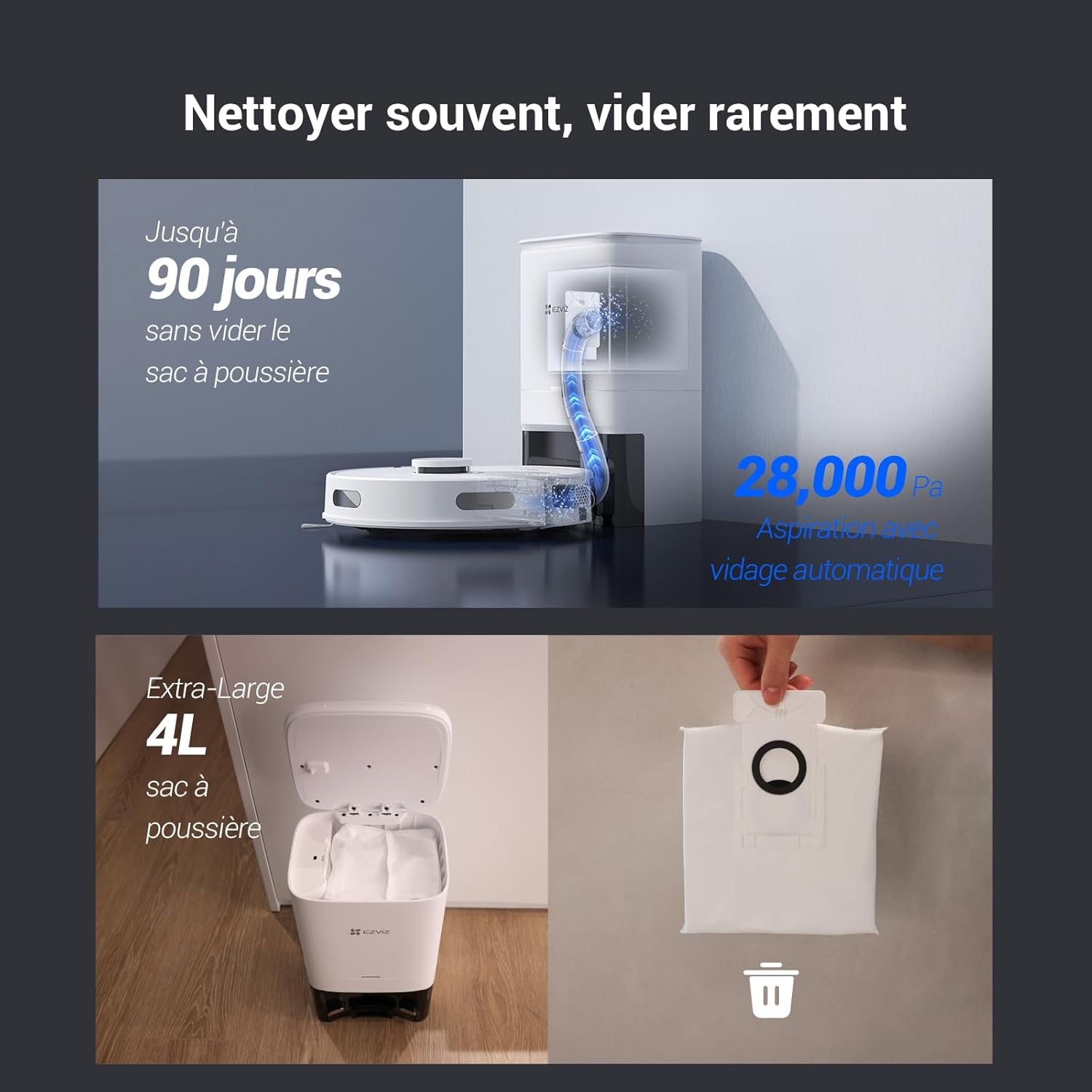
Figure 6.1: Automatic dust emptying process and replacement of the 4-liter dust bag.
6.2 రోబోట్ డస్ట్బిన్ మరియు ఫిల్టర్
Although the robot automatically empties its internal dustbin, it's recommended to periodically check and clean it, along with the filter.
- Remove the dustbin from the robot.
- Empty any remaining debris.
- Remove the filter and tap it gently to dislodge dust. Rinse the filter with water if necessary, but ensure it is completely dry before reinserting.
- Reassemble the dustbin and filter, then place it back into the robot.
6.3 వాటర్ ట్యాంక్ మరియు మాపింగ్ ప్యాడ్
For optimal mopping performance:
- After each mopping session, remove the water tank and empty any remaining water.
- Detach the mopping pad, rinse it thoroughly, and allow it to air dry.
- Periodically clean the water tank to prevent mold or blockages.
6.4 Brushes and Sensors
- ప్రధాన బ్రష్: Remove the main brush cover and clean any tangled hair or debris from the brush and its bearings. Use the cleaning tool provided.
- సైడ్ బ్రష్లు: Check side brushes for wear or damage. Replace if necessary. Remove any hair or debris.
- సెన్సార్లు: Wipe the cliff sensors, wall sensors, and charging contacts on both the robot and the station with a clean, dry cloth.
7. ట్రబుల్షూటింగ్
If you encounter issues with your EZVIZ RE4 Plus, refer to the following common problems and solutions:
| సమస్య | సాధ్యమైన కారణం | పరిష్కారం |
|---|---|---|
| రోబోట్ ఆన్ చేయదు | Low battery; Power button not pressed; Robot stuck. | Charge the robot; Press and hold the power button; Check for obstructions. |
| రోబోట్ ఛార్జ్ చేయలేదు | Charging contacts dirty; Charging station unplugged; Robot not properly docked. | Clean charging contacts; Ensure station is powered; Re-dock the robot. |
| పేలవమైన శుభ్రపరిచే పనితీరు | Dustbin full; Filter clogged; Brushes tangled; Water tank empty (for mopping). | Empty dustbin/replace bag; Clean/replace filter; Clean brushes; Fill water tank. |
| రోబో తరచుగా ఇరుక్కుపోతుంది | Too many obstacles; Cliff sensors dirty; Robot on dark-colored carpet. | Clear obstacles; Clean sensors; Use no-go zones for problematic areas. |
| యాప్ కనెక్షన్ సమస్యలు | Incorrect Wi-Fi password; Robot too far from router; Router issues. | Verify Wi-Fi credentials; Move robot closer to router; Restart router/robot. |
If the problem persists, please contact EZVIZ customer support.
8. స్పెసిఫికేషన్లు
| ఫీచర్ | వివరాలు |
|---|---|
| బ్రాండ్ | EZVIZ |
| మోడల్ పేరు | RE4 ప్లస్ |
| మోడల్ సంఖ్య | CS-RE4P |
| రంగు | Re4p (White) |
| కెపాసిటీ (డస్ట్ బ్యాగ్) | 4 లీటర్లు |
| వాల్యూమ్tage | 14.76 వోల్ట్లు |
| బ్యాటరీ లైఫ్ | 240 నిమిషాల వరకు (4 గంటలు) |
| వస్తువు బరువు | 9.81 కిలోలు |
| బ్యాటరీ రకం | 1 లిథియం-అయాన్ (చేర్చబడింది) |
| తయారీదారు | EZVIZ |
| ఉపరితల సిఫార్సు | కార్పెట్, హార్డ్ ఫ్లోర్స్ |
| ఉత్పత్తి కొలతలు | 18L x 38W x 22H సెంటీమీటర్లు |
| కంట్రోలర్ రకం | అనువర్తన నియంత్రణ |
| ఫిల్టర్ రకం | నురుగు |
| ప్రత్యేక లక్షణాలు | 90-day hands-free dust emptying, LDS LiDAR navigation, 4000 Pa suction, Auto-return & charging, App control & route customization, Automatic dustbin emptying, Obstacle avoidance, Fall detection, Carpet detection, Google Assistant & Amazon Alexa integration |
9. వారంటీ మరియు మద్దతు
For warranty information, please refer to the warranty card included in your product packaging or visit the official EZVIZ website. For technical support, troubleshooting assistance, or to purchase replacement parts, please contact EZVIZ customer service through their official channels. Spare parts availability information is not provided in this manual; please check the EZVIZ website or contact support for details.