
1. ఉత్పత్తి ముగిసిందిview
The HEANTLE WiFi Smart Lock M2-BBFLST-HNT is a keyless entry deadbolt with a handleset, offering multiple unlocking methods including fingerprint, keypad, mobile app, and physical key. It features remote WiFi control, voice control compatibility with Alexa and Google Assistant, auto-lock functionality, and real-time notifications.

Image: HEANTLE WiFi Smart Lock M2-BBFLST-HNT installed on a white door, showcasing its sleek design and integration with a smartphone app for control.
ముఖ్య లక్షణాలు:
- Remote Lock & Check Logs: WiFi connectivity (gateway included) for remote control and real-time monitoring via the app.
- బహుళ అన్లాకింగ్ పద్ధతులు: Fingerprint, mobile app, passcode, and physical key.
- Customized Access Codes: Generate one-time, time-limited, permanent, and scheduled codes.
- ఆటో-లాక్ & వన్-టచ్ లాక్: Configurable auto-lock timer (5s-1800s) and quick one-touch locking.
- వాయిస్ నియంత్రణ: Amazon Alexa మరియు Google Assistantతో అనుకూలమైనది.
- సులభమైన సంస్థాపన: Designed for straightforward installation without extra drilling, with detailed video guidance.
2. సెటప్ మరియు ఇన్స్టాలేషన్
2.1 తలుపు అనుకూలత
సరైన సంస్థాపన కోసం మీ తలుపు కింది స్పెసిఫికేషన్లకు అనుగుణంగా ఉందని నిర్ధారించుకోండి:
- తలుపు మందం: 1.5" - 1.89" (38-48mm)
- Cross Bore Diameter: 2.13" (54మి.మీ)
- బ్యాక్సెట్: 2.36"/2.76" (60/70mm)
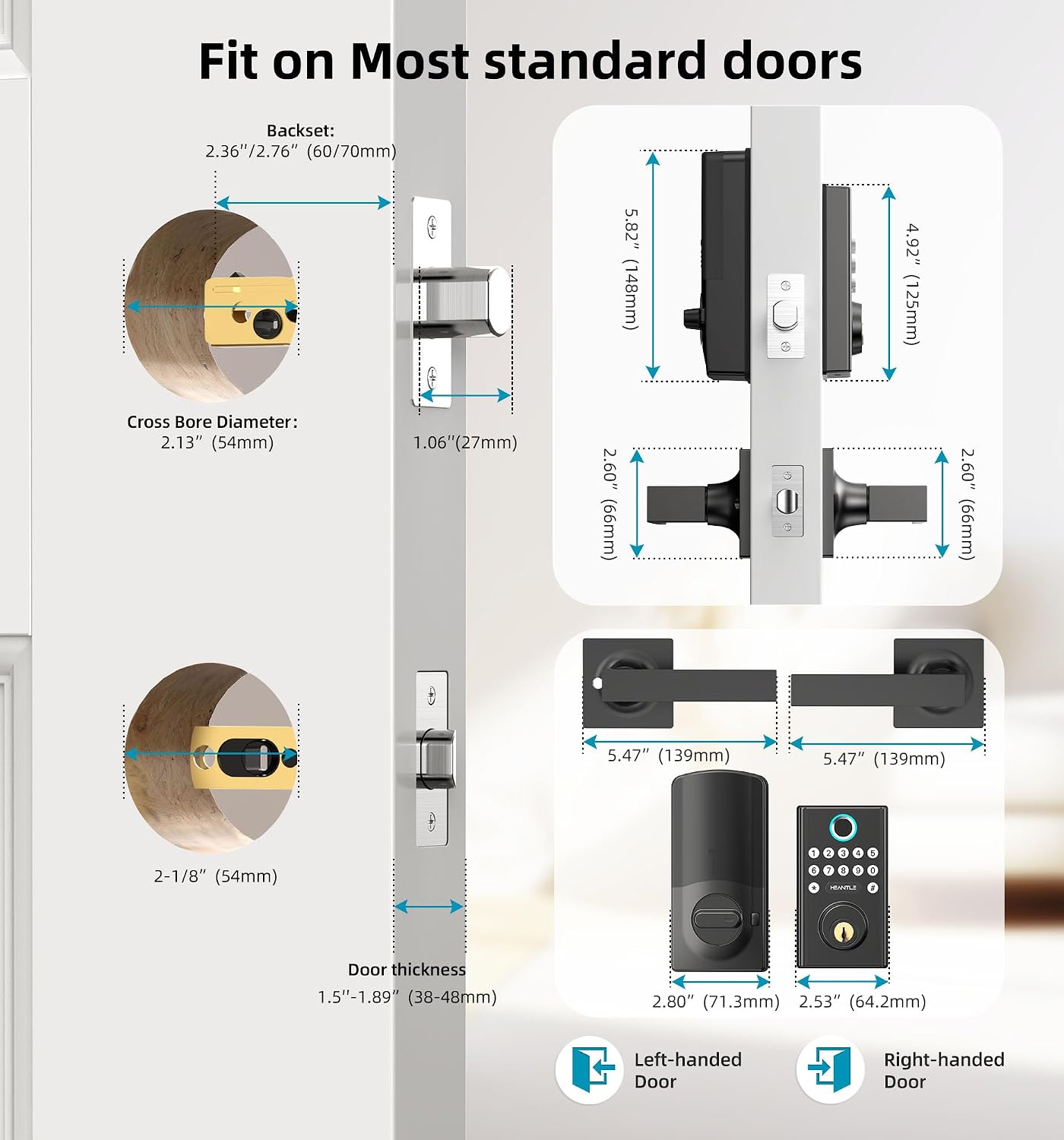
Image: Detailed diagram illustrating the necessary door measurements for installing the HEANTLE Smart Lock, ensuring proper fit and function.
2.2 సంస్థాపనా దశలు
Follow these steps for a successful installation. A Phillips screwdriver is the only tool required. Keep the door open during installation to avoid being locked out.
- Adjust the deadbolt length to 2-3/8" or 2-3/4" based on your door size. Ensure the word "UP" on the deadbolt faces upwards.
- Secure the retracted deadbolt with 2 screws.
- Place the spindle horizontally before inserting it. Keep the spindle horizontal and pass the cable under the deadbolt.
- Pass the spindle through the central hole and the cable through the right bottom hole. Secure the mounting plate with screws.
- Plug the cable into the port on the interior assembly.
- Install the 4 AA batteries and slide the battery cover on.
- Install the exterior handle, ensuring it is properly aligned and secured.
Video: Step-by-step guide on how to install the HEANTLE WiFi Door Lock, covering deadbolt adjustment, assembly, and handle installation.
2.3 Gateway and App Connection
To enable remote control and smart features, connect the included WiFi Gateway to your lock via the Smart Life app.
- Ensure your smartphone is connected to a 2.4GHz WiFi network (5G networks are not supported).
- మీ ఫోన్లో బ్లూటూత్ని ఆన్ చేయండి.
- Plug in the Gateway. Press and hold the reset button on the back until the blue indicator remains solid and the red indicator flashes slowly.
- Open the Smart Life APP, tap the "+" icon in the top right corner, then tap "Add" to discover devices.
- Choose your 2.4GHz WiFi network and enter its password.
- Wait for the Gateway to complete the connection. Once connected, the Gateway will appear in the "All devices" list.
- Tap "Gateway" and then "Add device" to pair it with your Smart Lock. The app will automatically search for your lock.
- Wait for the Gateway to complete the connection with the lock.
Video: Instructions on how to connect the HEANTLE Smart Lock to WiFi using the gateway and the Smart Life app, including resetting the gateway and pairing devices.
3. ఆపరేటింగ్ సూచనలు
3.1 అన్లాకింగ్ పద్ధతులు
- వేలిముద్ర: Place your registered fingerprint on the sensor for instant unlocking.
- Keypad Passcode: కీప్యాడ్లో మీ ప్రోగ్రామ్ చేయబడిన పాస్కోడ్ను నమోదు చేయండి.
- మొబైల్ యాప్: Use the Smart Life app to remotely unlock or lock the door.
- భౌతిక కీ: Use the provided physical keys as a traditional backup.

Image: Visual representation of the various ways to unlock the HEANTLE Smart Lock, including digital and traditional methods.
3.2 రిమోట్ కంట్రోల్ మరియు పర్యవేక్షణ
With the WiFi Gateway connected, you can manage your lock from anywhere:
- రిమోట్ అన్లాక్/లాక్: Control your door's status via the Smart Life app.
- రియల్ టైమ్ నోటిఫికేషన్లు: Receive alerts for wrong entries or other events.
- కార్యాచరణ లాగ్లు: Check real-time records of who entered and when.

Image: A user demonstrating remote unlocking of the HEANTLE Smart Lock via their smartphone, highlighting the convenience of WiFi control.
3.3 Access Code Management
The app allows for flexible management of access codes:
- One-time Codes: For single-use access.
- Time-limited Codes: Valid for a specific duration.
- Permanent Codes: For regular users.
- Scheduled Codes: For recurring access during specific times.

Image: The Smart Life app interface demonstrating the creation and sharing of temporary, one-time, and scheduled access codes for various users.
3.4 ఆటో-లాక్ మరియు వన్-టచ్ లాకింగ్
- తనంతట తానే తాళంవేసుకొను: The lock can be set to automatically lock after a period of 5 to 1800 seconds once the door is closed. This feature can be enabled/disabled via the app.
- వన్-టచ్ లాక్: From the outside, press the "#" key for 1 second to quickly lock the door.
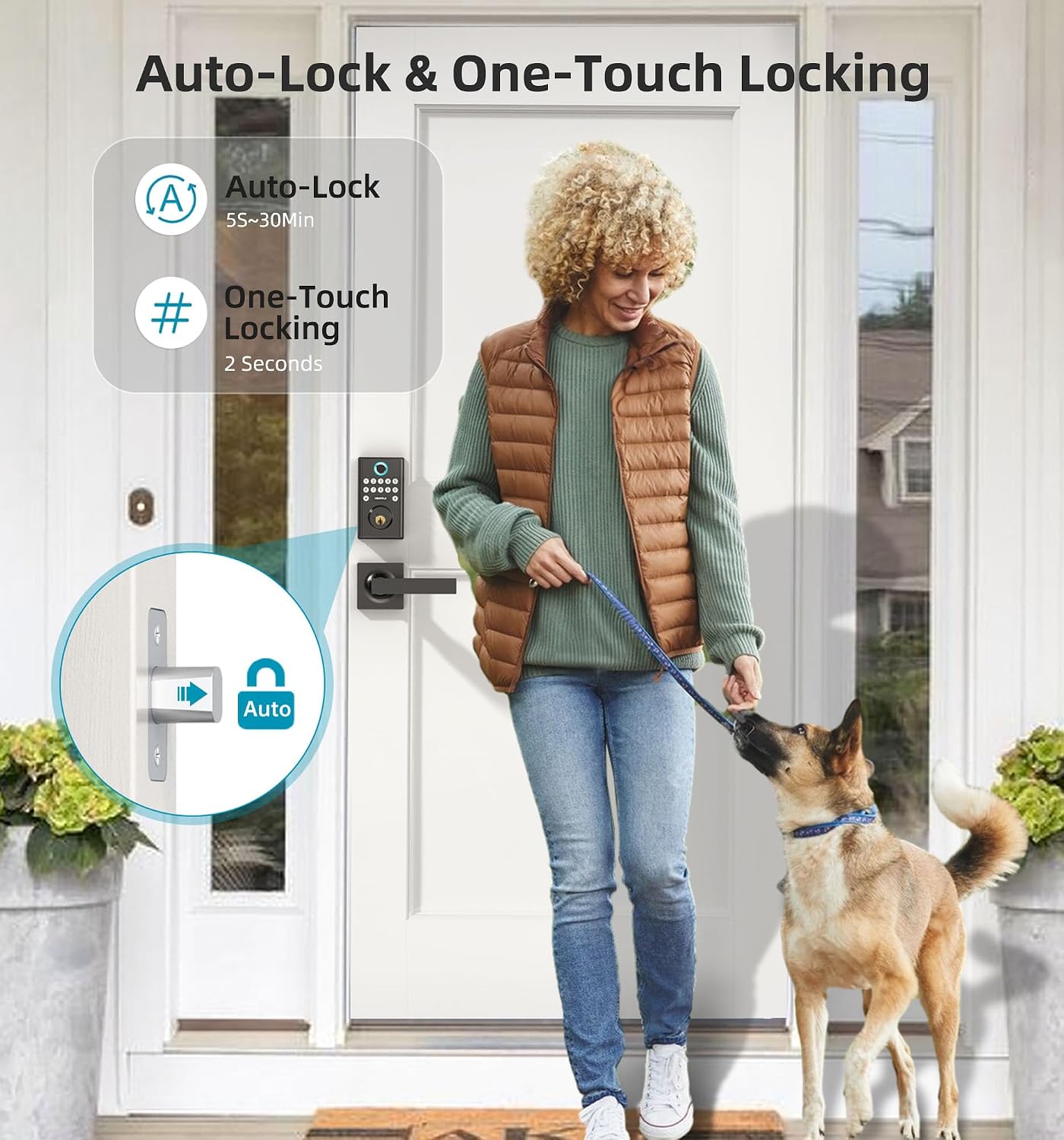
Image: A visual guide to the automatic locking feature, which secures the door after a user-defined delay, and the quick one-touch locking option.
3.5 వాయిస్ కంట్రోల్ ఇంటిగ్రేషన్
The HEANTLE Smart Lock is compatible with Amazon Alexa and Google Assistant, allowing for convenient voice commands to control your door.

Image: A person using voice commands with an Alexa device to unlock the HEANTLE Smart Lock, illustrating seamless integration with smart home ecosystems.
4. నిర్వహణ
4.1 బ్యాటరీ భర్తీ
The lock requires 4 AA batteries (not included). When the battery level is low, you will receive an alert via the app. To replace batteries:
- ఇంటీరియర్ అసెంబ్లీపై బ్యాటరీ కవర్ను తీసివేయండి.
- Replace all four AA batteries with new ones, ensuring correct polarity.
- బ్యాటరీ కవర్ను మళ్లీ అటాచ్ చేయండి.

Image: A smartphone displaying a low battery alert for the HEANTLE Smart Lock, prompting the user to replace batteries.
4.2 సాధారణ సంరక్షణ
మీ స్మార్ట్ లాక్ యొక్క దీర్ఘాయువు మరియు సరైన పనితీరును నిర్ధారించడానికి:
- Avoid using abrasive cleaners or solvents on the lock's surface.
- Regularly check for any loose screws or components and tighten them if necessary.
- Keep the fingerprint sensor clean and free from dirt or moisture.
5. ట్రబుల్షూటింగ్
If you encounter issues with your HEANTLE Smart Lock, consider the following common solutions:
- లాక్ స్పందించడం లేదు: Check battery levels and replace if necessary. Ensure the lock is within Bluetooth range for app control or that the WiFi Gateway is properly connected for remote access.
- వేలిముద్ర గుర్తించబడలేదు: మీ వేలు శుభ్రంగా మరియు పొడిగా ఉందని నిర్ధారించుకోండి. సమస్యలు కొనసాగితే మీ వేలిముద్రను తిరిగి నమోదు చేసుకోండి.
- పాస్కోడ్ పనిచేయడం లేదు: Verify the correct passcode is being entered. Check if the code is expired or time-limited via the app.
- Remote access issues: Confirm the WiFi Gateway is powered on and connected to a 2.4GHz WiFi network. Check your internet connection.
- ఆటో-లాక్ పనిచేయడం లేదు: Verify the auto-lock feature is enabled and the timer is set correctly in the app.
For further assistance, refer to the contact information in the Warranty and Support section.
6. స్పెసిఫికేషన్లు
| ఫీచర్ | వివరాలు |
|---|---|
| బ్రాండ్ | హేంటల్ |
| మోడల్ పేరు | WiFi Smart deadbolt Handle Set (M2-BBFLST-HNT) |
| లాక్ రకం | App Remote Control, Biometric, Deadbolt, Keypad |
| ప్రత్యేక లక్షణాలు | Auto-Lock, Fingerprint, One-Touch Lock, WiFi Deadbolt, Keyless Entry, Work with Alexa/Google Home, App Remote Control, Real-time Notification |
| మెటీరియల్ | మెటల్ |
| ముగింపు రకం | పౌడర్ కోటెడ్ |
| అంశం కొలతలు (L x W x H) | 15.5 x 6.5 x 4.7 అంగుళాలు |
| వస్తువు బరువు | 3.56 పౌండ్లు |
| శక్తి మూలం | 4 AA బ్యాటరీలు (చేర్చబడలేదు) |
| కనెక్టివిటీ ప్రోటోకాల్ | బ్లూటూత్, Wi-Fi (2.4GHz మాత్రమే) |
| కంట్రోలర్ రకం | Amazon Alexa, Android & iOS Smartphone, Google Assistant, Hand Control, Push Button |
| చేర్చబడిన భాగాలు | 2 keys, A 2.4G WIFI Gateway, Installation Instruction, Lever Handle Set, WiFi Smart Lock with Keypad |
7. వారంటీ మరియు మద్దతు
HEANTLE provides comprehensive support for your smart lock:
- వారంటీ: కొనుగోలు చేసిన తేదీ నుండి 1 సంవత్సరం కవరేజ్.
- Returns/Replacement: 30 days replacement policy.
- సాంకేతిక మద్దతు: Life-time free technical support available via Online Email.
For any questions or assistance, please contact HEANTLE customer service:
- టోల్ ఫ్రీ: 1-888-223-6660
- ఇమెయిల్: heantle@hotmail.com
Responses are typically provided within 24 hours.