
1. ఉత్పత్తి ముగిసిందిview
The Retrospiler LP-602 is a versatile 3-speed record player designed to bring the classic vinyl experience into the modern era. It features built-in stereo speakers for immediate playback and a range of connectivity options including Bluetooth for wireless streaming, FM radio, USB, and SD card playback. The unit also supports vinyl-to-MP3 encoding, allowing for digital preservation of your record collection. Its retro wooden design complements various home decors.
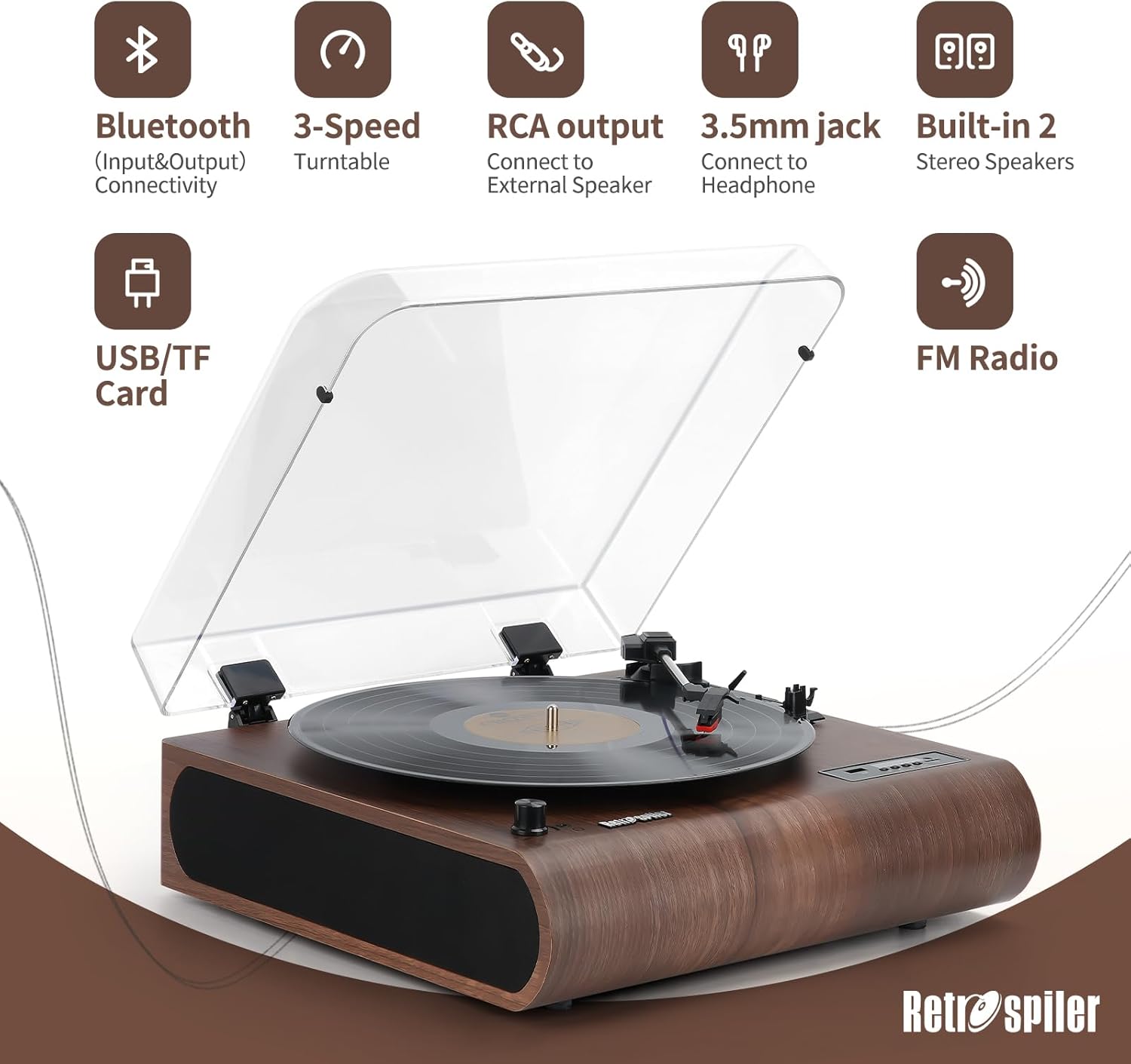
చిత్రం 1.1: ముగిసిందిview of the Retrospiler LP-602 Record Player, showcasing its key features including Bluetooth, 3-speed turntable, RCA output, 3.5mm jack, built-in speakers, USB/TF card slot, and FM Radio.
ముఖ్య లక్షణాలు:
- 3-స్పీడ్ టర్న్ టేబుల్: 33 1/3, 45, మరియు 78 RPM రికార్డులకు మద్దతు ఇస్తుంది.
- బ్లూటూత్ కనెక్టివిటీ: Both input and output for seamless music streaming from devices or to external Bluetooth speakers.
- అంతర్నిర్మిత స్టీరియో స్పీకర్లు: Dual speakers for direct audio playback.
- FM రేడియో: Integrated FM tuner for radio listening.
- Vinyl-MP3 Encoding: Digitize your vinyl records directly to USB drives or TF cards.
- USB & SD Playback: డిజిటల్ ఆడియోను ప్లే చేయండి files from USB flash drives and TF (Micro SD) cards.
- LED స్క్రీన్: Provides clear display for mode selection and track information.
- Aux-in & Headphone Jack: Additional wired connectivity options.
- RCA అవుట్పుట్: బాహ్యానికి కనెక్ట్ చేయండి ampలైఫ్లు లేదా పవర్డ్ స్పీకర్లు.
- దుమ్ము కవర్: Protects the turntable from dust and debris.
2. పెట్టెలో ఏముంది
Upon unboxing your Retrospiler LP-602 Record Player, please ensure all the following components are present:
- Retrospiler LP-602 Turntable Unit
- పవర్ అడాప్టర్
- 45 RPM అడాప్టర్
- సూచనల మాన్యువల్ (ఈ పత్రం)
3. Product Controls and Components
Familiarize yourself with the various controls and components of your record player for optimal use.
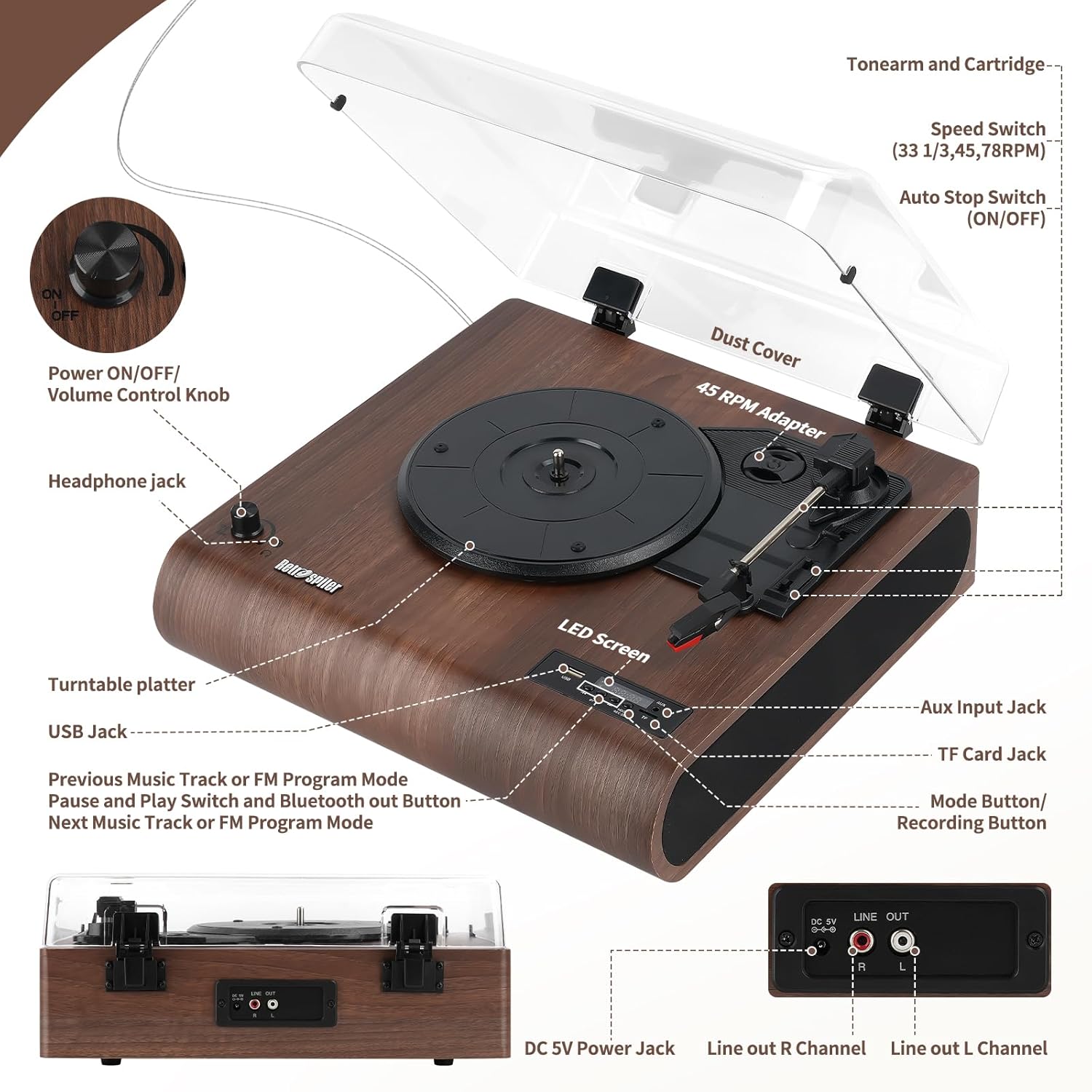
Image 3.1: Detailed diagram illustrating the location and function of all controls and ports on the Retrospiler LP-602 record player.
- Power ON/OFF/Volume Control Knob: Turn clockwise to power on and increase volume; turn counter-clockwise to decrease volume and power off.
- హెడ్ఫోన్ జాక్: ప్రైవేట్ లిజనింగ్ కోసం హెడ్ఫోన్లను కనెక్ట్ చేయండి.
- టర్న్ టేబుల్ ప్లేటర్: మీ వినైల్ రికార్డులను ఇక్కడ ఉంచండి.
- USB జాక్: Insert a USB flash drive for MP3 playback or recording.
- Previous Music Track or FM Program Mode Button: Navigate tracks or FM presets.
- Pause and Play Switch and Bluetooth Out Button: Controls playback and initiates Bluetooth output pairing.
- Next Music Track or FM Program Mode Button: Navigate tracks or FM presets.
- LED స్క్రీన్: Displays current mode, track number, or FM frequency.
- Aux Input Jack: 3.5mm కేబుల్ ద్వారా బాహ్య ఆడియో పరికరాలను కనెక్ట్ చేయండి.
- TF కార్డ్ జాక్: Insert a TF (Micro SD) card for MP3 playback or recording.
- Mode Button/Recording Button: Switches between modes (Phono, Bluetooth, FM, USB, TF, Aux) and initiates recording.
- దుమ్ము కవర్: Protects the turntable when not in use.
- Tone Arm and Cartridge: రికార్డులు ప్లే చేయడానికి స్టైలస్ను పట్టుకుంటుంది.
- Speed Switch (33 1/3, 45, 78 RPM): Select the appropriate playback speed for your record.
- Auto Stop Switch (ON/OFF): రికార్డ్ చివరిలో ప్లాటర్ యొక్క ఆటోమేటిక్ స్టాపింగ్ను ప్రారంభిస్తుంది లేదా నిలిపివేస్తుంది.
- 45 RPM అడాప్టర్: Used for playing 7-inch records with a large center hole.
- DC 5V పవర్ జాక్: అందించిన పవర్ అడాప్టర్ను కనెక్ట్ చేయండి.
- Line Out R Channel (RCA): కుడి ఛానెల్ ఆడియో అవుట్పుట్.
- Line Out L Channel (RCA): ఎడమ ఛానెల్ ఆడియో అవుట్పుట్.
4. సెటప్ సూచనలు
- అన్ప్యాకింగ్: Carefully remove the record player from its packaging. Remove any protective films or ties from the unit, especially from the dust cover and tone arm.
- ప్లేస్మెంట్: Place the record player on a stable, level surface away from direct sunlight, heat sources, and excessive dust.
- పవర్ కనెక్షన్: Connect the provided power adapter to the DC 5V Power Jack on the back of the unit, then plug the adapter into a wall outlet.
- ప్రారంభ పవర్ ఆన్: Turn the Power ON/OFF/Volume Control Knob clockwise to power on the unit. The LED screen will light up.
- Tone Arm Preparation: Gently unlock the tone arm clip. Remove the stylus protector from the needle.
5. ఆపరేటింగ్ సూచనలు
5.1. వినైల్ రికార్డ్లను ప్లే చేయడం
- పవర్ ఆన్: Turn the Power ON/OFF/Volume Control Knob clockwise to power on the unit.
- ఫోనో మోడ్ను ఎంచుకోండి: Press the Mode button until "PHON" appears on the LED screen.
- స్థల రికార్డు: Place a vinyl record on the turntable platter. If playing a 7-inch record with a large center hole, use the 45 RPM adapter.
- వేగాన్ని ఎంచుకోండి: Set the Speed Switch to the correct RPM (33 1/3, 45, or 78) for your record.
- ఆటో స్టాప్: Set the Auto Stop Switch to ON if you want the platter to stop automatically at the end of the record. Set to OFF for continuous play or if your record has a non-standard run-out groove.
- ప్లేబ్యాక్ ప్రారంభించండి: Gently lift the tone arm using the cue lever. Position the tone arm over the desired starting point of the record. Slowly lower the tone arm onto the record using the cue lever. The platter will begin to spin, and music will play through the built-in speakers or connected audio output.
- వాల్యూమ్ సర్దుబాటు: Use the Power ON/OFF/Volume Control Knob to adjust the listening volume.
- ప్లేబ్యాక్ ముగింపు: At the end of the record (if Auto Stop is ON), the platter will stop. If Auto Stop is OFF, manually lift the tone arm using the cue lever and return it to the tone arm rest. Secure the tone arm with the clip.
Video 5.1: Demonstration of unboxing and basic operation of the Retrospiler record player, including placing a record and starting playback.
5.2. Bluetooth Operation (Input)
Stream music wirelessly from your smartphone, tablet, or other Bluetooth-enabled devices to the record player's built-in speakers.
- పవర్ ఆన్: Turn the Power ON/OFF/Volume Control Knob clockwise to power on the unit.
- Select Bluetooth Input Mode: Press the Mode button until "BT IN" appears on the LED screen. The unit will enter pairing mode, indicated by a flashing Bluetooth icon.
- జత పరికరం: On your external Bluetooth device, enable Bluetooth and search for "Retrospiler" in the list of available devices. Select it to pair.
- సంగీతాన్ని ప్లే చేయండి: Once paired, you can play music from your device, and it will sound through the record player's speakers.

Image 5.2: The Retrospiler LP-602 record player demonstrating wireless music streaming from a smartphone.
5.3. Bluetooth Operation (Output)
Stream audio from the record player (e.g., vinyl playback) to external Bluetooth headphones or speakers.
- పవర్ ఆన్: Turn the Power ON/OFF/Volume Control Knob clockwise to power on the unit.
- మూలాన్ని ఎంచుకోండి: Choose your desired audio source (e.g., Phono, USB, TF, Aux).
- Activate Bluetooth Output: Press and hold the Pause and Play Switch and Bluetooth Out Button for a few seconds until "BT OUT" appears on the LED screen and the Bluetooth icon flashes.
- Pair External Device: Put your external Bluetooth headphones or speaker into pairing mode. The record player will automatically search and connect to the nearest available Bluetooth device.
- కనెక్షన్ని నిర్ధారించండి: Once connected, the Bluetooth icon on the LED screen will stop flashing. Audio from the record player will now be routed to your external Bluetooth device.

Image 5.3: The Retrospiler LP-602 record player illustrating its Bluetooth output capability, connecting to various external audio devices like headphones, speakers, and soundbars.
5.4. FM రేడియో ఆపరేషన్
- పవర్ ఆన్: Turn the Power ON/OFF/Volume Control Knob clockwise to power on the unit.
- FM మోడ్ను ఎంచుకోండి: Press the Mode button until "FM" appears on the LED screen.
- ఆటో స్కాన్: Press and hold the Play/Pause button to initiate an automatic scan for FM stations. The unit will scan and save available stations.
- ట్యూన్ స్టేషన్లు: Use the Previous/Next Track buttons to navigate through the saved FM stations.
5.5. USB/TF కార్డ్ ప్లేబ్యాక్
- పవర్ ఆన్: Turn the Power ON/OFF/Volume Control Knob clockwise to power on the unit.
- మీడియాను చొప్పించు: USB పోర్ట్లోకి USB ఫ్లాష్ డ్రైవ్ను లేదా TF కార్డ్ స్లాట్లోకి TF (మైక్రో SD) కార్డ్ను చొప్పించండి.
- మోడ్ని ఎంచుకోండి: Press the Mode button until "USB" or "TF" appears on the LED screen. The unit will automatically begin playing MP3 fileచొప్పించిన మీడియా నుండి.
- ప్లేబ్యాక్ని నియంత్రించండి: Use the Previous/Next Track buttons to skip tracks and the Play/Pause button to pause or resume playback.
5.6. Vinyl-to-MP3 Encoding
Digitize your vinyl records directly to a USB flash drive or TF card.
- మీడియాను సిద్ధం చేయండి: Insert a USB flash drive or TF card into the corresponding slot. Ensure it has sufficient free space.
- ఫోనో మోడ్ను ఎంచుకోండి: Press the Mode button until "PHON" appears on the LED screen.
- Start Record Playback: Begin playing your vinyl record as described in section 5.1.
- రికార్డింగ్ ప్రారంభించండి: Press the Mode/Record button. "REC" will appear on the LED screen, indicating that recording has started.
- రికార్డింగ్ ఆపివేయి: Press the Mode/Record button again to stop recording. The recorded audio file will be saved to your USB drive or TF card.
6. నిర్వహణ
- యూనిట్ శుభ్రపరచడం: రికార్డ్ ప్లేయర్ బయటి భాగాన్ని మృదువైన, పొడి గుడ్డతో తుడవండి. రాపిడి క్లీనర్లు లేదా ద్రావకాలను ఉపయోగించవద్దు.
- దుమ్ము కవర్: Keep the dust cover closed when the unit is not in use to prevent dust accumulation on the platter and stylus.
- స్టైలస్ కేర్: Handle the stylus (needle) with extreme care. Avoid touching it with your fingers. Use a soft brush designed for stylus cleaning to gently remove dust from the tip, brushing from back to front. Replace the stylus if you notice a decrease in sound quality or visible damage.
- రికార్డ్ కేర్: మీ రికార్డులను శుభ్రంగా మరియు దుమ్ము లేకుండా ఉంచండి. వార్పింగ్ను నివారించడానికి వాటిని వాటి చేతుల్లో నిలువుగా నిల్వ చేయండి.
7. ట్రబుల్షూటింగ్
| సమస్య | సాధ్యమైన కారణం | పరిష్కారం |
|---|---|---|
| శక్తి లేదు | Power adapter not connected; Power knob off. | Ensure power adapter is securely connected and plugged into a working outlet. Turn the Power ON/OFF/Volume Control Knob clockwise to power on. |
| ధ్వని లేదా తక్కువ వాల్యూమ్ లేదు | Volume too low; Incorrect mode selected; Stylus protector still on; External speakers not connected/powered. | Increase volume. Ensure correct mode (e.g., PHON for vinyl) is selected. Remove stylus protector. Check connections and power for external speakers if used. |
| Record skips or sound distortion | Dirty or damaged record; Dirty or worn stylus; Unit not on a stable surface. | Clean record. Clean or replace stylus. Place unit on a stable, level surface. |
| బ్లూటూత్ జత చేయడంలో సమస్యలు | Incorrect Bluetooth mode; Device too far; External device not in pairing mode. | Ensure "BT IN" or "BT OUT" mode is selected. Keep devices within range (approx. 10 meters). Put external device in pairing mode. |
| Vinyl-to-MP3 recording not working | USB/TF card full or not inserted correctly; Recording not initiated. | Ensure USB/TF card is inserted correctly and has free space. Press the Mode/Record button to start recording (LED shows "REC"). |
8. స్పెసిఫికేషన్లు
- బ్రాండ్: Retrospiler
- మోడల్ పేరు: రికార్డ్ ప్లేయర్
- అంశం మోడల్ సంఖ్య: LP-602
- ప్యాకేజీ కొలతలు: 17.13 x 16.22 x 8.35 అంగుళాలు
- వస్తువు బరువు: 9.26 పౌండ్లు
- మెటీరియల్: చెక్క
- రంగు: వాల్నట్
- గరిష్ట భ్రమణ వేగం: 78 RPM (33 1/3, 45, 78 RPM కి మద్దతు ఇస్తుంది)
- మోటార్ రకం: AC మోటార్
- ప్రత్యేక లక్షణాలు: Adjustable Speed, Built-In Speaker, Built-In Bluetooth Receiver (Input & Output), Dust Cover, RCA Output
- అనుకూల పరికరాలు: Headphone, Smartphone, Speaker, Tablet
9. వారంటీ మరియు మద్దతు
For warranty information, technical support, or service inquiries, please refer to the contact details provided with your purchase documentation or visit the official Retrospiler webవారంటీ క్లెయిమ్ల కోసం కొనుగోలు రుజువుగా మీ కొనుగోలు రసీదును ఉంచండి.