
IPRO IPRO P1
IPRO P1 GSM 2G Mobile Phone User Manual
Model: IPRO P1
పరిచయం
This manual provides comprehensive instructions for the IPRO P1 GSM 2G Mobile Phone. Designed for ease of use, particularly for seniors, this phone features large buttons, a clear display, and essential functions. Please read this manual carefully before using your device to ensure proper operation and maintenance.
పెట్టెలో ఏముంది
అన్బాక్సింగ్ తర్వాత, దయచేసి కింది అంశాలన్నీ చేర్చబడ్డాయని ధృవీకరించండి:
- 1 x IPRO P1 Mobile Phone
- 1 x Micro-USB Charger
- 1 x బ్యాటరీ
- 1 x వినియోగదారు మాన్యువల్
సెటప్
1. సిమ్ కార్డ్ మరియు బ్యాటరీని చొప్పించడం
- ఫోన్ వెనుక కవర్ను జాగ్రత్తగా తొలగించండి.
- Insert your 2G GSM SIM card(s) into the designated SIM card slot(s). This phone supports Dual SIM.
- Insert the battery into the battery compartment, ensuring the gold contacts align with the phone's terminals.
- వెనుక కవర్ సురక్షితంగా స్థానంలో క్లిక్ అయ్యే వరకు దాన్ని మార్చండి.
2 బ్యాటరీని ఛార్జ్ చేస్తోంది
మొదటిసారి ఉపయోగించే ముందు, ఫోన్ బ్యాటరీని పూర్తిగా ఛార్జ్ చేయండి.
- Connect the Micro-USB charger cable to the charging port on the phone.
- పవర్ అవుట్లెట్లో ఛార్జర్ను ప్లగ్ చేయండి.
- The charging indicator on the phone will show the charging status. Once fully charged, disconnect the charger.

మూర్తి 1: ముందు మరియు వెనుక view of the IPRO P1 mobile phone, showcasing its compact design and textured back cover.
ఆపరేటింగ్ సూచనలు
1. పవర్ ఆన్/ఆఫ్
- To power on: Press and hold the Power/End Call button (usually red) until the screen lights up.
- To power off: Press and hold the Power/End Call button until the power off options appear, then select "Power off".
2. కాల్స్ చేయడం
- కీప్యాడ్ ఉపయోగించి ఫోన్ నంబర్ను నమోదు చేయండి.
- కాల్ ప్రారంభించడానికి కాల్ బటన్ (సాధారణంగా ఆకుపచ్చ) నొక్కండి.
- కాల్ ముగించడానికి, పవర్/ఎండ్ కాల్ బటన్ను నొక్కండి.
3. SMS సందేశాలను పంపడం
- Navigate to the "Messages" menu from the main screen.
- Select "Write message" or "New SMS".
- కీప్యాడ్ ఉపయోగించి మీ సందేశాన్ని నమోదు చేయండి.
- గ్రహీత ఫోన్ నంబర్ను నమోదు చేయండి లేదా పరిచయాల నుండి ఎంచుకోండి.
- "పంపు" ఎంచుకోండి.
4. Using Key Features

మూర్తి 2: The IPRO P1 phone with visual representations of its core functionalities, including communication, settings, multimedia, and utility features.
- FM రేడియో: Plug in headphones (not included) to use as an antenna, then navigate to the FM Radio application.
- కెమెరా: Access the camera application from the menu to take photos. The phone has a basic camera.
- బ్లూటూత్: Enable Bluetooth in the settings menu to connect to compatible devices like headsets.
- ఫ్లాష్లైట్: The phone features a powerful LED flashlight. It can usually be activated by a dedicated button or a long press of a specific key (refer to quick guide or on-screen prompts).
- అలారం గడియారం: Set alarms through the "Clock" or "Alarm" application.
- Calendar & Calculator: Basic utility applications are available in the menu.

మూర్తి 3: The IPRO P1 phone demonstrating its powerful LED flashlight feature, illuminating a dark path.
నిర్వహణ
- శుభ్రపరచడం: Use a soft, dry cloth to clean the phone's surface. Avoid liquid cleaners or abrasive materials.
- బ్యాటరీ సంరక్షణ: బ్యాటరీని తీవ్రమైన ఉష్ణోగ్రతలకు గురిచేయవద్దు. ఫోన్ను ఎక్కువసేపు ఉపయోగించకపోతే, బ్యాటరీ ఆరోగ్యాన్ని కాపాడుకోవడానికి దానిని క్రమానుగతంగా ఛార్జ్ చేయండి.
- నిల్వ: ఫోన్ను ప్రత్యక్ష సూర్యకాంతి మరియు తేమకు దూరంగా చల్లని, పొడి ప్రదేశంలో నిల్వ చేయండి.
- చుక్కలను నివారించండి: While durable, avoid dropping the phone to prevent damage to internal components or the screen.
ట్రబుల్షూటింగ్
| సమస్య | సాధ్యమైన కారణం | పరిష్కారం |
|---|---|---|
| ఫోన్ ఆన్ అవ్వడం లేదు | బ్యాటరీ తక్కువగా ఉంది లేదా సరిగ్గా చొప్పించబడలేదు. | బ్యాటరీని ఛార్జ్ చేయండి. బ్యాటరీ సరిగ్గా చొప్పించబడిందని నిర్ధారించుకోండి. |
| కాల్స్ చేయలేరు లేదా స్వీకరించలేరు | No SIM card, SIM card not active, or out of network coverage. | Ensure SIM card is inserted and active. Check network signal strength. Contact your service provider. |
| పేలవమైన కాల్ నాణ్యత | బలహీనమైన నెట్వర్క్ సిగ్నల్ లేదా అంతరాయం. | Move to an area with better signal. Avoid using near other electronic devices. |
| బ్యాటరీ త్వరగా అయిపోతుంది | Frequent use, background applications, or old battery. | స్క్రీన్ ప్రకాశాన్ని తగ్గించండి. ఉపయోగించని అప్లికేషన్లను మూసివేయండి. బ్యాటరీ పాతదైతే దాన్ని మార్చడాన్ని పరిగణించండి. |
| స్క్రీన్ స్పందించడం లేదు | సాఫ్ట్వేర్ లోపం. | Remove and reinsert the battery to restart the phone. |
స్పెసిఫికేషన్లు
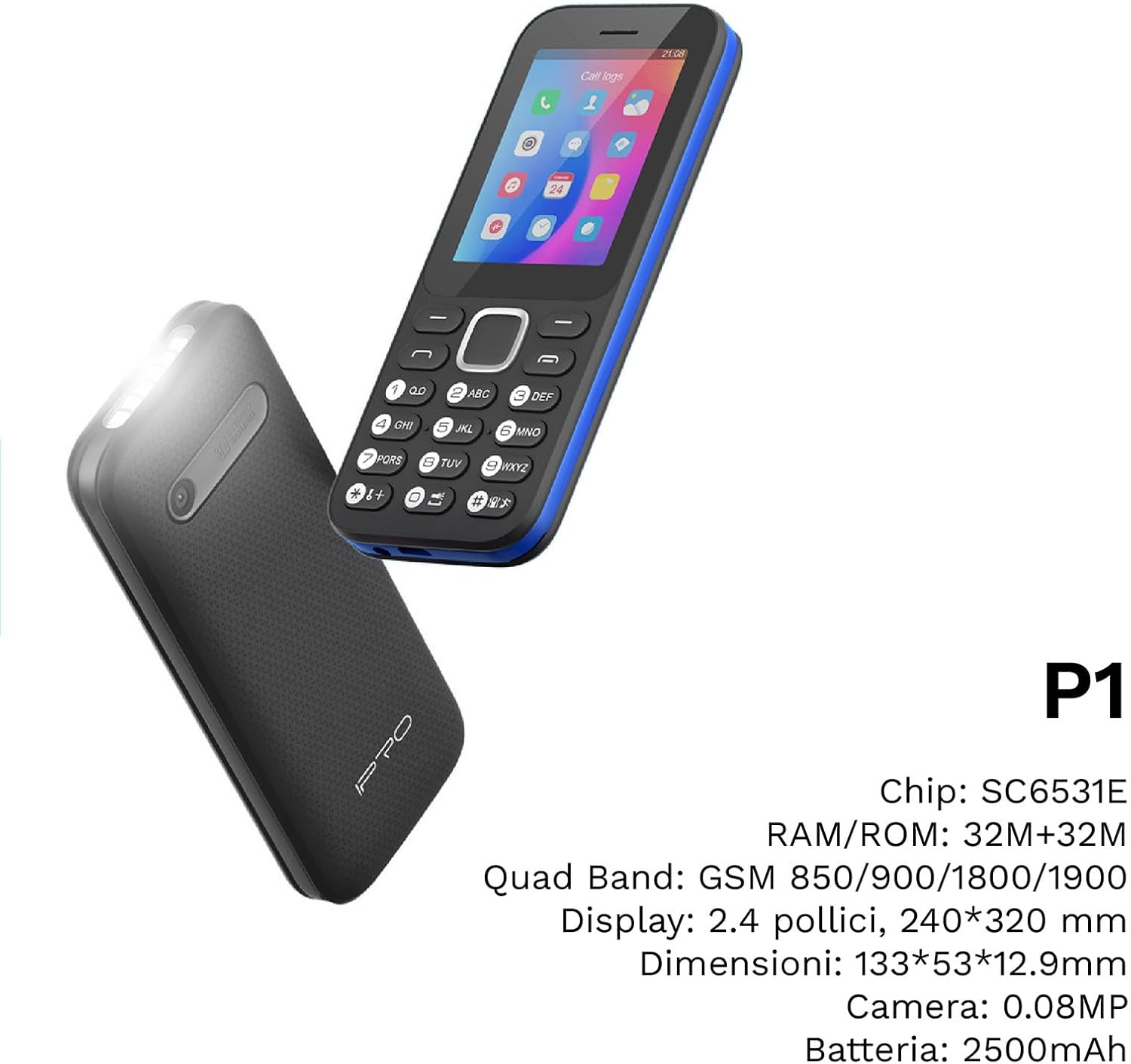
మూర్తి 4: కోణీయ view of the IPRO P1 phone, accompanied by a summary of its technical specifications.
- నెట్వర్క్: 2G GSM Quad Band (850/900/1800/1900 MHz)
- చిప్సెట్: SC6531E
- ప్రదర్శన: 2.4-inch Color Display (240 x 320 resolution)
- RAM: 4 MB
- ROM: 4 MB
- విస్తరించదగిన మెమరీ: Supports up to 16 GB (MicroSD card not included)
- SIM: డ్యూయల్ సిమ్ సపోర్ట్
- కనెక్టివిటీ: బ్లూటూత్
- ఫీచర్లు: Camera, FM Radio, MP3, MP4, Alarm Clock, Calendar, Calculator, Integrated Games, LED Flashlight
- బ్యాటరీ: 2500 mAh లిథియం-అయాన్
- భాషలు: Spanish, English, French, Italian, Portuguese
- రంగు: నలుపు
- ఉత్పత్తి కొలతలు: 133 x 53 x 12.9 మిమీ
- బరువు: సుమారు 200 గ్రాములు

మూర్తి 5: A close-up of the IPRO P1's screen, illustrating its 2.4-inch display size for clear viewing.
వారంటీ మరియు మద్దతు
IPRO offers technical service and customer support for two years from the date of purchase. This warranty covers manufacturing defects but does not include artificial damage.
For support, please contact IPRO customer service through the details provided on the product packaging or the official IPRO website. When contacting support, please have your product model number (IPRO P1) and purchase details ready.

మూర్తి 6: A visual representation of the IPRO P1 phone's target audience, showing various seniors comfortably interacting with mobile devices, highlighting its user-friendly design.

మూర్తి 7: Display of the IPRO P1 phone in two color variants: classic black and a version with a distinctive blue trim.
Ask a question about this manual
Ask about setup, troubleshooting, compatibility, parts, safety, or missing instructions. Manuals+ will review the question and use this page’s manual context to help answer it.