
HEANTLE Keyless Entry Fingerprint Keypad Deadbolt
HEANTLE Keyless Entry Fingerprint Keypad Deadbolt Door Lock Instruction Manual
Model: Keyless Entry Fingerprint Keypad Deadbolt
పరిచయం
This instruction manual provides detailed guidance for the installation, setup, operation, and maintenance of your HEANTLE Keyless Entry Fingerprint Keypad Deadbolt Door Lock. Please read this manual thoroughly before installation and use to ensure proper function and security.
ఉత్పత్తి ముగిసిందిview
The HEANTLE Keyless Entry Fingerprint Keypad Deadbolt offers secure and convenient access to your home. It features multiple unlocking methods including fingerprint, keypad code, and physical key. The robust design is made from high-grade alloy, ensuring durability and security.
ముఖ్య లక్షణాలు:
- వేలిముద్ర గుర్తింపు: Fast 0.3-second biometric identification with a 99.99% recognition rate, supporting up to 50 unique fingerprints.
- కీప్యాడ్ ఎంట్రీ: Backlit keypad for visibility in low light, supporting up to 100 user codes.
- ఆటో-లాక్ ఫంక్షన్: Automatically locks the door after a set time (5 to 60 seconds) for enhanced security.
- వన్-టచ్ లాకింగ్: Secure your door instantly by pressing the '#' key.
- Anti-Peep Code: Enter random digits before or after your actual code to prevent unauthorized viewing.
- Physical Key Access: Traditional key override for emergency situations.
- వాతావరణ నిరోధకత: IP63 దుమ్ము మరియు నీటి స్ప్లాష్ల నుండి రక్షణ కోసం రేట్ చేయబడింది.
- బహుముఖ సంస్థాపన: Compatible with both left and right-handed doors.
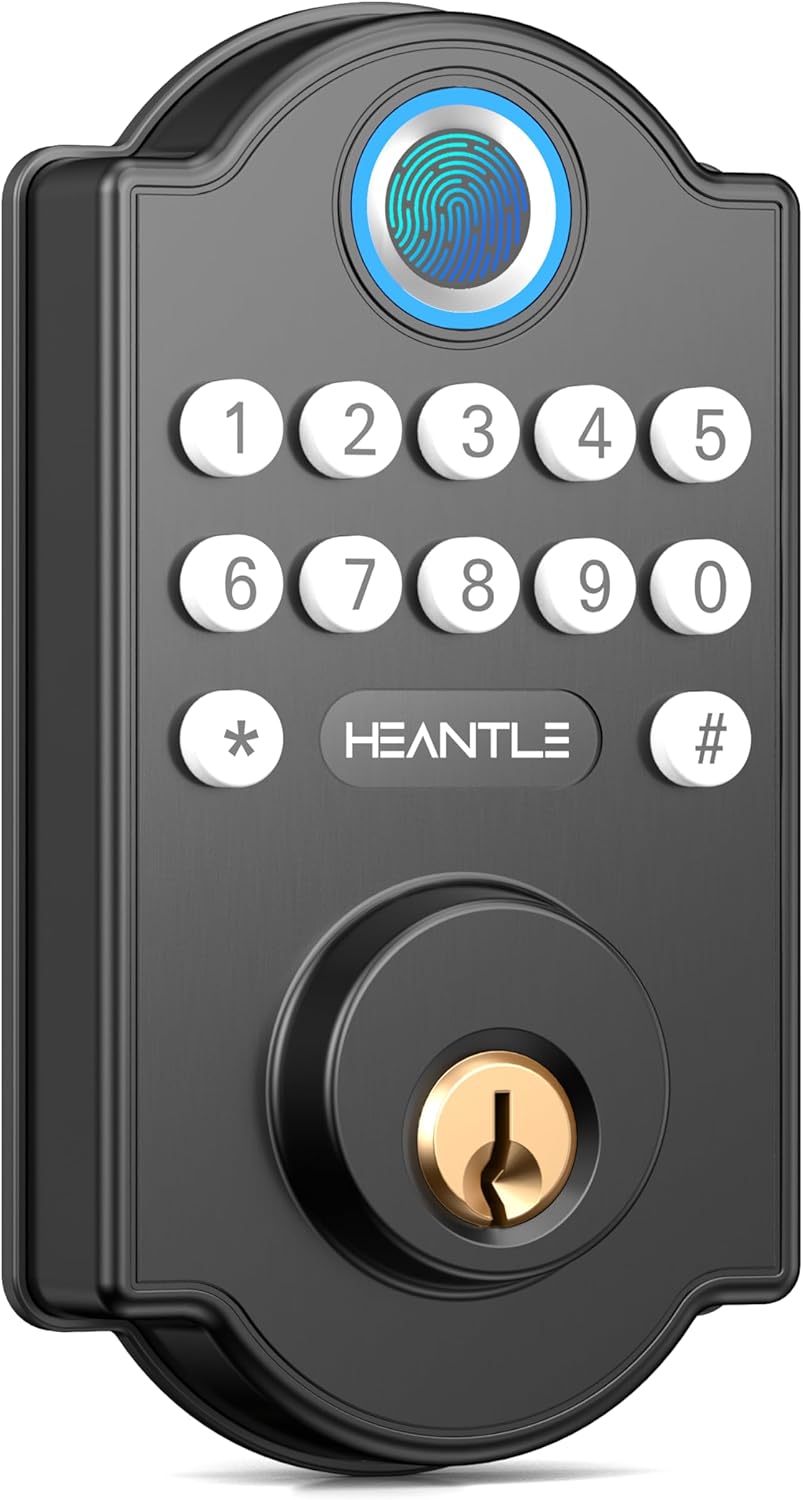
చిత్రం: ముందు భాగం view of the HEANTLE Keyless Entry Fingerprint Keypad Deadbolt Door Lock, showcasing the fingerprint sensor, keypad, and keyhole.

Image: Diagram highlighting key features such as fingerprint unlock, no app required, one-touch locking, physical key, and IP63 waterproof rating.
ఇన్స్టాలేషన్ గైడ్
The HEANTLE Keyless Entry Fingerprint Keypad Deadbolt is designed for straightforward installation, typically requiring only a Phillips screwdriver. Ensure your door meets the specified dimensions for proper fit.
ప్రీ-ఇన్స్టాలేషన్ తనిఖీలు:
- Verify door thickness and backset dimensions (refer to specifications section).
- ప్యాకేజీలో అన్ని భాగాలు ఉన్నాయని నిర్ధారించండి.
- Prepare a Phillips head screwdriver.
దశల వారీ సంస్థాపన:
- తలుపును సిద్ధం చేయండి: If replacing an existing deadbolt, remove it. Ensure the door bore hole and edge bore hole are clean and clear.
- గొళ్ళెం ఇన్స్టాల్ చేయండి: Insert the latch into the door edge. Ensure the "UP" arrow on the latch is pointing upwards. Secure with screws.
- బాహ్య అసెంబ్లీని ఇన్స్టాల్ చేయండి: Feed the cable and spindle through the bore hole. Align the exterior keypad assembly with the latch and secure it to the door.
- ఇంటీరియర్ మౌంటింగ్ ప్లేట్ను ఇన్స్టాల్ చేయండి: Route the cable through the mounting plate. Secure the mounting plate to the exterior assembly using screws.
- Connect the Cable and Install Interior Assembly: Connect the cable from the exterior assembly to the interior assembly. Ensure the thumb turn is in the vertical position. Attach the interior assembly to the mounting plate and secure with screws.
- బ్యాటరీలను వ్యవస్థాపించండి: Insert 4 AA batteries (not included) into the battery compartment of the interior assembly.
- Perform Door Handing Identification: After battery installation, the lock will automatically detect the door's handing (left or right). If it doesn't, manually set it using the 'L' and 'R' buttons as per the lock's internal instructions.
- పరీక్ష ఆపరేషన్: Test the lock with the physical key and by entering a default code (if applicable) to ensure smooth operation.

Image: A person installing the HEANTLE deadbolt, demonstrating the ease of installation with basic tools.

Image: Detailed diagram illustrating door thickness, backset, and cross bore diameter requirements, along with left and right-handed door compatibility.
ఆపరేషన్ సూచనలు
Adding a Master Code:
The first code you set should be the Master Code. This code is used to access programming functions.
- నొక్కండి కార్యక్రమం button (usually located on the interior assembly).
- Enter your desired 4-8 digit Master Code.
- నొక్కండి తాళం వేయండి button or '#' to confirm.
Adding User Codes:
మీరు కుటుంబ సభ్యులు లేదా అతిథుల కోసం 100 వరకు యూజర్ కోడ్లను జోడించవచ్చు.
- నొక్కండి కార్యక్రమం బటన్.
- Enter the Master Code, then press '#'.
- Select the option to add a user code (refer to your lock's specific menu prompts).
- Enter the desired 4-8 digit User Code.
- Press '#' to confirm.
వేలిముద్రలను కలుపుతోంది:
The lock supports up to 50 unique fingerprints.
- నొక్కండి కార్యక్రమం బటన్.
- Enter the Master Code, then press '#'.
- Select the option to add a fingerprint.
- Place your finger on the sensor multiple times as prompted until successfully registered.
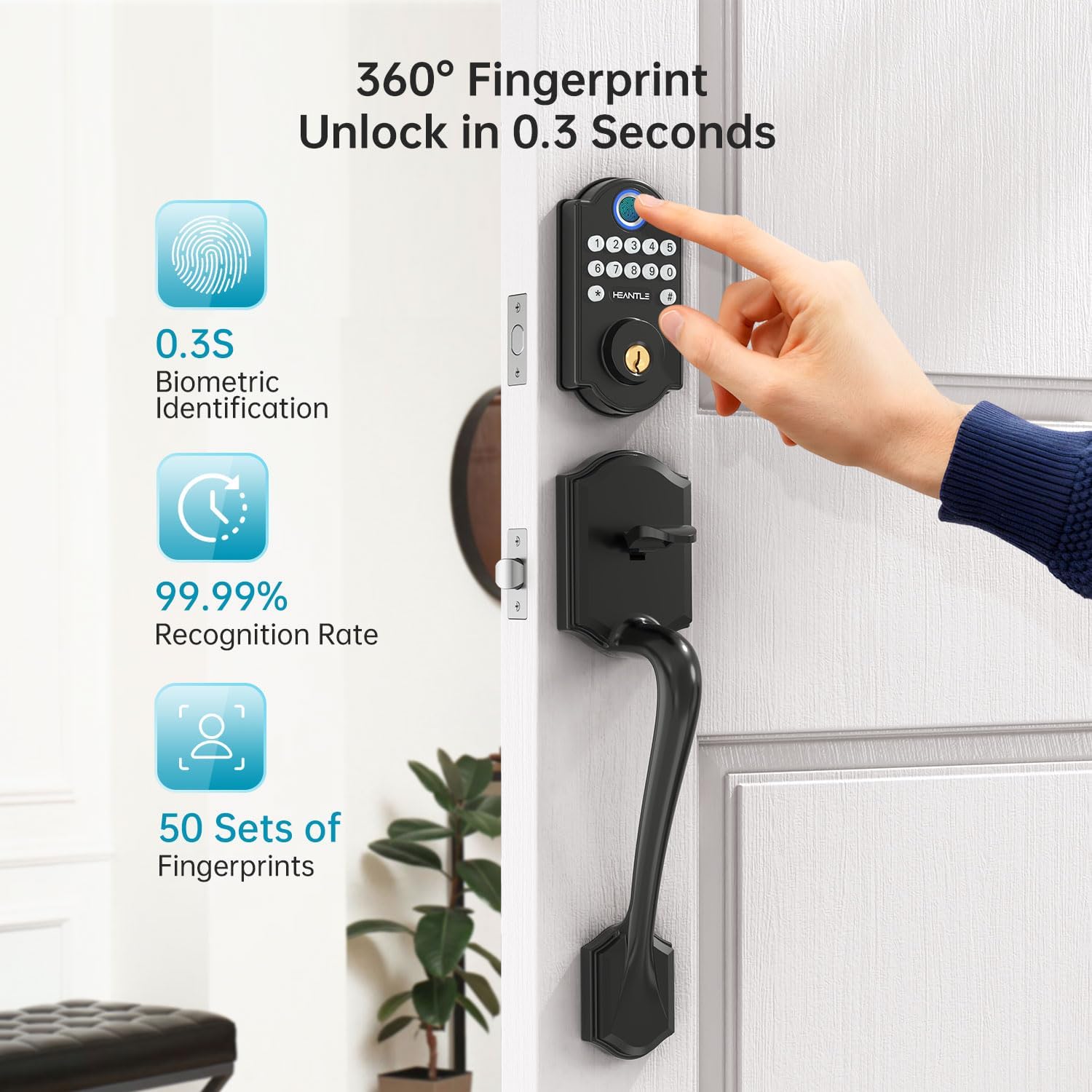
Image: A hand using the fingerprint sensor on the HEANTLE lock, illustrating the rapid 0.3-second unlock time and high recognition rate.
తలుపును అన్లాక్ చేయడం:
- వేలిముద్రతో: Place your registered finger on the sensor. The lock will unlock after successful recognition.
- With Keypad Code: Enter your 4-8 digit user code, then press '#'.
- With Physical Key: Insert the key into the keyhole and turn to unlock.
తలుపు లాక్ చేయడం:
- వన్-టచ్ లాకింగ్: Press the '#' key on the keypad.
- తనంతట తానే తాళంవేసుకొను: The lock will automatically engage after a preset time (5-60 seconds) if the auto-lock feature is enabled.

Image: A hand demonstrating one-touch locking by pressing the '#' button on the keypad.

Image: The HEANTLE deadbolt on a door, with an icon indicating the auto-lock feature and a customizable timer from 1 to 60 seconds.
అధునాతన ఫీచర్లు:
- Anti-Peep Code: To prevent others from guessing your code, you can enter any random digits before or after your actual code. For example, if your code is 123456, you can enter 987123456000#. The lock will still recognize 123456.
- వన్-టైమ్ పాస్కోడ్లు: Generate temporary codes for single use, ideal for deliveries or service personnel. These codes expire after one use.
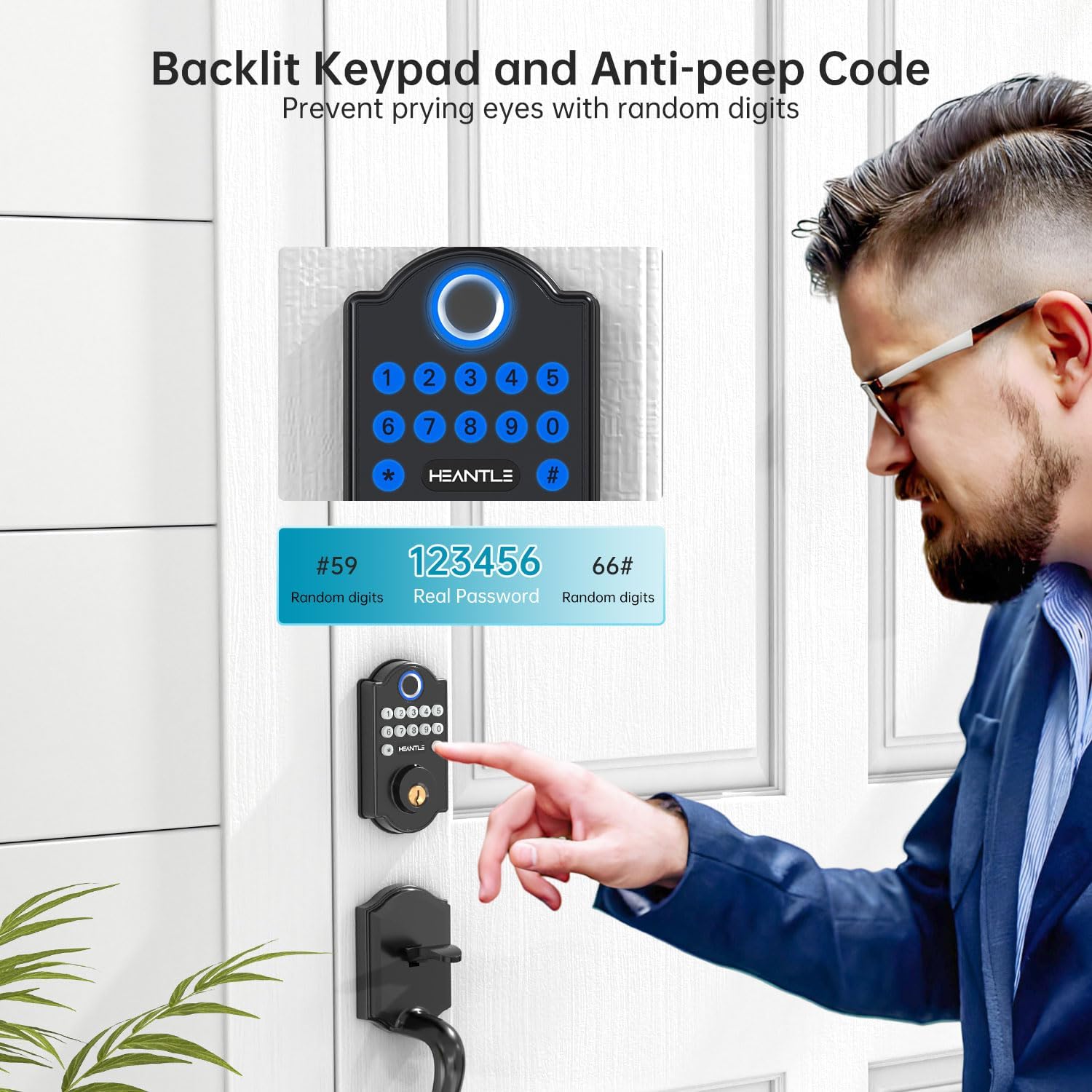
Image: A visual explanation of the anti-peep code feature, showing how random digits can be added before and after the real password to enhance security.

Image: A woman receiving a one-time passcode on her phone, demonstrating the convenience of granting temporary access without revealing permanent codes.
నిర్వహణ
బ్యాటరీ భర్తీ:
The lock requires 4 AA batteries. When the battery level is low, the lock will provide an audible and/or visual alert. Replace all four batteries simultaneously with new, high-quality alkaline batteries.
- ఇంటీరియర్ అసెంబ్లీపై బ్యాటరీ కవర్ను తీసివేయండి.
- పాత బ్యాటరీలను తీసివేసి కొత్త వాటిని చొప్పించండి, సరైన ధ్రువణతను నిర్ధారించండి.
- బ్యాటరీ కవర్ను భర్తీ చేయండి.
In case of complete battery depletion, the lock can be temporarily powered via a micro-USB port (if available) for emergency access using a power bank.

Image: Illustration of the lock's long battery life, low battery alert, and the option for temporary charging via a power bank.
శుభ్రపరచడం:
Wipe the lock's exterior surfaces with a soft, damp రాపిడి క్లీనర్లు లేదా ద్రావకాలను ఉపయోగించడం మానుకోండి, ఎందుకంటే ఇవి ముగింపు లేదా ఎలక్ట్రానిక్ భాగాలను దెబ్బతీస్తాయి.
ట్రబుల్షూటింగ్
| సమస్య | సాధ్యమైన కారణం | పరిష్కారం |
|---|---|---|
| లాక్ స్పందించదు. | డెడ్ బ్యాటరీలు. | Replace all 4 AA batteries. Use the emergency power port if needed. |
| వేలిముద్ర గుర్తించబడలేదు. | వేలు మురికిగా, తడిగా లేదా సరిగ్గా ఉంచబడలేదు. వేలిముద్ర నమోదు చేయబడలేదు. | వేలు శుభ్రంగా మరియు పొడిగా ఉందని నిర్ధారించుకోండి. సెన్సార్పై వేలును చదునుగా ఉంచండి. అవసరమైతే వేలిముద్రను తిరిగి నమోదు చేయండి. |
| Keypad code not working. | Incorrect code entered. Code not registered. | Verify the code. Ensure the code is registered. Try using the anti-peep feature correctly. |
| Auto-lock not engaging. | Auto-lock feature is disabled or timer is set too long. | Check settings to ensure auto-lock is enabled and the timer is set appropriately. |
| Lock mechanism sticks or is difficult to turn. | Misalignment during installation. Door frame or strike plate issue. | Recheck installation steps for proper alignment. Adjust strike plate if necessary. Ensure door closes smoothly. |
స్పెసిఫికేషన్లు
- బ్రాండ్: హేంటల్
- మోడల్: Keyless Entry Fingerprint Keypad Deadbolt
- మెటీరియల్: Metal (High-grade alloy)
- రంగు: నలుపు
- ఉత్పత్తి కొలతలు: 16.51 x 6.35 x 4.32 సెం.మీ
- వస్తువు బరువు: 770 గ్రా
- శక్తి మూలం: 4 x AA బ్యాటరీలు (చేర్చబడలేదు)
- ప్రత్యేక లక్షణాలు: Auto-Lock, Back-Lit Keypad, Fingerprint Recognition
- వేలిముద్ర సామర్థ్యం: 50 వరకు
- User Code Capacity: 100 వరకు
- లాక్ రకం: Keypad, Fingerprint, Key
- ముగించు రకం: Painted or Lacquered
- సిఫార్సు చేసిన ఉపయోగాలు: Home security, Keyless convenience
- మూలం దేశం: చైనా
వారంటీ మరియు మద్దతు
Your HEANTLE Keyless Entry Fingerprint Keypad Deadbolt is backed by a one-year coverage from the date of purchase. This warranty covers manufacturing defects and functional issues under normal use.
- కవరేజ్: One-year warranty for defects or scratches.
- సాంకేతిక మద్దతు: Prompt assistance with responses typically within one business day.
- సంప్రదింపు సమాచారం: For warranty claims, technical assistance, or any product-related inquiries, please contact HEANTLE customer support at +1 (888) 988 7968 or visit the official HEANTLE store on Amazon.
Ask a question about this manual
Ask about setup, troubleshooting, compatibility, parts, safety, or missing instructions. Manuals+ will review the question and use this page’s manual context to help answer it.