
1. పరిచయం
Thank you for choosing the IMGadgets Electric Standing Desk, Model Desk300. This manual provides essential information for the safe and efficient use of your new height-adjustable desk. Please read these instructions carefully before assembly and operation, and retain them for future reference.
This electric standing desk is designed to offer a versatile workspace, allowing seamless transitions between sitting and standing positions. It features a robust motor, memory height presets, and a spacious 47x24 inch tabletop, promoting an ergonomic and productive environment.
2. భద్రతా సమాచారం
ముఖ్యమైన భద్రతా జాగ్రత్తలు:
- Do not load the desk with more than 70 kilograms (154 lbs). Exceeding this weight limit can cause damage to the desk and potential injury.
- Ensure all cables are properly managed and secured to prevent tripping hazards or entanglement during height adjustments.
- ప్రమాదాలను నివారించడానికి ఆపరేషన్ సమయంలో పిల్లలు మరియు పెంపుడు జంతువులను డెస్క్ నుండి దూరంగా ఉంచండి.
- ద్రవాలను నేరుగా కంట్రోల్ ప్యానెల్పై లేదా ఎలక్ట్రికల్ భాగాల దగ్గర ఉంచడం మానుకోండి.
- అన్ని స్క్రూలు మరియు కనెక్షన్లు బిగుతుగా మరియు సురక్షితంగా ఉన్నాయని నిర్ధారించుకోవడానికి వాటిని క్రమం తప్పకుండా తనిఖీ చేయండి.
- Operate the desk only on a level surface.
- ఈ ఉత్పత్తి ఇండోర్ ఉపయోగం కోసం మాత్రమే ఉద్దేశించబడింది.
3. ప్యాకేజీ విషయాలు
Please verify that all components are present before beginning assembly. Refer to the included assembly guide for a detailed list of parts.
- Desk tabletop (47x24 inches, typically in two pieces)
- ఎలక్ట్రిక్ లిఫ్టింగ్ స్తంభాలు (కాళ్ళు)
- LED డిస్ప్లే మరియు మెమరీ బటన్లతో కంట్రోల్ ప్యానెల్
- Motor and power adapter
- Frame components (crossbar, feet)
- Headphone holders (2 units)
- అసెంబ్లీ హార్డ్వేర్ (స్క్రూలు, ఉపకరణాలు)
- User manual and assembly guide
4. సెటప్ మరియు అసెంబ్లీ
Detailed assembly instructions are provided in the separate assembly guide included with your product. Please follow these instructions carefully, ensuring all parts are correctly installed and tightened. Assembly typically involves:
- లిఫ్టింగ్ స్తంభాలను డెస్క్ పాదాలకు అటాచ్ చేయడం.
- Connecting the crossbar between the lifting columns.
- Securing the tabletop to the assembled frame. Note that the tabletop is typically supplied in two pieces.
- Mounting the control panel and headphone holders.
- Connecting the motor and power cables.
It is recommended to have two people for assembly due to the size and weight of the components.
5. ఆపరేటింగ్ సూచనలు
5.1 ప్రాథమిక ఎత్తు సర్దుబాటు

The desk's height can be adjusted electrically from 28.3 inches (71cm) to 46.5 inches (118cm). Use the పైకి (▲) మరియు డౌన్ (▼) buttons on the control panel to raise or lower the desk to your desired height. The current height is displayed on the LED screen.
5.2 మెమరీ ప్రీసెట్లు

The control panel features three memory buttons (1, 2, 3) to save and recall your preferred sitting and standing heights.
- To Save a Height: Adjust the desk to your desired height. Press the M button, then immediately press one of the number buttons (1, 2, or 3) until you hear a beep or see the display flash. The height is now saved.
- To Recall a Height: Simply press the corresponding number button (1, 2, or 3). The desk will automatically move to the saved position.
5.3 చైల్డ్ సేఫ్టీ లాక్
To prevent accidental adjustments, especially by children, the control panel includes a child safety lock feature.
- To Enable/Disable Child Lock: నొక్కండి మరియు పట్టుకోండి పైకి (▲) మరియు డౌన్ (▼) buttons simultaneously for 5 seconds. The display will indicate when the lock is activated or deactivated.
6. ఫీచర్లు ఓవర్view
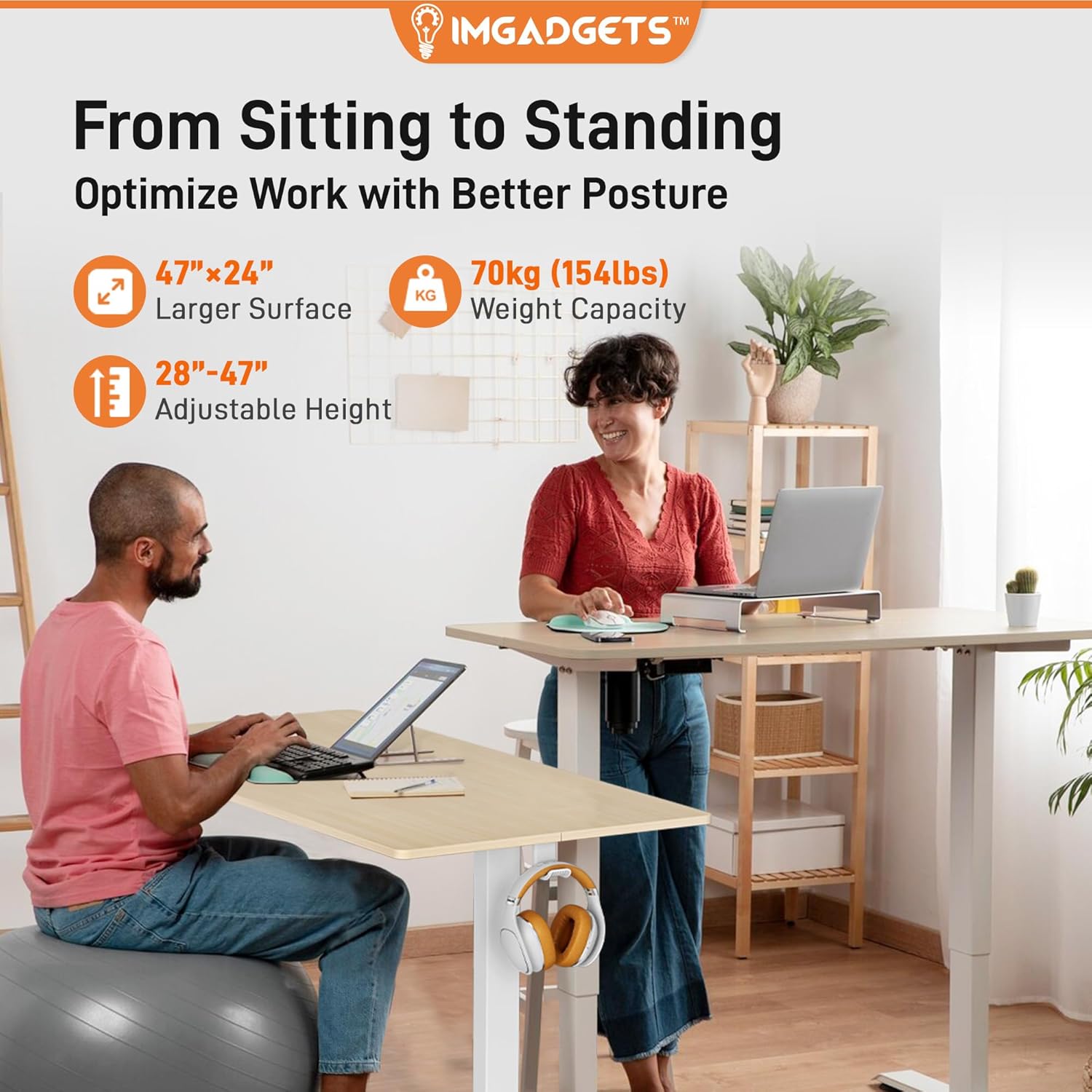
Ergonomic Sit-Stand Design
Seamlessly switch between sitting and standing positions to optimize your posture and reduce physical strain throughout your workday. The desk's electric height adjustment allows for a smooth transition.

Spacious and Sturdy Tabletop
The 47x24 inch tabletop provides ample space for multiple monitors, a laptop, and other office essentials, helping you maintain an organized and efficient workspace. The laminated wood pattern offers a sleek, scratch-resistant finish.

High Weight Capacity and Stability
Constructed with a sturdy steel frame, the desk supports up to 70 kg (154 lbs) and maintains stability even at its highest point. Leveling feet ensure balance on uneven floors.

నిశ్శబ్ద మరియు సున్నితమైన ఆపరేషన్
Equipped with a 6th generation quiet motor, the desk adjusts height with a motion noise of less than 55 dB, ensuring a peaceful work environment. Soft start/stop functions provide seamless movement.

Integrated Headphone Holders
Two smart holders are included, allowing you to conveniently hang headphones, bags, or other accessories, keeping your desk surface clear and organized.

Certified High-Quality Materials
The desk is made from CARB, UL1310, TSCA, and EPA Certified Premium Engineered Wood, ensuring it is free from harmful chemicals and meets strict environmental standards for a safer, healthier workspace.
7. నిర్వహణ
To ensure the longevity and optimal performance of your IMGadgets Electric Standing Desk, follow these maintenance guidelines:
- శుభ్రపరచడం: డెస్క్ ఉపరితలం మరియు ఫ్రేమ్ను మృదువైన, d వస్త్రంతో తుడవండి.amp వస్త్రం. ముగింపును దెబ్బతీసే కఠినమైన రసాయనాలు లేదా రాపిడి క్లీనర్లను ఉపయోగించకుండా ఉండండి.
- కేబుల్ నిర్వహణ: Periodically check and reorganize cables to prevent tangles and ensure smooth operation during height adjustments.
- ఫాస్టెనర్లు: Every few months, inspect all screws and bolts to ensure they are securely tightened. Retighten if necessary.
- బరువు పరిమితి: Always adhere to the maximum weight capacity of 70 kg (154 lbs) to prevent damage to the motor and frame.
8. ట్రబుల్షూటింగ్
If you encounter any issues with your IMGadgets Electric Standing Desk, refer to the following common troubleshooting tips:
| సమస్య | సాధ్యమైన కారణం | పరిష్కారం |
|---|---|---|
| డెస్క్ కదలడం లేదు | Power cable disconnected; Child lock activated; Overload protection triggered | Check power connection; Deactivate child lock (hold Up/Down for 5s); Reduce load on desk and wait 20 minutes before trying again. |
| అసమాన ఎత్తు సర్దుబాటు | Obstruction; Unbalanced load | Remove any obstructions; Redistribute weight evenly on the desk surface. |
| ఆపరేషన్ సమయంలో శబ్దం | Normal motor sound; Loose fasteners | A low hum is normal (under 55 dB). If excessive, check all assembly fasteners for tightness. |
| మెమరీ ప్రీసెట్లు పనిచేయడం లేదు | తప్పు పొదుపు విధానం | Ensure you press 'M' then the number button immediately after adjusting to the desired height. |
If the problem persists after attempting these solutions, please contact IMGadgets customer support.
9. స్పెసిఫికేషన్లు
| ఫీచర్ | వివరాలు |
|---|---|
| బ్రాండ్ | IMGadgets |
| మోడల్ సంఖ్య | డెస్క్ 300 |
| రంగు | Electric - Ivory |
| ఉత్పత్తి కొలతలు | 60D x 120W x 118H Centimetres (47" x 24" tabletop) |
| సర్దుబాటు ఎత్తు పరిధి | 28.3" (71cm) to 46.5" (118cm) |
| మెటీరియల్ | CARB, UL1310, TSCA and EPA Certified Premium Engineered Wood, Metal Base |
| గరిష్ట బరువు సామర్థ్యం | 70 కిలోలు (154 పౌండ్లు) |
| మోటార్ రకం | 6th Gen Quiet Motor |
| శబ్దం స్థాయి | 55 dB కంటే తక్కువ |
| ప్రత్యేక లక్షణాలు | Adjustable Height, Electric, Ergonomic, Height Memory Buttons, LED Display, 2 Headphone Holders |
| వస్తువు బరువు | 18.5 కిలోలు |
10. వారంటీ మరియు మద్దతు
IMGadgets is committed to providing high-quality products and customer satisfaction. For warranty information, technical support, or any inquiries regarding your Electric Standing Desk, please contact us directly:
- ఫోన్: +1 647-797-3804
- ఇమెయిల్: customercare@imgadgets.com
- చాట్: సందర్శించండి www.imgadgets.com
Please have your model number (Desk300) and purchase information ready when contacting support.