
1. ఉత్పత్తి ముగిసిందిview
The NOHON MS15 Mag-Safe Wireless Power Bank is a compact and efficient portable charging solution designed for iPhone 12, 13, 14, and 15 series, and other compatible devices. Featuring a 5000mAh capacity, ultra-slim design, and 20W Power Delivery (PD) fast charging, it offers convenient wireless and wired charging capabilities.

Figure 1: NOHON MS15 Mag-Safe Wireless Power Bank with iPhone.
2. ప్యాకేజీ విషయాలు
- NOHON MS15 Mag-Safe Wireless Power Bank
- USB-C ఛార్జింగ్ కేబుల్
- వినియోగదారు మాన్యువల్
3. పవర్ బ్యాంక్ను సెటప్ చేయడం మరియు ఛార్జ్ చేయడం
3.1 ప్రారంభ ఛార్జ్
Before first use, fully charge the NOHON MS15 Power Bank. Use the included USB-C cable and connect it to a compatible power adapter (not included).
3.2 ఛార్జింగ్ సూచికలు
The integrated LED indicators on the side of the power bank display the remaining battery capacity and charging status. Each light typically represents approximately 25% of the battery charge.

Figure 2: LED Power Indicator explanation.
4. ఆపరేటింగ్ సూచనలు
4.1 Wireless Charging (Mag-Safe Compatible)
- Ensure your device is Mag-Safe compatible (iPhone 12 series or newer) or has a magnetic phone case.
- Align the NOHON power bank with the back of your iPhone. The magnets will automatically snap it into place, initiating wireless charging.
- To stop charging, simply detach the power bank from your device.

Figure 3: Magnetic attachment for wireless charging.
4.2 వైర్డ్ ఛార్జింగ్ (USB-C)
- USB-C కేబుల్ యొక్క ఒక చివరను పవర్ బ్యాంక్ యొక్క USB-C పోర్ట్కు కనెక్ట్ చేయండి.
- USB-C కేబుల్ యొక్క మరొక చివరను మీ పరికరం ఛార్జింగ్ పోర్ట్కు కనెక్ట్ చేయండి.
- ఛార్జింగ్ స్వయంచాలకంగా ప్రారంభమవుతుంది.
4.3 ఏకకాలంలో ఛార్జింగ్
The NOHON MS15 supports charging two devices simultaneously: one wirelessly via Mag-Safe and another via the USB-C port.
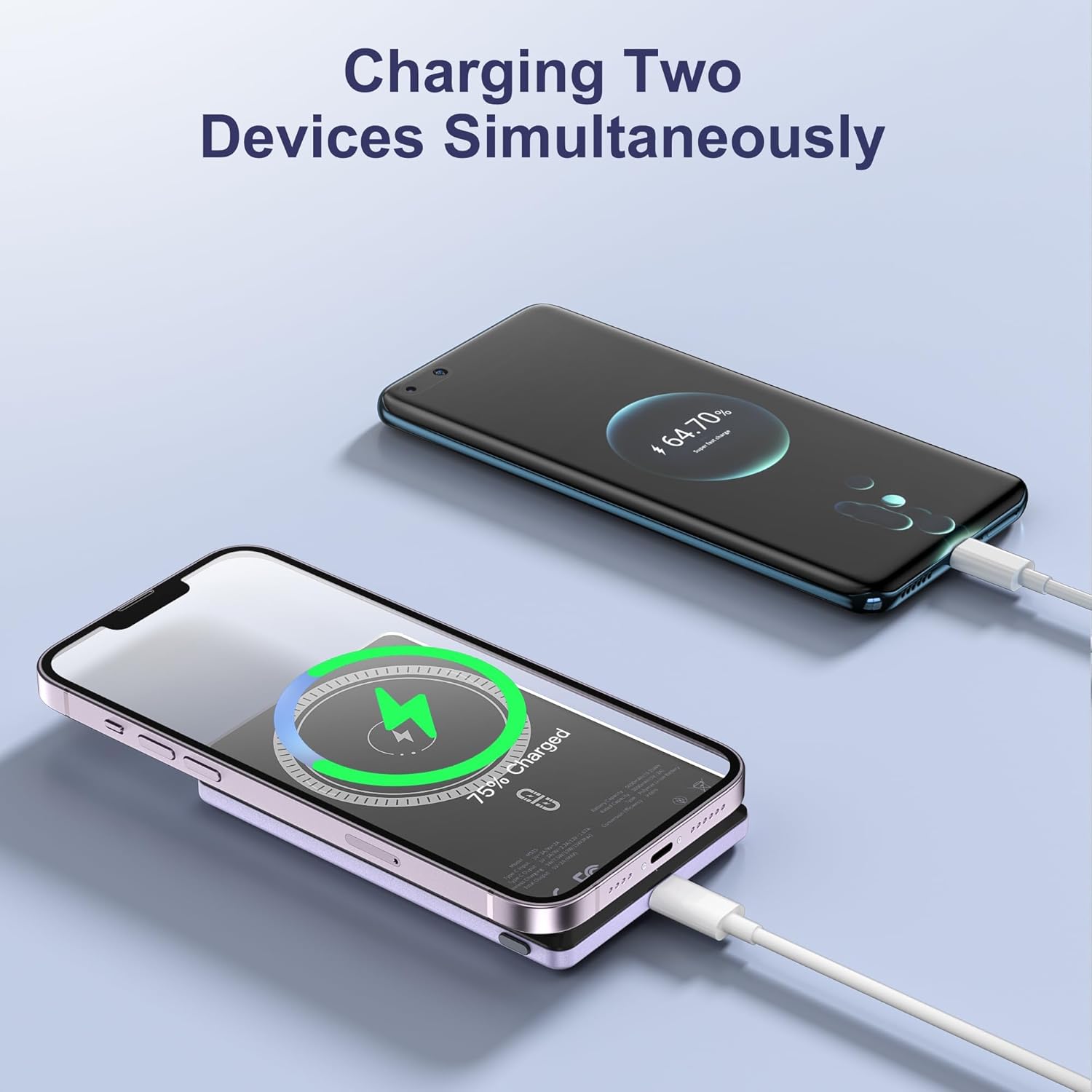
Figure 4: Charging two devices simultaneously.
4.4 పవర్ ఆన్/ఆఫ్
The power bank automatically activates charging when a device is connected wirelessly or via cable. To turn off the power bank, press the power button twice in quick succession.
5 కీ ఫీచర్లు
- అల్ట్రా-స్లిమ్ డిజైన్: Measuring just 0.32 inches (8mm) in thickness, it's designed for easy portability.
- 5000mAh కెపాసిటీ: అందిస్తుంది ampరోజువారీ ఉపయోగం కోసం le శక్తి.
- అయస్కాంత కనెక్షన్: Ensures a secure and stable wireless charging link.
- 20W PD ఫాస్ట్ ఛార్జింగ్: Delivers efficient wired charging speeds.
- ఏకకాలంలో ఛార్జింగ్: Charge two devices at once (wireless + wired).
- మేధో రక్షణ: ఓవర్-కరెంట్, ఓవర్-వాల్యూమ్ నుండి అంతర్నిర్మిత రక్షణలుtage, మరియు షార్ట్-సర్క్యూట్.

చిత్రం 5: పైగాview of NOHON MS15 features.
6. అనుకూలత
The NOHON MS15 Mag-Safe Wireless Power Bank is designed for universal compatibility with:
- Mag-Safe Charging: iPhone 12, 13, 14, and 15 series (including Pro Max models).
- వైర్లెస్ ఛార్జింగ్: Other Qi-enabled smartphones (requires a magnetic phone case for secure attachment).
- వైర్డు ఛార్జింగ్: Any device compatible with USB-C charging.
గమనిక: For non-magnetic charging phones, a magnetic phone case is required to ensure a secure connection for wireless charging.
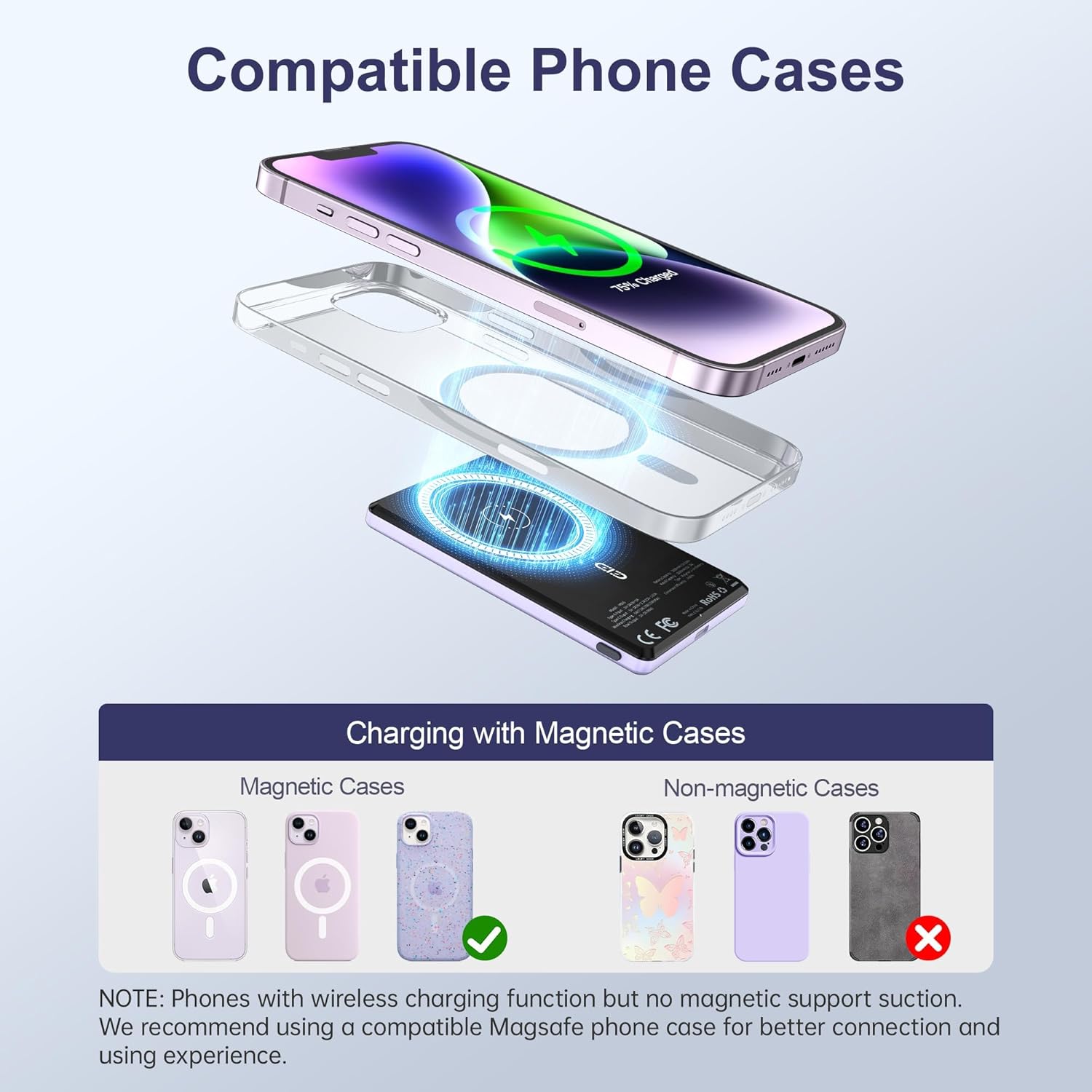
Figure 6: Compatible phone cases for magnetic charging.
7. నిర్వహణ మరియు సంరక్షణ
- పవర్ బ్యాంక్ను నీరు, తేమ మరియు తీవ్రమైన ఉష్ణోగ్రతల నుండి దూరంగా ఉంచండి.
- పరికరాన్ని వదలడం లేదా బలమైన ప్రభావాలకు గురి చేయడం మానుకోండి.
- మృదువైన, పొడి వస్త్రంతో ఉపరితలాన్ని శుభ్రం చేయండి. కఠినమైన రసాయనాలు లేదా రాపిడి పదార్థాలను ఉపయోగించవద్దు.
- ఉపయోగంలో లేనప్పుడు చల్లని, పొడి ప్రదేశంలో నిల్వ చేయండి.
8. ట్రబుల్షూటింగ్
8.1 పరికరం ఛార్జ్ అవ్వడం లేదు
- పవర్ బ్యాంక్ తగినంతగా ఛార్జ్ చేయబడిందని నిర్ధారించుకోండి. LED సూచికలను తనిఖీ చేయండి.
- For wireless charging, verify proper alignment between the power bank and your device/magnetic case.
- For wired charging, check that the USB-C cable is securely connected to both the power bank and your device. Try a different cable if necessary.
- Remove any non-magnetic cases that may interfere with wireless charging.
8.2 పవర్ బ్యాంక్ ఓవర్ హీటింగ్
- It is normal for the power bank to become slightly warm during charging.
- If it becomes excessively hot, discontinue use immediately and contact customer support.
- Ensure proper ventilation and avoid charging in direct sunlight or enclosed spaces.
9. స్పెసిఫికేషన్లు
| ఫీచర్ | వివరాలు |
|---|---|
| మోడల్ సంఖ్య | MS15 |
| బ్యాటరీ కెపాసిటీ | 5000mAh |
| ఉత్పత్తి కొలతలు | 4 x 2.5 x 0.32 అంగుళాలు |
| వస్తువు బరువు | 4.1 ఔన్సులు |
| వైర్డు ఛార్జింగ్ అవుట్పుట్ | PD 20W (USB Type C) |
| వైర్లెస్ ఛార్జింగ్ అవుట్పుట్ | Up to 15W (for Android), 7.5W (for iOS) |
| ప్రత్యేక లక్షణాలు | Fast Charging, Slim Design, Wireless Charging, Magnetic Attachment |
| రంగు | Violet Ash |
10. అధికారిక ఉత్పత్తి వీడియో
వీడియో 1: ఉత్పత్తి ముగిసిందిview of the NOHON Mag-Safe Power Bank. This video demonstrates the features and usage of the power bank, including its slim design and magnetic attachment.
11. వారంటీ మరియు మద్దతు
NOHON products typically come with a 12-month warranty. For any product inquiries, technical support, or warranty claims, please contact NOHON customer service through the retailer's platform or the official NOHON website. Please have your purchase details and model number (MS15) ready.