
1. పరిచయం
This manual provides detailed instructions for the installation, operation, and maintenance of your Xprinter XP-370B Thermal Barcode Sticker Printer. Please read this manual thoroughly before using the printer to ensure proper functionality and to prevent damage.
2. భద్రతా సమాచారం
- ప్రింటర్ను ఎల్లప్పుడూ గ్రౌండెడ్ పవర్ అవుట్లెట్కి కనెక్ట్ చేయండి.
- ప్రింటర్ను నీటికి లేదా అధిక తేమకు గురిచేయవద్దు.
- ప్రింటర్ను ప్రత్యక్ష సూర్యకాంతిలో లేదా ఉష్ణ వనరుల దగ్గర ఉంచకుండా ఉండండి.
- Use only Xprinter approved accessories and power adapters.
- ప్రింటర్ను పిల్లలకు దూరంగా ఉంచండి.
- ప్రింటర్ను మీరే విడదీయడానికి లేదా రిపేర్ చేయడానికి ప్రయత్నించవద్దు. సహాయం కోసం అర్హత కలిగిన సేవా సిబ్బందిని సంప్రదించండి.
3. ప్యాకేజీ విషయాలు
ప్యాకేజీలో అన్ని అంశాలు ఉన్నాయని నిర్ధారించుకోండి:
- Xprinter XP-370B Thermal Barcode Sticker Printer
- పవర్ అడాప్టర్
- USB కేబుల్
- త్వరిత ప్రారంభ మార్గదర్శి (చేర్చబడి ఉంటే)
4. ఉత్పత్తి ముగిసిందిview
The Xprinter XP-370B is a compact and efficient thermal printer designed for barcode and sticker printing. It features high-speed printing capabilities and supports various connectivity options.

చిత్రం 4.1: ముందు-కుడి view of the Xprinter XP-370B Thermal Barcode Sticker Printer.

మూర్తి 4.2: వైపు view illustrating the power button and top cover key for accessing the media compartment.
5. సెటప్
5.1 అన్ప్యాకింగ్ మరియు ప్లేస్మెంట్
- ప్రింటర్ను దాని ప్యాకేజింగ్ నుండి జాగ్రత్తగా తీసివేయండి.
- ప్రింటర్ను తగినంత వెంటిలేషన్ ఉన్న స్థిరమైన, చదునైన ఉపరితలంపై ఉంచండి.
- Ensure there is enough space around the printer for cable connections and media loading.
5.2 ప్రింటర్ను కనెక్ట్ చేస్తోంది
- Connect the power adapter to the printer's power port and then plug it into a power outlet.
- Connect the printer to your computer using the provided USB cable. The printer also supports Serial, Ethernet, and Bluetooth connectivity options depending on the model.
- Turn on the printer using the power button located on the side (refer to Figure 4.2).
5.3 Loading Print Media
- Press the top cover key (refer to Figure 4.2) to open the printer's top cover.
- Place the roll of thermal labels into the media compartment. The maximum label diameter supported is 100mm.
- Adjust the paper guide to fit the width of your labels securely.
- Pull a small length of labels past the print head.
- Close the top cover until it clicks into place.
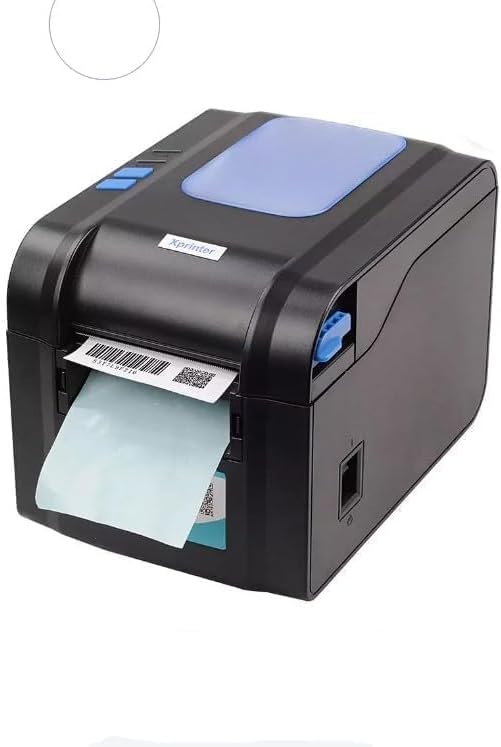
Figure 5.3: The printer demonstrating a label being fed out after printing.
5.4 డ్రైవర్ ఇన్స్టాలేషన్
- For Windows systems, insert the driver CD (if provided) or download the latest drivers from the official Xprinter webసైట్. ఇన్స్టాలేషన్ కోసం స్క్రీన్పై ఉన్న సూచనలను అనుసరించండి.
- For Android and iOS devices, download the appropriate printing application from your device's app store.
6. ఆపరేటింగ్ సూచనలు
6.1 ప్రాథమిక ముద్రణ
- ప్రింటర్ ఆన్ చేయబడి, మీ పరికరానికి కనెక్ట్ చేయబడిందని నిర్ధారించుకోండి.
- మీరు ప్రింట్ చేయాలనుకుంటున్న పత్రం లేదా అప్లికేషన్ను తెరవండి.
- Select the Xprinter XP-370B from your list of available printers.
- Adjust print settings such as label size, orientation, and density as needed.
- Initiate the print command. The printer will begin printing at speeds up to 152mm/s.
7. నిర్వహణ
7.1 ప్రింటర్ను శుభ్రపరచడం
- Turn off and unplug the printer before cleaning.
- మెత్తని, మెత్తని బట్టను ఉపయోగించండి డిampened with isopropyl alcohol to gently clean the print head.
- Clean the exterior of the printer with a soft, dry cloth.
- రాపిడి క్లీనర్లు లేదా ద్రావకాలు ఉపయోగించవద్దు.
8. ట్రబుల్షూటింగ్
- ప్రింటర్ స్పందించడం లేదు: Check power connection, USB/Serial/Ethernet/Bluetooth connection, and ensure drivers are correctly installed.
- పేలవమైన ముద్రణ నాణ్యత: Clean the print head, ensure correct media type is used, and check print density settings.
- పేపర్ జామ్: Open the top cover, carefully remove any jammed labels, and re-load the media correctly.
- ఆహారం ఇవ్వని లేబుల్లు: Ensure labels are loaded correctly and the paper guide is adjusted properly. Check for any obstructions.
9. స్పెసిఫికేషన్లు
| ఫీచర్ | స్పెసిఫికేషన్ |
|---|---|
| బ్రాండ్ | Xprinter |
| మోడల్ సంఖ్య | ఎక్స్పి-370బి |
| ప్రింటర్ టెక్నాలజీ | థర్మల్ |
| కనెక్టివిటీ టెక్నాలజీ | USB, Serial, Bluetooth, Ethernet (options vary) |
| గరిష్ట ముద్రణ వేగం | 152 మిమీ/సె వరకు |
| గరిష్ట మీడియా పరిమాణం | 4 x 6 అంగుళాలు |
| Maximum Label Diameter | 100 మి.మీ |
| ప్రింట్ మీడియా | లేబుల్స్ |
| ప్రింటర్ అవుట్పుట్ | మోనోక్రోమ్ |
| అంశం కొలతలు (D x W x H) | 15D x 7W x 10H సెంటీమీటర్లు |
| వస్తువు బరువు | 300 గ్రా |
| మద్దతు ఉన్న ఆపరేటింగ్ సిస్టమ్స్ | విండోస్, ఆండ్రాయిడ్, iOS |
10. వారంటీ మరియు మద్దతు
For warranty information and technical support, please refer to the documentation provided with your purchase or visit the official Xprinter webవారంటీ క్లెయిమ్ల కోసం కొనుగోలు రుజువుగా మీ కొనుగోలు రసీదును ఉంచండి.