
1. ఉత్పత్తి ముగిసిందిview
The ELECTROPRIME CAMSOY S20 is a compact 1080P WiFi action camera designed for security monitoring, pet monitoring, or as a baby monitor. It features two-way audio, IR night vision, and motion detection capabilities, making it a versatile solution for various surveillance needs. Its small size and 360-degree adjustable mount allow for flexible placement.
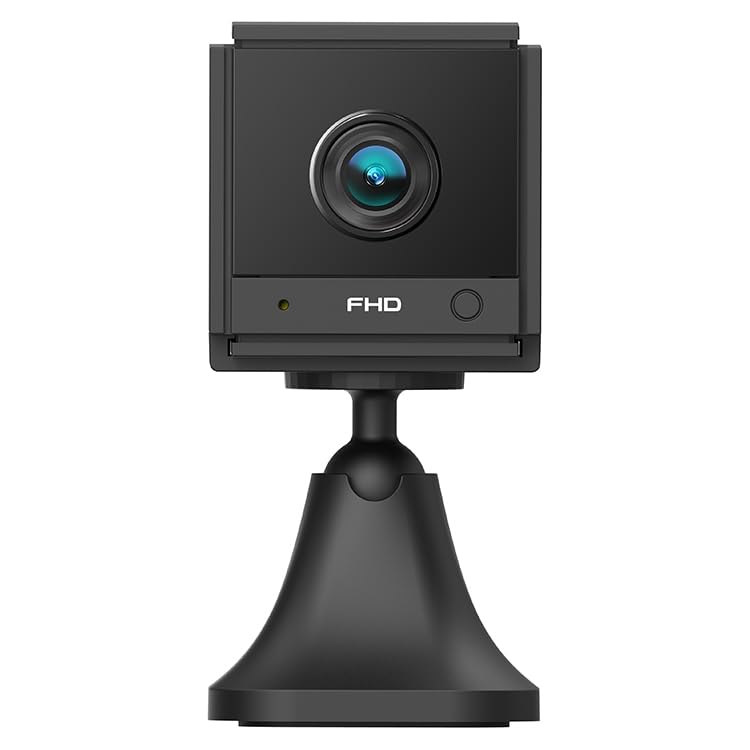
చిత్రం 1.1: కోణీయ view of the ELECTROPRIME CAMSOY S20 1080P WiFi Action Camera, showing the lens and adjustable mount.
2. ప్యాకేజీ విషయాలు
దయచేసి ఈ క్రింది అంశాల కోసం ప్యాకేజీని తనిఖీ చేయండి:
- ELECTROPRIME CAMSOY S20 Action Camera
- సర్దుబాటు మౌంటు బ్రాకెట్
- USB ఛార్జింగ్ కేబుల్
- వినియోగదారు మాన్యువల్ (ఈ పత్రం)
- Built-in 800mAh Li-ion Battery (pre-installed)
3. ఉత్పత్తి లక్షణాలు
- Full 1080P HD Video: స్పష్టమైన మరియు వివరణాత్మక వీడియో fooని సంగ్రహిస్తుందిtage.
- ఐఆర్ నైట్ విజన్: Equipped with 6 infrared LEDs for clear vision up to 5-7 meters in low light or darkness.
- రెండు-మార్గం ఆడియో: రిమోట్ కమ్యూనికేషన్ కోసం అంతర్నిర్మిత మైక్రోఫోన్ మరియు స్పీకర్.
- మోషన్ డిటెక్షన్ అలారం: గుర్తించబడిన కదలిక గురించి మిమ్మల్ని హెచ్చరిస్తుంది.
- Wi-Fi కనెక్టివిటీ: Supports 2.4G WiFi (IEEE802.11b/g/n) for remote viewing మరియు నియంత్రణ.
- కాంపాక్ట్ డిజైన్: Mini size allows for discreet placement.
- సర్దుబాటు మౌంట్: 360-degree free adjustable mount for flexible positioning.
- స్థానిక నిల్వ: Supports Micro-SD Card up to 128GB (card not included).
- అంతర్నిర్మిత బ్యాటరీ: 800mAh Li-ion battery provides backup power for 3-4 hours.
4. సెటప్ గైడ్
4.1 కెమెరాను ఛార్జ్ చేయడం
Before initial use, fully charge the camera. Connect the provided USB charging cable to the camera's Micro USB interface and plug the other end into a standard USB power adapter (not included) or a computer's USB port. The charging indicator light will show the charging status.
4.2 Installing a Micro-SD Card
The camera supports Micro-SD cards up to 128GB for local video storage. Locate the Micro-SD card slot on the camera. Gently insert the Micro-SD card with the gold contacts facing down until it clicks into place. To remove, push the card in again until it springs out.
4.3 కెమెరా మౌంటు
Attach the camera to the adjustable mounting bracket. The bracket allows for 360-degree rotation, enabling you to position the camera at the desired angle. Secure the bracket to a wall, ceiling, or flat surface using appropriate fasteners (not included).
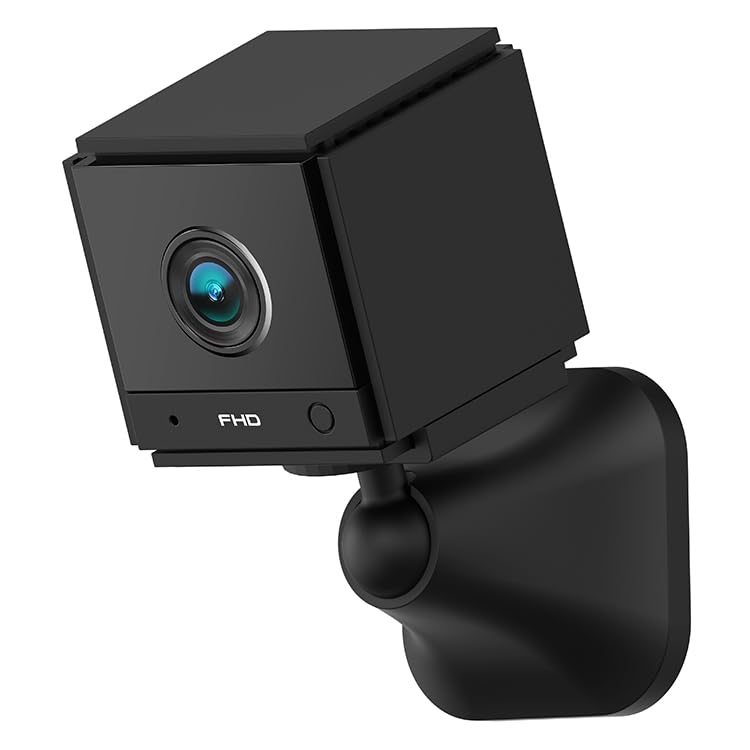
చిత్రం 4.1: ముందు view of the ELECTROPRIME CAMSOY S20 camera, showing the lens and indicator lights.
4.4 Wi-Fi మరియు యాప్ సెటప్కు కనెక్ట్ చేయడం
- అనువర్తనాన్ని డౌన్లోడ్ చేయండి: కోసం వెతకండి the recommended camera application on your smartphone's app store (e.g., "CAMSOY" or a similar security camera app, refer to packaging for specific app name).
- పవర్ ఆన్: Press and hold the power button on the camera until the indicator light turns on.
- పరికరాన్ని జోడించండి: Open the app, create an account if necessary, and select "Add Device" or a similar option.
- కెమెరా రకాన్ని ఎంచుకోండి: Follow the in-app instructions to select your camera model.
- Wi-Fiకి కనెక్ట్ చేయండి: The app will guide you through connecting the camera to your 2.4G Wi-Fi network. Ensure your Wi-Fi password is correct.
- జత చేయడం: The camera will pair with your smartphone. Once connected, you can view the live feed and access settings.
Note: The camera supports both AP Mode (direct connection to phone) and WiFi Mode (connection via router). Refer to the app for specific mode selection and setup.
5. ఆపరేటింగ్ సూచనలు
5.1 పవర్ ఆన్/ఆఫ్
- పవర్ ఆన్: సూచిక లైట్ వెలిగే వరకు పవర్ బటన్ను దాదాపు 3 సెకన్ల పాటు నొక్కి పట్టుకోండి.
- పవర్ ఆఫ్: సూచిక లైట్ ఆపివేయబడే వరకు పవర్ బటన్ను దాదాపు 3 సెకన్ల పాటు నొక్కి పట్టుకోండి.
5.2 ప్రత్యక్ష ప్రసారం View మరియు రికార్డింగ్
Once connected to the app, open the app to access the live video feed. From the live view ఇంటర్ఫేస్, మీరు:
- View నిజ-సమయ వీడియో.
- Manually start/stop video recording to the Micro-SD card or your phone.
- స్నాప్షాట్లు తీసుకోండి.
- రికార్డ్ చేసిన fooని యాక్సెస్ చేయండిtage from the Micro-SD card.
5.3 టూ-వే ఆడియో
ప్రత్యక్ష ప్రసారంలో view interface of the app, locate the microphone icon. Tap and hold the icon to speak through the camera's speaker. Release to listen through the camera's microphone.
౪.౧.౧౦ నైట్ విజన్
The camera automatically switches to IR night vision mode in low-light conditions. The 6 infrared LEDs provide clear black and white video up to 5-7 meters.
5.5 మోషన్ డిటెక్షన్ మరియు అలారాలు
Enable motion detection in the camera settings within the app. You can set sensitivity levels and define detection zones. When motion is detected, the camera can:
- మీ స్మార్ట్ఫోన్కు పుష్ నోటిఫికేషన్లను పంపండి.
- Start recording video to the Micro-SD card.
- Trigger a siren alarm (if enabled in settings).
6. నిర్వహణ
- శుభ్రపరచడం: కెమెరా లెన్స్ మరియు బాడీని శుభ్రం చేయడానికి మృదువైన, పొడి వస్త్రాన్ని ఉపయోగించండి. ద్రవ క్లీనర్లు లేదా రాపిడి పదార్థాలను ఉపయోగించవద్దు.
- బ్యాటరీ సంరక్షణ: To prolong battery life, avoid extreme temperatures. If storing for extended periods, charge the battery to about 50% every few months.
- ఫర్మ్వేర్ నవీకరణలు: Check the camera app periodically for available firmware updates to ensure optimal performance and security.
- నిల్వ: ఉపయోగంలో లేనప్పుడు కెమెరాను ప్రత్యక్ష సూర్యకాంతి మరియు తేమ నుండి దూరంగా చల్లని, పొడి ప్రదేశంలో నిల్వ చేయండి.
7. ట్రబుల్షూటింగ్
7.1 కెమెరా ఆన్ కావడం లేదు
- Ensure the camera is fully charged. Connect it to a power source using the USB cable.
- పవర్ బటన్ను కనీసం 3 సెకన్ల పాటు నొక్కి పట్టుకోండి.
7.2 Unable to Connect to Wi-Fi
- Verify that your Wi-Fi network is 2.4GHz. The camera does not support 5GHz Wi-Fi.
- Ensure the Wi-Fi password entered in the app is correct.
- Place the camera closer to your Wi-Fi router during setup.
- మీ రౌటర్ మరియు కెమెరాను పునఃప్రారంభించండి.
- Reset the camera to factory settings (refer to app or camera for reset button location).
7.3 పేలవమైన వీడియో నాణ్యత
- Check your Wi-Fi signal strength. A weak signal can affect streaming quality.
- కెమెరా లెన్స్ శుభ్రంగా మరియు దుమ్ము లేదా మరకలు లేకుండా చూసుకోండి.
- కాంతి లేదా బలమైన బ్యాక్లైటింగ్ను నివారించడానికి కెమెరా స్థానాన్ని సర్దుబాటు చేయండి.
7.4 Micro-SD Card Not Recording
- Ensure the Micro-SD card is inserted correctly and fully.
- Format the Micro-SD card through the camera app.
- Check if the Micro-SD card is full. Back up important footage and format the card.
- Verify the Micro-SD card is not damaged and is within the supported capacity (up to 128GB).
8. స్పెసిఫికేషన్లు
| మోడల్ సంఖ్య | NC0399B |
| రిజల్యూషన్ | 2MP / 1080P Full HD |
| View కోణం | (H)110 degrees, (D)140 degrees |
| నైట్ విజన్ | 6pcs 940nm SMT IR Led, Range 5~7 meters, Built-in IR-CUT |
| వీడియో కోడెక్ | H.264 / H.264 + |
| నెట్వర్క్ | 2.4G WiFi IEEE802.11b/g/n |
| బ్యాటరీ | Built-in 800mAh Li-ion Battery, lasts 3-4 hours (power cut off) |
| ఆడియో | Two-Way Audio (Built-in microphone and speaker) |
| ఇంటర్ఫేస్ | మైక్రో USB |
| ఆపరేటింగ్ మోడ్లు | AP Mode, WiFi Mode, Motion Detection Alarm |
| నిల్వ | Micro-SD Card Max. 128GB (Class 10 recommended) |
| అనుకూల పరికరాలు | స్మార్ట్ఫోన్ |
| రంగు | నలుపు |
| తయారీదారు | ELECTROGADGETSSTORE |
9. వారంటీ మరియు మద్దతు
For warranty information and technical support, please refer to the documentation provided at the time of purchase or contact the seller/manufacturer directly. The manufacturer of this product is ELECTROGADGETSSTORE.
ఏవైనా వారంటీ క్లెయిమ్ల కోసం దయచేసి మీ కొనుగోలు రుజువును ఉంచుకోండి.