
1. ఉత్పత్తి ముగిసిందిview
The LIORQUE Digital Kitchen Timer Model YGH5249 is a multi-functional device designed to assist with various timing needs. It features a large LCD display, adjustable alarm volume, and multiple placement options. This timer can function as a countdown timer, a count-up stopwatch, and a digital clock.

చిత్రం 1.1: ముందు view of the LIORQUE Digital Kitchen Timer, highlighting its large LCD screen and control buttons.
ముఖ్య లక్షణాలు:
- 3-ఇన్-1 ఫంక్షనాలిటీ: Timer, Stopwatch, and Clock modes.
- పెద్ద LCD డిస్ప్లే: Ensures clear readability of time.
- సర్దుబాటు చేయగల అలారం వాల్యూమ్: Three levels (Mute, Low, High) to suit different environments.
- అనుకూల మోడ్: Save frequently used countdown times for quick access.
- బహుముఖ ప్లేస్మెంట్: Magnetic back, foldable stand, and lanyard hole for flexible use.
- Delay Reminder: Automatically starts counting up after countdown finishes.
- Auto-Restore: Remembers the last set countdown time.

Image 1.2: Visual representation of the timer's main features and functions.
2. సెటప్ మరియు బ్యాటరీ ఇన్స్టాలేషన్
The timer requires 2 AAA batteries (included) for operation. Follow these steps to install them:
- టైమర్ వెనుక భాగంలో బ్యాటరీ కంపార్ట్మెంట్ కవర్ను గుర్తించండి.
- కవర్ని స్లైడ్ చేయండి.
- కంపార్ట్మెంట్ లోపల సూచించిన విధంగా సరైన ధ్రువణత (+ మరియు -) ఉండేలా చూసుకోవడానికి రెండు AAA బ్యాటరీలను చొప్పించండి.
- బ్యాటరీ కంపార్ట్మెంట్ కవర్ను సురక్షితంగా మూసివేయండి.
The timer will power on automatically once batteries are installed.
3. ఆపరేటింగ్ సూచనలు
3.1 Switching Modes (Timer/Stopwatch/Clock)
The LIORQUE timer offers three modes: Timer (countdown), Stopwatch (count-up), and Clock. To switch between Timer mode and Clock mode, press and hold the ST/SP button for 2 seconds. The timer will display the current time in Clock mode or the timer interface in Timer mode.

Image 3.1: Switching between Counting Mode and Clock Mode.
3.2 Setting Countdown Timer
- Ensure the timer is in Timer mode (displaying H:M:S).
- ఉపయోగించండి 1H, 5M, 1M, మరియు 5S buttons to set the desired countdown time. Each press adds the corresponding time increment.
- నొక్కండి ST/SP కౌంట్ డౌన్ ప్రారంభించడానికి బటన్.
- కౌంట్డౌన్ను పాజ్ చేయడానికి, ST/SP మళ్ళీ. మళ్ళీ ప్రారంభించడానికి దాన్ని మరోసారి నొక్కండి.
- టైమర్ను సున్నాకి రీసెట్ చేయడానికి, రీసెట్ చేయండి బటన్.
- When the countdown reaches zero, the alarm will sound for 1 minute.
3.3 Using Stopwatch (Count-Up)
- Ensure the timer is in Timer mode and reset to 00:00:00.
- నొక్కండి ST/SP లెక్కింపు ప్రారంభించడానికి బటన్.
- స్టాప్వాచ్ని పాజ్ చేయడానికి, నొక్కండి ST/SP మళ్ళీ. మళ్ళీ ప్రారంభించడానికి దాన్ని మరోసారి నొక్కండి.
- స్టాప్వాచ్ను సున్నాకి రీసెట్ చేయడానికి, రీసెట్ చేయండి బటన్.

Image 3.2: Illustration of Count-up and Countdown modes.
3.4 Shortcut Setting
The timer allows for quick setting of common intervals:
- నొక్కండి 1H 1 గంటల పాటు.
- నొక్కండి 5M 5 నిమిషాల పాటు.
- నొక్కండి 1M 1 నిమిషం పాటు.
- నొక్కండి 5S 5 సెకన్లు.

చిత్రం 3.3: ఉదాamples of using shortcut buttons for quick time setting.
3.5 కస్టమ్ మోడ్
The Custom Mode allows you to save a frequently used countdown time for instant recall.
- In Timer mode, set your desired countdown time using the 1H, 5M, 1M, మరియు 5S బటన్లు.
- నొక్కండి మరియు పట్టుకోండి కస్టమ్ button for 2 seconds. The timer will remember this setting.
- Each subsequent short press of the కస్టమ్ button will automatically load the saved time.

Image 3.4: Setting and recalling a custom timer value.
3.6 అలారం వాల్యూమ్ను సర్దుబాటు చేయడం
The timer features a 3-level alarm volume adjustment (Mute, Low, High). A switch on the side of the timer allows you to select the desired volume level.

Image 3.5: Volume adjustment switch and its three settings.
3.7 ప్లేస్మెంట్ ఎంపికలు
LIORQUE టైమర్ సౌకర్యవంతమైన ప్లేస్మెంట్ ఎంపికలను అందిస్తుంది:
- అయస్కాంతం: Attach the timer to metal surfaces like refrigerators using its strong magnetic back.
- స్టాండ్: Use the integrated foldable stand to place the timer on any flat surface, such as a countertop or desk.
- లాన్యార్డ్ హోల్: Hang the timer using a rope through the designated lanyard hole.
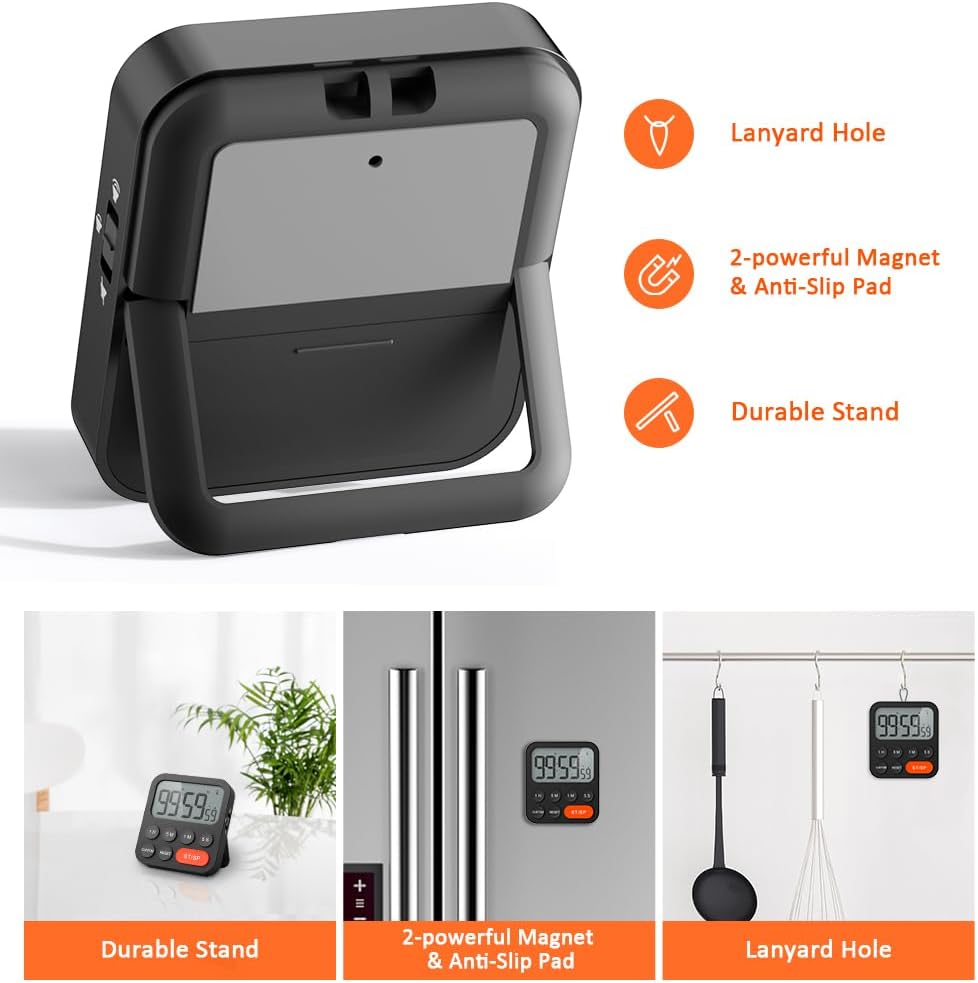
Image 3.6: Various ways to place and use the timer.
3.8 అదనపు విధులు
- Delay Reminder: After a countdown finishes, the timer will automatically start counting up, indicating the elapsed time since the alarm.
- Auto-Restore: Once a countdown is complete and the alarm has sounded, pressing the ST/SP button will restore the timer to the last set countdown time, making it convenient for repetitive tasks.

Image 3.7: Explanation of Delay Reminder and Auto-restore features.
4. నిర్వహణ
- Clean the timer with a soft, dry cloth. Do not use abrasive cleaners or immerse in water.
- Replace batteries when the display becomes dim or the timer functions erratically.
- ఎక్కువసేపు ఉపయోగంలో లేనప్పుడు టైమర్ను చల్లని, పొడి ప్రదేశంలో నిల్వ చేయండి.
5. ట్రబుల్షూటింగ్
- Timer not responding: బ్యాటరీలు సరిగ్గా ఇన్స్టాల్ చేయబడ్డాయో లేదో మరియు తగినంత ఛార్జ్ ఉందో లేదో తనిఖీ చేయండి. అవసరమైతే మార్చండి.
- Alarm too quiet/loud: Adjust the volume switch on the side of the timer to your preferred level.
- ప్రదర్శన ఖాళీగా ఉంది: Ensure batteries are installed and functional. If the issue persists, contact customer support.
6. స్పెసిఫికేషన్లు
| ఫీచర్ | వివరాలు |
|---|---|
| బ్రాండ్ | LIORQUE |
| మోడల్ సంఖ్య | YGH5249 |
| రంగు | నలుపు |
| ఉత్పత్తి కొలతలు | 0.94"డి x 0.94"హెచ్ |
| వస్తువు బరువు | 4.2 ఔన్సులు |
| శక్తి మూలం | 2 AAA బ్యాటరీలు (చేర్చబడినవి) |
| సెట్టింగ్ల సంఖ్య | 3 (వాల్యూమ్) |
| స్క్రీన్ పరిమాణం | 1E+1 సెంటీమీటర్లు |
7. వారంటీ మరియు మద్దతు
For warranty information or technical support, please refer to the product packaging or contact LIORQUE customer service through their official webఉత్పత్తిని కొనుగోలు చేసిన సైట్ లేదా రిటైలర్ వద్ద వారంటీ క్లెయిమ్ల కోసం మీ కొనుగోలు రసీదును ఉంచండి.