
పరిచయం
This manual provides detailed instructions for the setup, operation, maintenance, and troubleshooting of your ZTE MC888 Ultra 5G Router. The MC888 Ultra is a high-performance 5G router designed to deliver fast and reliable internet connectivity. It supports download speeds up to 3.8 Gbps and upload speeds up to 280 Mbps, features dual Gigabit LAN/WAN ports, and includes an RJ11 port for voice calls via VoIP, VoLTE, or VoNR.
భద్రతా సమాచారం
- పరికరాన్ని ఉపయోగించే ముందు అన్ని సూచనలను జాగ్రత్తగా చదవండి.
- Do not open or modify the device. Unauthorized modifications can void your warranty and create safety hazards.
- Use only the power adapter and accessories supplied with the router.
- పరికరాన్ని నీరు, తేమ మరియు తీవ్రమైన ఉష్ణోగ్రతల నుండి దూరంగా ఉంచండి.
- రౌటర్ వేడెక్కకుండా నిరోధించడానికి దాని చుట్టూ సరైన వెంటిలేషన్ ఉండేలా చూసుకోండి.
- బలమైన విద్యుదయస్కాంత క్షేత్రాల దగ్గర రౌటర్ను ఉంచడం మానుకోండి.
ప్యాకేజీ విషయాలు
మీ ప్యాకేజీలో అన్ని అంశాలు ఉన్నాయని ధృవీకరించండి:
- ZTE MC888 అల్ట్రా 5G రూటర్
- పవర్ అడాప్టర్
- ఈథర్నెట్ కేబుల్
- త్వరిత ప్రారంభ మార్గదర్శి (ఈ మాన్యువల్లో చేర్చబడలేదు)
పరికరం ముగిసిందిview
Familiarize yourself with the ports and indicators on your ZTE MC888 Ultra 5G Router.
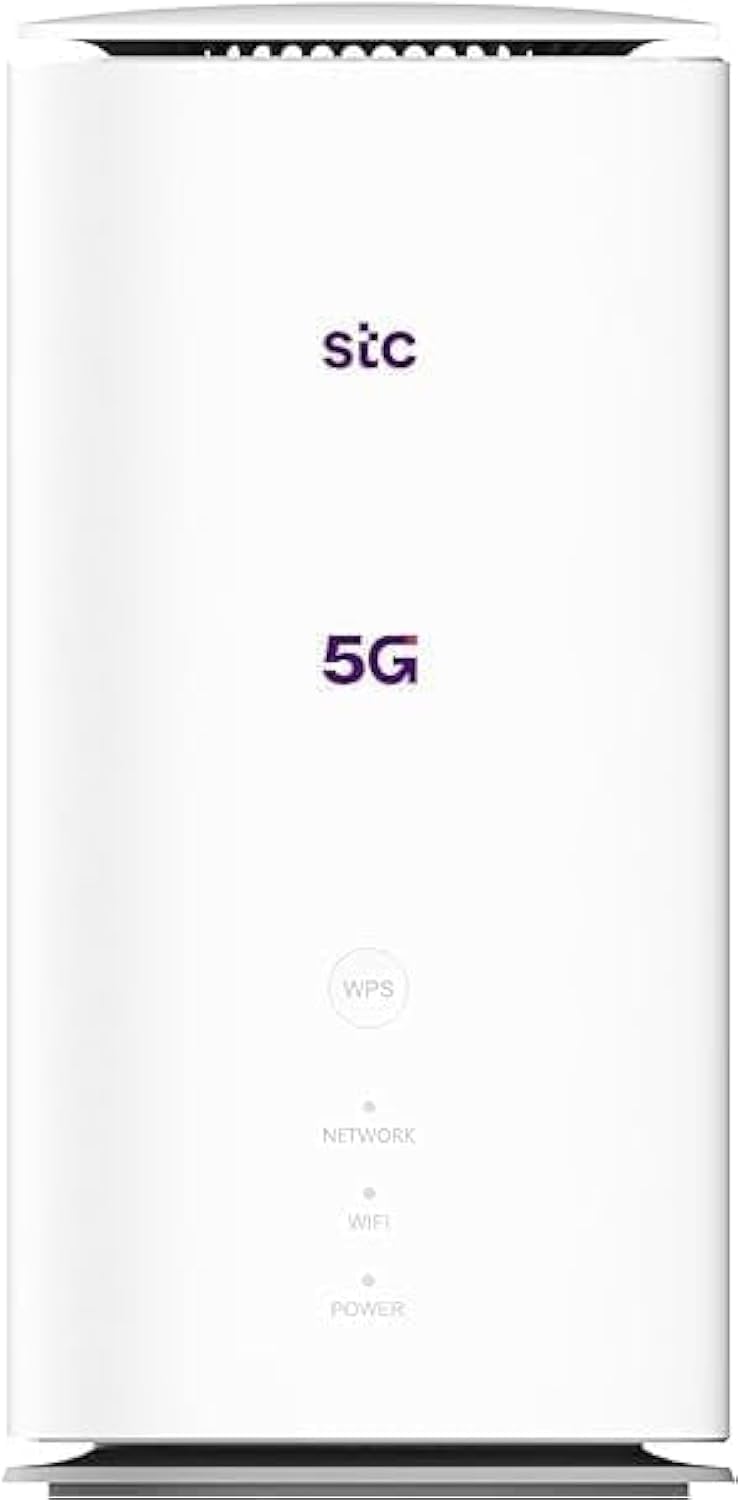
చిత్రం: ముందు మరియు వెనుక view of the ZTE MC888 Ultra 5G Router, showing LED indicators, SIM card slot, power port, LAN/WAN ports, and RJ11 port.
ముందు ప్యానెల్ సూచికలు:
- పవర్ LED: శక్తి స్థితిని సూచిస్తుంది.
- నెట్వర్క్ LED: Indicates 5G/4G network connection status.
- Wi-Fi LED: Wi-Fi కార్యాచరణను సూచిస్తుంది.
వెనుక ప్యానెల్ పోర్టులు:
- పవర్ పోర్ట్: పవర్ అడాప్టర్కు కనెక్ట్ చేస్తుంది.
- LAN/WAN Ports (x2): Gigabit Ethernet ports for wired connections or WAN input.
- RJ11 పోర్ట్: For connecting a telephone for VoIP, VoLTE, or VoNR calls.
- SIM కార్డ్ స్లాట్: For inserting your 5G/4G SIM card.
- రీసెట్ బటన్: ఫ్యాక్టరీ డిఫాల్ట్ సెట్టింగ్లను పునరుద్ధరించడానికి ఉపయోగించబడుతుంది.
సెటప్
1. SIM కార్డ్ని చొప్పించండి
- రూటర్ పవర్ ఆఫ్ చేయబడిందని నిర్ధారించుకోండి.
- వెనుక ప్యానెల్లో SIM కార్డ్ స్లాట్ను గుర్తించండి.
- బంగారు రంగు కాంటాక్ట్లు క్రిందికి ఉండేలా మరియు నాచ్ చేయబడిన మూల సరిగ్గా ఉండేలా స్లాట్లోకి ప్రామాణిక నానో-సిమ్ కార్డ్ను చొప్పించండి. అది స్థానంలో క్లిక్ అయ్యే వరకు నెట్టండి.
2. శక్తిని కనెక్ట్ చేయండి
- Connect the supplied power adapter to the router's power port.
- పవర్ అడాప్టర్ యొక్క మరొక చివరను గోడ అవుట్లెట్లోకి ప్లగ్ చేయండి.
3. పవర్ ఆన్
- The router will automatically power on. Wait for the Power LED to turn solid, and the Network LED to indicate a stable 5G/4G connection. This may take a few minutes.
4. పరికరాలను కనెక్ట్ చేయండి
- Wi-Fi కనెక్షన్: Find the Wi-Fi network name (SSID) and password printed on the label at the bottom of the router. Select this network on your device (smartphone, laptop, etc.) and enter the password.
- ఈథర్నెట్ కనెక్షన్: Use the provided Ethernet cable to connect your computer or other network device to one of the LAN/WAN ports on the router.
ఆపరేటింగ్
యాక్సెస్ చేస్తోంది Web ఇంటర్ఫేస్
- తెరవండి a web రౌటర్కి కనెక్ట్ చేయబడిన పరికరంలోని బ్రౌజర్.
- Enter the router's default IP address (e.g., 192.168.0.1 or 192.168.1.1) into the address bar and press Enter. The exact IP address is usually found on the router's label.
- Enter the default username and password (also found on the router's label) to log in.
Changing Wi-Fi Settings
నుండి web interface, navigate to the Wi-Fi settings section to change your SSID, password, security type, or enable/disable guest networks.
RJ11 Voice Call Functionality
The RJ11 port allows you to connect a standard analog telephone. You can manage sending and receiving calls via a configured VoIP account, or through VoLTE or VoNR, depending on your mobile operator's compatibility and SIM card support. Refer to your service provider for specific setup details.
యాక్సెస్ పాయింట్ మోడ్
The router supports Access Point (AP) mode, allowing it to extend an existing wired network wirelessly. This feature can be configured through the web interface under network settings.
నిర్వహణ
ఫర్మ్వేర్ నవీకరణలు
Periodically check the router's web interface for available firmware updates. Keeping your firmware up-to-date ensures optimal performance, security, and access to new features. Follow the on-screen instructions for safe updating.
క్లీనింగ్
Clean the router with a soft, dry cloth. Do not use liquid cleaners or aerosols. Ensure the device is powered off before cleaning.
ఫ్యాక్టరీ రీసెట్
If you experience persistent issues or forget your login credentials, you can perform a factory reset. With the router powered on, use a pin to press and hold the Reset button on the rear panel for approximately 5-10 seconds until the indicators flash. The router will restart with default settings.
ట్రబుల్షూటింగ్
- ఇంటర్నెట్ కనెక్షన్ లేదు: Check the Network LED. If it's off or red, ensure the SIM card is correctly inserted and has an active data plan. Try restarting the router.
- నెమ్మది వై-ఫై వేగం: Ensure your devices are within range. Reduce interference from other electronic devices. Try changing the Wi-Fi channel in the web ఇంటర్ఫేస్.
- యాక్సెస్ చేయలేరు Web ఇంటర్ఫేస్: Verify your device is connected to the router via Wi-Fi or Ethernet. Double-check the IP address and login credentials. Try clearing your browser's cache.
- Wi-Fi డిస్కనెక్షన్లు: Update router firmware. Ensure the router is placed in a central location. Check for conflicting Wi-Fi networks.
స్పెసిఫికేషన్లు
| బ్రాండ్ | ZTE |
| మోడల్ పేరు | MC888 అల్ట్రా |
| మోడల్ సంఖ్య | MC888 ULTRA |
| కనెక్టివిటీ టెక్నాలజీ | Wi-Fi, 5G/4G Cellular |
| వైర్లెస్ స్టాండర్డ్ | 802.11ac |
| ఫ్రీక్వెన్సీ బ్యాండ్ క్లాస్ | డ్యూయల్-బ్యాండ్ |
| గరిష్ట డౌన్లోడ్ వేగం | 3.8 Gbps |
| గరిష్ట అప్లోడ్ వేగం | 280 Mbps |
| LAN పోర్ట్ బ్యాండ్విడ్త్ | 1000 Mbps (గిగాబిట్) |
| పోర్టుల సంఖ్య | 2 x Gigabit LAN/WAN, 1 x RJ11 |
| యాంటెన్నా రకం | అంతర్గత |
| భద్రతా ప్రోటోకాల్ | WPS |
| ప్రత్యేక లక్షణాలు | Access Point Mode, RJ11 for VoIP/VoLTE/VoNR |
| RAM | 4 GB |
| అనుకూల పరికరాలు | PC, Laptop, Smartphone, Tablet, Gaming Console, Smart TV, Surveillance Camera, Printer, Ethernet-enabled devices |
| చేర్చబడిన భాగాలు | Router, Ethernet Cable, Charger |
వారంటీ మరియు మద్దతు
వారంటీ సమాచారం
The ZTE MC888 Ultra 5G Router comes with a 2-year agent warranty. Please retain your proof of purchase for warranty claims. The warranty covers manufacturing defects and malfunctions under normal use. It does not cover damage caused by misuse, accidents, unauthorized repairs, or acts of nature.
కస్టమర్ మద్దతు
For technical assistance, warranty service, or further inquiries, please contact your local ZTE authorized service center or the retailer from whom you purchased the product. You may also visit the official ZTE webమద్దతు వనరులు మరియు తరచుగా అడిగే ప్రశ్నల కోసం సైట్.