
Formuler Z Mini
Formuler Z Mini User Manual
Model: Z Mini
1. పరిచయం
The Formuler Z Mini is a compact and powerful Android 12-based streaming media player designed to deliver a high-quality entertainment experience. Featuring 4K output resolution, 2GB RAM, 8GB ROM, and dual-band 5G Wi-Fi connectivity, it provides seamless streaming and access to a wide range of applications. This manual provides essential information for setting up, operating, maintaining, and troubleshooting your Formuler Z Mini device.
2. భద్రతా సమాచారం
- పరికరాన్ని నీరు, తేమ లేదా తీవ్రమైన ఉష్ణోగ్రతలకు గురిచేయవద్దు.
- నష్టాన్ని నివారించడానికి అందించిన పవర్ అడాప్టర్ను మాత్రమే ఉపయోగించండి.
- Ensure proper ventilation around the device to avoid overheating.
- పరికరాన్ని మీరే విడదీయడానికి లేదా మరమ్మతు చేయడానికి ప్రయత్నించవద్దు. అర్హత కలిగిన సేవా సిబ్బందిని సంప్రదించండి.
- పరికరం మరియు ఉపకరణాలను పిల్లలకు అందుబాటులో లేకుండా ఉంచండి.
3. ప్యాకేజీ విషయాలు
ప్యాకేజీలో అన్ని అంశాలు ఉన్నాయని నిర్ధారించుకోండి:
- Formuler Z Mini Streaming Device
- బ్లూటూత్ రిమోట్ కంట్రోల్
- Power Adapter (5VDC / 1A)
- HDMI Extension Cable (integrated with device)
- 2 x AA బ్యాటరీలు (రిమోట్ కంట్రోల్ కోసం)

Image: Contents of the Formuler Z Mini package, including the streaming device, remote, and box.
4. సెటప్ గైడ్
4.1 పరికరాన్ని కనెక్ట్ చేస్తోంది
- టీవీకి కనెక్ట్ అవ్వండి: Plug the HDMI connector of the Formuler Z Mini directly into an available HDMI port on your television or display.
- పవర్ కనెక్ట్ చేయండి: Insert the power adapter cable into the DC IN port on the Formuler Z Mini, then plug the adapter into a wall outlet.
- పవర్ ఆన్: పరికరం స్వయంచాలకంగా పవర్ ఆన్ అవ్వాలి. లేకపోతే, రిమోట్ కంట్రోల్లోని పవర్ బటన్ను నొక్కండి.
4.2 ప్రారంభ కాన్ఫిగరేషన్
- రిమోట్ కంట్రోల్ జత చేయడం: Upon first use, the remote control may need to be paired. Follow the on-screen instructions, typically by pressing and holding specific buttons (e.g., Plus and Equals keys as indicated by some users) until the remote pairs.
- భాష ఎంపిక: ఆన్-స్క్రీన్ మెను నుండి మీకు నచ్చిన భాషను ఎంచుకోండి.
- నెట్వర్క్ కనెక్షన్: Connect the device to your Wi-Fi network. Select your network name (SSID) from the list and enter the password. The device supports Dual Band 5G 2x2 AC Wi-Fi for fast and stable connections.
- Google ఖాతా సెటప్: Sign in with your Google account to access the Google Play Store and other Google services.
- పూర్తి సెటప్: Follow any remaining on-screen prompts to finalize the initial setup process.

Image: The Formuler Z Mini device and its remote control, ready for connection.
5. పరికరాన్ని ఆపరేట్ చేయడం
5.1 రిమోట్ కంట్రోల్ ఓవర్view
The Formuler Z Mini comes with an advanced Bluetooth remote control. Familiarize yourself with its functions:
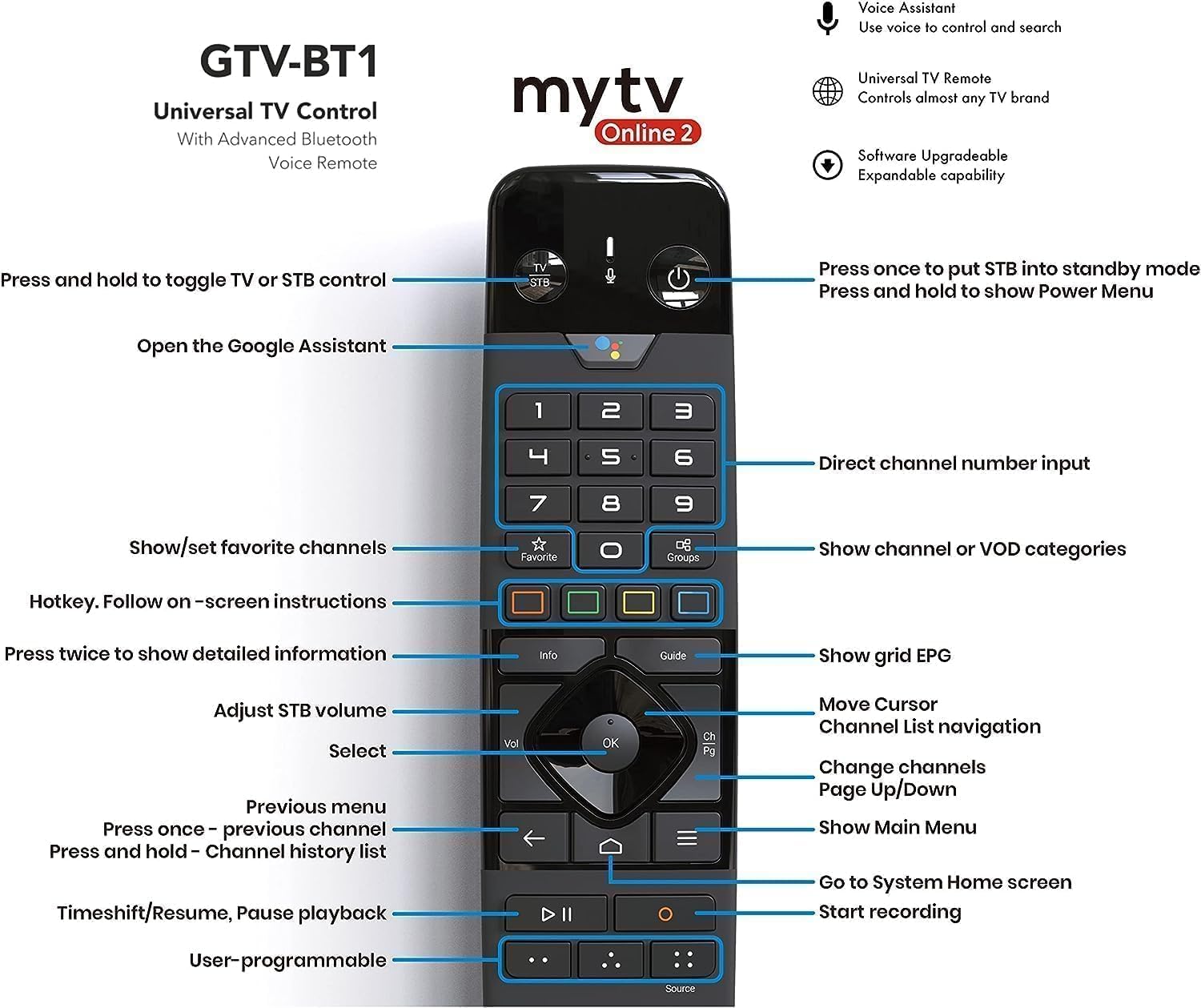
చిత్రం: వివరణాత్మకం view of the remote control with labeled buttons for various functions.
- పవర్ బటన్: Press once to put the device into standby mode; press and hold to show the Power Menu.
- TV/STB Control: Press and hold to toggle between TV or STB control.
- Google అసిస్టెంట్: Open the Google Assistant for voice commands.
- నంబర్ ప్యాడ్: Direct channel number input.
- Navigation Pad (OK, Up, Down, Left, Right): మెనూలను నావిగేట్ చేయండి మరియు అంశాలను ఎంచుకోండి.
- వెనుక బటన్: మునుపటి మెను లేదా స్క్రీన్కి తిరిగి వెళ్లండి.
- హోమ్ బటన్: Go to the System Home screen.
- వాల్యూమ్ బటన్లు: Adjust STB volume.
- ఛానెల్ బటన్లు: Change channels (Page Up/Down).
- సమాచార బటన్: Press twice for detailed information.
- గైడ్ బటన్: Show grid EPG (Electronic Program Guide).
- Favorite/Groups: Show/set favorite channels or show channel/VOD categories.
- ప్లేబ్యాక్ నియంత్రణలు: Timeshift/Resume, Pause playback, Start recording.
- User-programmable Buttons: Customize for quick access to preferred functions.
5.2 Navigation and Streaming
Once powered on, the Formuler Z Mini will display its home screen. Use the remote control's navigation pad to browse applications and settings. Launch your preferred streaming apps to enjoy content. The device supports 4K resolution, ensuring a crisp and clear viewఅనుకూల డిస్ప్లేలలో అనుభవం.
6. నిర్వహణ
- శుభ్రపరచడం: పరికరాన్ని శుభ్రం చేయడానికి మృదువైన, పొడి వస్త్రాన్ని ఉపయోగించండి. ద్రవ క్లీనర్లు లేదా ఏరోసోల్లను ఉపయోగించవద్దు.
- సాఫ్ట్వేర్ అప్డేట్లు: Regularly check for and install software updates to ensure optimal performance and access to the latest features. Updates are typically available through the device's settings menu.
- వెంటిలేషన్: Ensure the device is placed in a well-ventilated area and that its vents are not obstructed.
7. ట్రబుల్షూటింగ్
| సమస్య | సాధ్యమైన కారణం | పరిష్కారం |
|---|---|---|
| శక్తి లేదు | Power adapter not connected; outlet issue. | Ensure power adapter is securely connected to device and a working power outlet. |
| No signal on TV | Incorrect HDMI input selected; loose HDMI connection. | Select the correct HDMI input on your TV. Check HDMI cable connection. |
| రిమోట్ కంట్రోల్ స్పందించడం లేదు | Batteries low/dead; remote not paired. | Replace batteries. Re-pair the remote control by following on-screen instructions or referring to Section 4.2. |
| Wi-Fi కనెక్షన్ సమస్యలు | తప్పు పాస్వర్డ్; రౌటర్ సమస్యలు; సిగ్నల్ జోక్యం. | Verify Wi-Fi password. Restart your router. Move device closer to router or reduce interference. |
| పరికరం నెమ్మదిగా ఉంది లేదా గడ్డకట్టుకుంటోంది | చాలా యాప్లు రన్ అవుతున్నాయి; తక్కువ నిల్వ. | Close unused applications. Clear cache or uninstall unnecessary apps to free up storage. Restart the device. |
8. స్పెసిఫికేషన్లు
Detailed technical specifications for the Formuler Z Mini:
- అవుట్పుట్ రిజల్యూషన్: 4K (3840 x 2160)
- RAM: 2GB LPDDR4 @2400MHz
- నిల్వ: 8GB eMMC
- ఆపరేటింగ్ సిస్టమ్: ఆండ్రాయిడ్ 12
- నెట్వర్కింగ్: Wireless AC 2x2, Bluetooth 5.0
- Dimensions (L x W x T): 83 mm x 60 mm x 12.5 mm (3.3 x 2.4 x 0.5 అంగుళాలు)
- రంగు: నలుపు
- పవర్ ఇన్పుట్: 5 విడిసి / 1 ఎ
- విద్యుత్ వినియోగం: గరిష్టంగా 5 W
- వస్తువు బరువు: 15.8 ఔన్సులు
- మూలం దేశం: చైనా


చిత్రం: పైభాగం మరియు పక్క views of the Formuler Z Mini device, highlighting its compact design.
9. వారంటీ మరియు మద్దతు
For warranty information, technical support, or further assistance, please refer to the official Formuler webసైట్ లేదా వారి కస్టమర్ సర్వీస్ను సంప్రదించండి. వారంటీ క్లెయిమ్ల కోసం మీ కొనుగోలు రుజువును ఉంచండి.
Ask a question about this manual
Ask about setup, troubleshooting, compatibility, parts, safety, or missing instructions. Manuals+ will review the question and use this page’s manual context to help answer it.