
1. పరిచయం
Thank you for choosing the BESTEK 200W Power Inverter. This device converts 12V DC power from your vehicle's battery into 240V AC household power, along with multiple USB charging ports. It is designed for charging electronic devices, camping, and mobile office use. Please read this manual thoroughly before use to ensure safe and optimal operation.
2. భద్రతా సూచనలు
Adhering to these safety guidelines is crucial to prevent injury and damage to the inverter or connected devices.
- శక్తి పరిమితి: Ensure that the total power consumption of all connected devices does not exceed 200W. Overloading the inverter can cause damage and trigger protection mechanisms.
- వెంటిలేషన్: Always ensure adequate ventilation around the inverter. Do not block the cooling fan or air vents. Overheating can lead to automatic shutdown.
- పర్యావరణం: Use the inverter in a dry, well-ventilated area, away from direct sunlight, heat sources, flammable materials, and moisture.
- కనెక్షన్: Connect the inverter only to a 12V DC power source (e.g., a car cigarette lighter socket). Do not connect to 24V DC systems.
- పిల్లలు: ఇన్వర్టర్ను పిల్లలకు అందుబాటులో లేకుండా ఉంచండి.
- వేరుచేయడం: Do not attempt to disassemble, modify, or repair the inverter. Refer all servicing to qualified personnel.
- రక్షణ లక్షణాలు: The inverter includes built-in protections against overvoltagఇ, అండర్వాల్tage, overload, short circuit, and overheating. If a protection is triggered, the inverter may shut down automatically.

3. ఉత్పత్తి ముగిసిందిview
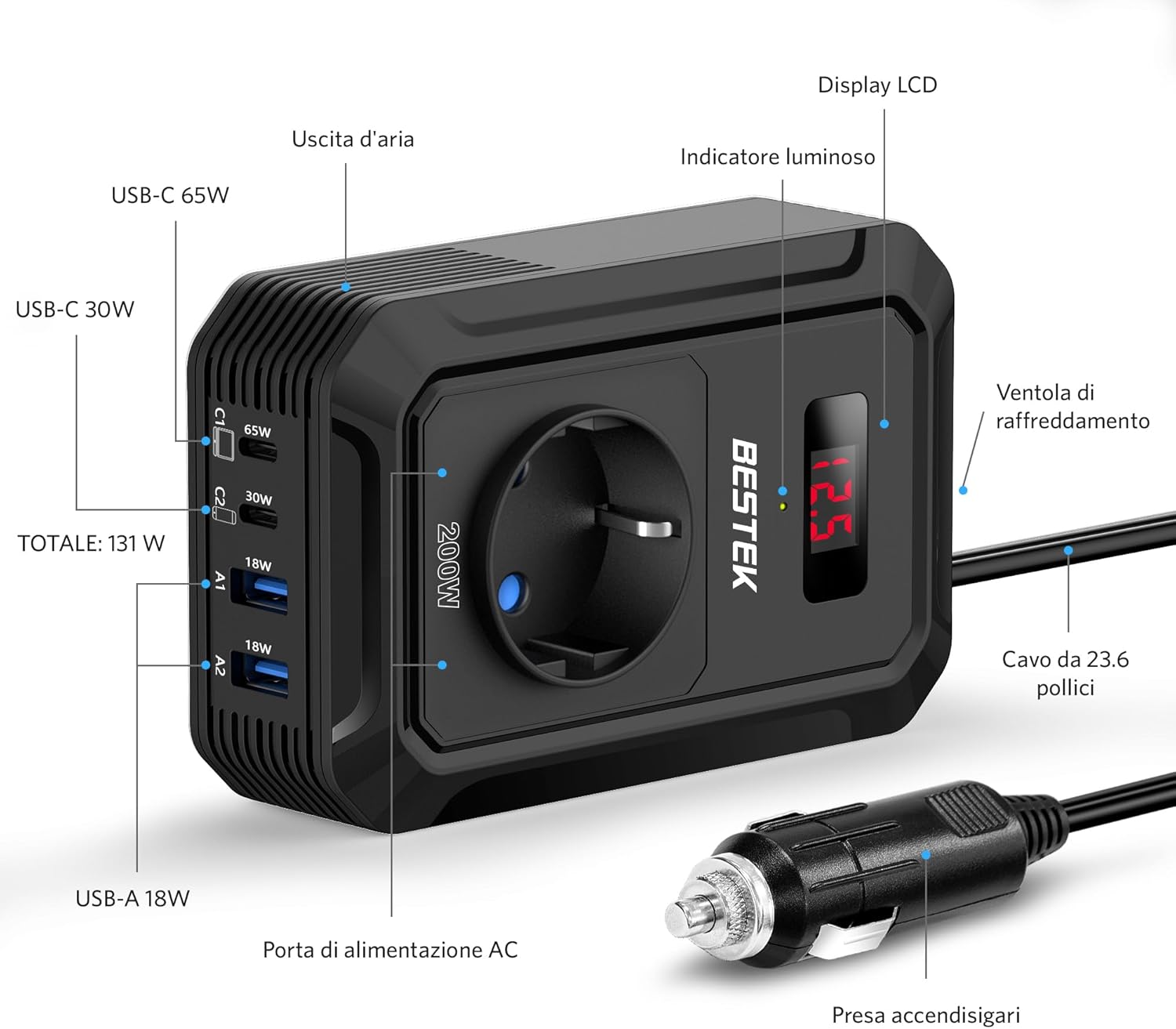
The BESTEK 200W Power Inverter is equipped with various ports and features for versatile power delivery.
భాగాలు:
- AC అవుట్లెట్: Universal EU socket for 240V AC devices.
- USB-C పోర్ట్లు: One 65W PD (Power Delivery) and one 30W QC3.0 (Quick Charge) port for fast charging compatible devices.
- USB-A పోర్ట్లు: Two 18W QC3.0 ports for quick charging.
- LCD డిస్ప్లే: ఇన్పుట్ వాల్యూమ్ను చూపుతుందిtage from the vehicle battery.
- కూలింగ్ ఫ్యాన్: వేడిని వెదజల్లడానికి స్వయంచాలకంగా సక్రియం అవుతుంది.
- సిగరెట్ లైటర్ ప్లగ్: For connecting to the vehicle's 12V DC power socket.
ముఖ్య లక్షణాలు:
- 200W Continuous Power: Provides stable power for various electronics.
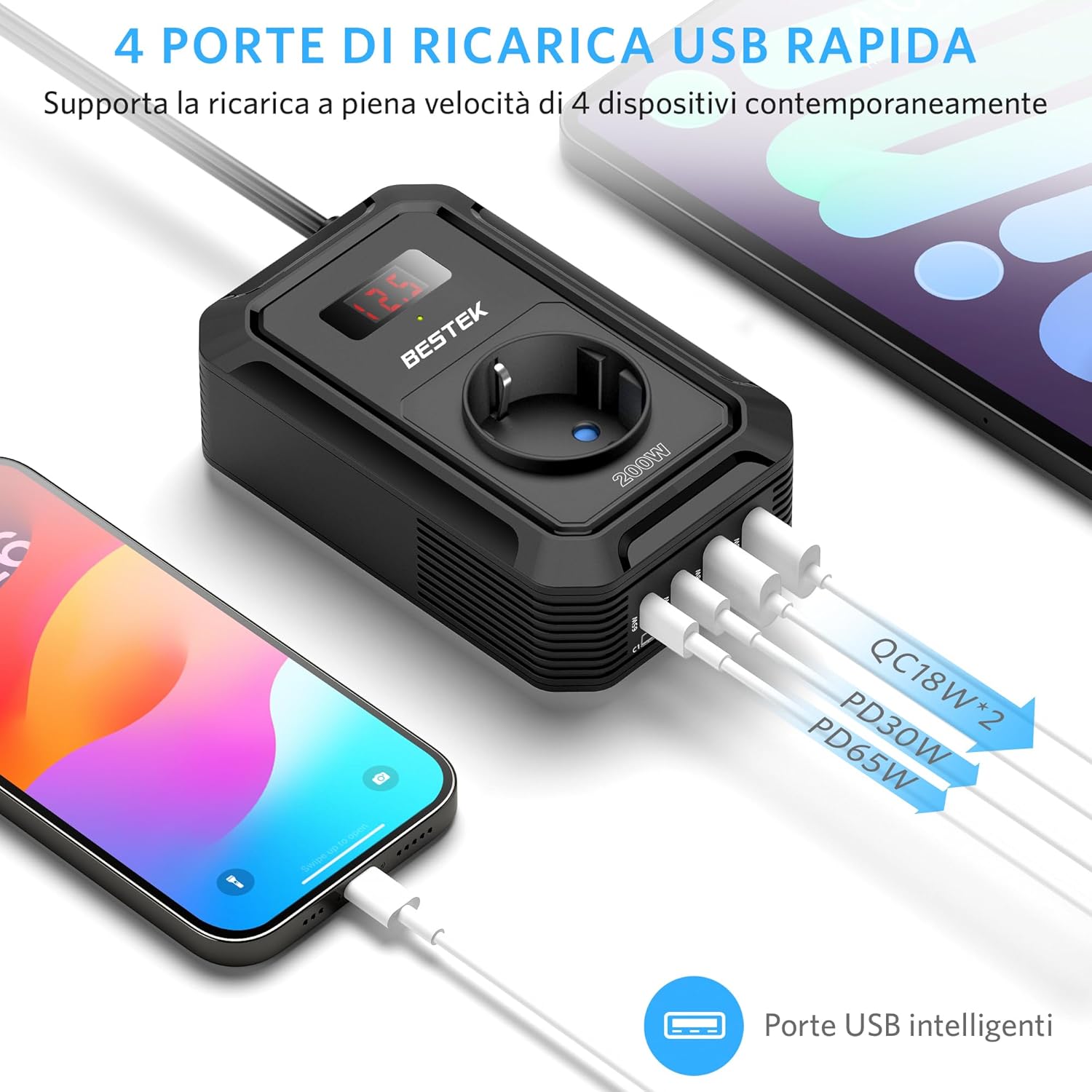
- హై-స్పీడ్ USB ఛార్జింగ్: Total USB output of 131W, including PD 65W and QC 18W ports for rapid charging of smartphones, tablets, and laptops.
- డిజిటల్ LCD స్క్రీన్: Displays real-time input voltagపర్యవేక్షణ కోసం ఇ.
- కాంపాక్ట్ మరియు పోర్టబుల్ డిజైన్: Measures approximately 8L x 3.3W x 12.5H cm, making it easy to store and transport.
- స్మార్ట్ కూలింగ్ సిస్టమ్: The fan adjusts speed based on load and temperature, reducing noise and preventing overheating.
4. సెటప్
Follow these steps to set up your BESTEK Power Inverter:
- వాహన తయారీ: Ensure your vehicle's engine is running to provide a stable 12V power supply and prevent draining the car battery, especially when using high-power devices.
- Connect to Cigarette Lighter: Insert the inverter's cigarette lighter plug firmly into your vehicle's 12V cigarette lighter socket. The LCD display should illuminate, showing the current input voltage.
- ప్లేస్మెంట్: Place the inverter on a stable surface, ensuring that the air vents are not obstructed. Maintain sufficient space around the unit for proper airflow.
5. ఆపరేటింగ్ సూచనలు
Once the inverter is properly set up, you can begin powering and charging your devices.
- పరికర అనుకూలతను తనిఖీ చేయండి: Before connecting, verify that your device's power requirement (in Watts) is within the inverter's 200W limit.
- పరికరాలను కనెక్ట్ చేయండి:
- For AC-powered devices, plug them into the universal AC outlet.
- For USB-powered devices, connect them to the appropriate USB-C (65W PD, 30W QC3.0) or USB-A (18W QC3.0) ports.
- మానిటర్ డిస్ప్లే: The LCD screen will show the input voltagఇ. వాల్యూమ్ ఉంటేtage drops too low (e.g., below 10.5V), the inverter may shut down to protect your car battery.
- ఉపయోగం తర్వాత డిస్కనెక్ట్ చేయండి: When you are finished, disconnect all devices and then unplug the inverter from the cigarette lighter socket.

యూనివర్సల్ అనుకూలత:
The inverter supports a wide range of devices, including:
- Laptops (e.g., MacBook Pro)
- స్మార్ట్ఫోన్లు మరియు టాబ్లెట్లు
- Gaming Devices (e.g., Nintendo Switch, PS5)
- Small Medical Machines (e.g., CPAP machine, Nebulizer)
- Car Accessories (e.g., Air Compressor, Small Fan, Bluetooth Speaker, Wireless Earbuds)

6. నిర్వహణ
Proper maintenance ensures the longevity and reliable performance of your inverter.
- శుభ్రపరచడం: ఇన్వర్టర్ యొక్క బాహ్య భాగాన్ని మెత్తటి, పొడి వస్త్రంతో కాలానుగుణంగా శుభ్రం చేయండి. ద్రవ క్లీనర్లు లేదా ద్రావకాలను ఉపయోగించవద్దు.
- వెంటిలేషన్: Regularly check that the cooling fan and air vents are free from dust and debris. Blocked vents can lead to overheating.
- నిల్వ: Store the inverter in a cool, dry place when not in use, away from extreme temperatures and direct sunlight.
- కేబుల్ తనిఖీ: Inspect the power cable and plug for any signs of damage before each use. Do not use if damaged.

7. ట్రబుల్షూటింగ్
మీ ఇన్వర్టర్తో మీకు సమస్యలు ఎదురైతే, ఈ క్రింది సాధారణ సమస్యలు మరియు పరిష్కారాలను చూడండి:
| సమస్య | సాధ్యమైన కారణం | పరిష్కారం |
|---|---|---|
| Inverter not powering on / No output |
|
|
| Inverter shuts down automatically (Protection mode) |
|
|
| Connected device not charging or working |
|
|
If the problem persists after attempting these solutions, please contact BESTEK customer support.
8. స్పెసిఫికేషన్లు
| ఫీచర్ | స్పెసిఫికేషన్ |
|---|---|
| బ్రాండ్ | బెస్టెక్ |
| మోడల్ పేరు | MRI2013EU |
| వాట్స్లో పవర్ | 200 వాట్స్ |
| పీక్ పవర్ | 200 వాట్స్ |
| ఇన్పుట్ వాల్యూమ్tage | 12 వోల్ట్లు (DC) |
| అవుట్పుట్ వాల్యూమ్tage | 240 వోల్ట్లు (AC) |
| అవుట్పుట్ వేవ్ఫార్మ్ | సవరించిన సైన్ వేవ్ |
| ఫ్రీక్వెన్సీ | 50 Hz |
| ఎసి అవుట్లెట్లు | 1 (Universal EU) |
| USB-C పోర్ట్లు | 2 (65W PD, 30W QC3.0) |
| USB-A పోర్ట్లు | 2 (18W QC3.0) |
| Total USB Power | 131W |
| శక్తి మూలం | సిగరెట్ తేలికైన సాకెట్ |
| ప్రదర్శన రకం | LCD |
| కొలతలు (L x W x H) | 8L x 3.3W x 12.5H సెం.మీ |
| బరువు | 300 గ్రాములు |
| భద్రతా ధృవపత్రాలు | CE, ETL Listed |
| సిఫార్సు చేసిన ఉపయోగాలు | Charging electronic devices, camping, mobile office use |
9. వారంటీ మరియు మద్దతు
BESTEK stands behind the quality of its products.
- వారంటీ: This product comes with an 18-month product replacement warranty.
- రిటర్న్ పాలసీ: BESTEK offers a 60-day refund policy for your purchase.
- కస్టమర్ మద్దతు: Friendly technical support and customer service are available 24/7. For assistance, please visit the official BESTEK store or contact their support channels.
For more information or to contact support, please visit the BESTEK Official Store.