
1. పరిచయం
The MASTECH MS2109D is a precise and versatile 6000-count digital multimeter with True RMS capabilities, designed for comprehensive electrical diagnosis. It features a 23mm max jaw opening for clamp measurements, overload protection, and various functions including Diode/Continuity, NCV Detection, Backlight, Data Hold, and Auto Power Off. This manual provides detailed instructions for the safe and effective use of your MS2109D multimeter.
2. భద్రతా సమాచారం
Always observe safety precautions when using electrical testing equipment. Failure to do so may result in injury or damage to the meter or equipment under test.
- ఉపయోగించే ముందు మీటర్ మంచి పని స్థితిలో ఉందని నిర్ధారించుకోండి.
- Do not exceed the maximum input values for any function. The MS2109D is rated CAT III 600V.
- వాల్యూమ్తో పని చేస్తున్నప్పుడు జాగ్రత్త వహించండిtag30V AC RMS, 42V పీక్ లేదా 60V DC కంటే ఎక్కువ. ఈ వాల్యూమ్లుtagషాక్ ప్రమాదాన్ని కలిగిస్తుంది.
- Always disconnect the test leads from the circuit before changing functions.
- Do not operate the meter if the battery cover is not in place or if the meter appears damaged.
- Use only the specified type of batteries (1.5V AAA x 3).
3. ఉత్పత్తి లక్షణాలు
- 6000 Counts Display
- నిజమైన RMS కొలత
- Frequency Measurement (up to 1000Hz)
- సాపేక్ష కొలత
- LED / Flashlight for illumination
- Duty Cycle / Inrush Current Measurement
- ఓవర్లోడ్ రక్షణ
- డయోడ్ మరియు కంటిన్యుటీ టెస్ట్
- సంపర్కం కాని సంtage (NCV) Detection / Live Wire Recognition
- Max Jaw Opening: 23mm
- Auto Power Off for battery saving
- డేటా హోల్డ్ ఫంక్షన్
- Backlight for easy reading in low light conditions
- యూనిట్ డిస్ప్లే
4. భాగాలు మరియు భాగాల గుర్తింపు
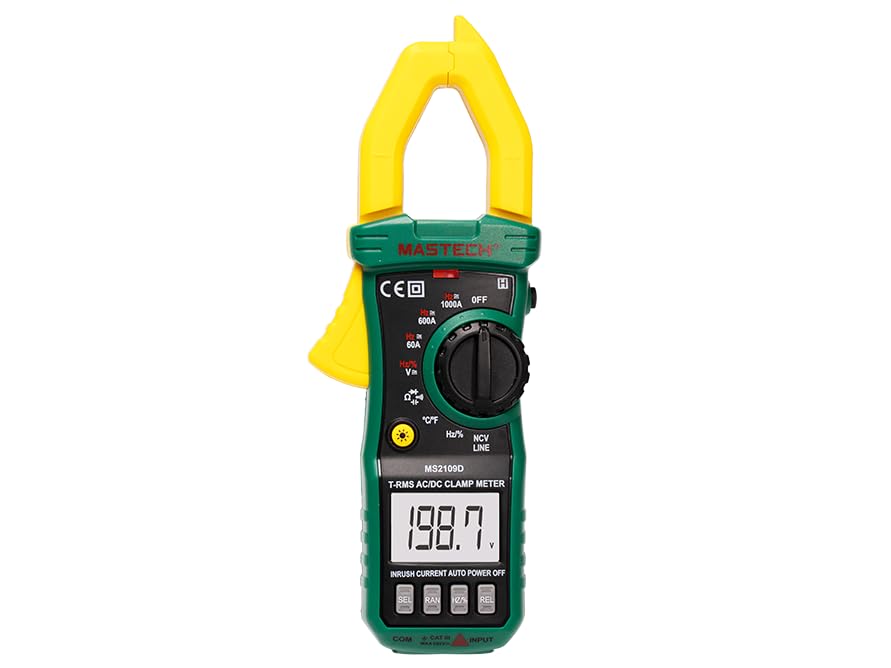
మూర్తి 4.1: ముందు view of the MASTECH MS2109D Digital Multimeter, showing the clamp jaw, display, rotary switch, and input terminals.
- Clamp దవడ: స్పర్శరహిత AC/DC కరెంట్ కొలతకు ఉపయోగించబడుతుంది.
- LCD డిస్ప్లే: కొలత రీడింగ్లు, యూనిట్లు మరియు ఫంక్షన్ సూచికలను చూపుతుంది.
- Function Rotary Switch: కావలసిన కొలత ఫంక్షన్ను ఎంచుకుంటుంది.
- ఫంక్షన్ బటన్లు: Buttons for specific features like HOLD, SELECT, NCV, etc.
- ఇన్పుట్ జాక్స్: Terminals for connecting test leads (COM, VΩHz, A).
- Flashlight/LED: Provides illumination for the measurement area.
5. సెటప్
5.1 బ్యాటరీ ఇన్స్టాలేషన్
- మీటర్ ఆఫ్ చేయబడిందని నిర్ధారించుకోండి.
- మీటర్ వెనుక భాగంలో బ్యాటరీ కంపార్ట్మెంట్ను గుర్తించండి.
- బ్యాటరీ కంపార్ట్మెంట్ కవర్ను విప్పు.
- Insert three 1.5V AAA batteries, observing the correct polarity (+/-) as indicated inside the compartment.
- బ్యాటరీ కవర్ను మార్చండి మరియు దానిని స్క్రూతో భద్రపరచండి.
5.2 టెస్ట్ లీడ్లను కనెక్ట్ చేయడం
- చాలా వాల్యూమ్లకుtage, resistance, continuity, diode, frequency, and capacitance measurements, insert the black test lead into the 'COM' (common) jack and the red test lead into the 'VΩHz' jack.
- For current measurements using test leads (not clamp), refer to the specific current input jack (if available, typically 'A' or 'mA' for smaller currents). For the MS2109D, current is primarily measured via the clamp.
6. ఆపరేటింగ్ సూచనలు
6.1 పవర్ ఆన్/ఆఫ్
Turn the rotary switch from 'OFF' to any desired function to power on the meter. To power off, turn the rotary switch back to 'OFF'. The meter features Auto Power Off to conserve battery life after a period of inactivity.
6.2 DC/AC వాల్యూమ్tagఇ కొలత (V)
- Set the rotary switch to the 'V' position. Use the 'SELECT' button to toggle between DCV and ACV if necessary.
- Connect the black test lead to the 'COM' jack and the red test lead to the 'VΩHz' jack.
- కొలవవలసిన సర్క్యూట్ లేదా కాంపోనెంట్కు సమాంతరంగా పరీక్ష ప్రోబ్లను కనెక్ట్ చేయండి.
- సంపుటాన్ని చదవండిtagడిస్ప్లేలో ఇ విలువ.
6.3 AC/DC Current Measurement (A) - Clamp ఫంక్షన్
- Set the rotary switch to the 'A' position (60A, 600A, or 1000A range). Use the 'SELECT' button to toggle between DCA and ACA.
- cl తెరవండిamp ట్రిగ్గర్ నొక్కడం ద్వారా దవడ.
- cl లోపల సర్క్యూట్ యొక్క ఒక కండక్టర్ను మాత్రమే మూసివేయండి.amp దవడ పూర్తిగా మూసివేయబడిందని నిర్ధారించుకోండి.
- డిస్ప్లేలో ప్రస్తుత విలువను చదవండి.
6.4 రెసిస్టెన్స్ మెజర్మెంట్ (Ω)
- Set the rotary switch to the 'Ω' position.
- Connect the black test lead to 'COM' and the red test lead to 'VΩHz'.
- Ensure the circuit or component is de-energized before connecting the probes.
- కొలవవలసిన భాగం అంతటా పరీక్ష ప్రోబ్లను కనెక్ట్ చేయండి.
- ప్రదర్శనలో నిరోధక విలువను చదవండి.
6.5 డయోడ్ మరియు కంటిన్యుటీ పరీక్ష
- Set the rotary switch to the 'Diode/Continuity' position. Use 'SELECT' to toggle between functions.
- Connect the black test lead to 'COM' and the red test lead to 'VΩHz'.
- For Continuity: Connect probes across the circuit. A continuous beep indicates continuity (low resistance).
- For Diode Test: Connect the red probe to the anode and the black probe to the cathode of the diode. The display will show the forward voltage drop. Reverse the probes; an open circuit (OL) reading indicates a good diode.
6.6 Frequency (Hz) and Capacitance (F) Measurement
- Set the rotary switch to the 'Hz/%' or 'Capacitance' position. Use 'SELECT' to toggle if combined.
- Connect the black test lead to 'COM' and the red test lead to 'VΩHz'.
- For Capacitance: Ensure the capacitor is fully discharged before testing. Connect probes across the capacitor.
- For Frequency: Connect probes across the signal source.
- ప్రదర్శనలో విలువను చదవండి.
6.7 Temperature Measurement (°C/°F)
- Set the rotary switch to the '°C/°F' position. Use 'SELECT' to toggle between Celsius and Fahrenheit.
- Connect the temperature probe (thermocouple) to the input jacks, observing polarity.
- ఉష్ణోగ్రతను కొలవవలసిన వస్తువుపై లేదా సమీపంలో ఉష్ణోగ్రత ప్రోబ్ యొక్క కొనను ఉంచండి.
- డిస్ప్లేపై ఉష్ణోగ్రత విలువను చదవండి.
6.8 నాన్-కాంటాక్ట్ వాల్యూమ్tagఇ (NCV) గుర్తింపు
- Set the rotary switch to the 'NCV' position.
- Move the top end of the meter (where the NCV sensor is located) close to the live conductor.
- The meter will emit an audible beep and the NCV indicator light will flash when AC voltagఇ గుర్తించబడింది.
6.9 Data Hold and Backlight
- డేటా హోల్డ్: డిస్ప్లేపై ప్రస్తుత రీడింగ్ను స్తంభింపజేయడానికి 'హోల్డ్' బటన్ను నొక్కండి. విడుదల చేయడానికి మళ్ళీ నొక్కండి.
- బ్యాక్లైట్: Press the 'Backlight' button (often combined with another function button) to turn the display backlight on or off for improved visibility in dark environments.
7. నిర్వహణ
7.1 శుభ్రపరచడం
మీటర్ను తుడవండి casinప్రకటనతో గ్రాamp వస్త్రం మరియు తేలికపాటి డిటర్జెంట్. అబ్రాసివ్లు లేదా ద్రావకాలను ఉపయోగించవద్దు. ఉపయోగించే ముందు మీటర్ పొడిగా ఉందని నిర్ధారించుకోండి.
7.2 బ్యాటరీ భర్తీ
When the battery indicator appears on the display, replace the batteries as described in Section 5.1. Always use fresh 1.5V AAA batteries.
7.3 నిల్వ
If the meter is not to be used for an extended period, remove the batteries to prevent leakage and store the meter in a cool, dry place away from direct sunlight and extreme temperatures.
8. ట్రబుల్షూటింగ్
- ప్రదర్శన లేదు: బ్యాటరీ ఇన్స్టాలేషన్ను తనిఖీ చేయండి మరియు బ్యాటరీలు అయిపోకుండా చూసుకోండి.
- 'OL' (Overload) Reading: The measured value exceeds the meter's range for the selected function. Select a higher range or ensure the input is within specifications.
- సరికాని రీడింగ్లు: Check test lead connections, ensure proper function selection, and verify battery level.
- మీటర్ ఆన్ అవ్వడం లేదు: Ensure the rotary switch is moved from the 'OFF' position.
9. స్పెసిఫికేషన్లు
9.1 సాధారణ లక్షణాలు
- గరిష్ట ప్రదర్శన: 6000 గణనలు
- భద్రతా రేటింగ్: క్యాట్ III 600 వి
- శక్తి మూలం: 3 x 1.5V AAA Batteries (included)
- కొలతలు: సుమారు 7.64 x 2.83 x 1.38 అంగుళాలు (19.4 x 7.2 x 3.5 సెం.మీ.)
- బరువు: దాదాపు 8.11 ఔన్సులు (230గ్రా)
- Max Jaw Opening: 23మి.మీ
9.2 కొలత లక్షణాలు
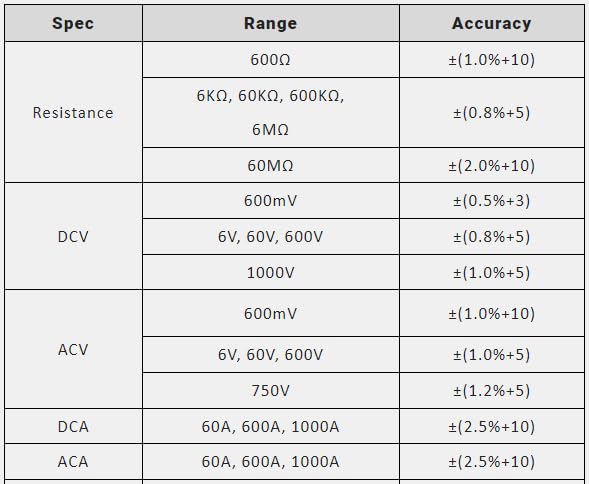
Figure 9.1: Measurement Specifications for Resistance, DCV, ACV, DCA, and ACA.
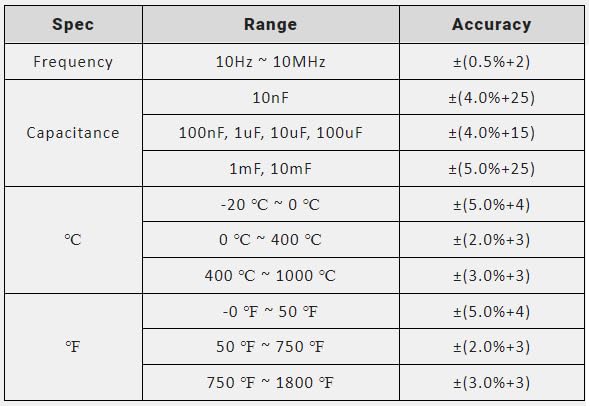
Figure 9.2: Measurement Specifications for Frequency, Capacitance, and Temperature (°C/°F).
10. పెట్టెలో ఏముంది
ఉత్పత్తి ప్యాకేజింగ్ తెరిచిన తర్వాత, మీరు ఈ క్రింది అంశాలను కనుగొనాలి:
- MASTECH MS2109D డిజిటల్ మల్టీమీటర్
- క్యారీ బ్యాగ్
- Test leads (one pair)
- వినియోగదారు మాన్యువల్ (ఈ పత్రం)
- ఉష్ణోగ్రత ప్రోబ్
- 3 x 1.5V AAA battery pack (pre-installed or separate)
11. వారంటీ మరియు మద్దతు
For warranty information and technical support, please refer to the warranty card included with your product or visit the official Mastech webవారంటీ క్లెయిమ్ల కోసం కొనుగోలు రుజువుగా మీ కొనుగోలు రసీదును ఉంచండి.
If you encounter any issues not covered in this manual, please contact Mastech customer service for assistance.