
iZEEKER iG500
iZEEKER iG500 Cellular Trail Camera Instruction Manual
Model: iG500 | Brand: iZEEKER
పరిచయం
The iZEEKER iG500 Cellular Trail Camera is designed for remote monitoring of wildlife, property, or other outdoor areas. Featuring 4G LTE connectivity, 2K HD live streaming, 360° pan and tilt functionality, and continuous power from an integrated solar panel, this camera provides reliable surveillance without the need for Wi-Fi. It includes advanced night vision modes and motion detection for comprehensive coverage day and night.
పెట్టెలో ఏముంది
- 1 x iG500 Trail Camera
- 1 x SIM Card
- 1 x Micro SD Card (32GB)
- 1 x Solar Panel (3W)
- 1 x వినియోగదారు మాన్యువల్
- 1 x USB కేబుల్
- 1 x Outdoor Mount
- 1 x Positioning Sticker
- 1 x ఇన్స్టాలేషన్ బ్రాకెట్
సెటప్
1. Insert SIM Card and Micro SD Card
Ensure the camera is powered off before inserting cards. Locate the card slots, typically protected by a rubber cover. Insert the provided 4G SIM card and 32GB Micro SD card into their respective slots. Close the cover securely to maintain IP65 waterproofing.
2. కెమెరాను మౌంట్ చేయడం
The iG500 camera offers flexible mounting options:
- స్ట్రాప్ మౌంట్: Use the provided strap to secure the camera to a tree or pole. Thread the strap through the designated slots on the camera's mounting bracket and fasten it.
- Screw Mount: For permanent installation, use the included screws and installation bracket to attach the camera to a wall, fence post, or tree.

Image: iZEEKER iG500 Cellular Trail Camera mounted on a tree, showcasing its camouflage design and solar panel connection.
3. సోలార్ ప్యానెల్ కనెక్షన్
Connect the provided 3W solar panel to the camera using the USB-C style connector. Mount the solar panel in a position that receives maximum direct sunlight throughout the day to ensure continuous charging of the built-in battery.

Image: iZEEKER iG500 Cellular Trail Camera with its solar panel mounted, illustrating how it receives sunlight for power.
4. యాప్ డౌన్లోడ్ మరియు ఖాతా నమోదు
Download the UBox app from your smartphone's app store (iOS or Android). Register for an account using your email address. Follow the in-app instructions to complete the registration process.
5. కెమెరాకు కనెక్ట్ చేస్తోంది
Power on the camera. Open the UBox app and follow the prompts to add a new device. The app will guide you through connecting to the camera via Bluetooth and then configuring the 4G LTE network. Ensure your phone's Bluetooth is enabled during this step.
Video: Step-by-step guide on how to install the iZEEKER Hunting Camera, including physical mounting and initial setup.
Video: Quick Setup Guide for the iZEEKER iG500 4G Solar Trail Camera, demonstrating the initial configuration process.
ఆపరేటింగ్ సూచనలు
1. 4G LTE కనెక్టివిటీ
The iG500 camera operates exclusively on 4G LTE networks. It automatically connects to the strongest available 4G signal. Note: This camera does not support Wi-Fi connectivity. Data plans can be managed and renewed through the UBox app after the initial trial data is consumed.
2. Remote Control and Live Streaming
Access and control your camera remotely using the UBox app on your smartphone. You can view 2K HD live streams with sound, take snapshots, and capture videos. The camera supports 336° pan, 90° tilt, and 4X digital zoom, allowing for a 360° panoramic view పర్యవేక్షించబడిన ప్రాంతం.
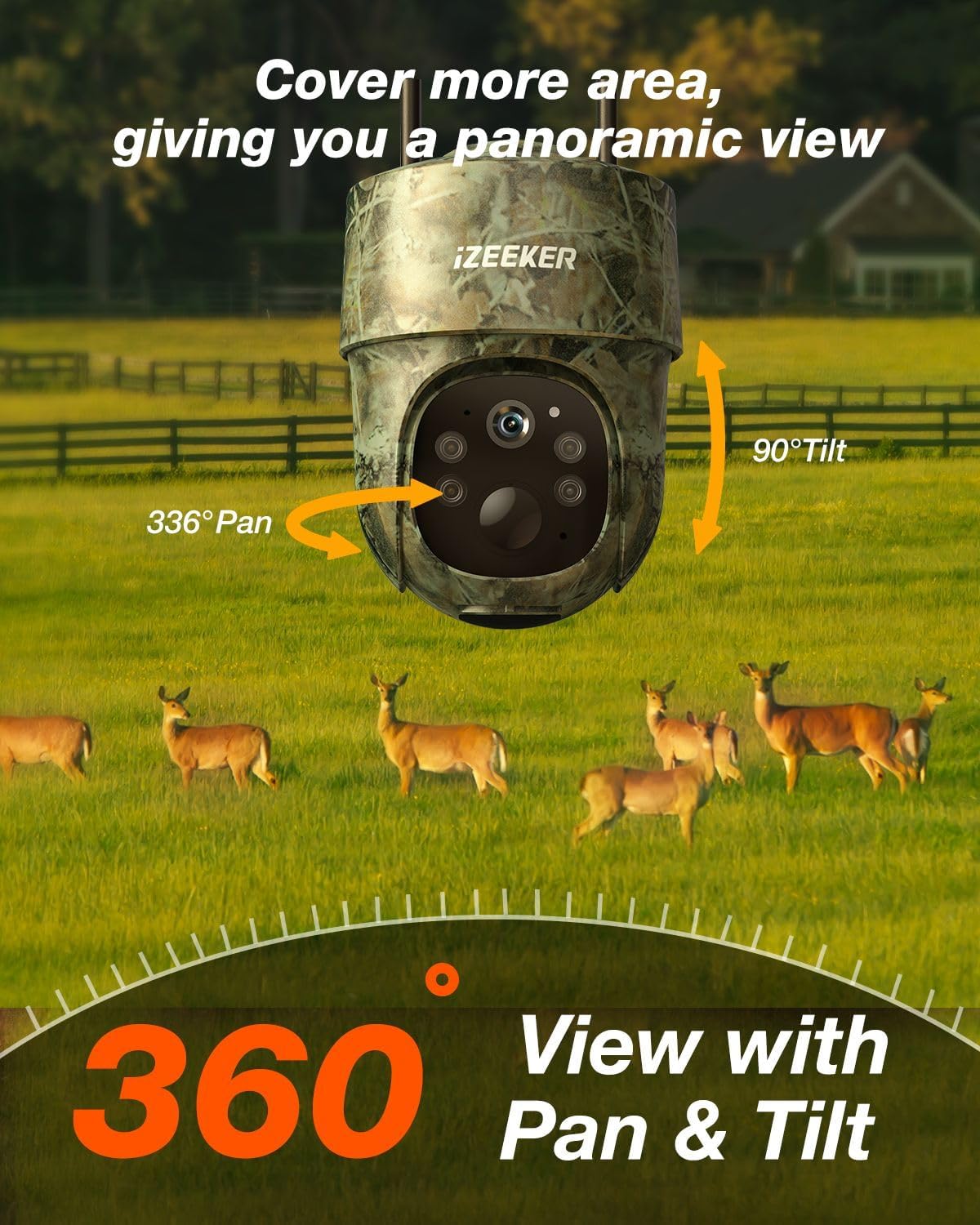
Image: The iZEEKER iG500 camera demonstrating its 336° pan and 90° tilt capabilities for full 360° coverage.
3. నైట్ విజన్ మోడ్లు
కెమెరా రెండు నైట్ విజన్ మోడ్లను అందిస్తుంది:
- No Glow Infrared Mode: Captures detailed black and white videos in low light conditions without emitting visible light, ensuring discretion.
- కలర్ నైట్ విజన్: Utilizes 4 white light LEDs (can be turned on via app) to capture full-color videos at night.

Image: Comparison of the two night vision modes: Spotlight Mode for color video and No Glow Infrared Mode for discreet black and white video.
4. మోషన్ డిటెక్షన్ మరియు హెచ్చరికలు
The camera features smart motion detection to reduce false alarms. When motion is detected, the UBox app will immediately send real-time notifications to your phone. You can adjust PIR interval and sensitivity settings within the app.

Image: A smartphone screen showing a real-time alert from the iG500 camera, indicating detected activity.
5. టూ-వే ఇంటర్కామ్
Utilize the two-way intercom feature via the app to communicate with subjects near the camera. This can be useful for deterring unwanted visitors or interacting with people on your property.
6. నిల్వ ఎంపికలు
Videos and images are stored on the included 32GB Micro SD card. Cloud storage service is also available as an option, which can be renewed through the UBox app.
నిర్వహణ
1. పవర్ మేనేజ్మెంట్
The iG500 features a built-in high-capacity battery and a 3W solar panel for continuous power. Ensure the solar panel is positioned to receive adequate sunlight to keep the battery charged. In areas with limited sunlight, the camera can also be charged via the provided USB cable.
2. వాతావరణ నిరోధకత
The camera is IP65 waterproof, designed to withstand various weather conditions. Ensure all port covers are securely closed after accessing them to maintain water resistance.

Image: The iG500 camera demonstrating its IP65 waterproof design, shown mounted on a tree during rainfall.
ట్రబుల్షూటింగ్
1. Camera Offline / No Connection
- Check 4G Signal: Ensure the camera is in an area with strong 4G LTE signal.
- SIM కార్డ్: Verify the SIM card is correctly inserted and activated. Check your data plan status via the UBox app.
- రీబూట్: Power off the camera, wait 10 seconds, and power it back on.
2. బ్యాటరీ ఛార్జ్ కావడం లేదు
- సోలార్ ప్యానెల్ స్థానం: సోలార్ ప్యానెల్ శుభ్రంగా ఉందని మరియు ప్రతిరోజూ చాలా గంటలు ప్రత్యక్ష సూర్యకాంతిని పొందుతుందని నిర్ధారించుకోండి.
- కేబుల్ కనెక్షన్: సోలార్ ప్యానెల్ కేబుల్ కెమెరాకు సురక్షితంగా కనెక్ట్ చేయబడిందని ధృవీకరించండి.
- Manual Charge: If solar charging is insufficient, charge the camera directly using the USB cable.
3. False Motion Alerts / Missed Events
- PIR సున్నితత్వం: Adjust the PIR sensitivity settings in the UBox app (Low, Medium, High) to optimize detection for your environment.
- PIR విరామం: Configure the PIR interval to prevent excessive recordings from continuous motion.
- అడ్డంకులు: Ensure there are no moving branches or objects directly in front of the camera that could trigger false alerts.
4. పేలవమైన చిత్రం/వీడియో నాణ్యత
- లెన్స్ శుభ్రత: కెమెరా లెన్స్ను మృదువైన, పొడి గుడ్డతో శుభ్రం చేయండి.
- లైటింగ్: Ensure adequate lighting for optimal daytime recording. For night vision, verify night mode settings.
- SD కార్డ్: Ensure the SD card is not full or corrupted. Format the SD card if necessary (this will erase all data).
స్పెసిఫికేషన్లు
| ఫీచర్ | వివరాలు |
|---|---|
| మోడల్ పేరు | iG500 |
| వీడియో క్యాప్చర్ రిజల్యూషన్ | 2K |
| కనెక్టివిటీ టెక్నాలజీ | వైర్లెస్ (4G LTE సెల్యులార్) |
| శక్తి మూలం | Solar Powered (3W Solar Panel) & Battery Powered (2 Lithium Ion batteries included) |
| అంతర్జాతీయ రక్షణ రేటింగ్ | IP65 జలనిరోధిత |
| పాన్ / టిల్ట్ / జూమ్ | 336° Pan, 90° Tilt, 4X Digital Zoom |
| నైట్ విజన్ | 2 Night Vision Modes (No Glow Infrared, Color Night Vision with 4 white light LEDs) |
| మోషన్ డిటెక్షన్ | PIR Motion Sensor, Real-Time Notifications |
| ఆడియో | రెండు-మార్గం ఇంటర్కామ్ |
| నిల్వ | Micro SD Card (up to 128GB, 32GB included), Cloud Storage |
| కొలతలు | 5.83 x 4.33 x 5.43 అంగుళాలు |
| వస్తువు బరువు | 2.51 పౌండ్లు |
మద్దతు
For any inquiries or assistance, please contact iZEEKER customer support. We are committed to providing continuous support for a lifetime.
- Prompt Replies: Expect responses within 24 hours.
- రిటర్న్స్ & ఎక్స్ఛేంజ్: Enjoy a 30-day hassle-free return and exchange policy.
Ask a question about this manual
Ask about setup, troubleshooting, compatibility, parts, safety, or missing instructions. Manuals+ will review the question and use this page’s manual context to help answer it.