
1. పరిచయం
Thank you for choosing the Yunir MP3 Player. This device is designed to provide a portable and versatile music experience with its Bluetooth 5.0 connectivity, 2.4-inch TFT touch screen, and support for various audio formats. This manual will guide you through the setup, operation, and maintenance of your new MP3 player.
2. ప్యాకేజీ విషయాలు
దయచేసి ఈ క్రింది అంశాల కోసం ప్యాకేజీని తనిఖీ చేయండి:
- Yunir MP3 Player
- వైర్డు హెడ్ఫోన్
- ఛార్జింగ్ కేబుల్ (USB)
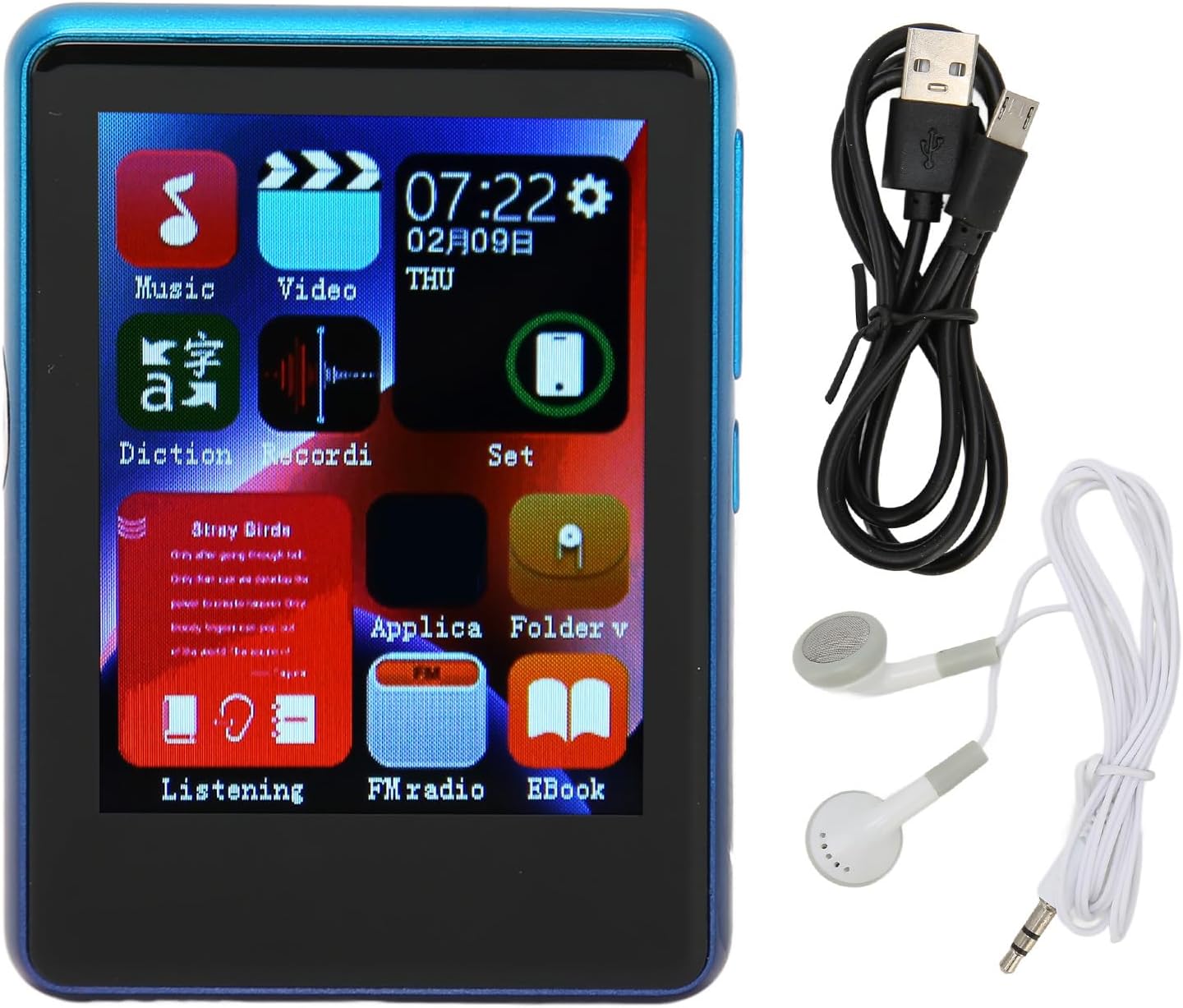
Image: The Yunir MP3 Player, accompanied by its wired headphones and USB charging cable, as included in the package.
3. ఉత్పత్తి ముగిసిందిview
3.1 పరికర లేఅవుట్
Familiarize yourself with the buttons, ports, and screen of your MP3 player.

చిత్రం: బహుళ వైపు views of the MP3 player, highlighting the volume control buttons (+ and -) and the power button on the side.

Image: A close-up of the bottom edge of the MP3 player, displaying the speaker grille, 3.5mm headphone jack, and Micro USB charging/data port.
- 2.4-అంగుళాల TFT టచ్ స్క్రీన్: నావిగేషన్ మరియు పరస్పర చర్య కోసం.
- వాల్యూమ్ బటన్లు (+/-): ఆడియో అవుట్పుట్ స్థాయిని సర్దుబాటు చేయండి.
- పవర్ బటన్: Turn the device on/off or lock/unlock the screen.
- 3.5mm హెడ్ఫోన్ జాక్: Connect wired headphones.
- మైక్రో USB పోర్ట్: ఛార్జింగ్ మరియు డేటా బదిలీ కోసం.
- మైక్రో SD కార్డ్ స్లాట్: Expand storage up to 256GB (card not included).
4. సెటప్
4.1 పరికరాన్ని ఛార్జ్ చేస్తోంది
- Connect the small end of the included USB charging cable to the Micro USB port on the MP3 player.
- USB కేబుల్ యొక్క పెద్ద చివరను USB పవర్ అడాప్టర్ (చేర్చబడలేదు) లేదా కంప్యూటర్ యొక్క USB పోర్ట్కి కనెక్ట్ చేయండి.
- The device will indicate that it is charging. Allow sufficient time for a full charge before first use.
గమనిక: Ensure the charging port is clean and free of debris to prevent connection issues.
4.2 మైక్రో SD కార్డ్ని చొప్పించడం
The device has 4GB of built-in memory and supports expansion up to 256GB via a Micro SD card (not included).
- ప్లేయర్ వైపు మైక్రో SD కార్డ్ స్లాట్ను గుర్తించండి.
- Gently insert the Micro SD card into the slot with the gold contacts facing down until it clicks into place.
- తీసివేయడానికి, కార్డు బయటకు వచ్చే వరకు కొద్దిగా లోపలికి నెట్టండి.
5. ఆపరేటింగ్ సూచనలు
5.1 పవర్ ఆన్/ఆఫ్
- పవర్ ఆన్ చేయడానికి: స్క్రీన్ వెలిగే వరకు పవర్ బటన్ను నొక్కి ఉంచండి.
- పవర్ ఆఫ్ చేయడానికి: Press and hold the Power button, then select "Power Off" on the screen.
- స్క్రీన్ లాక్/అన్లాక్: స్క్రీన్ను లాక్ చేయడానికి లేదా అన్లాక్ చేయడానికి పవర్ బటన్ను క్లుప్తంగా నొక్కండి.
5.2 నావిగేషన్
The MP3 player features a 2.4-inch TFT touch screen for intuitive navigation. Tap icons to open applications or settings, and swipe to scroll through lists.

Image: The MP3 player's main menu interface, showing various application icons such as Music, Video, FM Radio, and EBook, indicating touch screen functionality.
5.3 మ్యూజిక్ ప్లేబ్యాక్
The player supports a wide range of audio formats including MP3, APE, FLAC, WMA, WAV, and AAC, up to 24-bit quality.

Image: The MP3 player screen showing a music playback interface, with text indicating support for multiple audio formats like MP3, APE, FLAC, WMA, WAV, and AAC.
- ప్రధాన మెనూ నుండి, "సంగీతం" చిహ్నాన్ని నొక్కండి.
- మీ సంగీత లైబ్రరీని కళాకారుడు, ఆల్బమ్, శైలి లేదా ఫోల్డర్ వారీగా బ్రౌజ్ చేయండి.
- ప్లేబ్యాక్ ప్రారంభించడానికి పాటను నొక్కండి.
- Use the on-screen controls for play/pause, skip tracks, and adjust volume.
5.4 బ్లూటూత్ కనెక్టివిటీ
Connect to Bluetooth headphones or speakers for wireless audio.

Image: The MP3 player connected to wired headphones, illustrating its audio output capabilities, including the 3.5mm stereo line output jack for stable transmission.
- From the main menu, tap the "Set" or "Bluetooth" icon (if available).
- బ్లూటూత్ ఆన్ చేసి, అందుబాటులో ఉన్న పరికరాల కోసం స్కాన్ చేయండి.
- Select your Bluetooth device from the list to pair.
- Once paired, audio will stream wirelessly to your connected device.
5.5 FM రేడియో
The MP3 player includes an FM radio function.
- Connect wired headphones to the 3.5mm jack; they act as the antenna.
- From the main menu, tap the "FM Radio" icon.
- స్టేషన్ల కోసం స్కాన్ చేయడానికి లేదా మాన్యువల్గా ట్యూన్ చేయడానికి ఆన్-స్క్రీన్ నియంత్రణలను ఉపయోగించండి.
5.6 E-book Function
వచనాన్ని చదవండి files directly on your device.
- From the main menu, tap the "EBook" icon.
- Browse for compatible text files stored on your device or Micro SD card.
- a నొక్కండి file తెరిచి చదవడానికి.
6. File నిర్వహణ
6.1 బదిలీ Files
- Connect the MP3 player to your computer using the USB charging cable.
- The player should appear as a removable disk drive on your computer.
- Drag and drop music, video, or e-book files into the appropriate folders on the device's internal storage or the Micro SD card.
- USB కేబుల్ను డిస్కనెక్ట్ చేసే ముందు మీ కంప్యూటర్ నుండి పరికరాన్ని సురక్షితంగా బయటకు తీయండి.
7. నిర్వహణ
- శుభ్రపరచడం: Use a soft, dry cloth to clean the screen and body of the player. Avoid liquid cleaners.
- నిల్వ: పరికరాన్ని ప్రత్యక్ష సూర్యకాంతి మరియు తీవ్రమైన ఉష్ణోగ్రతలు లేకుండా చల్లని, పొడి ప్రదేశంలో నిల్వ చేయండి.
- బ్యాటరీ సంరక్షణ: బ్యాటరీ జీవితకాలాన్ని పొడిగించడానికి, బ్యాటరీని తరచుగా పూర్తిగా డిశ్చార్జ్ చేయకుండా ఉండండి. ఎక్కువసేపు ఉపయోగంలో లేనప్పటికీ, పరికరాన్ని క్రమం తప్పకుండా ఛార్జ్ చేయండి.
- చుక్కలను నివారించండి: భౌతిక షాక్లు మరియు చుక్కల నుండి పరికరాన్ని రక్షించండి.
8. ట్రబుల్షూటింగ్
| సమస్య | సాధ్యమైన పరిష్కారం |
|---|---|
| పరికరం పవర్ ఆన్ చేయదు. | బ్యాటరీ ఛార్జ్ అయ్యిందని నిర్ధారించుకోండి. పవర్ సోర్స్కి కనెక్ట్ చేసి, మళ్లీ ప్రయత్నించండి. |
| బదిలీ చేయలేరు fileపరికరానికి లు. | Check USB cable connection. Ensure the device is recognized by the computer. Try a different USB port or cable. |
| హెడ్ఫోన్ల నుండి శబ్దం లేదు. | Check headphone connection. Ensure volume is not muted or too low. Test with different headphones. |
| బ్లూటూత్ పరికరం జత కావడం లేదు. | Ensure Bluetooth is enabled on both devices. Place devices close to each other. Try unpairing and re-pairing. |
| Charging port issues. | Inspect the charging port for debris or damage. Use the original charging cable. If issues persist, contact support. |
9. స్పెసిఫికేషన్లు
| ఫీచర్ | వివరాలు |
|---|---|
| మోడల్ పేరు | Yunirc3gg08n9f6-12 |
| ప్రదర్శించు | 2.4 Inches TFT, Touch Screen |
| కనెక్టివిటీ | బ్లూటూత్ 5.0, USB |
| అంతర్గత మెమరీ | 4 GB |
| విస్తరించదగిన మెమరీ | Up to 256GB (Micro SD Card) |
| మద్దతు ఉన్న ఆడియో ఫార్మాట్లు | MP3, APE, FLAC, WMA, WAV, AAC (up to 24-bit) |
| ప్రత్యేక లక్షణాలు | FM Radio, E-book Function |
| బరువు | 0.11 కిలోలు |
| చేర్చబడిన భాగాలు | Wired Headphone, Charging Cable |
10. వారంటీ మరియు మద్దతు
This product comes with a standard manufacturer's warranty. For detailed warranty information, please refer to the warranty card included in your package or contact your retailer.
For technical support or customer service, please contact the vendor through your purchase platform or refer to the contact information provided with the product.