
1. పరిచయం
This manual provides detailed instructions for the safe and effective operation of your MASTECH MY74 Digital Multimeter. Please read this manual thoroughly before using the device and retain it for future reference. The MY74 is a compact, handheld digital multimeter designed for measuring AC/DC voltage, AC/DC current, resistance, capacitance, frequency, temperature, diode, continuity, and transistor hFE.
2. భద్రతా సమాచారం
WARNING: To avoid electric shock or personal injury, read and understand all safety information before using this multimeter.
- Always ensure the multimeter is in good working condition and free from damage.
- రేట్ చేయబడిన వాల్యూమ్ కంటే ఎక్కువ వర్తించవద్దుtagఇ, మీటర్పై, టెర్మినల్స్ మధ్య లేదా ఏదైనా టెర్మినల్ మరియు ఎర్త్ గ్రౌండ్ మధ్య గుర్తించినట్లుగా.
- వాల్యూమ్తో పని చేస్తున్నప్పుడు జాగ్రత్త వహించండిtag30V AC RMS, 42V పీక్ లేదా 60V DC కంటే ఎక్కువ. ఈ వాల్యూమ్లుtagషాక్ ప్రమాదాన్ని కలిగిస్తుంది.
- Always disconnect the test leads from the circuit before changing functions.
- Do not use the meter if the battery cover is not properly closed.
- తక్కువ బ్యాటరీ సూచిక కనిపించిన వెంటనే బ్యాటరీని మార్చండి.
- Adhere to the measurement category (CAT III 600V) for safe operation.
3. ఉత్పత్తి ముగిసిందిview
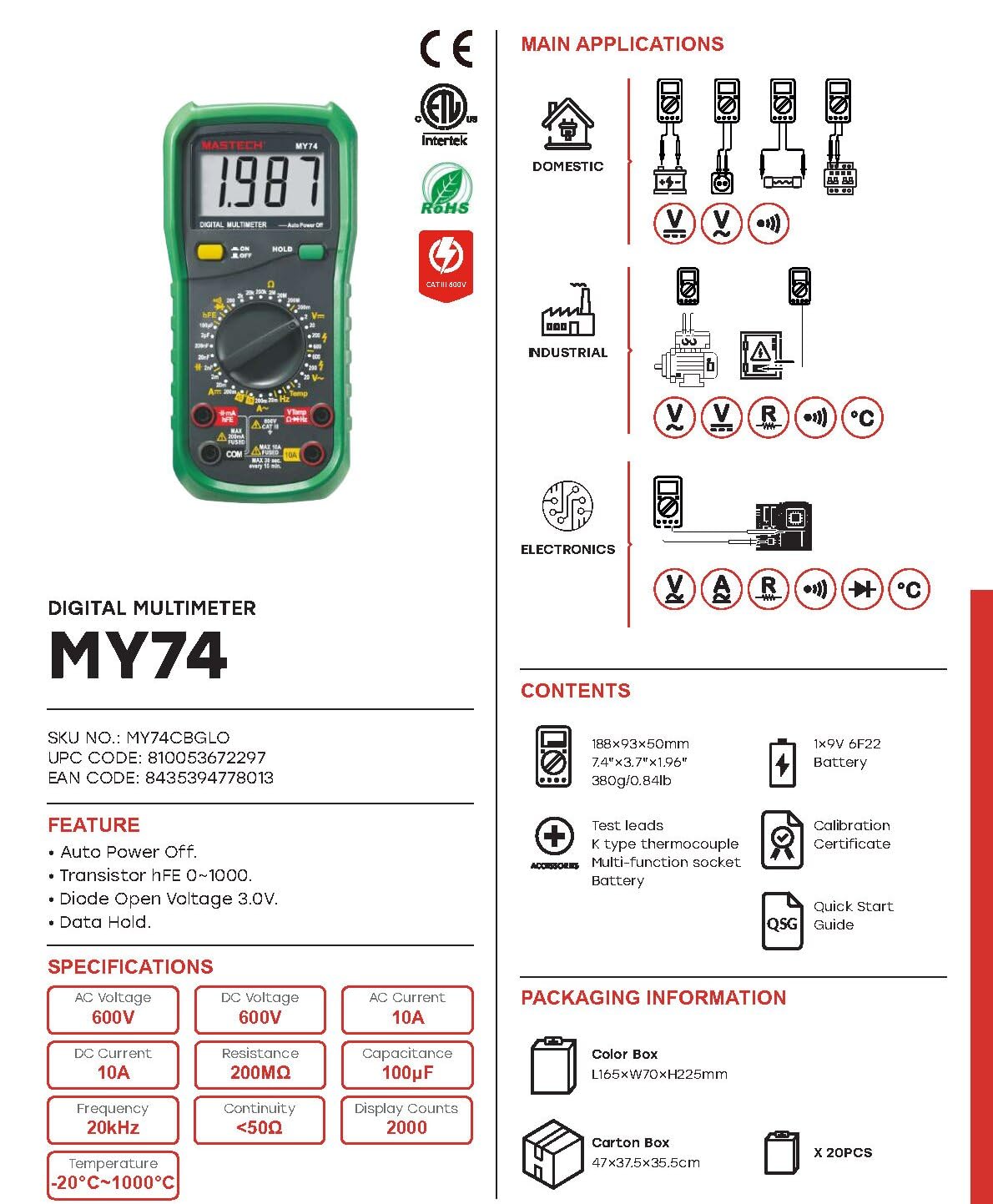
The MASTECH MY74 Digital Multimeter features a clear display, a rotary function switch, and input jacks for test leads. Familiarize yourself with the components shown below.

కీలక భాగాలు:
- LCD డిస్ప్లే: కొలత రీడింగ్లు, యూనిట్లు మరియు ఫంక్షన్ సూచికలను చూపుతుంది.
- రోటరీ ఫంక్షన్ స్విచ్: కావలసిన కొలత ఫంక్షన్ను ఎంచుకుంటుంది.
- ఆన్/ఆఫ్ బటన్: పరికరాన్ని ఆన్ లేదా ఆఫ్ చేస్తుంది.
- హోల్డ్ బటన్: ప్రస్తుత డిస్ప్లే రీడింగ్ను స్తంభింపజేస్తుంది.
- ఇన్పుట్ జాక్స్:
- COM: అన్ని కొలతలకు సాధారణ టెర్మినల్.
- VΩHz: వాల్యూమ్ కోసం ఇన్పుట్tage, నిరోధకత, పౌనఃపున్యం, కెపాసిటెన్స్, డయోడ్ మరియు కొనసాగింపు కొలతలు.
- మాµA: మిల్లీ కోసం ఇన్పుట్ampముందు మరియు సూక్ష్మampప్రస్తుత కొలతలు.
- 10A: Input for 10 Ampప్రస్తుత కొలతలు.
4 ఫీచర్లు
The MASTECH MY74 Digital Multimeter offers the following key features:
- ప్రదర్శన: 2000 గణనలు
- ఆటో పవర్ ఆఫ్ ఫంక్షన్
- Transistor hFE measurement (0~1000)
- డయోడ్ ఓపెన్ వాల్యూమ్tagఇ: 3.0 వి
- Continuity Buzzer: Activates below 50Ω
- డేటా హోల్డ్ ఫంక్షన్
- Low Battery Display indicator
5. సెటప్
5.1 బ్యాటరీ ఇన్స్టాలేషన్
MASTECH MY74 కి 2 LR44 బ్యాటరీలు అవసరం (చేర్చబడ్డాయి). బ్యాటరీలను ఇన్స్టాల్ చేయడానికి లేదా భర్తీ చేయడానికి:
- మల్టీమీటర్ ఆపివేయబడిందని నిర్ధారించుకోండి మరియు అన్ని పరీక్ష లీడ్లను డిస్కనెక్ట్ చేయండి.
- మీటర్ వెనుక భాగంలో బ్యాటరీ కంపార్ట్మెంట్ను గుర్తించండి.
- బ్యాటరీ కంపార్ట్మెంట్ కవర్ను విప్పు.
- Insert the batteries, observing correct polarity (+ and -).
- బ్యాటరీ కంపార్ట్మెంట్ కవర్ను మార్చండి మరియు దానిని స్క్రూతో భద్రపరచండి.
5.2 టెస్ట్ లీడ్లను కనెక్ట్ చేయడం
Always connect the black test lead to the COM jack. Connect the red test lead to the appropriate input jack based on the measurement function:
- VΩHz: వాల్యూమ్ కోసంtage, resistance, frequency, capacitance, diode, and continuity.
- మాµA: 200mA వరకు ప్రస్తుత కొలతల కోసం.
- 10A: 10A వరకు కరెంట్ కొలతలకు.
6. ఆపరేటింగ్ సూచనలు
Before taking any measurement, ensure the test leads are correctly connected and the rotary switch is set to the desired function.
6.1 DC వాల్యూమ్tage కొలత (V–)
- Connect the red test lead to the VΩHz jack and the black test lead to the COM jack.
- రోటరీ స్విచ్ను కావలసిన DC వాల్యూమ్కు సెట్ చేయండిtage range (e.g., 200mV, 2V, 20V, 200V, 600V).
- పరీక్ష లీడ్లను పరీక్షించబడుతున్న సర్క్యూట్ లేదా కాంపోనెంట్కు సమాంతరంగా కనెక్ట్ చేయండి.
- సంపుటాన్ని చదవండిtagడిస్ప్లేలో ఇ విలువ.
6.2 AC వాల్యూమ్tage కొలత (V∼)
- Connect the red test lead to the VΩHz jack and the black test lead to the COM jack.
- రోటరీ స్విచ్ను కావలసిన AC వాల్యూమ్కు సెట్ చేయండిtage range (e.g., 2V, 20V, 200V, 750V).
- Connect the test leads in parallel to the AC circuit or component.
- సంపుటాన్ని చదవండిtagడిస్ప్లేలో ఇ విలువ.
6.3 DC కరెంట్ కొలత (A–)
CAUTION: Never connect the multimeter in parallel to a voltagకరెంట్ కొలిచేటప్పుడు e మూలం. ఇది ఫ్యూజ్ పేలిపోవచ్చు లేదా మీటర్ దెబ్బతినవచ్చు.
- బ్లాక్ టెస్ట్ లీడ్ను COM జాక్కి కనెక్ట్ చేయండి.
- For currents up to 200mA, connect the red test lead to the mAµA jack. For currents up to 10A, connect the red test lead to the 10A jack.
- Set the rotary switch to the appropriate DC Current range (e.g., 2mA, 20mA, 200mA, 10A).
- సర్క్యూట్ తెరిచి, మల్టీమీటర్ను లోడ్తో సిరీస్లో కనెక్ట్ చేయండి.
- డిస్ప్లేలో ప్రస్తుత విలువను చదవండి.
6.4 AC Current Measurement (A∼)
CAUTION: Never connect the multimeter in parallel to a voltagకరెంట్ కొలిచేటప్పుడు e మూలం. ఇది ఫ్యూజ్ పేలిపోవచ్చు లేదా మీటర్ దెబ్బతినవచ్చు.
- బ్లాక్ టెస్ట్ లీడ్ను COM జాక్కి కనెక్ట్ చేయండి.
- For currents up to 200mA, connect the red test lead to the mAµA jack. For currents up to 10A, connect the red test lead to the 10A jack.
- Set the rotary switch to the appropriate AC Current range (e.g., 2mA, 20mA, 200mA, 10A).
- సర్క్యూట్ తెరిచి, మల్టీమీటర్ను లోడ్తో సిరీస్లో కనెక్ట్ చేయండి.
- డిస్ప్లేలో ప్రస్తుత విలువను చదవండి.
6.5 Resistance Measurement (Ω)
జాగ్రత్త: నిరోధకతను కొలిచే ముందు సర్క్యూట్ డి-ఎనర్జైజ్ చేయబడిందని మరియు అన్ని కెపాసిటర్లు డిశ్చార్జ్ అయ్యాయని నిర్ధారించుకోండి.
- Connect the red test lead to the VΩHz jack and the black test lead to the COM jack.
- Set the rotary switch to the desired Resistance range (e.g., 200Ω, 2kΩ, 20kΩ, 200kΩ, 2MΩ, 200MΩ).
- కొలవవలసిన భాగం అంతటా పరీక్ష లీడ్లను కనెక్ట్ చేయండి.
- ప్రదర్శనలో నిరోధక విలువను చదవండి.
6.6 డయోడ్ పరీక్ష (→|–)
- Connect the red test lead to the VΩHz jack and the black test lead to the COM jack.
- రోటరీ స్విచ్ను డయోడ్ టెస్ట్ స్థానానికి సెట్ చేయండి.
- ఎరుపు పరీక్ష లీడ్ను ఆనోడ్కు మరియు నలుపు పరీక్ష లీడ్ను డయోడ్ యొక్క కాథోడ్కు అనుసంధానించండి.
- డిస్ప్లే ఫార్వర్డ్ వాల్యూమ్ను చూపుతుందిtage drop. Reverse the leads; the display should show "OL" (Open Loop) for a good diode.
6.7 కంటిన్యుటీ టెస్ట్ (♫)
- Connect the red test lead to the VΩHz jack and the black test lead to the COM jack.
- రోటరీ స్విచ్ను కంటిన్యుటీ టెస్ట్ స్థానానికి సెట్ చేయండి.
- సర్క్యూట్ లేదా కాంపోనెంట్ అంతటా టెస్ట్ లీడ్లను కనెక్ట్ చేయండి.
- If the resistance is less than approximately 50Ω, the buzzer will sound, indicating continuity.
6.8 ట్రాన్సిస్టర్ hFE పరీక్ష
- రోటరీ స్విచ్ను hFE స్థానానికి సెట్ చేయండి.
- Insert the transistor's Emitter, Base, and Collector leads into the corresponding holes in the multi-function socket (NPN or PNP).
- డిస్ప్లేపై hFE విలువను చదవండి.
6.9 కెపాసిటెన్స్ కొలత (F)
CAUTION: Ensure the capacitor is fully discharged before measuring capacitance to avoid damage to the meter.
- Connect the red test lead to the VΩHz jack and the black test lead to the COM jack.
- Set the rotary switch to the Capacitance range (e.g., 2nF, 20nF, 200nF, 2µF, 20µF, 100µF).
- కెపాసిటర్ అంతటా పరీక్ష లీడ్లను కనెక్ట్ చేయండి.
- డిస్ప్లేలో కెపాసిటెన్స్ విలువను చదవండి.
6.10 ఫ్రీక్వెన్సీ కొలత (Hz)
- Connect the red test lead to the VΩHz jack and the black test lead to the COM jack.
- Set the rotary switch to the Frequency range (20kHz).
- Connect the test leads in parallel to the signal source.
- డిస్ప్లేలో ఫ్రీక్వెన్సీ విలువను చదవండి.
6.11 Temperature Measurement (°C/°F)
- Connect the K-type thermocouple to the VΩHz and COM jacks, observing polarity.
- Set the rotary switch to the Temperature range.
- ఉష్ణోగ్రతను కొలవవలసిన బిందువు వద్ద థర్మోకపుల్ ప్రోబ్ను ఉంచండి.
- డిస్ప్లేపై ఉష్ణోగ్రత విలువను చదవండి.
7. నిర్వహణ
7.1 శుభ్రపరచడం
ప్రకటనతో కేసును తుడిచివేయండిamp వస్త్రం మరియు తేలికపాటి డిటర్జెంట్. అబ్రాసివ్లు లేదా ద్రావకాలను ఉపయోగించవద్దు. ఉపయోగించే ముందు మీటర్ పూర్తిగా పొడిగా ఉందని నిర్ధారించుకోండి.
7.2 బ్యాటరీ భర్తీ
Refer to section 5.1 for battery replacement instructions. Replace batteries promptly when the low battery indicator appears to ensure accurate readings.
7.3 ఫ్యూజ్ రీప్లేస్మెంట్
If the current measurement function fails, the fuse may need replacement. Refer to the specifications for the correct fuse type and rating. Fuse replacement should only be performed by qualified personnel.
8. ట్రబుల్షూటింగ్
| సమస్య | సాధ్యమైన కారణం | పరిష్కారం |
|---|---|---|
| మీటర్ పవర్ ఆన్ అవ్వదు. | డెడ్ లేదా తప్పుగా ఇన్స్టాల్ చేయబడిన బ్యాటరీలు. | బ్యాటరీ ధ్రువణతను తనిఖీ చేయండి లేదా బ్యాటరీలను మార్చండి. |
| "OL" (ఓవర్లోడ్) ప్రదర్శించబడింది. | Measurement exceeds selected range or open circuit. | Select a higher range or check for open circuit. |
| Incorrect current reading. | Blown fuse or incorrect input jack. | Check fuse and ensure test lead is in the correct current input jack (mAµA or 10A). |
| కంటిన్యుటీ బీప్ లేదు. | Resistance is too high or circuit is open. | Check the circuit for breaks. Ensure resistance is below 50Ω. |
9. స్పెసిఫికేషన్లు
The following table details the technical specifications for the MASTECH MY74 Digital Multimeter.

| ఫంక్షన్ | పరిధి | రిజల్యూషన్ | ఖచ్చితత్వం |
|---|---|---|---|
| DC సంtage | 200mV/2V/20V/200V | 0.1mV/1mV/10mV/0.1V | ±(0.5%+2) |
| 600V | 1V | ±(0.8%+2) | |
| AC వాల్యూమ్tage | 2V/20V/200V | 1mV/10mV/100mV | ±(0.8%+3) |
| 750V | 1V | ±(1.2%+3) | |
| DC కరెంట్ | 2mA | 1µA | ±(0.8%+1) |
| 20mA | 10µA | ±(1.5%+1) | |
| 200mA | 0.1mA | ±(1.5%+1) | |
| 10A | 10mA | ±(2.0%+5) | |
| ఎసి కరెంట్ | 20mA | 10µA | ±(1.0%+5) |
| 200mA | 0.1mA | ±(1.8%+5) | |
| 10A | 0.01A | ±(3.0%+7) | |
| ప్రతిఘటన | 200Ω | 0.1Ω | ±(0.8%+3) |
| 2kΩ/20kΩ/200kΩ/2MΩ | 1Ω/10Ω/100Ω/1kΩ | ±(0.8%+2) | |
| 20MΩ | 10kΩ | ±(1.0%+2) | |
| 200MΩ | 0.1MΩ | ±(6.0%+10) | |
| డయోడ్ ఓపెన్ వాల్యూమ్tage | 3.0V | N/A | N/A |
| కెపాసిటెన్స్ | 2nF/20nF/200nF/2µF | 1pF/10pF/0.1nF/1nF | ±(4.0%+3) |
| 20µ ఎఫ్ | 10 ఎన్ఎఫ్ | ±(5.0%+3) | |
| 100µ ఎఫ్ | 0.1µ ఎఫ్ | ±(6.0%+10) | |
| ఫ్రీక్వెన్సీ | 20kHz | 0.01kHz | ±(2.0%+5) |
| ఉష్ణోగ్రత | -20°C~0°C | 1°C | ±(5.0%+4) |
| 1°C~400°C | 1°C | ±(2.0%+3) | |
| 401°C~1000°C | 1°C | ±(2.0%+5) | |
| ట్రాన్సిస్టర్ hFE | 0~1000 | N/A | N/A |
| ప్రదర్శించు | 2000 గణనలు | ||
| ఆటో పవర్ ఆఫ్ | అవును | ||
| కంటిన్యుటీ బజర్ | <50Ω | ||
| డేటా హోల్డ్ | అవును | ||
| తక్కువ బ్యాటరీ డిస్ప్లే | అవును | ||
| శక్తి మూలం | 2 LR44 బ్యాటరీలు (చేర్చబడినవి) | ||
| ఉత్పత్తి కొలతలు | 16 x 9 x 5 సెం.మీ | ||
| వస్తువు బరువు | 0.5 కిలోలు | ||
| భద్రతా రేటింగ్ | CAT III 600V, CE, RoHS | ||
Note: Accuracy specifications are given for one year after calibration, at 18°C to 28°C (64°F to 82°F), with relative humidity up to 75%.
10. వారంటీ మరియు మద్దతు
MASTECH products are designed for reliability and performance. For warranty information and technical support, please refer to the documentation included with your purchase or visit the official MASTECH website. The EU Spare Part Availability Duration is 1 year.