
FAMOO 33
FAMOO Bluetooth Headset Model 33 User Manual
మోడల్: 33
పరిచయం
Thank you for choosing the FAMOO Bluetooth Headset Model 33. This manual provides essential information for setting up, operating, and maintaining your new headset. Please read it thoroughly before use to ensure optimal performance and longevity of your device.
పెట్టెలో ఏముంది
- Wireless Bluetooth Headset x1
- ఛార్జింగ్ కేసు x1
- ఛార్జింగ్ కేబుల్ x1
- Spare Ear Caps x3 Pairs (S, M, L)
- ఇన్స్ట్రక్షన్ మాన్యువల్ x1
సెటప్
1. హెడ్సెట్ మరియు కేస్ను ఛార్జ్ చేయడం
Before first use, fully charge the headset and its charging case. Connect the provided charging cable to the charging case and a USB power source. The headset charges automatically when placed inside the case.
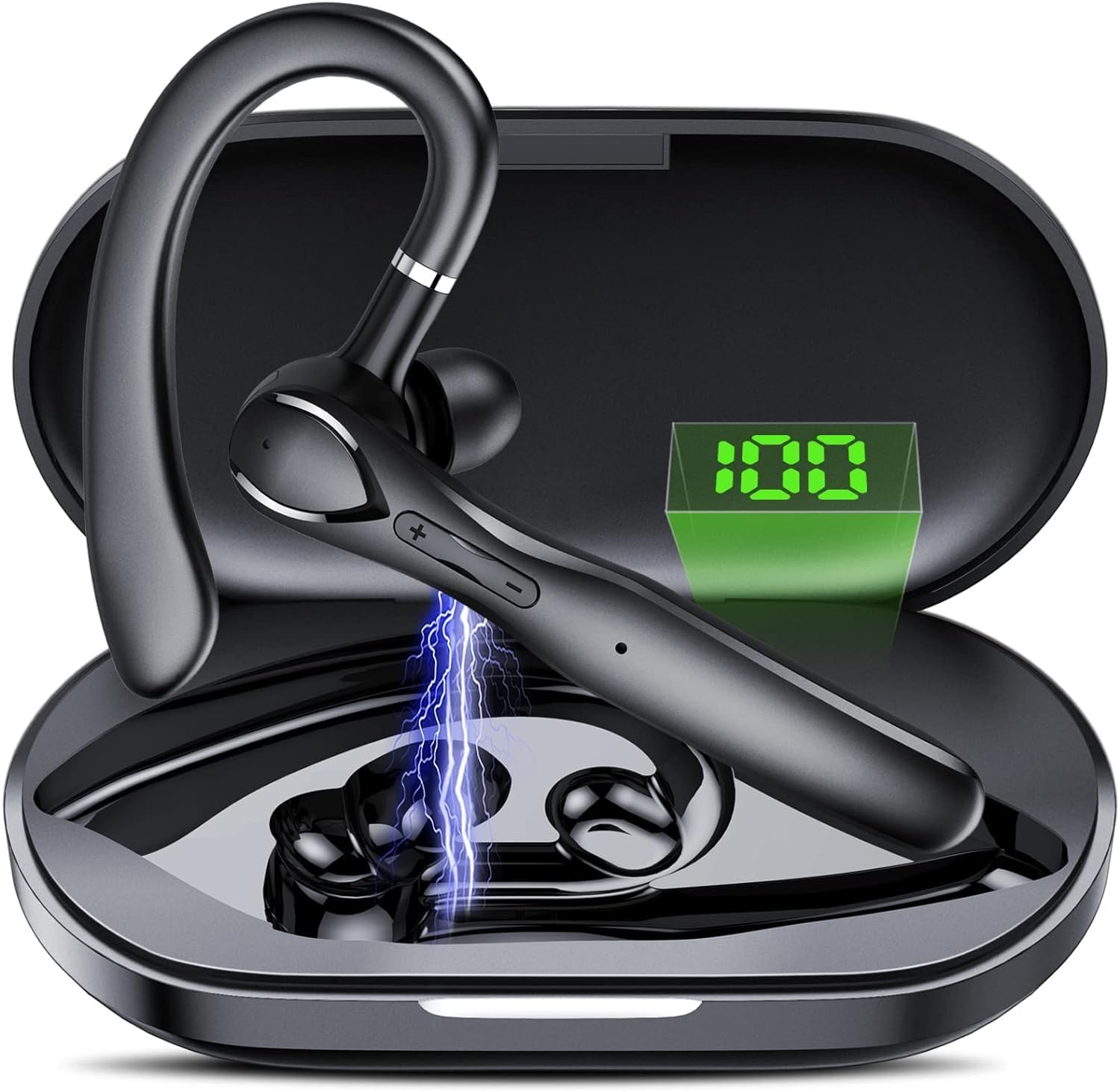
చిత్రం: The FAMOO Bluetooth Headset inside its charging case, illustrating battery life and charging duration. The charging case provides up to 100 hours of total play time, with the headset offering 20 hours of play time on a single charge. A full charge takes approximately 1.5 hours.
- ఛార్జింగ్ కేసు సామర్థ్యం: 400mAh
- Headset Play Time: 20 గంటల వరకు
- Total Play Time (with case): 100 గంటల వరకు
- ఛార్జింగ్ సమయం: సుమారు 1.5 గంటలు
2. మీ పరికరంతో జత చేయడం
- హెడ్సెట్ ఛార్జ్ చేయబడి, ఆన్ చేయబడిందని నిర్ధారించుకోండి.
- Activate Bluetooth on your smartphone or other device.
- కోసం వెతకండి available Bluetooth devices and select "FAMOO 33" from the list.
- కనెక్ట్ అయిన తర్వాత, హెడ్సెట్ విజయవంతమైన జతను సూచిస్తుంది.
The FAMOO Bluetooth Headset supports Bluetooth 5.3 for stable connectivity and can connect to two devices simultaneously.

చిత్రం: The FAMOO Bluetooth Headset shown wirelessly connected to two different smartphones, demonstrating its dual device connectivity feature. This allows for seamless switching between devices like Android phones, iPhones, iPads, laptops, and desktop computers.
3. Adjusting for a Comfortable Fit
The headset is designed for an adjustable and comfortable fit for both ears. Choose the appropriate ear cap size (S, M, L) for a secure and comfortable seal. The ear hook can be rotated to fit either the left or right ear.

చిత్రం: A man wearing the FAMOO Bluetooth Headset, illustrating its adjustable design for a comfortable fit on either the left or right ear. The image highlights the ergonomic ear hook design.
ఆపరేటింగ్ సూచనలు
1. పవర్ ఆన్/ఆఫ్
- పవర్ ఆన్: మల్టీ-ఫంక్షన్ బటన్ను 3 సెకన్ల పాటు నొక్కి పట్టుకోండి.
- పవర్ ఆఫ్: మల్టీ-ఫంక్షన్ బటన్ను 5 సెకన్ల పాటు నొక్కి పట్టుకోండి.
2. కాల్ నిర్వహణ
The headset features an HD microphone and ENC (Environmental Noise Cancellation) for clear calls, even in noisy environments. CVC8.0 technology further enhances audio clarity.

చిత్రం: A man using the FAMOO Bluetooth Headset while driving, demonstrating the clear call feature with ENC Noise Cancellation and Smart Voice Assistant. The graphic indicates a significant reduction in background noise (90% reduction).
- సమాధానం/ముగింపు కాల్: మల్టీ-ఫంక్షన్ బటన్ను ఒకసారి నొక్కండి.
- కాల్ని తిరస్కరించండి: మల్టీ-ఫంక్షన్ బటన్ను 2 సెకన్ల పాటు నొక్కి పట్టుకోండి.
- చివరి నంబర్ని మళ్లీ డయల్ చేయండి: మల్టీ-ఫంక్షన్ బటన్ను రెండుసార్లు నొక్కండి.
3. మ్యూజిక్ ప్లేబ్యాక్
- ప్లే/పాజ్: మల్టీ-ఫంక్షన్ బటన్ను ఒకసారి నొక్కండి.
- తదుపరి ట్రాక్: వాల్యూమ్ అప్ బటన్ను నొక్కి పట్టుకోండి.
- మునుపటి ట్రాక్: వాల్యూమ్ డౌన్ బటన్ను నొక్కి పట్టుకోండి.
4. వాల్యూమ్ నియంత్రణ
The headset features dedicated volume control buttons to adjust audio levels.

చిత్రం: A close-up of the FAMOO Bluetooth Headset highlighting the two physical control buttons (volume up/down) and the touch-sensitive area for other functions. This design aims to reduce accidental touches while providing easy access to controls.
- ధ్వని పెంచు: వాల్యూమ్ అప్ బటన్ను చిన్నగా నొక్కండి.
- వాల్యూమ్ డౌన్: వాల్యూమ్ డౌన్ బటన్ను చిన్నగా నొక్కండి.
5. వాయిస్ అసిస్టెంట్
Activate your device's voice assistant (e.g., Siri, Google Assistant) using the headset.
- వాయిస్ అసిస్టెంట్ను సక్రియం చేయండి: మల్టీ-ఫంక్షన్ బటన్ను మూడుసార్లు నొక్కండి.
నిర్వహణ
- శుభ్రపరచడం: Use a soft, dry cloth to clean the headset and charging case. Do not use harsh chemicals or abrasive materials.
- నిల్వ: Store the headset in its charging case when not in use to protect it from dust and damage. Avoid extreme temperatures.
- బ్యాటరీ సంరక్షణ: బ్యాటరీ జీవితకాలాన్ని పొడిగించడానికి, హెడ్సెట్ను తరచుగా పూర్తిగా డిశ్చార్జ్ చేయకుండా ఉండండి. నిరంతరం ఉపయోగంలో లేకపోయినా, దానిని క్రమం తప్పకుండా ఛార్జ్ చేయండి.
ట్రబుల్షూటింగ్
1. హెడ్సెట్ జత కావడం లేదు
- హెడ్సెట్ ఛార్జ్ చేయబడి, ఆన్ చేయబడిందని నిర్ధారించుకోండి.
- మీ పరికరం యొక్క బ్లూటూత్ను ఆఫ్ చేసి ఆన్ చేయండి.
- Delete "FAMOO 33" from your device's Bluetooth list and try pairing again.
- హెడ్సెట్ను మీ పరికరానికి దగ్గరగా తరలించండి.
2. ధ్వని లేదు
- హెడ్సెట్ మరియు మీ కనెక్ట్ చేయబడిన పరికరం రెండింటిలోనూ వాల్యూమ్ స్థాయిని తనిఖీ చేయండి.
- హెడ్సెట్ మీ పరికరానికి సరిగ్గా కనెక్ట్ చేయబడిందని నిర్ధారించుకోండి.
- వేరే అప్లికేషన్ లేదా మూలం నుండి ఆడియోను ప్లే చేయడానికి ప్రయత్నించండి.
3. ఛార్జింగ్ సమస్యలు
- ఛార్జింగ్ కేబుల్ కేస్ మరియు పవర్ సోర్స్ రెండింటికీ సురక్షితంగా కనెక్ట్ చేయబడిందని ధృవీకరించండి.
- విద్యుత్ వనరు పనిచేస్తుందని నిర్ధారించుకోండి.
- Clean the charging contacts on the headset and inside the case with a dry cotton swab.
స్పెసిఫికేషన్లు
| బ్రాండ్ | FAMOO |
| మోడల్ సంఖ్య | 33 |
| కనెక్టివిటీ టెక్నాలజీ | వైర్లెస్ (బ్లూటూత్) |
| బ్లూటూత్ వెర్షన్ | 5.3 |
| చెవి ప్లేస్మెంట్ | చెవిలో |
| ఫారమ్ ఫ్యాక్టర్ | చెవిలో |
| నాయిస్ కంట్రోల్ | యాక్టివ్ నాయిస్ క్యాన్సిలేషన్ (ENC) |
| మైక్రోఫోన్ | Built-in HD Microphone |
| నియంత్రణ పద్ధతి | Voice, Touch Control, Physical Buttons |
| ఇయర్పీస్ ఆకారం | హుక్ |
| ఎన్క్లోజర్ మెటీరియల్ | ప్లాస్టిక్ |
| అదనపు ఫీచర్లు | Fast Charging, Microphone Included, Touch Control, Dual Device Connectivity |
వారంటీ సమాచారం
The FAMOO Bluetooth Headset Model 33 comes with a 2 సంవత్సరాల వారంటీ from the date of purchase. This warranty covers manufacturing defects and workmanship. Please retain your proof of purchase for warranty claims. For detailed warranty terms and conditions, please refer to the official FAMOO webసైట్ లేదా కస్టమర్ సపోర్ట్ని సంప్రదించండి.
కస్టమర్ మద్దతు
For further assistance, technical support, or warranty inquiries, please visit the official FAMOO store or contact our customer service team.
FAMOO Store: Visit the FAMOO Store on Amazon
Ask a question about this manual
Ask about setup, troubleshooting, compatibility, parts, safety, or missing instructions. Manuals+ will review the question and use this page’s manual context to help answer it.