
పరిచయం
The Yesido YAU41 is a versatile 2-in-1 Bluetooth 5.0 audio adapter designed to function as both a transmitter (TX) and a receiver (RX). It enables wireless audio streaming for a wide range of devices, converting traditional audio systems into Bluetooth-enabled ones. Additionally, it features a built-in TF card reader for direct music playback. This manual provides essential information for proper setup, operation, and maintenance of your YAU41 device.
ఉత్పత్తి ముగిసిందిview
ముఖ్య లక్షణాలు:
- స్థిరమైన మరియు సమర్థవంతమైన వైర్లెస్ కనెక్షన్ కోసం బ్లూటూత్ 5.0.
- 2-in-1 functionality: Transmitter (TX) and Receiver (RX) modes.
- Integrated TF card reader for direct audio playback.
- 3.5mm AUX audio input/output.
- Rechargeable battery with approximately 10 hours of music playback.
- కాంపాక్ట్ మరియు పోర్టబుల్ డిజైన్.
- Intuitive TX/RX mode switch button.
పరికర భాగాలు:
Familiarize yourself with the various parts of your YAU41 audio adapter:
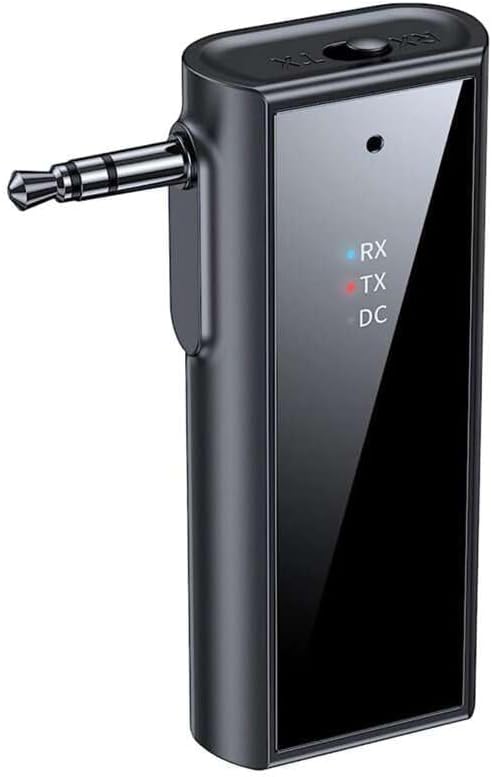
చిత్రం: ముందు భాగం view of the Yesido YAU41 Audio Adapter, highlighting the 3.5mm audio jack, mode indicator lights (RX, TX, DC), and the Yesido logo.
- 3.5mm ఆడియో జాక్: For connecting to audio sources (TX mode) or speakers (RX mode).
- TX/RX Switch Button: ట్రాన్స్మిటర్ మరియు రిసీవర్ మోడ్ల మధ్య టోగుల్ చేస్తుంది.
- Power Button/Multi-function Button: Powers the device on/off, plays/pauses music, answers/ends calls.
- వాల్యూమ్ పెంచు/తదుపరి ట్రాక్ బటన్: వాల్యూమ్ పెంచుతుంది లేదా తదుపరి ట్రాక్కి వెళుతుంది.
- వాల్యూమ్ డౌన్/మునుపటి ట్రాక్ బటన్: వాల్యూమ్ తగ్గిస్తుంది లేదా మునుపటి ట్రాక్కి వెళుతుంది.
- TF కార్డ్ స్లాట్: For inserting a TF (MicroSD) card for direct music playback.
- USB-C ఛార్జింగ్ పోర్ట్: పరికరాన్ని ఛార్జ్ చేయడానికి.
- Indicator Lights (RX, TX, DC):
- RX (Blue): Indicates Receiver mode is active.
- TX (Red): Indicates Transmitter mode is active.
- DC (Green): ఛార్జింగ్ స్థితిని సూచిస్తుంది.
సెటప్
1. ప్రారంభ ఛార్జింగ్:
Before first use, fully charge the YAU41 adapter. Connect the provided USB-C charging cable to the device's USB-C port and the other end to a standard USB power adapter (not included) or a computer USB port. The DC indicator light will illuminate during charging and turn off when fully charged.
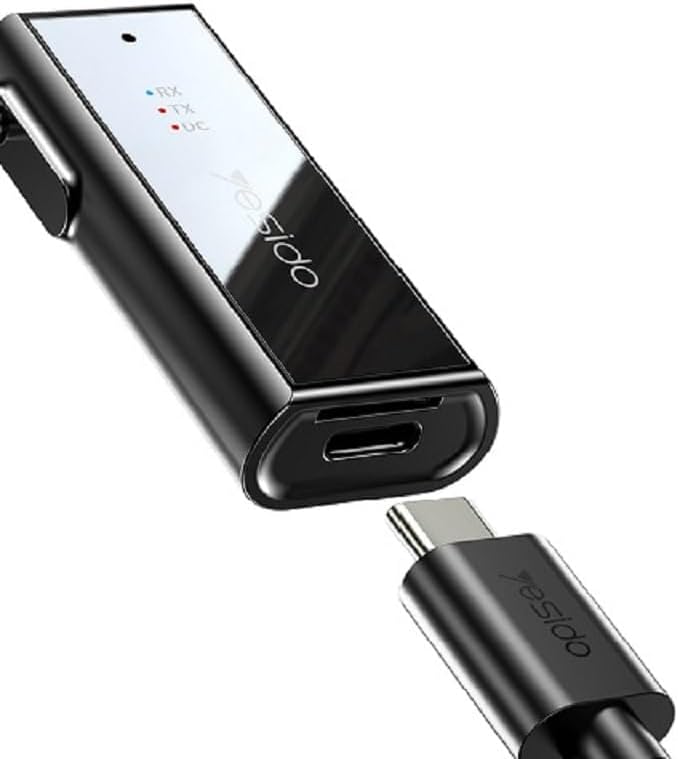
Image: The Yesido YAU41 Audio Adapter being charged via its USB-C port.
2. పవర్ చేయడం ఆన్/ఆఫ్:
- పవర్ ఆన్ చేయడానికి: Press and hold the Power button for approximately 3 seconds until the indicator lights flash.
- పవర్ ఆఫ్ చేయడానికి: సూచిక లైట్లు ఆపివేయబడే వరకు పవర్ బటన్ను దాదాపు 3 సెకన్ల పాటు నొక్కి పట్టుకోండి.
ఆపరేటింగ్ మోడ్లు
ట్రాన్స్మిటర్ (TX) మోడ్:
In TX mode, the YAU41 transmits audio from a non-Bluetooth device (e.g., TV, computer, MP3 player) to a Bluetooth-enabled receiving device (e.g., Bluetooth headphones, Bluetooth speaker).
- Ensure the YAU41 is powered on.
- Slide the TX/RX switch to the TX position. The red TX indicator light will illuminate.
- Connect the YAU41's 3.5mm audio jack to the audio output port of your non-Bluetooth device using the provided 3.5mm audio cable.
- Place your Bluetooth receiving device (headphones/speaker) into pairing mode.
- The YAU41 will automatically search for and connect to nearby Bluetooth receiving devices. Once connected, the TX indicator light may change its blinking pattern or remain solid.
- Play audio on your non-Bluetooth device. The sound should now be transmitted to your Bluetooth headphones/speaker.
రిసీవర్ (RX) మోడ్:
In RX mode, the YAU41 receives audio from a Bluetooth-enabled device (e.g., smartphone, tablet) and outputs it to a non-Bluetooth audio system (e.g., car stereo, home stereo, wired headphones).
- Ensure the YAU41 is powered on.
- Slide the TX/RX switch to the RX position. The blue RX indicator light will illuminate and flash, indicating it's in pairing mode.
- Connect the YAU41's 3.5mm audio jack to the audio input port (e.g., AUX-in) of your non-Bluetooth audio system using the provided 3.5mm audio cable.
- On your Bluetooth-enabled device (e.g., smartphone), enable Bluetooth and search for available devices. Select "YAU41" from the list to pair.
- Once successfully paired, the blue RX indicator light will remain solid.
- Play audio on your Bluetooth-enabled device. The sound will now be output through your connected audio system.

Image: The Yesido YAU41 Audio Adapter in a car, demonstrating its use with a TF card for direct music playback.
TF కార్డ్ ప్లేబ్యాక్:
The YAU41 supports direct audio playback from a TF (MicroSD) card.
- ఆడియోతో TF కార్డ్ని చొప్పించండి files (e.g., MP3) into the TF card slot on the YAU41.
- The device will automatically switch to TF card playback mode.
- Use the Volume Up/Next Track and Volume Down/Previous Track buttons to control playback.
- The Power/Multi-function button can be used to play/pause.
- Ensure the YAU41 is connected to an audio output device (e.g., speaker in RX mode) to hear the audio.
ఛార్జింగ్
When the battery is low, the indicator light may flash or a voice prompt may be heard. To charge the device:
- Connect the YAU41 to a USB power source using the provided USB-C cable.
- The DC indicator light will turn on during charging.
- Once fully charged, the DC indicator light will turn off.
- A full charge typically takes approximately 1-2 hours and provides up to 10 hours of music playback.
నిర్వహణ
- Keep the device dry. Do not expose it to moisture or liquids.
- పరికరాన్ని మృదువైన, పొడి వస్త్రంతో శుభ్రం చేయండి. కఠినమైన రసాయనాలు లేదా రాపిడి క్లీనర్లను ఉపయోగించకుండా ఉండండి.
- పరికరాన్ని ప్రత్యక్ష సూర్యకాంతి మరియు తీవ్రమైన ఉష్ణోగ్రతలు లేకుండా చల్లని, పొడి ప్రదేశంలో నిల్వ చేయండి.
- పరికరాన్ని వదలడం లేదా బలమైన ప్రభావాలకు గురి చేయడం మానుకోండి.
- పరికరాన్ని విడదీయడానికి లేదా సవరించడానికి ప్రయత్నించవద్దు, ఎందుకంటే ఇది వారంటీని రద్దు చేస్తుంది మరియు నష్టాన్ని కలిగించవచ్చు.
ట్రబుల్షూటింగ్
| సమస్య | సాధ్యమైన పరిష్కారం |
|---|---|
| పరికరం పవర్ ఆన్ చేయదు. | Ensure the device is fully charged. Press and hold the Power button for 3-5 seconds. |
| Cannot pair in TX/RX mode. |
|
| ఆడియో అవుట్పుట్/ఇన్పుట్ లేదు. |
|
| Audio delay/lag. | Bluetooth audio transmission can sometimes introduce minor latency. This device uses Bluetooth 5.0, which minimizes this, but some applications (e.g., live music performance) may still experience noticeable delay. Ensure no obstacles are between devices. |
స్పెసిఫికేషన్లు
| ఫీచర్ | వివరాలు |
|---|---|
| మోడల్ | YAU41 |
| బ్లూటూత్ వెర్షన్ | 5.0 |
| ఆపరేటింగ్ మోడ్లు | ట్రాన్స్మిటర్ (TX), రిసీవర్ (RX) |
| కనెక్టివిటీ | బ్లూటూత్, 3.5mm AUX |
| TF కార్డ్ మద్దతు | Yes (MicroSD) |
| ప్రసార దూరం | 10 మీటర్లు (33 అడుగులు) వరకు |
| బ్యాటరీ రకం | Rechargeable Lithium Ion/Polymer |
| సంగీతం ప్లేబ్యాక్ సమయం | సుమారు 10 గంటలు |
| ఛార్జింగ్ పోర్ట్ | USB-C |
| నియంత్రణ పద్ధతి | బటన్లు |
| మెటీరియల్ | PC (పాలికార్బోనేట్) |
| బరువు | 300 గ్రాములు |
| రంగు | నలుపు |
| అనుకూల పరికరాలు | TV, Radio, Speaker, Smartphone, Car Audio Systems |
భద్రతా సమాచారం
- పరికరాన్ని తీవ్రమైన ఉష్ణోగ్రతలు, ప్రత్యక్ష సూర్యకాంతి లేదా బహిరంగ మంటలకు గురిచేయవద్దు.
- Avoid using the device in dusty or dirty environments.
- బలమైన అయస్కాంత క్షేత్రాల నుండి పరికరాన్ని దూరంగా ఉంచండి.
- Do not use unauthorized chargers or cables, as this may damage the device or pose a safety risk.
- స్థానిక నిబంధనల ప్రకారం పరికరాన్ని మరియు దాని బ్యాటరీని బాధ్యతాయుతంగా పారవేయండి.
వారంటీ మరియు మద్దతు
వారంటీ సమాచారం మరియు సాంకేతిక మద్దతు కోసం, దయచేసి మీ కొనుగోలుతో అందించిన డాక్యుమెంటేషన్ను చూడండి లేదా తయారీదారుని నేరుగా సంప్రదించండి. వారంటీ క్లెయిమ్ల కోసం మీ కొనుగోలు రుజువును ఉంచండి.