
1. పరిచయం
Thank you for choosing the ELECTROPRIME LANGTU LT700 Wired Silent Punk Keyboard. This keyboard features a unique punk keycap design, silent operation, and strong compatibility, making it suitable for various computing tasks. Its ergonomic design ensures a comfortable typing experience, even during extended use. This manual provides essential information for setting up, operating, maintaining, and troubleshooting your keyboard.
2. భద్రతా సమాచారం
- కీబోర్డ్ను ద్రవాలకు లేదా అధిక తేమకు గురిచేయవద్దు.
- తీవ్రమైన ఉష్ణోగ్రతలను నివారించండి.
- Do not attempt to disassemble or repair the keyboard yourself. Contact qualified service personnel if needed.
- పిల్లలకు దూరంగా ఉంచండి.
- కీబోర్డ్ను మృదువైన, పొడి గుడ్డతో శుభ్రం చేయండి. కఠినమైన రసాయనాలను నివారించండి.
3. ప్యాకేజీ విషయాలు
మీ ప్యాకేజీలో అన్ని అంశాలు ఉన్నాయని ధృవీకరించండి:
- ELECTROPRIME LANGTU LT700 Wired Silent Punk Keyboard
- వినియోగదారు మాన్యువల్ (ఈ పత్రం)
4. సెటప్
The LANGTU LT700 keyboard is designed for simple plug-and-play operation.
- కీబోర్డ్ను దాని ప్యాకేజింగ్ నుండి అన్ప్యాక్ చేయండి.
- మీ కంప్యూటర్లో అందుబాటులో ఉన్న USB పోర్ట్ను గుర్తించండి.
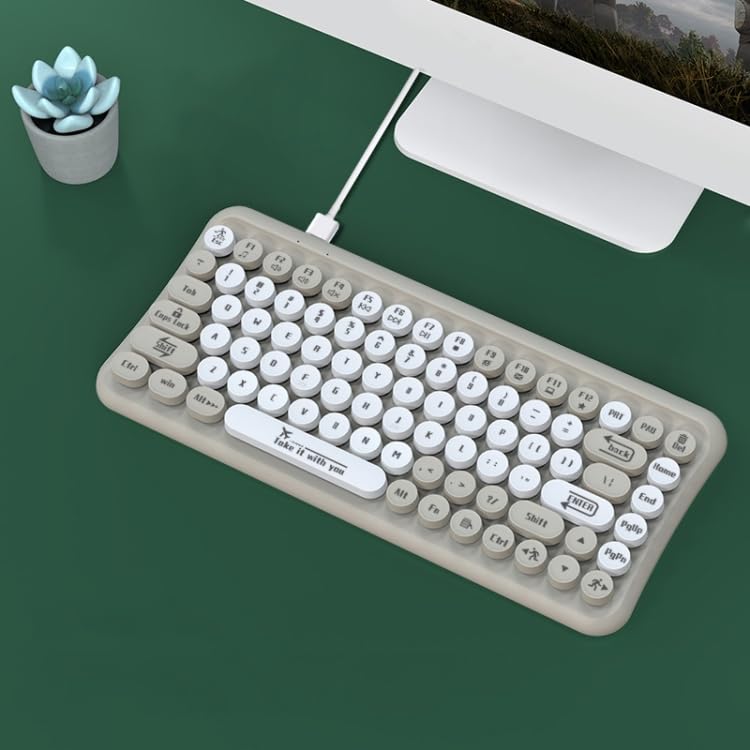
- Plug the USB connector of the keyboard into the USB port on your computer.
- మీ ఆపరేటింగ్ సిస్టమ్ అవసరమైన డ్రైవర్లను స్వయంచాలకంగా గుర్తించి ఇన్స్టాల్ చేయాలి. సాధారణంగా అదనపు సాఫ్ట్వేర్ ఇన్స్టాలేషన్ అవసరం లేదు.
- కీబోర్డ్ ఇప్పుడు ఉపయోగం కోసం సిద్ధంగా ఉంది.
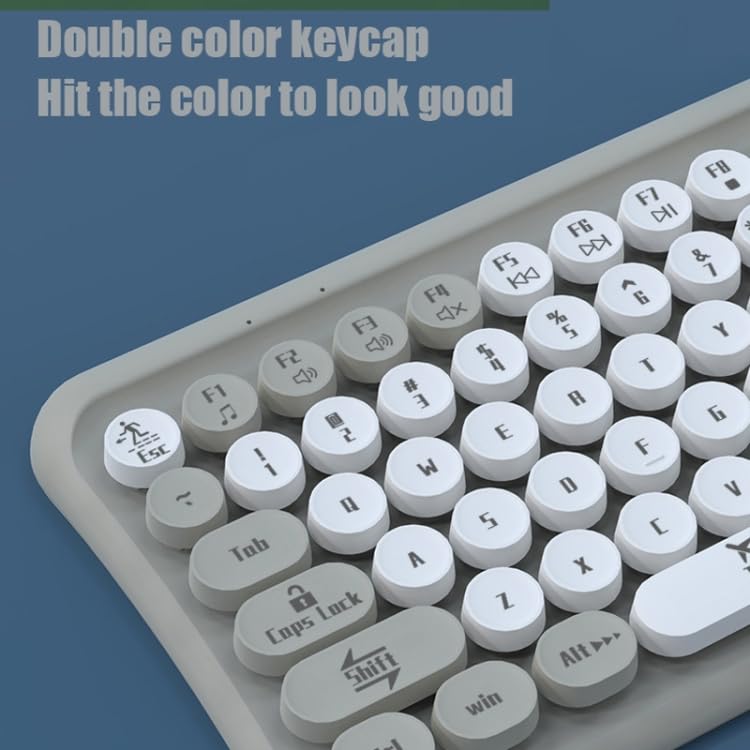
Image: The ELECTROPRIME LANGTU LT700 keyboard connected via its USB cable to a desktop computer, ready for use.
5. ఆపరేటింగ్ సూచనలు
5.1 ప్రాథమిక టైపింగ్
The keyboard functions as a standard 85-key layout. Simply press the desired keys to input text or commands into your computer.
5.2 నిశ్శబ్ద ఆపరేషన్
The keycaps utilize noise reduction technology, significantly reducing the sound of keystrokes for a quieter typing experience.
5.3 ఫంక్షన్ కీలు
The top row of keys (F1-F12) includes standard function keys and may have secondary multimedia functions accessible by pressing the 'Fn' key in combination with the respective function key. Refer to the icons printed on the keycaps for specific functions such as volume control, media playback, or screen brightness.
చిత్రం: క్లోజప్ view of the keyboard's double-color keycaps, highlighting the ergonomic design and the icons on the function keys (F1-F12) for multimedia control.
6. నిర్వహణ
6.1 శుభ్రపరచడం
- శుభ్రం చేయడానికి ముందు మీ కంప్యూటర్ నుండి కీబోర్డ్ను డిస్కనెక్ట్ చేయండి.
- కీబోర్డ్ ఉపరితలాన్ని తుడవడానికి మృదువైన, మెత్తటి బట్టను ఉపయోగించండి.
- కీల మధ్య దుమ్ము మరియు శిధిలాల కోసం, సంపీడన గాలి లేదా చిన్న బ్రష్ను ఉపయోగించండి.
- Do not use abrasive cleaners, solvents, or spray cleaners directly on the keyboard.
6.2 నిల్వ
ఎక్కువసేపు ఉపయోగంలో లేనప్పుడు, కీబోర్డ్ను ప్రత్యక్ష సూర్యకాంతి మరియు తీవ్రమైన ఉష్ణోగ్రతలకు దూరంగా చల్లని, పొడి ప్రదేశంలో నిల్వ చేయండి.
7. ట్రబుల్షూటింగ్
7.1 కీబోర్డ్ స్పందించడం లేదు
- USB కేబుల్ కీబోర్డ్ మరియు కంప్యూటర్ రెండింటికీ సురక్షితంగా ప్లగ్ చేయబడిందని నిర్ధారించుకోండి.
- మీ కంప్యూటర్లోని వేరే USB పోర్ట్లోకి కీబోర్డ్ను ప్లగ్ చేసి ప్రయత్నించండి.
- మీ కంప్యూటర్ని పునఃప్రారంభించండి.
- సమస్య కీబోర్డ్లో ఉందా లేదా కంప్యూటర్లో ఉందా అని నిర్ధారించడానికి మరొక కంప్యూటర్లో కీబోర్డ్ను పరీక్షించండి.
7.2 Specific Keys Not Working
- Check for any debris or obstructions under the non-functional key. Gently clean around the key.
- If cleaning does not resolve the issue, the key mechanism may be damaged.
If you continue to experience problems, refer to the Warranty and Support section.
8. స్పెసిఫికేషన్లు
| ఫీచర్ | స్పెసిఫికేషన్ |
|---|---|
| మోడల్ | LANGTU LT700 |
| ఇంటర్ఫేస్ | USB వైర్డ్ |
| కీల సంఖ్య | 85 కీలు |
| కీక్యాప్ రకం | Punk Keycap, Chocolate Keycaps |
| బటన్ లైఫ్ | Approximately 10 million times |
| కేబుల్ పొడవు | 1.5 మీటర్లు |
| కొలతలు (L x W) | సుమారు 315mm x 150mm |
| బరువు | సుమారు 0.60 కిలోలు (1.33 పౌండ్లు) |
| అనుకూలత | Plug and Play with most operating systems |
9. వారంటీ మరియు మద్దతు
వారంటీ సమాచారం లేదా సాంకేతిక మద్దతు కోసం, దయచేసి కొనుగోలు సమయంలో అందించిన డాక్యుమెంటేషన్ను చూడండి లేదా మీ రిటైలర్ను సంప్రదించండి. ఏవైనా వారంటీ క్లెయిమ్ల కోసం మీ కొనుగోలు రుజువును ఉంచండి.