
1. పరిచయం
The ELECTROPRIME Hishell M9 Translator is a portable, intelligent device designed for multi-language simultaneous translation, facilitating communication across language barriers. It supports both online and offline translation modes, along with photo and recording translation functionalities. This manual provides essential information for the proper setup, operation, and maintenance of your device.
2. భద్రతా సమాచారం
- పరికరాన్ని తీవ్రమైన ఉష్ణోగ్రతలు, ప్రత్యక్ష సూర్యకాంతి లేదా అధిక తేమకు గురిచేయవద్దు.
- పరికరాన్ని వదలడం లేదా బలమైన ప్రభావాలకు గురి చేయడం మానుకోండి.
- Keep the device away from water and other liquids. If it gets wet, power it off immediately and allow it to dry completely before use.
- Use only the provided or approved charging cable and adapter.
- Do not attempt to disassemble, repair, or modify the device yourself. Contact customer support for assistance.
- స్థానిక నిబంధనల ప్రకారం పరికరాన్ని మరియు దాని బ్యాటరీని పారవేయండి.
3. ప్యాకేజీ విషయాలు
దయచేసి ఈ క్రింది అంశాల కోసం ప్యాకేజీని తనిఖీ చేయండి:
- ELECTROPRIME Hishell M9 Translator Device
- USB ఛార్జింగ్ కేబుల్
- వినియోగదారు మాన్యువల్ (ఈ పత్రం)
4. పరికరం ముగిసిందిview
Familiarize yourself with the physical components of your Hishell M9 Translator.
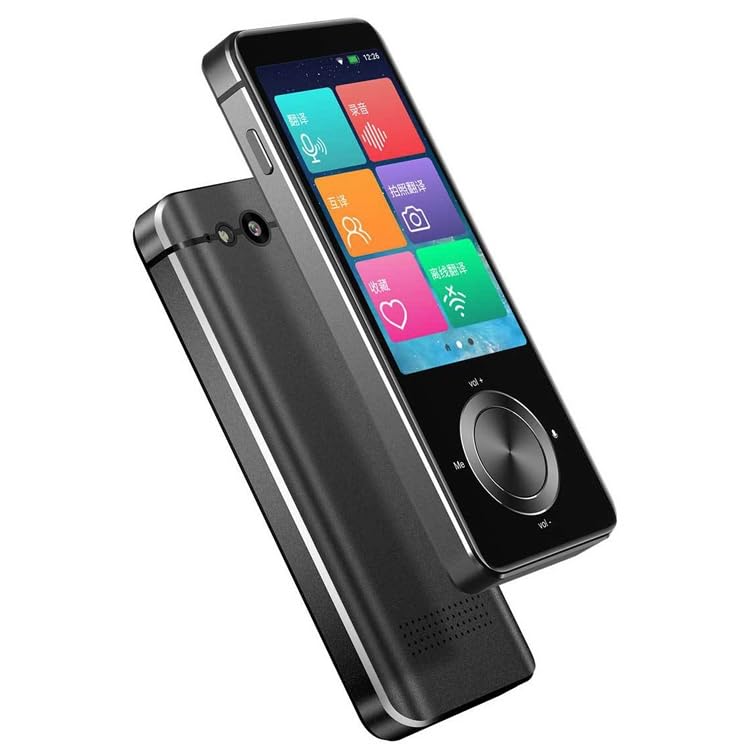
చిత్రం 1: ముందు మరియు వైపు view of the ELECTROPRIME Hishell M9 Translator. This image shows the device's screen, volume buttons, and power button on the side, along with the speaker grille at the bottom.
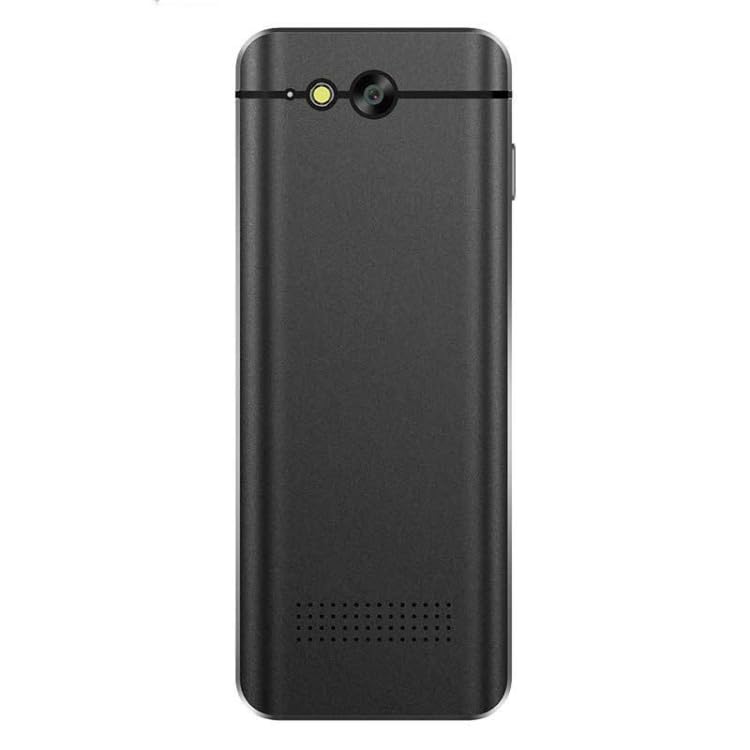
చిత్రం 2: వెనుకకు view of the ELECTROPRIME Hishell M9 Translator. This image highlights the rear camera and flash, along with the microphone and speaker perforations.
- టచ్స్క్రీన్ డిస్ప్లే: Main interface for interaction.
- పవర్ బటన్: Located on the side, used for powering on/off and screen lock.
- వాల్యూమ్ బటన్లు: ఆడియో అవుట్పుట్ స్థాయిని సర్దుబాటు చేయండి.
- మైక్రోఫోన్: Captures spoken language for translation.
- స్పీకర్: Outputs translated audio.
- కెమెరా: Used for photo translation.
- USB పోర్ట్: పరికరాన్ని ఛార్జ్ చేయడానికి.
5. సెటప్
5.1. పరికరాన్ని ఛార్జ్ చేస్తోంది
- Connect the USB charging cable to the device's USB port.
- కేబుల్ యొక్క మరొక చివరను అనుకూలమైన USB పవర్ అడాప్టర్ (చేర్చబడలేదు) లేదా కంప్యూటర్ యొక్క USB పోర్ట్లోకి ప్లగ్ చేయండి.
- The device will indicate charging status on the screen. Allow the device to fully charge before first use.
5.2. పవర్ ఆన్/ఆఫ్
- పవర్ ఆన్ చేయడానికి: Press and hold the Power button on the side of the device until the screen lights up.
- పవర్ ఆఫ్ చేయడానికి: Press and hold the Power button until a power-off menu appears on the screen. Select 'Power Off'.
- స్క్రీన్ను లాక్/అన్లాక్ చేయడానికి: పవర్ బటన్ని క్లుప్తంగా నొక్కండి.
5.3. Initial Language Settings
Upon first power-on, you may be prompted to select the device's system language and your preferred translation languages. Follow the on-screen instructions.
5.4. నెట్వర్క్ కనెక్షన్ (వై-ఫై)
For online translation features, a Wi-Fi connection is required.
- From the main screen, navigate to 'Settings'.
- 'Wi-Fi' ని ఎంచుకుని దాన్ని ఆన్ చేయండి.
- జాబితా నుండి మీకు కావలసిన Wi-Fi నెట్వర్క్ను ఎంచుకోండి.
- ప్రాంప్ట్ చేయబడితే పాస్వర్డ్ను నమోదు చేసి కనెక్ట్ చేయండి.
6. ఆపరేటింగ్ సూచనలు
6.1. Real-time Online Translation
This mode requires an active Wi-Fi connection.
- From the main menu, select the 'Real-time Translation' or 'Voice Translation' icon.
- Select the source language (the language you will speak) and the target language (the language you want to translate to).
- Press and hold the designated button (often marked 'Me' or a microphone icon) and speak clearly into the device's microphone.
- Release the button. The device will process your speech and display/speak the translation in the target language.
6.2. ఆఫ్లైన్ అనువాదం
The Hishell M9 supports offline translation for certain language pairs. Ensure necessary language packs are downloaded in advance via Wi-Fi in the 'Settings' menu.
- Select 'Offline Translation' from the main menu.
- Choose the downloaded source and target language packs.
- Proceed with voice input as described in section 6.1.
6.3. ఫోటో అనువాదం
This feature translates text from images using the device's camera.
- Select 'Photo Translation' from the main menu.
- Point the camera at the text you wish to translate. Ensure good lighting and clear focus.
- చిత్రాన్ని క్యాప్చర్ చేయడానికి స్క్రీన్ను నొక్కండి.
- The device will analyze the text and display the translation.
6.4. Recording Translation
This function allows you to record longer conversations and translate them.
- Select 'Recording Translation' from the main menu.
- Tap the 'Record' button to start recording.
- Tap 'Stop' when finished.
- Select the recorded audio file and choose the desired translation language. The device will process and display the translated text.
6.5. సెట్టింగ్లు
Access the 'Settings' menu to adjust various device parameters:
- Wi-Fi: Manage network connections.
- ప్రకాశం: స్క్రీన్ ప్రకాశాన్ని సర్దుబాటు చేయండి.
- వాల్యూమ్: స్పీకర్ వాల్యూమ్ను నియంత్రించండి.
- భాషా సెట్టింగ్లు: Change system language and download offline language packs.
- సిస్టమ్ నవీకరణను: Check for and install software updates.
- పరికరం గురించి: View పరికర సమాచారం.
7. నిర్వహణ
7.1. శుభ్రపరచడం
- పరికరం యొక్క స్క్రీన్ మరియు బాడీని శుభ్రం చేయడానికి మృదువైన, పొడి, మెత్తటి బట్టను ఉపయోగించండి.
- రాపిడి క్లీనర్లు, ఆల్కహాల్ లేదా రసాయన ద్రావకాలను ఉపయోగించవద్దు.
7.2. నిల్వ
- పరికరాన్ని ప్రత్యక్ష సూర్యకాంతి మరియు తీవ్రమైన ఉష్ణోగ్రతలు లేకుండా చల్లని, పొడి ప్రదేశంలో నిల్వ చేయండి.
- If storing for an extended period, ensure the battery is charged to approximately 50% to prolong its lifespan.
7.3. బ్యాటరీ సంరక్షణ
- బ్యాటరీని తరచుగా పూర్తిగా డిశ్చార్జ్ చేయడాన్ని నివారించండి.
- Do not leave the device connected to a charger for excessively long periods after it is fully charged.
8. ట్రబుల్షూటింగ్
| సమస్య | సాధ్యమైన కారణం | పరిష్కారం |
|---|---|---|
| పరికరం పవర్ ఆన్ చేయదు. | బ్యాటరీ తక్కువగా ఉంది; పరికరం స్తంభించిపోయింది. | Charge the device for at least 30 minutes. If still unresponsive, perform a hard reset (refer to device-specific instructions if available, usually holding power button for 10-15 seconds). |
| Translation is inaccurate or not working. | Poor internet connection; incorrect language selection; unclear speech. | Ensure stable Wi-Fi connection. Verify source and target languages. Speak clearly and at a moderate pace. For offline mode, ensure language packs are downloaded. |
| Wi-Fi కనెక్షన్ సమస్యలు. | తప్పు పాస్వర్డ్; పరిధిలో లేదు; రౌటర్ సమస్య. | Re-enter Wi-Fi password. Move closer to the Wi-Fi router. Restart the device and the router. |
| స్క్రీన్ స్పందించడం లేదు. | సాఫ్ట్వేర్ లోపం; పరికరం స్తంభించిపోయింది. | Restart the device. If unresponsive, perform a hard reset. |
9. స్పెసిఫికేషన్లు
- మోడల్: Hishell M9
- బ్రాండ్: ఎలక్ట్రోప్రైమ్
- కనెక్టివిటీ: వైర్లెస్
- ప్యాకేజీ బరువు: 0.23 కేజీలు / 0.51 పౌండ్లు
- ప్యాకేజీ కొలతలు: 18 cm x 12 cm x 3 cm / 7.09 inches x 4.72 inches x 1.18 inches
- తయారీదారు: ఎలక్ట్రోప్రైమ్
10. వారంటీ మరియు మద్దతు
For warranty information and customer support, please refer to the warranty card included with your purchase or contact ELECTROPRIME customer service directly. Keep your proof of purchase for any warranty claims.
For further assistance, visit the official ELECTROPRIME webసైట్ లేదా వారి మద్దతు ఛానెల్లను సంప్రదించండి.