
1. ముఖ్యమైన భద్రతా సూచనలు
Please read and understand all instructions before using this product. Failure to follow these instructions may result in injury or damage.
- హెచ్చరిక: Always use the chair as intended. Do not exceed the weight capacity of 350lbs.
- Be cautious when using the lift mechanism to prevent injury.
- వేళ్లు మరియు ఇతర శరీర భాగాలను కదిలే భాగాల నుండి దూరంగా ఉంచండి.
- పవర్ కార్డ్ పించ్ చేయబడలేదని లేదా పాడైపోలేదని నిర్ధారించుకోండి.
- పిల్లలు మరియు పెంపుడు జంతువులను కుర్చీ కదిలే భాగాల నుండి దూరంగా ఉంచండి.
2. ప్యాకేజీ విషయాలు
అసెంబ్లీకి ముందు అన్ని భాగాలు ఉన్నాయని ధృవీకరించండి:
- ఆర్మ్రెస్ట్లు (2)
- బ్యాక్రెస్ట్ (1)
- బేస్ (1)
- Accessories Box (1) - Contains power adapter, remote controls, and small parts.
- వినియోగదారు మాన్యువల్ (1)
3. అసెంబ్లీ సూచనలు
Assembly is designed to be straightforward and typically takes about 20 minutes for a novice, with no tools required. It is recommended to have two people for moving the heavier parts.
- భాగాలను అన్ప్యాక్ చేయండి: Carefully remove all parts from the packaging. The chair comes in multiple boxes, with the base being the heaviest.
- ఆర్మ్రెస్ట్లను అటాచ్ చేయండి: Slide each armrest onto the corresponding side of the chair base until they securely click into place.
- బ్యాక్రెస్ట్ను కనెక్ట్ చేయండి: Align the backrest with the slots on the chair base and push down firmly until it locks into position.
- ప్లగ్ ఇన్ వైరింగ్: Connect all electrical wiring according to the labels. Ensure all connections are secure.
- పవర్ కనెక్ట్ చేయండి: Plug the power adapter into the chair and then into a wall outlet.

Figure 3.1: Main components of the recliner chair.

Figure 3.2: Attaching the backrest.
4. ఆపరేటింగ్ సూచనలు
4.1 Power Lift and Recline Functions
The chair features a counter-balanced lift mechanism and a 150° maximum recline. Use the dedicated remote control for these functions.
- ఎత్తడానికి: Press and hold the 'UP' arrow button on the remote. The chair will gently tilt forward and lift, assisting you to a standing position.
- పడుకోవడానికి: Press and hold the 'DOWN' arrow button on the remote. The chair will recline backward, and the footrest will extend. Release the button at your desired recline angle. The chair offers a 150° recline for deep relaxation.
- To Return to Upright Position: Press and hold the 'UP' arrow button. The chair will return to its original upright position.
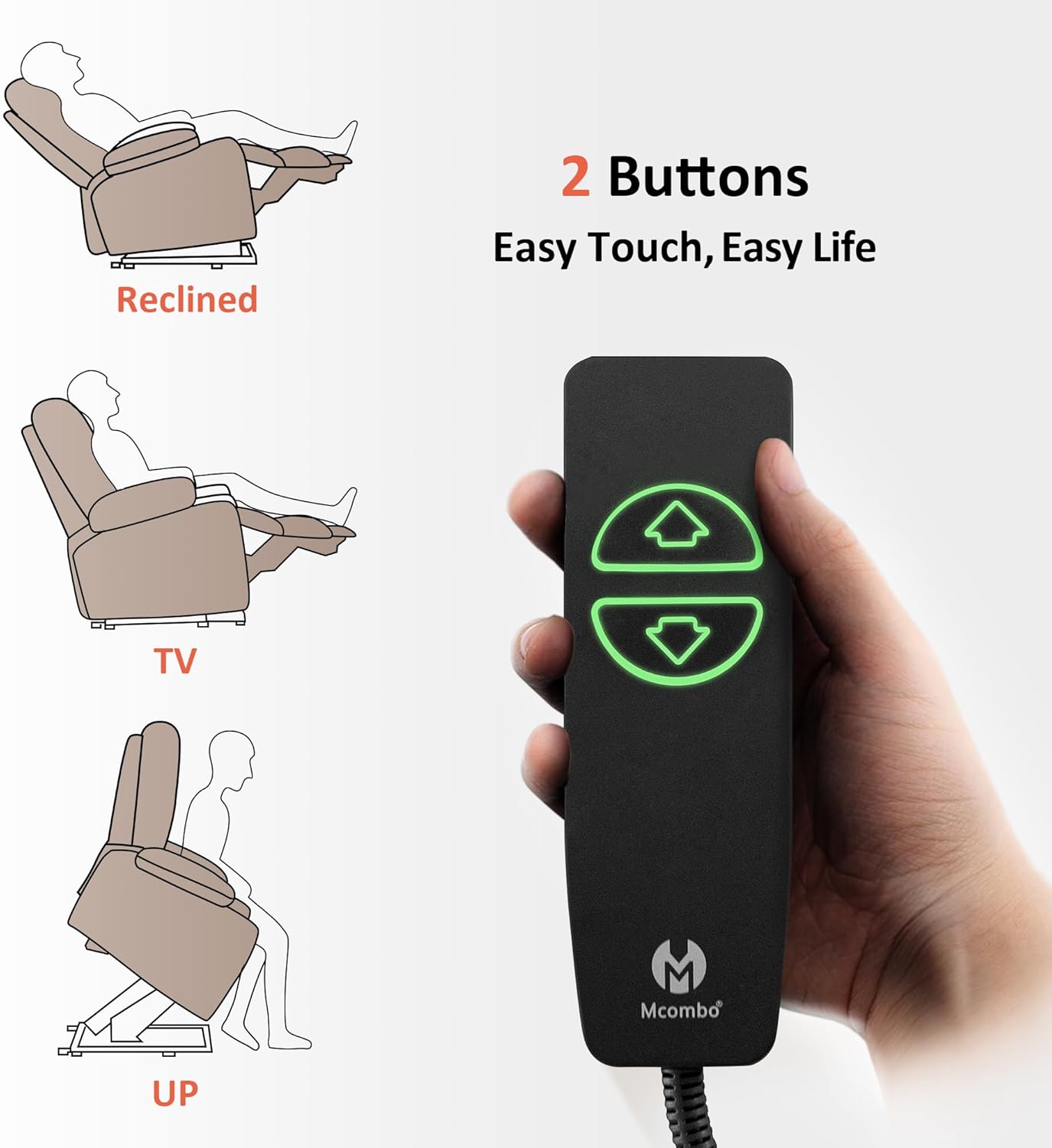
Figure 4.1: Power lift and recline remote control.

Figure 4.2: Chair in fully reclined position.
4.2 వేడి మరియు మసాజ్ విధులు
The chair features lumbar heating and full-body vibration with 8 vibration nodes, 3 massage modes, and 3 intensity levels. These functions operate independently.
- To Activate Heat: Press the 'HEAT' button on the massage remote. The lumbar area will begin to warm. Press again to turn off.
- To Activate Massage: Press the 'POWER' button on the massage remote. Use the 'MODE' button to cycle through 3 massage modes. Adjust intensity with '+' and '-' buttons.
- టార్గెటెడ్ మసాజ్: Select specific areas (BACK, LUMBAR, THIGH, LEG) for massage.
- టైమర్ ఫంక్షన్: Set the massage/heat to automatically turn off after 10, 20, or 30 minutes using the 'TIMER' button.

Figure 4.3: Heat and massage remote control.
Video 4.1: Demonstration of the MCombo Power Lift Recliner R7092 features, including heat and massage.
4.3 Charging Ports and Storage
The chair is equipped with convenient features for your comfort and accessibility.
- USB & టైప్-సి పోర్ట్లు: Located on the side of the chair, these ports allow you to charge your electronic devices without leaving your seat.
- కప్ హోల్డర్లు: Two built-in cup holders are integrated into the armrests to keep beverages within easy reach.
- Side & Front Pockets: Convenient pockets are available on the sides and front of the chair for storing remotes, magazines, or other small items.

Figure 4.4: Integrated charging ports, cup holders, and storage pockets.
5. సంరక్షణ మరియు నిర్వహణ
Proper care will extend the life and appearance of your MCombo recliner chair.
- శుభ్రపరచడం: Spot clean the fabric as needed. Use a mild detergent and a soft cloth. Do not saturate the fabric.
- కఠినమైన రసాయనాలను నివారించండి: Do not use abrasive cleaners or strong chemicals, as they may damage the fabric or finish.
- సాధారణ తనిఖీ: అన్ని కనెక్షన్లు మరియు కదిలే భాగాలు సురక్షితంగా ఉన్నాయని మరియు సరిగ్గా పనిచేస్తున్నాయని నిర్ధారించుకోవడానికి కాలానుగుణంగా వాటిని తనిఖీ చేయండి.
- పవర్ కార్డ్: Ensure the power cord is not tangled or placed where it can be tripped over or damaged.
6. ట్రబుల్షూటింగ్
If you encounter any issues with your recliner, refer to the following common problems and solutions:
- Chair Not Responding:
- Check if the power cord is securely plugged into both the chair and the wall outlet.
- Ensure the power adapter is functioning.
- Verify that the remote control cables are properly connected to the chair.
- Heat/Massage Not Working:
- Confirm the massage remote is connected and powered on.
- Check if the timer function has automatically turned off the feature.
- ఆపరేషన్ సమయంలో అసాధారణ శబ్దాలు:
- Inspect the lift mechanism for any obstructions.
- Ensure all assembly bolts are tightened.
If the issue persists, please contact MCombo Customer Support.
7. స్పెసిఫికేషన్లు
| బ్రాండ్ | MCombo |
| మోడల్ పేరు | 6160-7095Fabric (R7092 Series) |
| రంగు | లేత గోధుమరంగు |
| పరిమాణం | అధిక పరిమాణం |
| ఉత్పత్తి కొలతలు | 37.4"డి x 41.7"వా x 46.9"హ |
| గరిష్ట బరువు సిఫార్సు | 350 పౌండ్లు |
| మెటీరియల్ | Alloy Steel, Wood, Foam (CertiPUR-US certified), Fabric (OEKO-TEX certified) |
| ప్రత్యేక లక్షణాలు | Power Lift Assistance, Lumbar Heat, Full-Body Vibration, Cup Holders, USB & Type C Ports |
| రిక్లైనింగ్ పొజిషన్ కౌంట్ | 3 (Upright, TV Viewing, Full Recline 150°) |
| అసెంబ్లీ సమయం | Approximately 20 minutes (no tools required) |

చిత్రం 7.1: ఉత్పత్తి కొలతలు.
8. వారంటీ సమాచారం
Your MCombo Power Lift Recliner Chair is backed by a 2-సంవత్సరం పరిమిత వారంటీ. This warranty covers free replacements for the following components:
- Reclining/Lifting Mechanisms
- ఎలక్ట్రికల్ సిస్టమ్స్
- Upholstery & Cushions
- Wood/Metal Frame Structures
Please refer to the full user manual (if provided separately) or contact customer support for complete warranty terms and conditions.
9. కస్టమర్ మద్దతు
For any questions, assistance, or warranty claims, please contact MCombo Customer Support:
- Webసైట్: Visit the official MCombo webతరచుగా అడిగే ప్రశ్నలు మరియు మద్దతు వనరుల కోసం సైట్.
- ఇమెయిల్: నిర్దిష్ట సంప్రదింపు ఇమెయిల్ కోసం మీ కొనుగోలు డాక్యుమెంటేషన్ను చూడండి.
- ఫోన్: నిర్దిష్ట సంప్రదింపు నంబర్ కోసం మీ కొనుగోలు డాక్యుమెంటేషన్ చూడండి.
Please have your model number (R7092) and purchase date ready when contacting support.