
1. పరిచయం
This document provides comprehensive instructions for the installation, operation, and maintenance of the WLLKIY 3000W Hybrid Solar Inverter, Model SM-3200H. This multi-functional inverter/charger combines the functions of an inverter, MPPT solar charger, and battery charger to provide uninterruptible power support. It features a comprehensive LCD display for user-configurable operations such as battery charging current, AC/solar charger priority, and acceptable input voltage.
ముఖ్య లక్షణాలు:
- Pure sine wave output inverter.
- ఎంచుకోదగిన ఇన్పుట్ వాల్యూమ్tage range for home appliances or personal computers.
- Adjustable battery charging current via LCD display.
- Configurable battery charging priority mode.
- LCD display for monitoring and settings.
- Optional dust filter.
- Compatible with utility grid and generator inputs.
- Maximizes PV power utilization with automatic restart function upon PV restoration.
- Overload, high temperature, and inverter output short circuit protection.
- కోల్డ్ స్టార్ట్ ఫంక్షన్.
- Supports lithium batteries.
- Optional WIFI monitoring and setting capabilities.
2. భద్రతా సూచనలు
Please read all instructions and warnings in this manual carefully before installation and operation. Failure to follow these instructions may result in electric shock, fire, or severe injury. Keep this manual for future reference.
- ఇన్స్టాలేషన్ తప్పనిసరిగా అర్హత కలిగిన సిబ్బందిచే నిర్వహించబడాలి.
- ఇన్వర్టర్ యొక్క సరైన గ్రౌండింగ్ నిర్ధారించుకోండి.
- Do not expose the inverter to rain, snow, or liquids of any type.
- Do not disassemble the unit. There are no user-serviceable parts inside.
- Disconnect all power sources (PV, battery, AC) before performing any maintenance or wiring.
- ఇన్వర్టర్ వేడెక్కకుండా నిరోధించడానికి చుట్టూ తగినంత వెంటిలేషన్ ఉండేలా చూసుకోండి.
3. ఉత్పత్తి ముగిసిందిview
The WLLKIY SM-3200H is a compact and efficient hybrid solar inverter designed for various power applications. It integrates an inverter, solar charger, and battery charger into a single unit.

మూర్తి 3.1: ముందు view of the SM-3200H Hybrid Solar Inverter, highlighting its display and main features.
The inverter features a clear LCD display for monitoring system status and configuring operational parameters. The rear panel provides all necessary connection terminals for PV input, battery, AC input, and AC output.

చిత్రం 3.2: వెనుక view of the SM-3200H, illustrating connection points for AC, battery, and PV.

చిత్రం 3.3: వివరణాత్మక వెనుక భాగం view of the SM-3200H, showing the input breaker and cooling vents.
4. సెటప్
Proper installation is crucial for the safe and efficient operation of your hybrid solar inverter. Ensure all local electrical codes are followed.
4.1 అన్ప్యాకింగ్ మరియు తనిఖీ
Upon receiving the inverter, carefully unpack it and inspect for any shipping damage. Report any damage to your dealer immediately. Ensure all accessories are present.
4.2 యూనిట్ మౌంట్
Mount the inverter on a vertical surface in a clean, dry, and well-ventilated area. Ensure there is sufficient clearance around the unit for proper airflow. Avoid direct sunlight and heat sources.
4.3 వైరింగ్ కనెక్షన్లు
All wiring must be performed with power disconnected from all sources. Use appropriate gauge wiring for all connections.
- బ్యాటరీ కనెక్షన్: Connect the battery bank to the BATTERY terminals. Ensure correct polarity (+ to + and - to -).
- PV అర్రే కనెక్షన్: Connect the solar panel array to the PV IN terminals. Observe correct polarity and ensure the PV input voltagఇ 450VDCని మించదు.
- AC ఇన్పుట్ కనెక్షన్: Connect the utility grid or generator AC source to the AC IN terminals.
- AC అవుట్పుట్ కనెక్షన్: Connect your loads (home appliances, computers) to the AC OUT terminals.
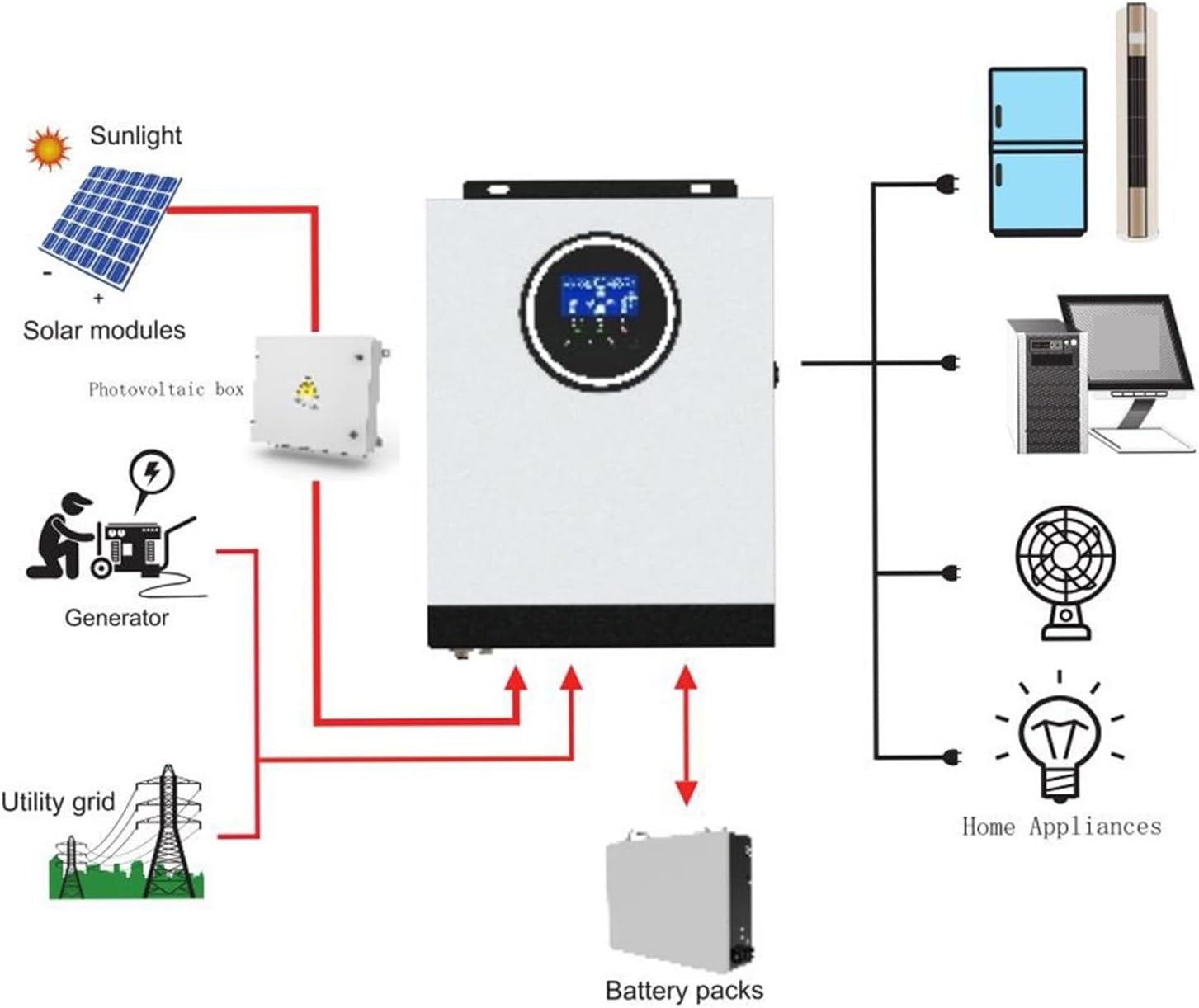
Figure 4.1: Typical system connection diagram for the SM-3200H Hybrid Solar Inverter.
5. ఆపరేటింగ్ సూచనలు
Once all connections are securely made, you can begin operating the inverter.
5.1 పవర్ చేయడం ఆన్/ఆఫ్
- పవర్ ఆన్ చేయడానికి: Ensure the input breaker is in the 'ON' position. The inverter will perform a self-test and the LCD display will illuminate.
- పవర్ ఆఫ్ చేయడానికి: Disconnect all AC loads. Turn off the input breaker. Disconnect the PV input and then the battery input.
5.2 LCD డిస్ప్లే మరియు సెట్టింగ్లు
The LCD display provides real-time system information and allows for configuration of various parameters. Use the buttons adjacent to the display to navigate menus and adjust settings.
- పర్యవేక్షణ: View ఇన్పుట్/అవుట్పుట్ వాల్యూమ్tage, frequency, battery status, charging current, and load percentage.
- పారామీటర్ సెట్టింగ్లు: Adjust settings such as battery charging current, AC input voltage range (170-280VAC for PC or 90-280VAC for appliances), and charger source priority (Solar first, Utility first, SBU priority).
6. నిర్వహణ
క్రమం తప్పకుండా నిర్వహణ మీ ఇన్వర్టర్ యొక్క దీర్ఘాయువు మరియు సరైన పనితీరును నిర్ధారిస్తుంది.
- శుభ్రపరచడం: Periodically clean the exterior of the inverter with a dry cloth. Ensure ventilation openings are free from dust and debris. If an optional dust filter is installed, clean or replace it as recommended.
- కనెక్షన్లు: Annually check all electrical connections for tightness and corrosion.
- బ్యాటరీ తనిఖీ: Regularly inspect battery terminals for corrosion and ensure battery voltagఇ ఆమోదయోగ్యమైన పరిమితుల్లో ఉంది.
- పర్యావరణం: ఇన్స్టాలేషన్ వాతావరణం పేర్కొన్న ఉష్ణోగ్రత మరియు తేమ పరిధిలో ఉండేలా చూసుకోండి.
7. ట్రబుల్షూటింగ్
ఈ విభాగం మీరు ఎదుర్కొనే సాధారణ సమస్యలకు పరిష్కారాలను అందిస్తుంది.
| సమస్య | సాధ్యమైన కారణం | పరిష్కారం |
|---|---|---|
| ఇన్వర్టర్ ఆన్ అవ్వదు | బ్యాటరీ కనెక్షన్ లేదు; బ్యాటరీ వాల్యూమ్tage too low; Input breaker off | బ్యాటరీ కనెక్షన్లు మరియు వాల్యూమ్ను తనిఖీ చేయండిtage; Ensure input breaker is ON. |
| AC అవుట్పుట్ లేదు | ఓవర్లోడ్; షార్ట్ సర్క్యూట్; ఇన్వర్టర్ లోపం | Reduce load; Check for short circuits in wiring; Restart inverter. |
| బ్యాటరీ ఛార్జ్ కావడం లేదు | PV input too low/disconnected; AC input not present; Charger settings incorrect | Check PV connections and sunlight; Verify AC input; Adjust charger settings via LCD. |
| ఓవర్లోడ్ హెచ్చరిక | Connected load exceeds inverter capacity | Reduce the total load connected to the inverter. |
ఈ పరిష్కారాలను ప్రయత్నించిన తర్వాత కూడా సమస్య కొనసాగితే, దయచేసి కస్టమర్ మద్దతును సంప్రదించండి.
8. స్పెసిఫికేషన్లు
| పరామితి | విలువ |
|---|---|
| మోడల్ | SM-3200H |
| రేట్ చేయబడిన శక్తి | 3000 W |
| AC ఇన్పుట్ వాల్యూమ్tage | 230 V AC |
| ఎంచుకోదగిన వాల్యూమ్tage Range (PC) | 170-280 VAC |
| ఎంచుకోదగిన వాల్యూమ్tage Range (Appliances) | 90-280 VAC |
| ఫ్రీక్వెన్సీ రేంజ్ | 50 Hz / 60 Hz (ఆటో సెన్సింగ్) |
| AC వాల్యూమ్tagఇ నియంత్రణ (బ్యాటరీ మోడ్) | 230 VAC ± 5% |
| సర్జ్ పవర్ | 6400 VA |
| Transfer Time (PC) | 10 ms |
| Transfer Time (Appliances) | 20 ms |
| తరంగ రూపం | స్వచ్ఛమైన సైన్ వేవ్ |
| బ్యాటరీ వాల్యూమ్tage | 24 VDC |
| ఫ్లోటింగ్ ఛార్జ్ వాల్యూమ్tage | 27 వి |
| MPPT Solar Charger Current | 80 ఎ |
| గరిష్టంగా PV అర్రే ఓపెన్ సర్క్యూట్ వాల్యూమ్tage | 450 VDC |
| ఉత్పత్తి బరువు | 10 గ్రాములు |
9. వారంటీ మరియు మద్దతు
This product comes with a standard manufacturer's warranty. Please refer to the warranty card included with your purchase for specific terms and conditions. For technical support, troubleshooting assistance, or warranty claims, please contact your dealer or the manufacturer directly.
వారంటీ ప్రయోజనాల కోసం కొనుగోలు రుజువుగా మీ కొనుగోలు రసీదును ఉంచండి.