
1. పరిచయం
This instruction manual provides essential information for the safe and effective operation of your Mastech MS2000G Digital Clamp Meter. Please read this manual thoroughly before use and retain it for future reference. This device is designed for measuring AC current, AC/DC voltage, resistance, continuity, diode, frequency, and temperature in various electrical applications.
2. భద్రతా సమాచారం
WARNING: To avoid electric shock or personal injury, always follow these safety precautions.
- Always disconnect measuring leads before removing the battery cover.
- సంపుటిని వర్తింపజేయవద్దుtage or current that exceeds the maximum specified limits for the meter.
- Ensure the rotary switch is in the correct position for the desired measurement before connecting to the circuit.
- Inspect test leads for damaged insulation or exposed metal before each use. Replace if damaged.
- Do not use the meter if it appears damaged or if the case is open.
- The Mastech MS2000G is rated for CAT II 1000V and CAT III 600V. Adhere to these category ratings for safe operation.
- లైవ్ సర్క్యూట్లతో పనిచేసేటప్పుడు చాలా జాగ్రత్తగా ఉండండి.
For detailed safety guidelines, refer to relevant electrical safety standards.
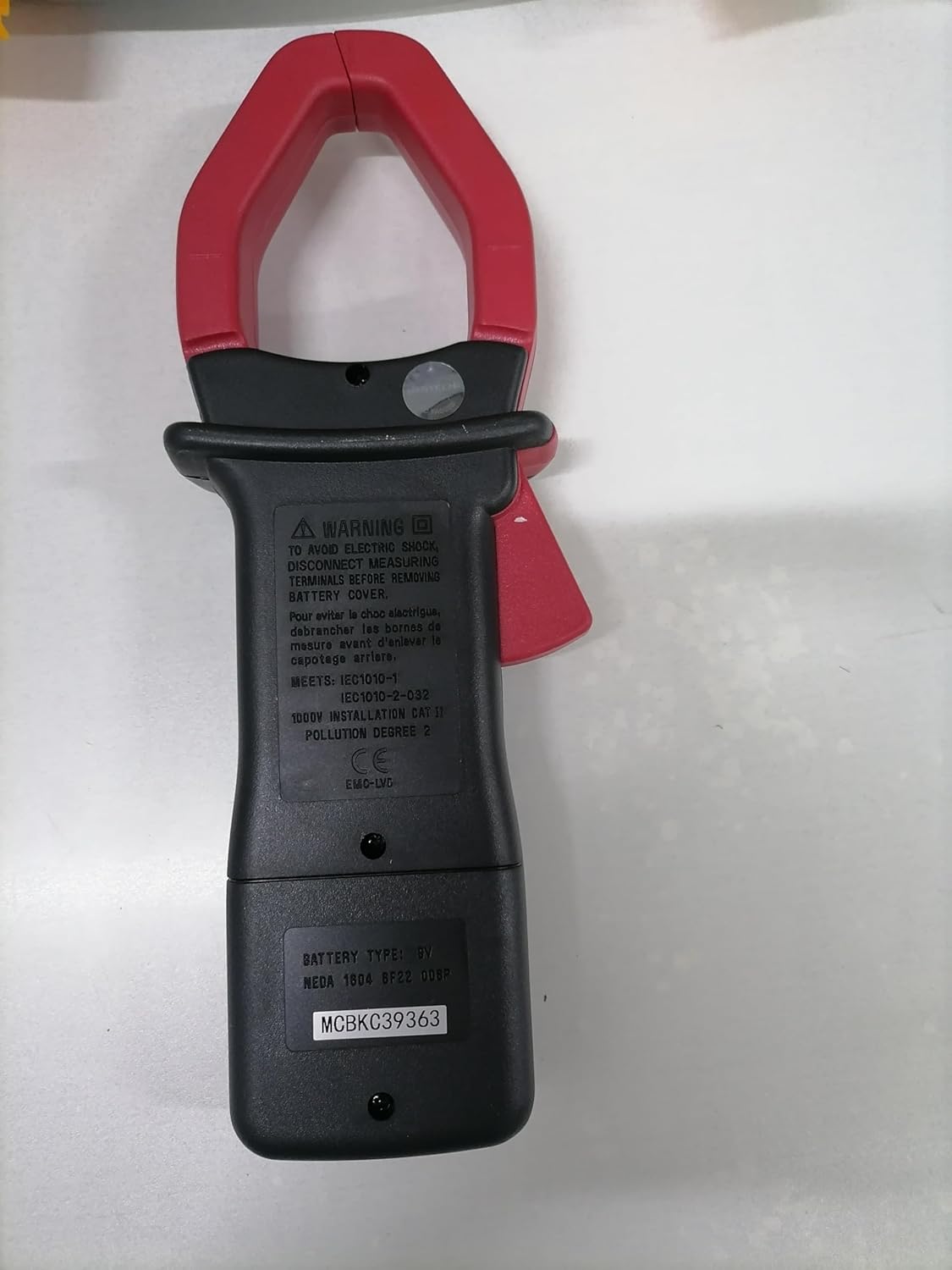
వెనుక view of the Mastech MS2000G Digital Clamp Meter, showing the battery compartment and safety warnings, including instructions to disconnect leads before opening.
3. ఉత్పత్తి లక్షణాలు
- 2000 కౌంట్స్ డిజిటల్ డిస్ప్లే
- Jaw Opening: 55mm (2.2 inches)
- డయోడ్ ఓపెన్ వాల్యూమ్tagఇ: 3.0 వి
- Continuity Buzzer: Activates below 30Ω
- డేటా హోల్డ్ ఫంక్షన్
- Display Backlight for low-light conditions
- Low Battery Display Indicator
4. ఉత్పత్తి ముగిసిందిview
The Mastech MS2000G features a robust design for professional and home use. Key components include:
- Clamp దవడ: Used for non-contact AC current measurement.
- రోటరీ స్విచ్: Selects measurement functions (AC Current, Voltage, Resistance, etc.).
- LCD డిస్ప్లే: కొలత రీడింగ్లు, యూనిట్లు మరియు సూచికలను చూపుతుంది.
- ఇన్పుట్ జాక్స్: For connecting test leads for voltage, resistance, continuity, diode, frequency, and temperature measurements.
- Data Hold Button: డిస్ప్లేపై ప్రస్తుత రీడింగ్ను స్తంభింపజేస్తుంది.
- బ్యాక్లైట్ బటన్: మెరుగైన దృశ్యమానత కోసం ప్రదర్శనను ప్రకాశిస్తుంది.

ముందు view of the Mastech MS2000G Digital Clamp Meter, highlighting the display, rotary switch, and clamp దవడ.
5. సెటప్
5.1 బ్యాటరీ ఇన్స్టాలేషన్
- Ensure the meter is turned OFF and all test leads are disconnected.
- మీటర్ వెనుక భాగంలో బ్యాటరీ కంపార్ట్మెంట్ కవర్ను గుర్తించండి.
- బ్యాటరీ కవర్ను భద్రపరిచే స్క్రూ(లు)ను విప్పడానికి స్క్రూడ్రైవర్ను ఉపయోగించండి.
- కవర్ తొలగించండి.
- సరైన ధ్రువణతను (+ మరియు -) గమనిస్తూ కొత్త 9V బ్యాటరీని చొప్పించండి.
- బ్యాటరీ కవర్ను మార్చి, దానిని స్క్రూ(లు)తో భద్రపరచండి.
5.2 టెస్ట్ లీడ్లను కనెక్ట్ చేయడం
For measurements requiring test leads (voltage, resistance, continuity, diode, frequency, temperature):
- Insert the red test lead into the VHzΩ input jack.
- COM ఇన్పుట్ జాక్లో బ్లాక్ టెస్ట్ లీడ్ను చొప్పించండి.
- For temperature measurements, connect the K-type thermocouple to the designated input terminals, observing polarity.
6. ఆపరేటింగ్ సూచనలు
To operate the Mastech MS2000G, turn the rotary switch to the desired function. The display will show the measurement reading.
6.1 AC కరెంట్ కొలత
- Turn the rotary switch to the 'A' (AC Current) range.
- cl తెరవండిamp ట్రిగ్గర్ నొక్కడం ద్వారా దవడ.
- సర్క్యూట్లోని ఒకే ఒక కండక్టర్ను cl తో చుట్టుముట్టండి.amp దవడ పూర్తిగా మూసివేయబడిందని నిర్ధారించుకోండి.
- డిస్ప్లేలో AC కరెంట్ విలువను చదవండి.
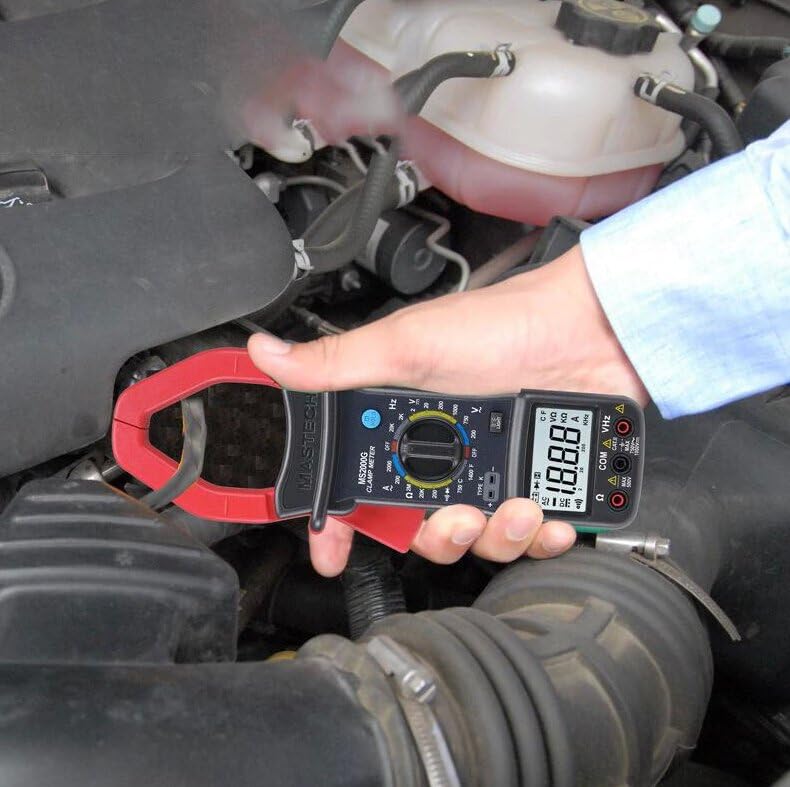
Demonstration of the Mastech MS2000G measuring AC current around a single conductor.
6.2 AC/DC వాల్యూమ్tagఇ కొలత
- విభాగం 5.2లో వివరించిన విధంగా పరీక్ష లీడ్లను కనెక్ట్ చేయండి.
- Turn the rotary switch to the 'V~' (AC Voltage) or 'V=' (DC Voltage) range.
- Connect the test probes in parallel to the circuit or component under test.
- సంపుటాన్ని చదవండిtagడిస్ప్లేలో ఇ విలువ.
6.3 నిరోధక కొలత
- పరీక్ష లీడ్లను కనెక్ట్ చేయండి.
- Turn the rotary switch to the 'Ω' (Resistance) range.
- Ensure the circuit or component is de-energized before connecting the probes.
- పరీక్ష ప్రోబ్లను కాంపోనెంట్ అంతటా కనెక్ట్ చేయండి.
- ప్రదర్శనలో నిరోధక విలువను చదవండి.
6.4 కొనసాగింపు పరీక్ష
- పరీక్ష లీడ్లను కనెక్ట్ చేయండి.
- Turn the rotary switch to the 'Ω' (Resistance) range and press the 'SELECT' button if necessary to choose continuity mode (indicated by a buzzer symbol).
- సర్క్యూట్ లేదా కాంపోనెంట్ అంతటా పరీక్ష ప్రోబ్లను కనెక్ట్ చేయండి.
- If the resistance is below approximately 30Ω, the buzzer will sound, indicating continuity.
6.5 డయోడ్ టెస్ట్
- పరీక్ష లీడ్లను కనెక్ట్ చేయండి.
- Turn the rotary switch to the 'Ω' (Resistance) range and press 'SELECT' to choose diode mode (indicated by a diode symbol).
- Connect the red probe to the anode and the black probe to the cathode of the diode.
- డిస్ప్లే ఫార్వర్డ్ వాల్యూమ్ను చూపుతుందిtage డ్రాప్ చేయండి. ప్రోబ్స్ను రివర్స్ చేయండి; మంచి డయోడ్ కోసం డిస్ప్లే 'OL' (ఓపెన్ లూప్) ను చూపించాలి.
6.6 ఫ్రీక్వెన్సీ కొలత
- పరీక్ష లీడ్లను కనెక్ట్ చేయండి.
- Turn the rotary switch to the 'Hz' (Frequency) range.
- Connect the test probes to the circuit where frequency is to be measured.
- డిస్ప్లేలో ఫ్రీక్వెన్సీ విలువను చదవండి.
6.7 ఉష్ణోగ్రత కొలత
- Connect the K-type thermocouple to the designated input terminals, observing polarity.
- Turn the rotary switch to the '°C' or '°F' (Temperature) range.
- Place the thermocouple probe on or near the object whose temperature is to be measured.
- డిస్ప్లేపై ఉష్ణోగ్రత విలువను చదవండి.
6.8 డేటా హోల్డ్ ఫంక్షన్
Press the 'HOLD' button to freeze the current reading on the display. Press it again to release and resume live measurements.
6.9 బ్యాక్లైట్ని ప్రదర్శించు
Press the 'LIGHT' button to turn on the display backlight for improved visibility in dimly lit environments. Press it again to turn off the backlight.
7. నిర్వహణ
7.1 శుభ్రపరచడం
ప్రకటనతో మీటర్ కేసును తుడవండిamp వస్త్రం మరియు తేలికపాటి డిటర్జెంట్. అబ్రాసివ్లు లేదా ద్రావకాలను ఉపయోగించవద్దు. ఉపయోగించే ముందు మీటర్ పొడిగా ఉందని నిర్ధారించుకోండి.
7.2 బ్యాటరీ భర్తీ
When the 'Low Battery' indicator appears on the display, replace the 9V battery as described in Section 5.1. Prompt battery replacement ensures accurate readings.
7.3 నిల్వ
If the meter is not used for an extended period, remove the battery to prevent leakage and damage. Store the meter in a cool, dry place, away from direct sunlight and extreme temperatures.
8. ట్రబుల్షూటింగ్
- డిస్ప్లే లేదు/మసక డిస్ప్లే: Check battery installation and replace the 9V battery if necessary.
- సరికాని రీడింగ్లు: Ensure the rotary switch is set to the correct function and range. Verify test lead connections. Check for damaged test leads.
- ప్రదర్శనలో 'OL': Indicates an over-range condition or an open circuit. Select a higher range or check the circuit connection.
- Buzzer Not Sounding in Continuity Mode: The resistance may be above the continuity threshold (30Ω), or the circuit is open.
9. స్పెసిఫికేషన్లు
| పరామితి | స్పెసిఫికేషన్ |
|---|---|
| ప్రదర్శించు | 2000 గణనలు |
| దవడ తెరవడం | 55మి.మీ (2.2") |
| AC వాల్యూమ్tage | 750V |
| DC సంtage | 1000V |
| ఎసి కరెంట్ | 1000A |
| ప్రతిఘటన | 2MΩ |
| ఫ్రీక్వెన్సీ | 20kHz |
| కొనసాగింపు | <30Ω (Buzzer) |
| డయోడ్ ఓపెన్ వాల్యూమ్tage | 3.0V |
| ఉష్ణోగ్రత (రకం K) | -0°C నుండి 750°C (32°F నుండి 1382°F) |
| భద్రతా రేటింగ్ | CAT II 1000V, CAT III 600V |
| శక్తి మూలం | 9V బ్యాటరీ (చేర్చబడింది) |
| ఉత్పత్తి కొలతలు | 7.87 x 5.91 x 9.84 అంగుళాలు |
| వస్తువు బరువు | 1 కిలోగ్రాము (2.2 పౌండ్లు) |

Detailed specifications and features for the Mastech MS2000G and other models.
10. పెట్టెలో ఏముంది
The Mastech MS2000G package typically includes:
- మాస్టెక్ MS2000G డిజిటల్ Clamp మీటర్
- Test Leads (one pair)
- Wrapping Case
- K- టైప్ థర్మోకపుల్
- 9V బ్యాటరీ
- కాలిబ్రేషన్ సర్టిఫికేట్
- త్వరిత ప్రారంభ మార్గదర్శి / వినియోగదారు మాన్యువల్

Contents of the Mastech MS2000G package, including the clamp meter and accessories.
11. వారంటీ మరియు మద్దతు
For warranty information and technical support, please refer to the documentation included with your product or contact the seller/manufacturer directly. Keep your purchase receipt as proof of purchase.