
1. పరిచయం
This manual provides essential information for the safe and effective operation of your Mastech MS8301A Digital Multimeter. Please read this manual thoroughly before using the device to ensure proper functionality and to prevent potential hazards. Keep this manual for future reference.
2. భద్రతా సమాచారం
Always adhere to the following safety precautions to avoid electric shock or personal injury, and to prevent damage to the multimeter or the equipment under test.
- సూచనలను చదవండి: Understand all instructions and safety information before use.
- వాల్యూమ్ రేట్ చేయబడిందిtage: రేట్ చేయబడిన వాల్యూమ్ కంటే ఎక్కువ వర్తించవద్దుtage, as marked on the multimeter, between the terminals or between any terminal and ground.
- టెస్ట్ లీడ్స్: దెబ్బతిన్న ఇన్సులేషన్ లేదా బహిర్గతమైన మెటల్ కోసం టెస్ట్ లీడ్లను తనిఖీ చేయండి. దెబ్బతిన్నట్లయితే భర్తీ చేయండి.
- Circuit Disconnection: సర్క్యూట్ పవర్ను డిస్కనెక్ట్ చేసి, అధిక-వాల్యూమ్ విద్యుత్తును పూర్తిగా డిశ్చార్జ్ చేయండి.tagప్రతిఘటన, కొనసాగింపు, డయోడ్లు లేదా కెపాసిటెన్స్ని పరీక్షించే ముందు ఇ కెపాసిటర్లు.
- ఫంక్షన్ ఎంపిక: కొలత నిర్వహించబడటానికి ఫంక్షన్ స్విచ్ సరైన స్థితిలో ఉందని నిర్ధారించుకోండి.
- లైవ్ సర్క్యూట్లు: Do not measure current on a live circuit with the test leads connected in parallel.
- ఆపరేటింగ్ ఎన్విరాన్మెంట్: Do not operate the multimeter in explosive gas, vapor, or damp పరిసరాలు.
- వ్యక్తిగత రక్షణ పరికరాలు: Always wear appropriate personal protective equipment, such as safety glasses, when working with electrical circuits.
- భద్రతా రేటింగ్: This device is rated for CAT III 600V. Do not exceed this rating.
3. ఉత్పత్తి ముగిసిందిview
3.1 లక్షణాలు
The Mastech MS8301A Digital Multimeter offers a range of features for various electrical measurements:
- ప్రదర్శన: 2000 గణనలు
- డేటా హోల్డ్: అనుకూలమైన రికార్డింగ్ కోసం ప్రదర్శించబడే పఠనాన్ని స్తంభింపజేస్తుంది.
- బ్యాటరీ టెస్టర్: For 1.5V and 9V batteries.
- కాంపాక్ట్ డిజైన్: Product Size: 150mm x 74mm x 48mm (5.9" x 2.9" x 1.7")
- తేలికపాటి: Product Weight: 220g (0.48lb)

Image: Detailed features and specifications of the Mastech MS8301A multimeter, including display count, data hold, battery test function, and physical dimensions.
3.2 భాగాలు
The Mastech MS8301A package typically includes the following components:
- Mastech MS8301A Digital Multimeter Unit
- పరీక్ష లీడ్లు (ఎరుపు మరియు నలుపు)
- AAA Batteries (2x1.5V)
- అమరిక సర్టిఫికేట్ (వర్తిస్తే)
- త్వరిత ప్రారంభ గైడ్
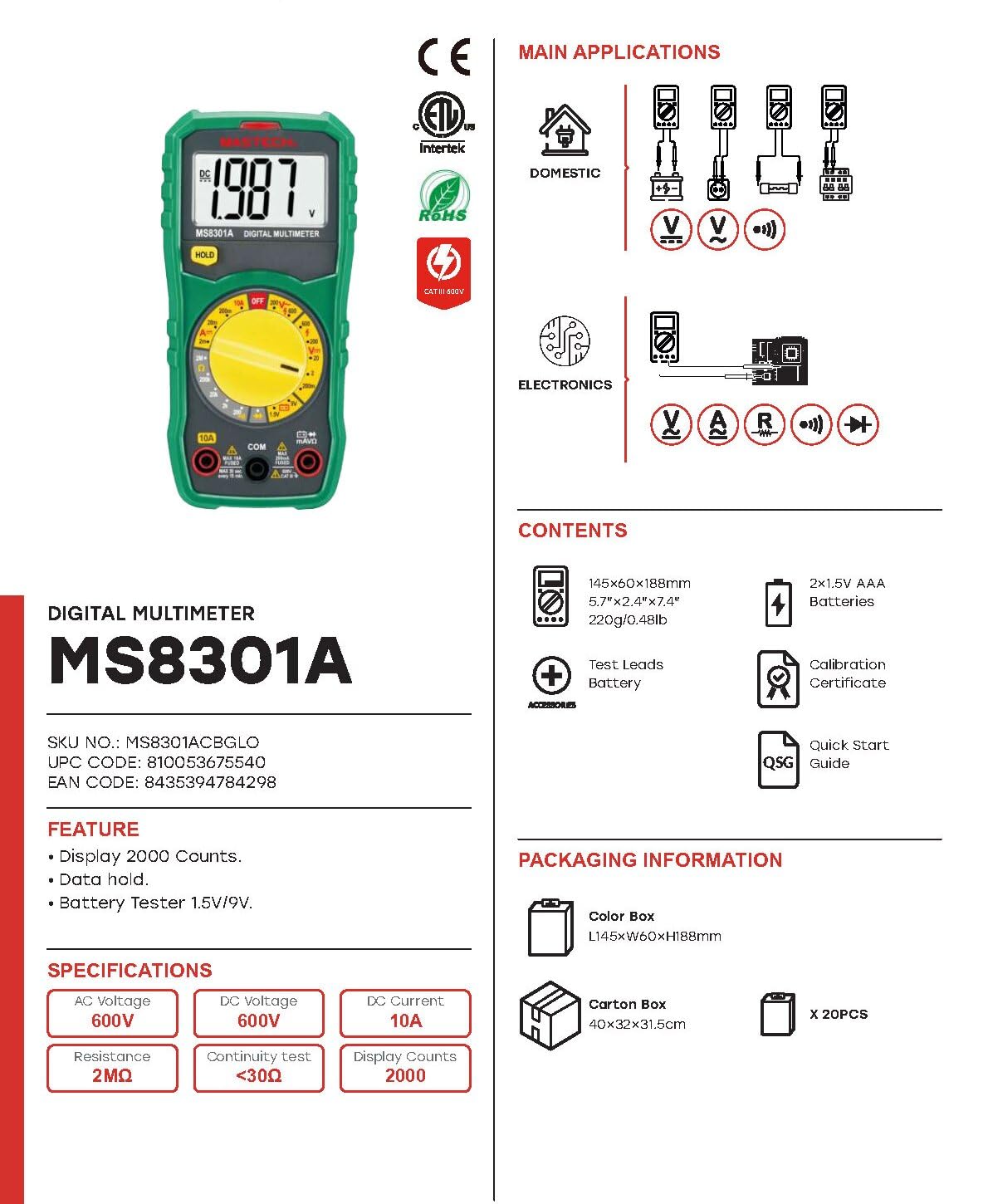
Image: The Mastech MS8301A Digital Multimeter showing its front panel, rotary switch, display, input jacks, and a list of included accessories such as test leads and batteries.
4. సెటప్
4.1 బ్యాటరీ ఇన్స్టాలేషన్
- Ensure the multimeter is turned off and disconnect any test leads.
- మల్టీమీటర్ వెనుక భాగంలో బ్యాటరీ కంపార్ట్మెంట్ కవర్ను గుర్తించండి.
- రిటైనింగ్ స్క్రూ(లు) విప్పు మరియు కవర్ తొలగించండి.
- Insert two 1.5V AAA batteries, observing the correct polarity (+ and -) as indicated inside the compartment.
- బ్యాటరీ కంపార్ట్మెంట్ కవర్ను మార్చి, దానిని స్క్రూ(లు)తో భద్రపరచండి.
4.2 టెస్ట్ లీడ్లను కనెక్ట్ చేయడం
Connect the test leads to the appropriate input jacks on the multimeter:
- చొప్పించు నలుపు పరీక్షలో లీడ్ COM (సాధారణ) జాక్.
- చాలా కొలతలకు (వాల్యూమ్tage, Resistance, Diode, Continuity, Temperature, Battery Test), insert the ఎరుపు పరీక్షలో లీడ్ VΩmA జాక్.
- For high current measurements (up to 10A), insert the ఎరుపు పరీక్షలో లీడ్ 10A జాక్.
5. ఆపరేటింగ్ సూచనలు
Before taking any measurement, ensure the test leads are correctly connected and the rotary switch is set to the desired function.
5.1 కొలిచే DC వాల్యూమ్tagఇ (వి=)
- Set the rotary switch to the desired V= range (e.g., 20V for measuring up to 20V DC).
- ఎరుపు పరీక్ష తాడును సర్క్యూట్ యొక్క సానుకూల (+) వైపుకు మరియు నలుపు పరీక్ష తాడును ప్రతికూల (-) వైపుకు కనెక్ట్ చేయండి.
- సంపుటాన్ని చదవండిtagడిస్ప్లేలో ఇ విలువ.
5.2 కొలిచే AC వాల్యూమ్tagఇ (V~)
- Set the rotary switch to the desired V~ range (e.g., 200V for measuring up to 200V AC).
- AC వాల్యూమ్ అంతటా టెస్ట్ లీడ్లను కనెక్ట్ చేయండి.tagఇ మూలం.
- సంపుటాన్ని చదవండిtagడిస్ప్లేలో ఇ విలువ.
5.3 Measuring DC Current (A=)
- ముఖ్యమైన: Disconnect power to the circuit before connecting the multimeter in series.
- Set the rotary switch to the desired A= range (e.g., 200mA or 10A). Remember to move the red lead to the 10A jack for high current.
- Open the circuit where current is to be measured.
- Connect the multimeter in series with the circuit, ensuring the current flows through the multimeter.
- సర్క్యూట్కు విద్యుత్తును వర్తింపజేసి, డిస్ప్లేపై కరెంట్ విలువను చదవండి.
5.4 నిరోధకతను కొలవడం (Ω)
- ముఖ్యమైన: నిరోధకతను కొలిచే ముందు సర్క్యూట్ డి-ఎనర్జైజ్ చేయబడిందని మరియు అన్ని కెపాసిటర్లు డిశ్చార్జ్ అయ్యాయని నిర్ధారించుకోండి.
- Set the rotary switch to the desired Ω పరిధి.
- కొలవవలసిన భాగం అంతటా పరీక్ష లీడ్లను కనెక్ట్ చేయండి.
- ప్రదర్శనలో నిరోధక విలువను చదవండి.
5.5 డయోడ్ పరీక్ష (→|)
- ముఖ్యమైన: డయోడ్ సర్క్యూట్ నుండి డిస్కనెక్ట్ చేయబడిందని నిర్ధారించుకోండి.
- రోటరీ స్విచ్ను సెట్ చేయండి డయోడ్ టెస్ట్ స్థానం.
- Connect the red test lead to the anode and the black test lead to the cathode of the diode. The display will show the forward voltagఇ డ్రాప్.
- లీడ్లను రివర్స్ చేయండి. మంచి డయోడ్ కోసం డిస్ప్లే "OL" (ఓపెన్ లూప్) చూపించాలి.
5.6 కంటిన్యుటీ టెస్ట్ ())))
- ముఖ్యమైన: సర్క్యూట్ డి-ఎనర్జైజ్ చేయబడిందని నిర్ధారించుకోండి.
- రోటరీ స్విచ్ను సెట్ చేయండి కంటిన్యుటీ టెస్ట్ స్థానం.
- Connect the test leads across the component or wire to be tested.
- If the resistance is below approximately 30Ω, the buzzer will sound, indicating continuity. The display will also show the resistance value.
5.7 Battery Test (1.5V/9V)
- రోటరీ స్విచ్ను సెట్ చేయండి 1.5V or 9V battery test position, corresponding to the battery type.
- Connect the red test lead to the positive (+) terminal of the battery and the black test lead to the negative (-) terminal.
- బ్యాటరీ వాల్యూమ్ చదవండిtagఇ డిస్ప్లేలో.
5.8 డేటా హోల్డ్
Press the "HOLD" button to freeze the current reading on the display. Press it again to release the hold function and resume live readings.
6. స్పెసిఫికేషన్లు
| కొలత | పరిధి | రిజల్యూషన్ |
|---|---|---|
| DC సంtage | 200mV / 2V / 20V / 200V / 600V | 100µV / 1mV / 10mV / 100mV / 1V |
| AC వాల్యూమ్tage | 200V / 600V | 100mV / 1V |
| DC కరెంట్ | 2mA / 20mA / 200mA / 10A | 1µA / 10µA / 100µA / 10mA |
| ప్రతిఘటన | 200Ω / 2kΩ / 20kΩ / 200kΩ / 2MΩ | 0.1Ω / 1Ω / 10Ω / 100Ω / 1kΩ |
| కంటిన్యుటీ టెస్ట్ | Buzzer sounds at <30Ω | — |
| డయోడ్ టెస్ట్ | ఫార్వార్డ్ వాల్యూమ్tagఇ డ్రాప్ | — |
| బ్యాటరీ పరీక్ష | 1.5V / 9V | — |
సాధారణ లక్షణాలు
- ప్రదర్శన: 2000 గణనలు
- విద్యుత్ సరఫరా: 2 x 1.5V AAA బ్యాటరీలు
- కొలతలు: 150mm x 74mm x 48mm (5.9" x 2.9" x 1.7")
- బరువు: 220g (0.48lb)
- భద్రతా రేటింగ్: క్యాట్ III 600 వి
- మెటీరియల్: యాక్రిలోనిట్రైల్ బుటాడిన్ స్టైరీన్ (ABS)
- రంగు: నీలం

Image: A table detailing manual ranging specifications for various Mastech digital multimeters, including the MS8301A, showing display counts, safety ratings, and measurement capabilities.
7. నిర్వహణ
7.1 బ్యాటరీ భర్తీ
When the battery low indicator appears on the display, replace the batteries immediately to ensure accurate readings. Follow the steps outlined in Section 4.1 for battery installation.
7.2 శుభ్రపరచడం
ప్రకటనతో కేసును తుడిచివేయండిamp వస్త్రం మరియు తేలికపాటి డిటర్జెంట్. అబ్రాసివ్లు లేదా ద్రావకాలను ఉపయోగించవద్దు. ఉపయోగించే ముందు మల్టీమీటర్ పూర్తిగా పొడిగా ఉందని నిర్ధారించుకోండి.
7.3 నిల్వ
If the multimeter is not used for an extended period, remove the batteries to prevent leakage and damage to the device. Store in a cool, dry place away from direct sunlight.
8. ట్రబుల్షూటింగ్
| సమస్య | సాధ్యమైన కారణం | పరిష్కారం |
|---|---|---|
| డిస్ప్లే లేదు లేదా డిమ్ డిస్ప్లే లేదు | Dead or low batteries; incorrect battery polarity. | బ్యాటరీలను మార్చండి; బ్యాటరీ ఓరియంటేషన్ను తనిఖీ చేయండి. |
| "OL" (ఓవర్లోడ్) ప్రదర్శించబడింది | Measurement exceeds selected range; open circuit. | Select a higher range; check for open circuit in the component or leads. |
| సరికాని రీడింగ్లు | Incorrect function selected; poor test lead connection; damaged test leads. | Verify function switch position; ensure secure lead connection; inspect and replace damaged leads. |
| కంటిన్యుటీ బీప్ లేదు | Open circuit; resistance too high. | Check for breaks in the circuit; ensure resistance is below 30Ω. |
9. వారంటీ మరియు మద్దతు
Mastech products are designed for reliability and performance. For specific warranty information, please refer to the warranty card included with your product or contact Mastech customer support. Keep your purchase receipt as proof of purchase.
For technical support or service inquiries, please visit the official Mastech webసైట్ లేదా వారి అధీకృత సేవా కేంద్రాలను సంప్రదించండి.