
JMT FM225
FM225 Facial Recognition Module User Manual
మోడల్: FM225
1. పరిచయం
The JMT FM225 Facial Recognition Module is an advanced 3D facial recognition camera designed for intelligent offline applications. Utilizing deep learning infrared facial recognition algorithms, this module provides highly accurate and reliable live detection capabilities, making it suitable for integration into smart homes, security monitoring systems, smart door locks, mobile vending machines, and various other fields requiring robust biometric authentication.
This manual provides comprehensive instructions for the setup, operation, maintenance, and troubleshooting of your FM225 module.
2. భద్రతా సమాచారం
- Ensure the power supply meets the specified requirements (DC5.5V~9V@1A) to prevent damage to the module.
- Do not expose the module to extreme temperatures outside the working range (-20°C to +60°C) or storage range (-30°C to +70°C).
- Avoid environments with high humidity (above 93% without condensation) to prevent electrical short circuits.
- Handle the module with care to prevent physical damage. Avoid dropping or subjecting it to strong impacts.
- Do not attempt to disassemble or modify the module, as this will void the warranty and may cause malfunction.
- మాడ్యూల్ను నీరు మరియు ఇతర ద్రవాలకు దూరంగా ఉంచండి.
3. Package Contents (Kit A)
ప్యాకేజీని తెరిచినప్పుడు, కింది అన్ని భాగాలు ఉన్నాయని నిర్ధారించుకోండి:

Image: Contents of the FM225 Facial Recognition Module Kit A, including the module, a USB cable, and a set of connection wires.
- 1x FM225 Facial Recognition Module
- 1x USB Communication Cable
- 1x Set of Connection Wires (for UART/power)
4. ఉత్పత్తి ముగిసిందిview
The FM225 module is a compact and powerful facial recognition solution. It features dual infrared cameras for 3D depth sensing and a central infrared illuminator for reliable performance in various lighting conditions. The module supports both UART and USB communication interfaces for flexible integration.

చిత్రం: వివరణాత్మక టాప్-డౌన్ view of the FM225 module, highlighting the two camera lenses and the central infrared illuminator.
ముఖ్య లక్షణాలు:
- Deep Learning Infrared Facial Recognition: Advanced algorithms for high accuracy.
- ప్రత్యక్ష గుర్తింపు: Prevents spoofing attempts.
- ఆఫ్లైన్ ఆపరేషన్: Capable of performing recognition without an internet connection.
- High Recognition Accuracy: 98.85% accuracy rate.
- Large Face Capacity: Stores up to 100 facial features.
- Flexible Communication: UART and USB interfaces.
5. సెటప్
This section details the physical connection and initial setup of the FM225 module.
5.1 పిన్అవుట్ రేఖాచిత్రం
Refer to the diagram below for the pin assignments for both UART and USB interfaces.
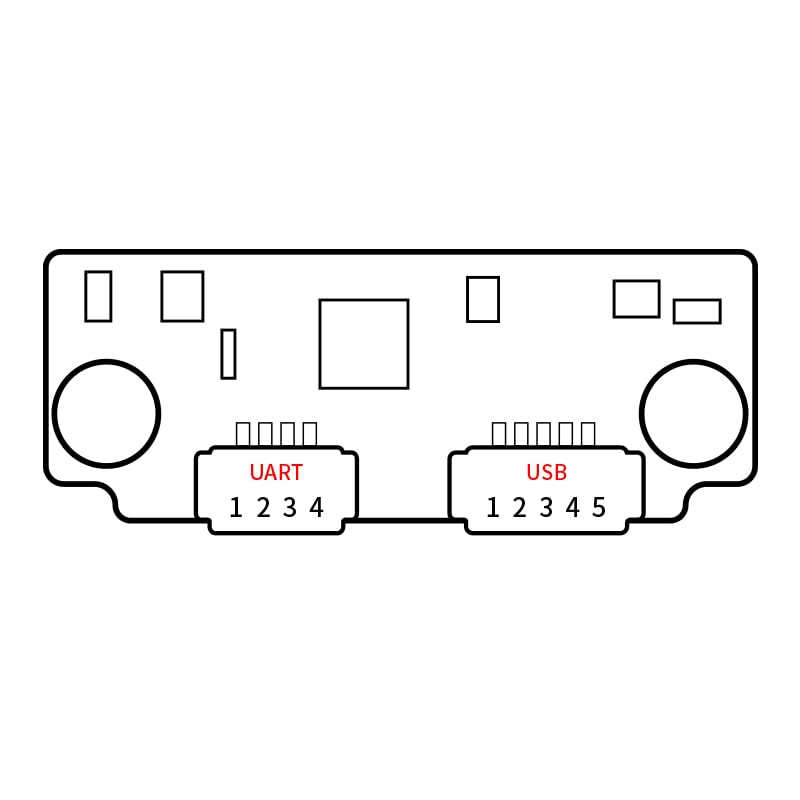
Image: Schematic diagram illustrating the UART (1-4) and USB (1-5) pin connections on the FM225 module's circuit board.
5.2 Connecting the Module
- పవర్ కనెక్షన్: Connect the module to a stable DC power supply within the range of 5.5V to 9V at 1A. Ensure correct polarity.
- కమ్యూనికేషన్ ఇంటర్ఫేస్:
- UART: Use the provided connection wires to interface with your host system via UART. Refer to the pinout diagram for TX/RX and GND connections.
- USB: Connect the module to your host system using the provided USB cable. This interface is typically used for data transfer and configuration.
- మౌంటు: Securely mount the module in its intended location, ensuring the camera lenses have a clear, unobstructed view of the area where facial recognition will occur. Consider the optimal recognition distance (0.3m to 1.1m) and height (1.35m to 2.20m).
6. ఆపరేటింగ్ సూచనలు
The FM225 module operates primarily through commands sent via its communication interfaces. Specific software or SDKs provided by the manufacturer are typically required for full functionality, including face enrollment and recognition.
6.1 Face Enrollment
To enroll a new face into the module's memory:
- Ensure the module is powered on and connected to your host system.
- Use the manufacturer's provided software or send the appropriate UART/USB commands to initiate the enrollment process.
- Position the subject's face within the recognition distance (0.3m to 1.1m) and within the recognition angle (supports multi-angle input).
- Follow the on-screen prompts or command responses to complete the enrollment. The module can store up to 100 facial features.
6.2 ముఖ గుర్తింపు
Once faces are enrolled, the module can perform recognition:
- The module continuously scans for faces within its field of view.
- When a face is detected, the module compares it against its stored facial features.
- If a match is found with sufficient accuracy (98.85%), the module will output a recognition result via the chosen communication interface.
- The module's live detection feature helps prevent recognition from photos or videos.
7. నిర్వహణ
The FM225 module requires minimal maintenance to ensure optimal performance.
- శుభ్రపరచడం: Gently wipe the camera lenses with a soft, lint-free cloth. Do not use abrasive cleaners or solvents.
- పర్యావరణం: ఆపరేటింగ్ వాతావరణం పేర్కొన్న ఉష్ణోగ్రత మరియు తేమ పరిధిలో ఉండేలా చూసుకోండి.
- ఫర్మ్వేర్ నవీకరణలు: తయారీదారుని కాలానుగుణంగా తనిఖీ చేయండి website for any available firmware updates to improve performance or add new features.
8. ట్రబుల్షూటింగ్
This section addresses common issues you might encounter with the FM225 module.
| సమస్య | సాధ్యమైన కారణం | పరిష్కారం |
|---|---|---|
| మాడ్యూల్ ఆన్ కావడం లేదు. | సరికాని విద్యుత్ సరఫరా వాల్యూమ్tage or current; reversed polarity; loose connection. | Verify power supply meets DC5.5V~9V@1A. Check power cable connections and polarity. |
| Facial recognition fails or is inaccurate. | Incorrect recognition distance/angle; poor lighting; dirty lenses; face not enrolled. | Ensure subject is within 0.3m-1.1m. Check lighting conditions. Clean camera lenses. Verify face is enrolled. |
| Communication issues (UART/USB). | Incorrect wiring; driver issues; incorrect baud rate/port settings. | Check pinout connections. Install necessary drivers on host system. Verify communication settings (baud rate, etc.). |
| Module becomes unresponsive. | Overheating; software error; power fluctuation. | Power cycle the module. Ensure adequate ventilation. Check power supply stability. |
9. స్పెసిఫికేషన్లు
Detailed technical specifications for the FM225 Facial Recognition Module:
| పరామితి | విలువ |
|---|---|
| ఉత్పత్తి మోడల్ | FM225 |
| కమ్యూనికేషన్ ఇంటర్ఫేస్ | UART & USB |
| Facial Algorithm | Deep learning infrared facial recognition algorithms |
| Recognition Accuracy | 98.85% |
| Number of Faces | 100 facial features |
| తప్పుగా గుర్తించే రేటు | <0.0001% (parts per million) |
| FAR/FRR | <1% |
| గుర్తింపు దూరం | 0.3 ~ 1.1 మీ |
| Height Recognition | 1.35 - 2.20m (@ 20°~23° tilt angle Left, right, up, down~20°) |
| గుర్తింపు కోణం | Supports multi-angle facial input, expanding recognition range |
| విద్యుత్ సరఫరా అవసరం | DC5.5V ~ 9V@1A |
| పని ఉష్ణోగ్రత | -20°C ~ +60°C |
| నిల్వ ఉష్ణోగ్రత | -30°C ~ +70°C |
| పర్యావరణ తేమ | 10% ~ 93% (సంక్షేపణం లేకుండా) |
| Main Board Size | 40 * 15 * 10.65mm (non-integral size) |
| వర్తించే దృశ్యాలు | Smart homes, security monitoring, smart door locks, mobile vending machines, and other fields |
10. వారంటీ మరియు మద్దతు
For warranty information, technical support, or further inquiries, please contact the manufacturer or your point of purchase. Keep your purchase receipt as proof of purchase for warranty claims.
Manufacturer: HI-LINK
Brand: JMT
For the latest documentation and software, please visit the official JMT store or HI-LINK support page.
Ask a question about this manual
Ask about setup, troubleshooting, compatibility, parts, safety, or missing instructions. Manuals+ will review the question and use this page’s manual context to help answer it.