
1. ఉత్పత్తి ముగిసిందిview
The Lenovo Legion Pro 7 Gen 8 is a high-performance 16-inch gaming laptop designed for demanding applications and gaming. It features an AMD Ryzen 9 7945HX processor, NVIDIA GeForce RTX 4090 graphics, 32GB of DDR5 RAM, and a 2TB NVMe SSD. The laptop is equipped with a 16-inch WQXGA (2560 x 1600) IPS display with a 240Hz refresh rate, offering a vibrant and smooth visual experience. Advanced thermal management, including Legion Coldfront 5.0 and liquid metal CPU cooling, ensures optimal performance during intensive use. The device runs on Windows 11 Home.
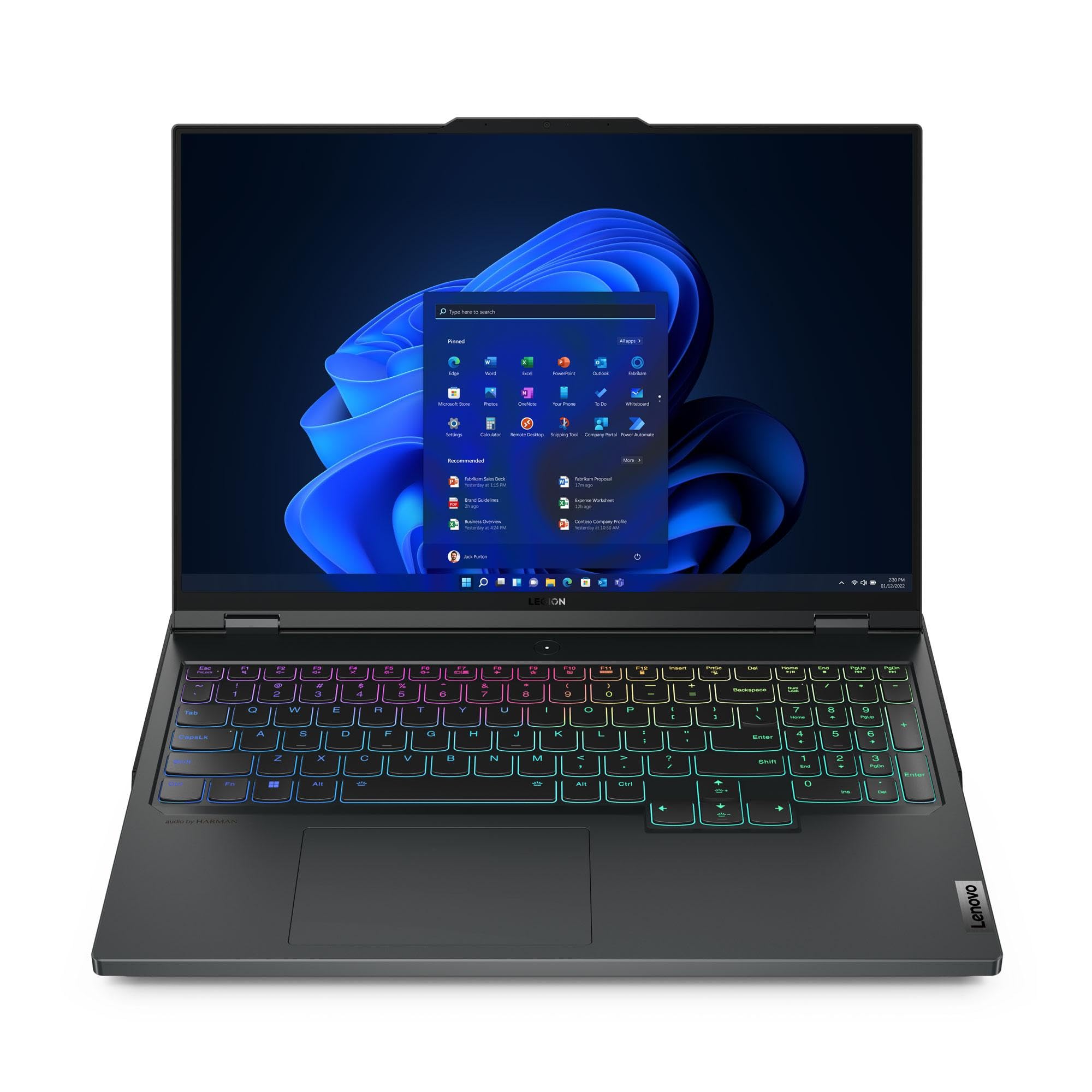
మూర్తి 1: ముందు view of the Lenovo Legion Pro 7 Gen 8 Gaming Laptop.

చిత్రం 2: కోణీయ view of the Lenovo Legion Pro 7 Gen 8.
ముఖ్య లక్షణాలు:
- ప్రాసెసర్: AMD Ryzen 9 7945HX (2.50 GHz up to 5.40 GHz)
- గ్రాఫిక్స్: NVIDIA GeForce RTX 4090 ల్యాప్టాప్ GPU 16GB GDDR6
- మెమరీ: 32 GB DDR5-5200MHz (2 x 16 GB)
- నిల్వ: 2 TB SSD M.2 2280 PCIe Gen4 TLC (2 x 1 TB)
- ప్రదర్శన: 16" WQXGA (2560 x 1600) IPS, Anti-Glare, HDR 400, 100% sRGB, 500 nits, 240Hz
- ఆపరేటింగ్ సిస్టమ్: విండోస్ 11 హోమ్ 64
- కెమెరా: 1080P FHD with Dual Microphone and Electronic Privacy Shutter
- కీబోర్డ్: Per-Key RGB Backlit, English (US)
- కనెక్టివిటీ: WiFi 6E 2x2 AX & Bluetooth 5.1 or above
2. సెటప్
2.1 అన్బాక్సింగ్ మరియు ప్రారంభ పవర్ ఆన్
- Carefully remove the laptop and its accessories from the packaging. Ensure all components listed in the "What's in the Box" section are present: Laptop, AC Adapter, Product Manuals.
- Connect the AC adapter to the laptop's power input port (refer to Figure 3, item 5) and then to a power outlet.
- Open the laptop lid and press the power button, typically located on the keyboard deck, to turn on the device.
- భాష ఎంపిక, నెట్వర్క్ కనెక్షన్ మరియు వినియోగదారు ఖాతా సృష్టితో సహా ప్రారంభ Windows 11 హోమ్ సెటప్ను పూర్తి చేయడానికి స్క్రీన్పై సూచనలను అనుసరించండి.
2.2 Connecting Peripherals and Port Overview
The Legion Pro 7 Gen 8 offers a variety of ports for connecting external devices. Familiarize yourself with the port layout for optimal connectivity.

Figure 3: Port layout of the Lenovo Legion Pro 7 Gen 8.
| అంశం నం. | పోర్ట్ | వివరణ |
|---|---|---|
| 1 | ఈథర్నెట్ (RJ45) | వైర్డు నెట్వర్క్ కనెక్షన్ కోసం. |
| 2 | USB-C 3.2 Gen 2 (DisplayPort™ 1.4, power delivery 140W) | Multi-functional port for data transfer, video output, and power delivery. |
| 3 | HDMI 2.1 | బాహ్య డిస్ప్లేలు లేదా టీవీలకు కనెక్ట్ చేయడానికి. |
| 4 | USB-A 3.2 Gen 1 (1 always on 5V2A) | Standard USB port, one supports charging devices even when the laptop is off. |
| 5 | పవర్ ఇన్పుట్ | ఇక్కడ AC అడాప్టర్ని కనెక్ట్ చేయండి. |
| 6 | హెడ్ఫోన్ / మైక్ కాంబో | హెడ్ఫోన్లు లేదా హెడ్సెట్ను మైక్రోఫోన్తో కనెక్ట్ చేయడానికి. |
| 7 | Webcam privacy e-shutter | Physical switch to disable the webగోప్యత కోసం కామ్. |
| 8 | USB-A 3.2 Gen 1 | పెరిఫెరల్స్ కోసం ప్రామాణిక USB పోర్ట్. |
| 9 | USB-A 3.2 Gen 1 | పెరిఫెరల్స్ కోసం ప్రామాణిక USB పోర్ట్. |
| 10 | USB-C 3.2 Gen 2 (DisplayPort™ 1.4) | Multi-functional port for data transfer and video output. |
3. ఆపరేషన్
3.1 పవర్ మేనేజ్మెంట్
- పవర్ ఆన్: పవర్ బటన్ను నొక్కండి.
- స్లీప్ మోడ్: మూత మూసివేయండి లేదా Windows స్టార్ట్ మెను నుండి "స్లీప్" ఎంచుకోండి.
- షట్ డౌన్: విండోస్ స్టార్ట్ మెనూ నుండి "షట్ డౌన్" ఎంచుకోండి.
- పునఃప్రారంభించు: విండోస్ స్టార్ట్ మెనూ నుండి "పునఃప్రారంభించు" ఎంచుకోండి.
3.2 కీబోర్డ్ మరియు టచ్ప్యాడ్
The laptop features a Per-Key RGB Backlit keyboard and a precision touchpad. The keyboard backlight can be adjusted through system settings or dedicated function keys (Fn + Spacebar, typically). The touchpad supports multi-touch gestures for navigation and control within Windows 11.

చిత్రం 4: కీబోర్డ్ మరియు టచ్ప్యాడ్ లేఅవుట్.
3.3 ప్రదర్శన సెట్టింగ్లు
The 16-inch WQXGA (2560 x 1600) IPS display offers a 240Hz refresh rate. You can adjust display settings such as brightness, resolution, and refresh rate through Windows Display Settings. For optimal gaming, ensure the display is set to its maximum refresh rate.
3.4 ఆడియో మరియు కెమెరా
The laptop includes stereo speakers and dual microphones. The 1080P Full HD camera is equipped with an electronic privacy shutter (Figure 3, item 7). Slide the shutter to cover the camera lens when not in use to ensure privacy.
3.5 గేమింగ్ పనితీరు లక్షణాలు
- Lenovo Legion AI Engine+: This intelligent system, powered by the LA2-Q AI chip, optimizes game performance in real-time by leveraging system sensors to maximize FPS. The Smart Engine adapts and improves over time.
- Legion Coldfront 5.0: An advanced thermal solution featuring thin fan blades, a massive intake and exhaust system, liquid metal for CPU heat transfer, and a wide vapor chamber for both CPU and GPU. This technology ensures efficient cooling during intense gaming sessions.

చిత్రం 5: దిగువ view illustrating the cooling system.
4. నిర్వహణ
4.1 మీ ల్యాప్టాప్ను శుభ్రపరచడం
- స్క్రీన్: మెత్తని, మెత్తని బట్టను తేలికగా ఉపయోగించండి డిampనీటితో లేదా స్క్రీన్-క్లీనింగ్ ద్రావణంతో కలిపి ఉంచండి. కఠినమైన రసాయనాలను నివారించండి.
- కీబోర్డ్ మరియు చాసిస్: మృదువైన, పొడి వస్త్రాన్ని ఉపయోగించండి. మొండి ధూళి కోసం, కొద్దిగా damp వస్త్రాన్ని ఉపయోగించవచ్చు. సంపీడన గాలి కీల మధ్య నుండి దుమ్మును తొలగించడానికి సహాయపడుతుంది.
- వెంట్స్: Periodically inspect and gently clean the air vents (located on the sides and bottom) to ensure unobstructed airflow. Use compressed air to remove dust buildup.
4.2 సాఫ్ట్వేర్ నవీకరణలు
Regularly update your operating system, drivers, and firmware to ensure optimal performance, security, and compatibility. Windows Update will handle OS updates, and Lenovo Vantage software can assist with driver and firmware updates.
4.3 బ్యాటరీ సంరక్షణ
To prolong battery life, avoid consistently discharging the battery completely or keeping it at 100% charge for extended periods. Lenovo Vantage software may offer battery health management features to optimize charging behavior.
5. ట్రబుల్షూటింగ్
ఈ విభాగం మీరు ఎదుర్కొనే సాధారణ సమస్యలను పరిష్కరిస్తుంది. మరింత క్లిష్టమైన సమస్యల కోసం, Lenovo మద్దతును చూడండి. webసైట్ లేదా కస్టమర్ సేవను సంప్రదించండి.
5.1 సాధారణ సమస్యలు మరియు పరిష్కారాలు
- ల్యాప్టాప్ పవర్ ఆన్ చేయదు:
- AC అడాప్టర్ ల్యాప్టాప్ మరియు పనిచేసే పవర్ అవుట్లెట్ రెండింటికీ సురక్షితంగా కనెక్ట్ చేయబడిందని నిర్ధారించుకోండి.
- మరొక పరికరాన్ని ప్లగ్ చేయడం ద్వారా పవర్ అవుట్లెట్ పనిచేస్తుందో లేదో ధృవీకరించండి.
- బ్యాటరీ పూర్తిగా ఖాళీ అయిపోతే, పవర్ ఆన్ చేయడానికి ప్రయత్నించే ముందు కొన్ని నిమిషాలు ఛార్జ్ అవ్వడానికి అనుమతించండి.
- స్క్రీన్ ఖాళీగా లేదా నల్లగా ఉంది:
- ల్యాప్టాప్ ఆన్ చేయబడిందో లేదో తనిఖీ చేయండి (పవర్ ఇండికేటర్ లైట్).
- Press Fn + F10 (or the appropriate function key for display output) to cycle through display modes.
- Connect an external monitor to check if video output is working.
- Wi-Fi లేదా బ్లూటూత్ కనెక్టివిటీ సమస్యలు:
- విండోస్ సెట్టింగ్లలో Wi-Fi/బ్లూటూత్ ప్రారంభించబడిందని నిర్ధారించుకోండి.
- మీ రౌటర్/మోడెమ్ను రీస్టార్ట్ చేయండి.
- Update wireless drivers through Lenovo Vantage or Device Manager.
- System performance is slow:
- నేపథ్యంలో నడుస్తున్న అనవసరమైన అప్లికేషన్లను మూసివేయండి.
- ఏవైనా పెండింగ్లో ఉన్న Windows లేదా డ్రైవర్ నవీకరణల కోసం తనిఖీ చేసి, ఇన్స్టాల్ చేయండి.
- Ensure adequate ventilation and clean cooling vents to prevent thermal throttling.
- మాల్వేర్ స్కాన్ను అమలు చేయండి.
6. స్పెసిఫికేషన్లు
| ఫీచర్ | వివరాలు |
|---|---|
| బ్రాండ్ | లెనోవో |
| మోడల్ పేరు | Legion Pro 7 Gen 8 16" AMD |
| మోడల్ సంఖ్య | 82WS003UUS |
| స్క్రీన్ పరిమాణం | 16 అంగుళాలు |
| రిజల్యూషన్ | 2560 x 1600 పిక్సెల్స్ (WQXGA) |
| రిఫ్రెష్ రేట్ | 240 Hz |
| ప్రదర్శన సాంకేతికత | IPS, Anti-Glare, HDR 400, 100% sRGB, 500 nits |
| CPU మోడల్ | AMD రైజెన్ 9 7945HX |
| ప్రాసెసర్ వేగం | 5.4 GHz వరకు |
| గ్రాఫిక్స్ కోప్రాసెసర్ | NVIDIA GeForce RTX 4090 |
| Graphics Card RAM | 16 GB GDDR6 |
| RAM మెమరీ ఇన్స్టాల్ చేయబడిన పరిమాణం | 32 GB DDR5-5200MHz |
| RAM మెమరీ గరిష్ట పరిమాణం | 64 GB |
| హార్డ్ డిస్క్ పరిమాణం | 2 TB SSD (M.2 2280 PCIe Gen4 TLC) |
| ఆపరేటింగ్ సిస్టమ్ | Windows 11 హోమ్ |
| Webకెమెరా | 1080P FHD with Dual Microphone and Electronic Privacy Shutter |
| కీబోర్డ్ | Per-Key RGB Backlit, English (US) |
| WLAN | WiFi 6E 2x2 AX |
| బ్లూటూత్ | బ్లూటూత్ 5.1 లేదా అంతకంటే ఎక్కువ |
| బ్యాటరీ శక్తి కంటెంట్ | 99.99 Watt Hours (Lithium Ion) |
| మొత్తం USB పోర్ట్లు | 5 |
| HDMI పోర్ట్లు | 1 (HDMI 2.1) |
| ఈథర్నెట్ పోర్ట్స్ | 1 (RJ45) |
| అంశం కొలతలు (L x W x మందం) | 14.3"లీ x 1.01"వా x 10.32"వ |
7. వారంటీ మరియు మద్దతు
7.1 వారంటీ సమాచారం
This Lenovo Legion Pro 7 Gen 8 laptop comes with a One Year Legion Ultimate Support warranty. This warranty covers manufacturing defects and hardware failures under normal use conditions. For specific terms and conditions, please refer to the warranty documentation included with your product or visit the official Lenovo support webసైట్.
7.2 కస్టమర్ మద్దతు
For technical assistance, warranty claims, or further inquiries, please contact Lenovo customer support. You can find contact information and additional resources on the official Lenovo support webసైట్:
Please have your laptop's model number (82WS003UUS) and serial number ready when contacting support.