
1. ఓవర్view
The Teufel Concept 8 is a versatile 5.1 multichannel subwoofer designed to enhance your audio experience. It features a powerful 200 mm woofer, capable of delivering deep bass down to 33 Hz, suitable for rooms up to 25 m². This unit integrates an AV receiver with advanced connectivity options.
- Integrated AV receiver with Bluetooth 5.0 (Qualcomm aptX and AAC) for wireless audio streaming.
- HDMI (ARC, CEC) for seamless integration with your television and control.
- Dynamore technology for enhanced sound.
- Downfire driver with extreme excursion and a large bass reflex port to minimize flow noise, even at high volumes.
- 5.1 USB-C sound card function for direct digital audio connection.
- అధిక-నాణ్యత తరగతి D amplifier from Texas Instruments.
- Automatic standby activation for energy efficiency.
- Sound settings for various configurations, including 2.1 setup capability.
- Compatible with Teufel CONSONO, CUBYCON, ULTIMA 20, VITON, and LT 4 speaker systems.

మూర్తి 1: టాప్ view of the Teufel Concept 8 Subwoofer with its integrated control panel.
2. భద్రతా సూచనలు
పరికరాన్ని ఆపరేట్ చేసే ముందు దయచేసి ఈ భద్రతా సూచనలను జాగ్రత్తగా చదవండి. భవిష్యత్తు సూచన కోసం ఈ మాన్యువల్ని ఉంచండి.
- జాగ్రత్త: విద్యుత్ షాక్ ప్రమాదం. తెరవవద్దు. అన్ని సేవలను అర్హత కలిగిన సిబ్బందికి సూచించండి.
- అగ్ని లేదా విద్యుత్ షాక్ను నివారించడానికి పరికరాన్ని వర్షం లేదా తేమకు గురిచేయవద్దు.
- సరైన వెంటిలేషన్ ఉండేలా చూసుకోండి. ఎలాంటి వెంటిలేషన్ ఓపెనింగ్లను బ్లాక్ చేయవద్దు.
- సబ్ వూఫర్ పడిపోకుండా ఉండటానికి స్థిరమైన, స్థాయి ఉపరితలంపై ఉంచండి.
- రేడియేటర్లు, హీట్ రిజిస్టర్లు, స్టవ్లు లేదా వేడిని ఉత్పత్తి చేసే ఇతర ఉపకరణాలు వంటి ఉష్ణ మూలాల నుండి పరికరాన్ని దూరంగా ఉంచండి.
- తయారీదారు పేర్కొన్న జోడింపులు/యాక్సెసరీలను మాత్రమే ఉపయోగించండి.
- మెరుపు తుఫానుల సమయంలో లేదా ఎక్కువ కాలం ఉపయోగించనప్పుడు పరికరాన్ని అన్ప్లగ్ చేయండి.
- పరికర ఓపెనింగ్లలోకి ఎలాంటి వస్తువులను చొప్పించవద్దు.

Figure 2: Rear panel warnings, emphasizing the need for professional servicing.
3. ప్యాకేజీ విషయాలు
Carefully unpack the box and ensure all items are present and in good condition. If any item is missing or damaged, contact your retailer immediately.
- Teufel Concept 8 Subwoofer unit
- పవర్ కేబుల్
- రిమోట్ కంట్రోల్
- Speaker cable (approx. 25 meters)
- వినియోగదారు మాన్యువల్ (ఈ పత్రం)
4. సెటప్
4.1 ప్లేస్మెంట్
The Teufel Concept 8 Subwoofer is designed with a downfire driver, meaning the woofer faces downwards. For optimal performance, place the subwoofer on a solid, level floor surface. Avoid placing it directly against walls or in corners, as this can lead to exaggerated or boomy bass. Experiment with different positions in your room to find the best sound balance.

Figure 3: The downfire woofer and sturdy feet of the subwoofer.
4.2 కనెక్షన్లు
Before making any connections, ensure the subwoofer and all connected devices are powered off and unplugged from the mains.

Figure 4: Rear connection panel of the Teufel Concept 8 Subwoofer.
- Speaker Outputs (Right Front, Center, Right Rear, Left Front, Left Rear): Connect your satellite speakers to these spring clip terminals. Ensure correct polarity (+ to + and - to -).
- HDMI ARC/CEC (TV ARC/CEC): Connect an HDMI cable from your TV's HDMI ARC port to the subwoofer's HDMI ARC port for audio return channel functionality and integrated control.
- HDMI-IN: Connect other HDMI sources (e.g., Blu-ray player, game console) to this input.
- USB-C (5.1 Sound Card): Connect a USB-C cable to your computer for 5.1 digital audio playback.
- ఆప్టికల్ IN: Connect digital audio sources using an optical cable.
- AUX IN (Left/Right Cinch): Connect analog audio sources using RCA cables.
- 5.1 IN (Left/Right, Center/Sub, Rear L/R): For connecting a 5.1 analog audio source.
- శక్తి: Connect the supplied power cable to the subwoofer and then to a suitable wall outlet (220-240V AC 50/60Hz).
5. ఆపరేటింగ్ సూచనలు
5.1 నియంత్రణ ప్యానెల్
The subwoofer features a touch-sensitive control panel on its top surface for easy operation.

మూర్తి 5: వివరంగా view నియంత్రణ ప్యానెల్ యొక్క.
- పవర్ బటన్: Press to turn the subwoofer on or off.
- Input Selection Buttons (TV, HDMI, OPT, AUX, USB): Tap to cycle through available audio inputs.
- బ్లూటూత్ బటన్: బ్లూటూత్ జత చేసే మోడ్లోకి ప్రవేశించడానికి నొక్కి పట్టుకోండి.
- వాల్యూమ్ నియంత్రణలు (+/-): Adjust the overall system volume.
5.2 బ్లూటూత్ జత చేయడం
- సబ్ వూఫర్ ఆన్ చేయబడిందని నిర్ధారించుకోండి.
- Press and hold the Bluetooth button on the control panel until the Bluetooth indicator light flashes.
- మీ మొబైల్ పరికరంలో, బ్లూటూత్ని ప్రారంభించండి మరియు అందుబాటులో ఉన్న పరికరాల కోసం శోధించండి.
- Select "Teufel Concept 8" from the list to pair. Once connected, the indicator light will become solid.

Figure 6: Subwoofer connected via Bluetooth to a smartphone.
5.3 HDMI ARC/CEC Functionality
When connected to a compatible TV via HDMI ARC, the subwoofer can receive audio from the TV and be controlled by the TV remote (volume, power on/off) through CEC (Consumer Electronics Control).
- Connect an HDMI cable from the TV's HDMI ARC port to the subwoofer's HDMI ARC port.
- Ensure HDMI ARC and CEC are enabled in your TV's audio settings.
- Select the HDMI input on the subwoofer.
5.4 USB-C Sound Card
Connect your computer to the subwoofer via the USB-C port to use the integrated 5.1 sound card. Your computer should automatically detect the subwoofer as an audio output device.
5.5 సౌండ్ సెట్టింగ్లు
The rear panel offers controls for adjusting bass performance and speaker configuration.
- Bass Performance (Deep/Loud): Adjust the bass characteristics to your preference. "Deep" provides a more extended, subtle bass, while "Loud" offers a more impactful, pronounced bass.
- 2.1/5.1 Setup Switch: Select the appropriate setting based on whether you are using a 2.1 or 5.1 speaker configuration.
6. నిర్వహణ
To ensure the longevity and optimal performance of your Teufel Concept 8 Subwoofer, follow these maintenance guidelines:
- క్లీనింగ్: Use a soft, dry cloth to clean the exterior surfaces. Do not use liquid cleaners, aerosols, or abrasive materials, as these can damage the finish.
- వెంటిలేషన్: Ensure that the ventilation openings are not blocked by dust or debris. Periodically clean them with a soft brush or vacuum cleaner.
- నిల్వ: If storing the subwoofer for an extended period, unplug it from the power outlet and store it in a cool, dry place, away from direct sunlight and extreme temperatures.
- తేమను నివారించండి: Keep the subwoofer away from water, high humidity, and other liquids.
7. ట్రబుల్షూటింగ్
If you encounter issues with your Teufel Concept 8 Subwoofer, refer to the following common problems and solutions:
| సమస్య | సాధ్యమైన కారణం | పరిష్కారం |
|---|---|---|
| శక్తి లేదు | Power cable not connected; Power outlet not active; Subwoofer in standby mode. | Ensure power cable is securely connected. Check the power outlet. Press the power button on the unit or remote. |
| No sound from subwoofer/speakers | Incorrect input selected; Volume too low; Speaker cables incorrectly connected; Source device issue. | Select the correct input. Increase volume. Check speaker cable connections for correct polarity. Verify source device is playing audio. |
| బ్లూటూత్ కనెక్ట్ కావడం లేదు | Subwoofer not in pairing mode; Device too far; Interference. | Ensure subwoofer is in pairing mode (flashing Bluetooth light). Move device closer. Avoid sources of interference. |
| వక్రీకరించిన ధ్వని | Volume too high; Source audio quality is poor; Incorrect sound settings. | Reduce volume. Check source audio. Adjust bass performance settings (Deep/Loud). |
If the problem persists after trying these solutions, please contact Teufel customer support or a qualified service technician.
8. స్పెసిఫికేషన్లు
- బ్రాండ్: Teufel
- మోడల్ పేరు: CONCEPT 8 Subwoofer
- గరిష్ట స్పీకర్ అవుట్పుట్ పవర్: 295 వాట్స్
- ఫ్రీక్వెన్సీ రెస్పాన్స్: 33 హెర్ట్జ్
- కనెక్టివిటీ టెక్నాలజీ: Bluetooth 5.0 (Qualcomm aptX and AAC), AUX, HDMI ARC CEC, Stereo Cinch Input, 3.5 mm Jack Input, Optical Digital Inputs, Spring Clips, USB-C, HDMI Video Input/Outputs, High-Level Speaker Outputs, 5.1 USB Sound Card.
- ఆడియో అవుట్పుట్ మోడ్: మోనో
- మౌంటు రకం: అంతస్తు
- మెటీరియల్: ప్లాస్టిక్
- ప్రత్యేక ఫీచర్: పోర్టబుల్
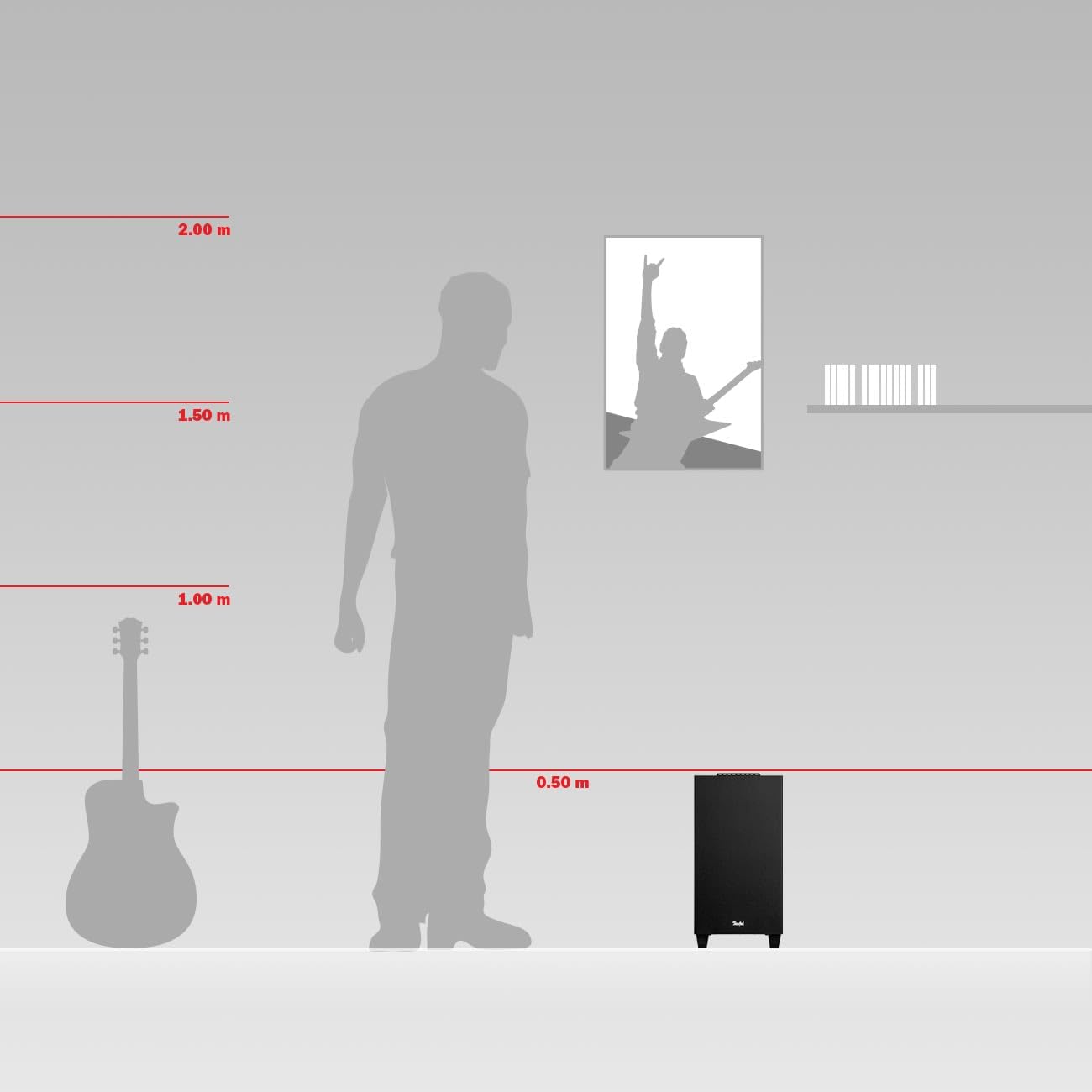
Figure 7: Subwoofer size comparison.
9. వారంటీ మరియు మద్దతు
For detailed information regarding warranty terms, technical support, and service, please refer to the official Teufel website or contact your local Teufel dealer. Keep your proof of purchase for warranty claims.
ఆన్లైన్ మద్దతు: సందర్శించండి www.teufelaudio.com తరచుగా అడిగే ప్రశ్నలు, డౌన్లోడ్లు మరియు సంప్రదింపు సమాచారం కోసం.