
పరిచయం
This manual provides essential information for the safe and effective operation of your ORDRO G801 64MP 4K Digital Camera. Please read this manual thoroughly before using the camera and keep it for future reference.
ఏమి చేర్చబడింది
క్రింద జాబితా చేయబడిన అన్ని అంశాలు మీ ప్యాకేజీలో ఉన్నాయని నిర్ధారించుకోండి:

Image: The ORDRO G801 camera package contents, showing the G700 camera body, two batteries, a 64GB SD card, a lens cap, a lanyard, a Type-C USB cable, and the user manual.
- ORDRO G801 Digital Camera (also referred to as G700 in some materials)
- పునర్వినియోగపరచదగిన బ్యాటరీలు (x2)
- 64GB SD కార్డ్
- లెన్స్ క్యాప్
- Lanyard / Wrist Strap
- టైప్-సి యుఎస్బి కేబుల్
- వినియోగదారు మాన్యువల్ (ఈ పత్రం)
సెటప్
1 బ్యాటరీని ఛార్జ్ చేస్తోంది
Insert the provided rechargeable battery into the camera or use the external charger. Ensure the battery is fully charged before first use. A full charge typically takes approximately 2-3 hours.
2. SD కార్డ్ చొప్పించడం
Locate the SD card slot on the camera body. Insert the 64GB SD card with the metal contacts facing the correct direction until it clicks into place. Ensure the camera is powered off before inserting or removing the SD card.
3. Attaching the Lanyard/Strap
Attach the lanyard or wrist strap to the designated strap lugs on the camera body. This helps prevent accidental drops and provides security during use.
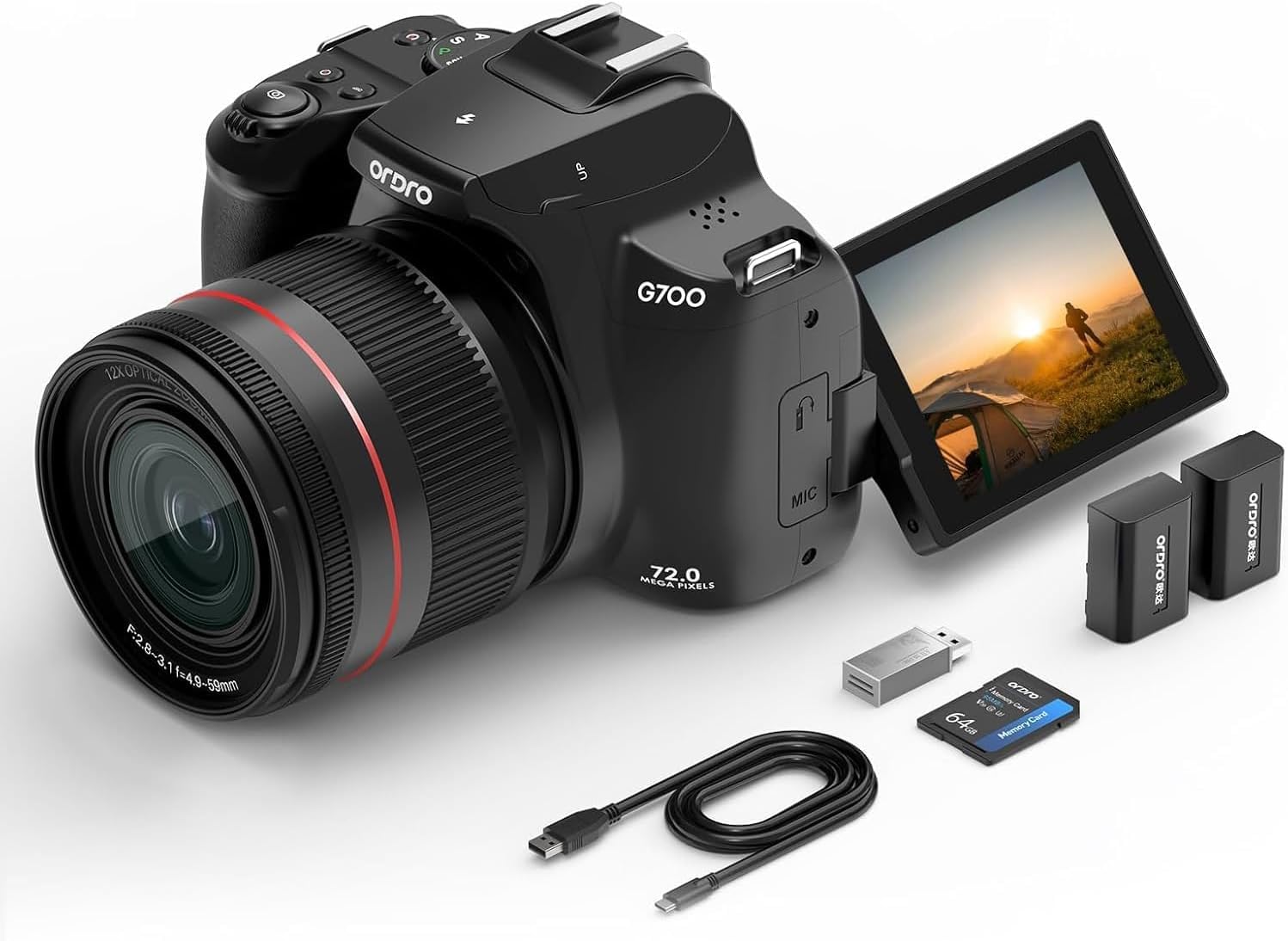
Image: A person's hands attaching the camera strap to the ORDRO G801 digital camera, which is resting on a concrete surface.
ప్రాథమిక ఆపరేషన్
1. పవర్ చేయడం ఆన్/ఆఫ్
Press and hold the Power button (usually located on the top or side of the camera) to turn the camera on or off.
2. Using the Flip Screen
The camera features a 3-inch IPS HD touchscreen that can flip 180 to 270 degrees. This is ideal for vlogging, selfies, or shooting from various angles.

Image: The ORDRO G801 camera demonstrating its 3-inch foldable screen, showing it can rotate 270 degrees and flip 180 degrees for versatile shooting.

Image: The ORDRO G801 camera held in hands, with the 3-inch flip screen extended and displaying a live view, ready for use.
3. మెనూలను నావిగేట్ చేయడం
Use the directional buttons and the 'OK' button to navigate through the camera's menu options. The touchscreen also allows for direct selection.
4. షూటింగ్ మోడ్లను ఎంచుకోవడం
Rotate the mode dial (typically on the top of the camera) to select your desired shooting mode. Available modes include AUTO, Programmed Auto Exposure (P), Aperture Priority (AV), Shutter Priority (TV), Manual (M), Scene Mode (SCN), and Filter (CA).

Image: The ORDRO G801 camera showing its mode dial, with a visual guide to different photo modes such as AUTO, P, AV, TV, M, SCN, and CA (Filter).

Image: A collage of images demonstrating the effect of various filter modes available on the ORDRO G801 camera, applied to portraits and landscapes.
అధునాతన ఫీచర్లు
1. Zoom Functionality
The camera features 12X optical zoom and 30X digital zoom. Use the zoom lever (typically around the shutter button) to adjust the focal length. Optical zoom maintains image quality, while digital zoom magnifies the image electronically.

Image: The ORDRO G801 camera illustrating its 12X optical zoom capability, with comparative images showing the view at 1X, 6X, and 12X zoom levels.

Image: The ORDRO G801 camera highlighting its 12X optical zoom and 30X digital zoom, with two images demonstrating the difference between a wide shot and a zoomed-in shot of a building.
2. Flash and Hot Shoe
The built-in flash provides illumination in low-light conditions. To activate, typically press a button or slide a switch. The camera also features a hot shoe for attaching external flash units or other accessories.

Image: The ORDRO G801 camera illustrating its built-in flash in both retracted and popped-up positions, alongside a diagram of its standard hot shoe for accessories.
3. ఆటో ఫోకస్ మరియు మాన్యువల్ ఫోకస్
The camera supports both autofocus (AF) and manual focus (MF). In AF mode, the camera automatically detects and focuses on subjects, including face detection. In MF mode, you can manually adjust the focus for precise control.

Image: A screenshot from the ORDRO G801 camera's display during 4K video recording, showing green boxes indicating active face focus on multiple subjects.
4. Wi-Fi కనెక్టివిటీ
Enable Wi-Fi in the camera settings to connect to your smartphone via a companion app. This allows for seamless transfer of images and videos, and remote control of the camera.
5. Webcam and Live Streaming
Connect the camera to a PC via the USB cable and select 'PC Mode' to use it as a webవీడియో కాల్స్ లేదా లైవ్ స్ట్రీమింగ్ కోసం కామ్.

Image: The ORDRO G801 camera shown in two scenarios: connected to a laptop for use as a webcam during a video call, and connected to a television via HDMI for direct playback.
6. వీడియో రికార్డింగ్
The camera supports 4K video recording. Select video mode and press the shutter button to start/stop recording. Ensure sufficient SD card space for 4K video files.

Image: The ORDRO G801 camera's view during 4K video recording, showing a person walking through a vibrant field of flowers.
నిర్వహణ
1. కెమెరాను శుభ్రపరచడం
Use a soft, lint-free cloth to clean the camera body. For the lens, use a specialized lens cleaning cloth and solution. Avoid harsh chemicals or abrasive materials.
2. బ్యాటరీ సంరక్షణ
Store batteries in a cool, dry place. If not using the camera for an extended period, remove the batteries. Recharge batteries regularly to maintain their lifespan.
3. SD కార్డ్ నిర్వహణ
Regularly back up your photos and videos from the SD card to a computer or external storage. Format the SD card periodically within the camera to ensure optimal performance.
ట్రబుల్షూటింగ్
కెమెరా పవర్ చేయడం లేదు
- బ్యాటరీ పూర్తిగా ఛార్జ్ అయిందని మరియు సరిగ్గా చొప్పించబడిందని నిర్ధారించుకోండి.
- Try using the second provided battery.
- Check the power button for any obstructions.
అస్పష్టమైన ఫోటోలు
- Verify that the lens is clean.
- Ensure proper focus mode (Autofocus or Manual Focus) is selected.
- Use the anti-shake function or a tripod in low light conditions.
- Check shutter speed settings; a faster shutter speed can reduce blur from camera shake or subject movement.
Wi-Fi కనెక్షన్ సమస్యలు
- Ensure Wi-Fi is enabled in the camera's settings.
- Restart both the camera and your smartphone/device.
- Confirm you are using the correct companion app and password.
SD కార్డ్ లోపం
- SD కార్డ్ సరిగ్గా చొప్పించబడిందని నిర్ధారించుకోండి.
- SD కార్డ్ని ఫార్మాట్ చేయడానికి ప్రయత్నించండి (ఇది మొత్తం డేటాను తొలగిస్తుంది, కాబట్టి ముందుగా బ్యాకప్ చేయండి).
- వేరే అనుకూల SD కార్డ్తో పరీక్షించండి.
స్పెసిఫికేషన్లు
Below are the technical specifications for the ORDRO G801 Digital Camera:

చిత్రం: ఒక ఓవర్view graphic highlighting key features of the ORDRO G700 (G801) 4K Digital Camera, such as 64MP resolution, auto and manual focus, flash, zoom capabilities, flip screen, and connectivity options.
| ఫీచర్ | వివరాలు |
|---|---|
| బ్రాండ్ | ORDRO |
| మోడల్ పేరు | G800 |
| మోడల్ సంఖ్య | G801 |
| ఫోటో సెన్సార్ రిజల్యూషన్ | 64 ఎంపీ |
| వీడియో రిజల్యూషన్ | 4K (2160p) |
| ఆప్టికల్ జూమ్ | 12x |
| డిజిటల్ జూమ్ | 30x |
| స్క్రీన్ పరిమాణం | 3 Inches (Articulating LCD) |
| కనెక్టివిటీ టెక్నాలజీ | వై-ఫై, బ్లూటూత్, యుఎస్బి, హెచ్డిఎంఐ |
| చిత్రం స్థిరీకరణ | డిజిటల్ |
| ఫోకస్ ఫీచర్లు | Autofocus (Face Detection), Manual Focus |
| ఫ్లాష్ | Built-In, Hot Shoe Mount |
| మెమరీ నిల్వ | 64 GB SD Card (Included), Supports up to 256GB |
| బ్యాటరీ రకం | లిథియం అయాన్ (2 చేర్చబడింది) |
| Weight (Battery) | 19 గ్రాములు |
| నీటి నిరోధక స్థాయి | వాటర్ రెసిస్టెంట్ కాదు |
వారంటీ మరియు మద్దతు
For warranty information and technical support, please refer to the contact details provided on the product packaging or the official ORDRO webవారంటీ క్లెయిమ్ల కోసం కొనుగోలు రుజువుగా మీ కొనుగోలు రసీదును ఉంచండి.