
పరిచయం
Thank you for choosing the Zipro Wave Elliptical Trainer. This manual provides essential information for the safe and effective assembly, operation, and maintenance of your new fitness equipment. Please read this manual thoroughly before using the elliptical trainer and keep it for future reference.

Figure 1: Zipro Wave Elliptical Trainer Overview
భద్రతా సమాచారం
Before beginning any exercise program, consult with your physician. It is crucial to follow these safety guidelines to prevent injury and ensure proper operation of the equipment.
- Always place the elliptical trainer on a flat, stable surface. Ensure there is sufficient clear space around the equipment for safe operation.
- The maximum user weight for this elliptical trainer is 120 kg (264 lbs). Do not exceed this limit.
- ఆపరేషన్ సమయంలో పిల్లలు మరియు పెంపుడు జంతువులను పరికరాల నుండి దూరంగా ఉంచండి.
- Wear appropriate athletic clothing and footwear when using the elliptical trainer. Avoid loose clothing that could get caught in moving parts.
- Inspect the equipment before each use for any loose parts, damage, or wear. Do not use if any components are damaged.
- Do not attempt to modify the equipment. Use only original replacement parts if needed.
- If you experience dizziness, nausea, chest pain, or any other abnormal symptoms, stop your workout immediately and consult a physician.
భాగాలు జాబితా
Please ensure all components listed below are present in your package before beginning assembly. If any parts are missing or damaged, contact customer support.
- ప్రధాన ఫ్రేమ్
- ఫ్రంట్ బేస్
- వెనుక బేస్
- Handlebars (fixed and moving)
- కనెక్షన్ కేబుల్
- Allen screws (M8 x 15)
- Resistance adjustment knob and cover
- Flat washers (d5, d8)
- Screws (M5 x 40, M10 x 57)
- పల్స్ కొలత కేబుల్
- Arc support discs
- Nylon nuts (M8, M10)
- హ్యాండిల్బార్ ఫోమ్
- Computer/Console
- హ్యాండిల్ బార్ కవర్
- ఫిలిప్స్ మరలు
- ప్లాస్టిక్ స్లీవ్
- టవల్ హోల్డర్
- ఇన్స్ట్రక్షన్ మాన్యువల్
- పెడల్స్
- క్రాంక్స్
- ఫ్రంట్ బేస్ కవర్
- Rear base balancing plate
- నిరోధక సర్దుబాటు కేబుల్
- కంప్యూటర్ కేబుల్

చిత్రం 2: ఉదాample of Elliptical Trainer Components
సెటప్ మరియు అసెంబ్లీ
Assembly typically involves attaching the front and rear bases to the main frame, installing the handlebars, pedals, and connecting the console. Follow the detailed instructions provided in the included instruction manual for step-by-step assembly. Ensure all bolts and nuts are securely tightened before use.

Figure 3: The elliptical trainer features transport wheels for easy relocation after assembly.

Figure 4: Detail of the integrated transport wheels for convenient movement.
ఆపరేటింగ్ సూచనలు
కన్సోల్ విధులు
The integrated console displays key workout metrics such as time, distance, speed, calories burned, and heart rate. Use the buttons on the console to navigate through modes, adjust settings, and select programs.
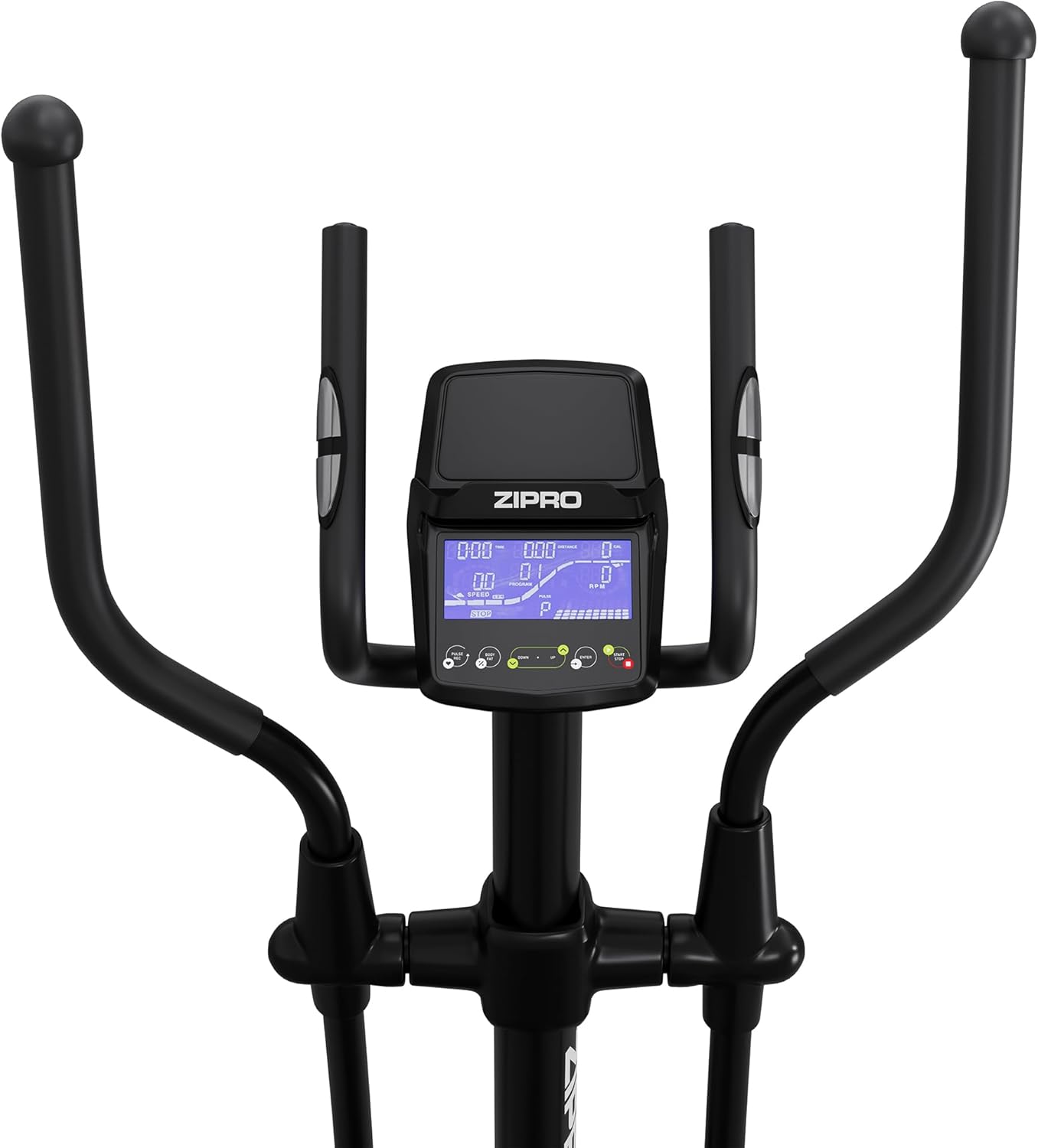
మూర్తి 5: క్లోజ్-అప్ view of the elliptical trainer's digital console.
ప్రతిఘటన సర్దుబాటు
The Zipro Wave Elliptical Trainer offers 32 levels of electromagnetic resistance. Adjust the resistance level via the console to increase or decrease the intensity of your workout. Higher levels provide a more challenging exercise.
ముందుగా సెట్ చేసిన ప్రోగ్రామ్లు
The elliptical trainer includes 16 pre-set workout programs designed for various fitness goals, such as endurance, fat burning, and interval training. Refer to the console's user guide for details on each program and how to select them.
హార్ట్ రేట్ మానిటరింగ్
Grip the pulse sensors on the fixed handlebars to monitor your heart rate during your workout. The console will display your current heart rate, allowing you to stay within your target heart rate zone. The HRC (Heart Rate Control) programs automatically adjust resistance based on your heart rate.
App Connectivity (Bluetooth)
Connect your smartphone or tablet to the elliptical trainer via Bluetooth to use compatible fitness apps like Kinomap and Zwift. These apps can provide interactive training experiences, virtual routes, and track your progress.

Figure 6: User interacting with the console and a tablet mounted on the elliptical trainer.

Figure 7: The console features a dedicated holder for tablets or smartphones.

Figure 8: Proper posture and movement during elliptical exercise.
నిర్వహణ
Regular maintenance ensures the longevity and safe operation of your elliptical trainer.
- శుభ్రపరచడం: ప్రకటనతో పరికరాలను తుడిచివేయండిamp ప్రతి ఉపయోగం తర్వాత చెమట మరియు ధూళిని తొలగించడానికి వస్త్రాన్ని ధరించండి. రాపిడి క్లీనర్లు లేదా ద్రావకాలను నివారించండి.
- సరళత: Periodically check moving parts for friction. Apply a silicone-based lubricant to joints and pivot points as recommended in the detailed assembly manual.
- తనిఖీ: Regularly check all bolts, nuts, and connections to ensure they are tight. Tighten any loose fasteners. Inspect cables and wires for any signs of wear or damage.
- నిల్వ: Store the elliptical trainer in a dry, cool place away from direct sunlight and extreme temperatures.
ట్రబుల్షూటింగ్
ఈ విభాగం మీరు ఎదుర్కొనే సాధారణ సమస్యలను పరిష్కరిస్తుంది. ఇక్కడ జాబితా చేయని సమస్యల కోసం, దయచేసి కస్టమర్ మద్దతును సంప్రదించండి.
| సమస్య | సాధ్యమైన కారణం | పరిష్కారం |
|---|---|---|
| Console not turning on/displaying | Loose power connection; Dead batteries (if applicable) | Ensure power adapter is securely plugged in. Replace console batteries if battery-operated. |
| ఆపరేషన్ సమయంలో అసాధారణ శబ్దం | Loose bolts; Lack of lubrication; Worn parts | Check and tighten all assembly bolts. Apply lubricant to moving joints. Inspect for worn components and replace if necessary. |
| ప్రతిఘటన మారదు | Resistance cable disconnected or damaged; Console malfunction | Check the resistance adjustment cable connection. Ensure it is not pinched or damaged. If the problem persists, contact customer support. |
| తప్పు హృదయ స్పందన రేటు రీడింగ్ | Improper hand placement; Dry hands; Sensor malfunction | Ensure hands are firmly and fully gripping the pulse sensors. Lightly moisten hands if they are too dry. Clean sensors. |
స్పెసిఫికేషన్లు
| ఫీచర్ | వివరాలు |
|---|---|
| మోడల్ పేరు | అల |
| మోడల్ సంఖ్య | 13112327 |
| రంగు | నలుపు |
| ప్రధాన పదార్థం | Aluminum, Polyethylene, Metal |
| ఉత్పత్తి కొలతలు (L x W x H) | 117 x 67 x 163 సెం.మీ (46.1 x 26.4 x 64.2 అంగుళాలు) |
| వస్తువు బరువు | 41 కిలోలు (90.4 పౌండ్లు) |
| గరిష్ట వినియోగదారు బరువు | 120 కిలోలు (264 పౌండ్లు) |
| రెసిస్టెన్స్ మెకానిజం | అయస్కాంత |
| నిరోధక స్థాయిల సంఖ్య | 32 |
| గరిష్ట స్ట్రిడే పొడవు | 30 సెం.మీ (11.8 అంగుళాలు) |
వారంటీ మరియు మద్దతు
For warranty information, please refer to the warranty card included with your product or visit the official ZIPRO website. If you require technical assistance, have questions about assembly, operation, or need to order replacement parts, please contact ZIPRO customer support through their official channels. Keep your purchase receipt as proof of purchase for any warranty claims.