
Andoer 0226b5d0-9fdc-46fa-87a1-023ef5ed8edc
Andoer 4K Digital Camera User Manual
Model: 0226b5d0-9fdc-46fa-87a1-023ef5ed8edc
పరిచయం
This manual provides detailed instructions for the safe and effective use of your Andoer 4K Digital Camera. Please read this manual thoroughly before operating the camera and retain it for future reference. This camera is designed for capturing high-quality photos at 48MP and videos at 4K resolution, featuring a 2.8-inch screen, 16X digital zoom, auto-focus, anti-shake technology, and a built-in flash.
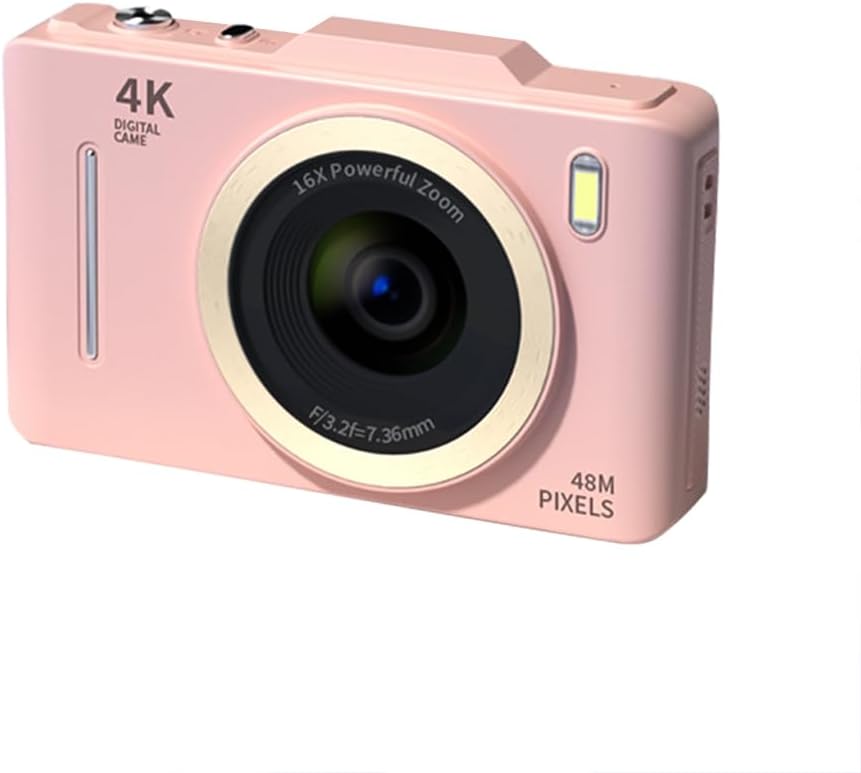
చిత్రం: ముందు భాగం view of the Andoer 4K Digital Camera in pink, showcasing its lens, flash, and 4K Digital Camera branding.
ముఖ్యమైన భద్రతా సమాచారం
హెచ్చరిక:
- Not suitable for children. Please read the product instructions and applicable age range carefully before purchase and use.
- Do not expose the camera to water or excessive moisture.
- కెమెరాను కింద పడేయడం లేదా బలమైన దెబ్బలకు గురిచేయడం మానుకోండి.
- Use only specified batteries and charging methods.
- కెమెరాను విడదీయడానికి లేదా సవరించడానికి ప్రయత్నించవద్దు.

Image: A warning label indicating that the product is not suitable for children, with the warning translated into multiple languages.
ప్యాకేజీ విషయాలు
దయచేసి ప్యాకేజీలో అన్ని అంశాలు ఉన్నాయో లేదో తనిఖీ చేయండి:
- Andoer 4K Digital Camera
- USB కేబుల్
- పునర్వినియోగపరచదగిన లిథియం బ్యాటరీ
- వినియోగదారు మాన్యువల్
- మణికట్టు పట్టీ (ప్యాకేజీని బట్టి మారవచ్చు)
ఉత్పత్తి ముగిసిందిview
కెమెరా భాగాలతో మిమ్మల్ని మీరు పరిచయం చేసుకోండి:
- లెన్స్: చిత్రాలను సంగ్రహించడానికి ప్రధాన ఆప్టికల్ భాగం.
- ఫ్లాష్: Provides additional light in low-light conditions.
- 2.8-అంగుళాల LCD స్క్రీన్: కోసం viewing live feed, reviewing photos/videos, and navigating menus.
- నియంత్రణ బటన్లు: Power, Shutter, Zoom (W/T), Menu, OK, Display, Delete.
- USB పోర్ట్: ఛార్జింగ్ మరియు డేటా బదిలీ కోసం.
- బ్యాటరీ కంపార్ట్మెంట్: రీఛార్జబుల్ బ్యాటరీని ఉంచుతుంది.
- మెమరీ కార్డ్ స్లాట్: For inserting an SD card (not included).

చిత్రం: వెనుక view of the camera highlighting the 2.8-inch display screen and various control buttons for navigation and operation.
సెటప్
1. బ్యాటరీ సంస్థాపన మరియు ఛార్జింగ్
- కెమెరా దిగువన ఉన్న బ్యాటరీ కంపార్ట్మెంట్ కవర్ను తెరవండి.
- Insert the provided lithium battery, ensuring the correct polarity.
- బ్యాటరీ కంపార్ట్మెంట్ కవర్ను సురక్షితంగా మూసివేయండి.
- Connect the camera to a power source using the USB cable for charging. The charging indicator light will illuminate.
- సూచిక లైట్ ఆపివేయబడినప్పుడు ఛార్జింగ్ పూర్తవుతుంది.
2. మెమరీ కార్డ్ సంస్థాపన
A memory card (SD card, not included) is required to store photos and videos.
- Locate the memory card slot, usually near the battery compartment.
- Insert the SD card with the metal contacts facing the front of the camera until it clicks into place.
- తీసివేయడానికి, కార్డు బయటకు వచ్చే వరకు సున్నితంగా నొక్కండి.
ఆపరేటింగ్ సూచనలు
పవర్ ఆన్/ఆఫ్
- నొక్కండి మరియు పట్టుకోండి శక్తి కెమెరాను ఆన్ లేదా ఆఫ్ చేయడానికి బటన్.
ఫోటోలు తీయడం
- కెమెరాను ఆన్ చేయండి.
- 2.8-అంగుళాల LCD స్క్రీన్ ఉపయోగించి మీ షాట్ను ఫ్రేమ్ చేయండి.
- నొక్కండి షట్టర్ button halfway down to activate auto-focus (AF).
- Once focused, press the షట్టర్ button fully to capture the photo.
వీడియోలను రికార్డ్ చేస్తోంది
- కెమెరాను ఆన్ చేయండి.
- Switch to video mode (refer to the on-screen icons or menu for mode selection).
- నొక్కండి షట్టర్ రికార్డింగ్ ప్రారంభించడానికి బటన్.
- నొక్కండి షట్టర్ రికార్డింగ్ ఆపివేయడానికి మళ్లీ బటన్.
జూమ్ ఫంక్షన్
- ఉపయోగించండి W (వెడల్పు) మరియు T (Telephoto) buttons to adjust the 16X digital zoom.

Image: A visual comparison demonstrating the effect of 1x digital zoom versus 16x digital zoom, showing how the camera can magnify distant subjects.
ఫ్లాష్ని ఉపయోగించడం
- The built-in flash can be activated in low-light conditions. Access flash settings via the menu to select modes like Auto Flash, Fill-in Flash, or Flash Off.

Image: Illustrates the effect of the built-in flash, showing a scene with and without flash to demonstrate improved lighting in dark environments.
Anti-Shake Feature
- The camera features digital anti-shake technology to reduce blur caused by camera movement. This feature is typically active by default or can be enabled in the settings menu.

Image: Demonstrates the effectiveness of the anti-shake feature by comparing a clear image taken with anti-shake mode to a blurry image without it, both showing people in motion.
బ్యూటీ ఫిల్టర్లు
- Access the menu to apply various beauty filters (e.g., Original, Cool colors, Retro, Black and white) to your photos for creative effects.

Image: Displays different beauty filter options available on the camera, including Original, Cool colors, Retro, and Black and white, applied to a portrait.
మోషన్ డిటెక్షన్ వీడియో
- Enable motion detection in the video settings. The camera will automatically start recording when movement is detected within the frame.

Image: Illustrates the motion detection feature, showing a dog in motion with a white square indicating the detection area.
Playback and Review
- నొక్కండి ప్లేబ్యాక్ button (often labeled with a play icon) to view ఫోటోలు మరియు వీడియోలను స్వాధీనం చేసుకున్నారు.
- మీ మీడియా ద్వారా స్క్రోల్ చేయడానికి నావిగేషన్ బటన్లను ఉపయోగించండి.
- నొక్కండి తొలగించు అవాంఛిత వాటిని తొలగించడానికి బటన్ files.
కంప్యూటర్కు కనెక్ట్ చేస్తోంది
- అందించిన USB కేబుల్ని ఉపయోగించి కెమెరాను మీ కంప్యూటర్కి కనెక్ట్ చేయండి.
- The camera will appear as a removable disk drive, allowing you to transfer files.
నిర్వహణ
- లెన్స్ శుభ్రపరచడం: కెమెరా లెన్స్ల కోసం ప్రత్యేకంగా రూపొందించిన మృదువైన, మెత్తటి రహిత వస్త్రాన్ని ఉపయోగించండి. రాపిడి పదార్థాలు లేదా కఠినమైన రసాయనాలను ఉపయోగించవద్దు.
- స్క్రీన్ క్లీనింగ్: Wipe the LCD screen gently with a soft, dry cloth.
- నిల్వ: When not in use for extended periods, remove the battery and store the camera in a cool, dry place away from direct sunlight.
- బ్యాటరీ సంరక్షణ: Fully charge the battery before first use. Avoid completely draining the battery frequently to prolong its lifespan.
ట్రబుల్షూటింగ్
| సమస్య | సాధ్యమైన పరిష్కారం |
|---|---|
| కెమెరా ఆన్ అవ్వదు. | బ్యాటరీ సరిగ్గా ఇన్స్టాల్ చేయబడిందని మరియు పూర్తిగా ఛార్జ్ చేయబడిందని నిర్ధారించుకోండి. |
| ఫోటోలు తీయలేరు/వీడియోలు రికార్డ్ చేయలేరు. | Check if a memory card is inserted and has sufficient free space. Ensure the camera is in the correct mode (photo/video). |
| చిత్రాలు అస్పష్టంగా ఉన్నాయి. | Ensure the lens is clean. Check lighting conditions. Enable anti-shake feature. Hold the camera steady. |
| ఫ్లాష్ పనిచేయడం లేదు. | Check flash settings in the menu; ensure it's not set to 'Flash Off'. |
| కంప్యూటర్ ద్వారా కెమెరా గుర్తించబడలేదు. | Ensure the USB cable is securely connected. Try a different USB port or cable. Restart both camera and computer. |
స్పెసిఫికేషన్లు
| ఫీచర్ | వివరాలు |
|---|---|
| బ్రాండ్ | అండోయర్ |
| మోడల్ సంఖ్య | 0226b5d0-9fdc-46fa-87a1-023ef5ed8edc |
| ఎఫెక్టివ్ స్టిల్ రిజల్యూషన్ | 48 ఎంపీ |
| వీడియో రిజల్యూషన్ | 4K (2160p) |
| స్క్రీన్ పరిమాణం | 2.8 అంగుళాలు |
| డిజిటల్ జూమ్ | 16X |
| ఆటో ఫోకస్ | అవును (కాంట్రాస్ట్ డిటెక్షన్) |
| చిత్రం స్థిరీకరణ | డిజిటల్ యాంటీ షేక్ |
| అంతర్నిర్మిత ఫ్లాష్ | అవును |
| బ్యాటరీ రకం | లిథియం అయాన్ |
| ఫోటో ఫార్మాట్ | JPEG |
| వీడియో ఫార్మాట్ | MP4 |
| బాహ్య ఇంటర్ఫేస్ | USB |
| సెన్సార్ రకం | CMOS |
| రంగు | Pink (variant) |
| నీటి నిరోధక స్థాయి | వాటర్ రెసిస్టెంట్ కాదు |
వారంటీ మరియు మద్దతు
For warranty information and technical support, please refer to the documentation included with your purchase or visit the official Andoer webవారంటీ క్లెయిమ్ల కోసం మీ కొనుగోలు రుజువును ఉంచండి.
Andoer Official Store: Visit Andoer Store on Amazon
Ask a question about this manual
Ask about setup, troubleshooting, compatibility, parts, safety, or missing instructions. Manuals+ will review the question and use this page’s manual context to help answer it.