
1. పరిచయం
This manual provides detailed instructions for the safe and effective operation of your WLLKIY ET31C/ET32C Automotive Signal Generator Multimeter. This device combines the functions of a signal generator and a multimeter, designed for automotive diagnostics and testing. It can simulate various automotive sensor signals, test ignition coils, and perform standard multimeter measurements.

Figure 1: WLLKIY ET31C/ET32C Automotive Signal Generator Multimeter and included accessories.
2. భద్రతా సమాచారం
ఈ పరికరాన్ని ఉపయోగించే ముందు దయచేసి అన్ని భద్రతా హెచ్చరికలు మరియు ఆపరేటింగ్ సూచనలను చదివి అర్థం చేసుకోండి. ఈ సూచనలను పాటించడంలో విఫలమైతే విద్యుత్ షాక్, అగ్ని ప్రమాదం లేదా తీవ్రమైన గాయం సంభవించవచ్చు.
- వాహనాలపై పనిచేసేటప్పుడు ఎల్లప్పుడూ భద్రతా గ్లాసెస్ వంటి తగిన వ్యక్తిగత రక్షణ పరికరాలను ధరించండి.
- Do not use the device if it appears damaged or if the test leads are compromised.
- టెస్ట్ లీడ్లను కనెక్ట్ చేయడానికి లేదా డిస్కనెక్ట్ చేయడానికి ముందు పరికరం పవర్ ఆఫ్ చేయబడిందని నిర్ధారించుకోండి.
- లైవ్ సర్క్యూట్లతో సంబంధాన్ని నివారించండి.
- Do not exceed the maximum input ratings specified in the specifications section.
- పరికరాన్ని తేమ మరియు తీవ్రమైన ఉష్ణోగ్రతల నుండి దూరంగా ఉంచండి.
3. ప్యాకేజీ విషయాలు
క్రింద జాబితా చేయబడిన అన్ని అంశాలు మీ ప్యాకేజీలో ఉన్నాయని నిర్ధారించుకోండి:
- 1 x Signal Generator Multimeter (ET31C or ET32C model)
- 1 x జత టెస్ట్ లీడ్లు
- 1 x Pair of Alligator Clip Wires
- 1 x USB Type-C Cable (for ET32C charging, or data for both)
- 1 x ఆంగ్ల వినియోగదారు మాన్యువల్
Note: For ET31C, 3x 1.5V AAA batteries are required and are not included. The ET32C model includes a built-in 4.2V lithium battery.
4. సెటప్
4.1 పరికరాన్ని ఆన్ చేయడం
- For ET31C: Open the battery compartment on the back of the device. Insert 3x 1.5V AAA batteries, ensuring correct polarity. Close the compartment.
- For ET32C: The device has a built-in rechargeable battery. If the battery is low, connect the included USB Type-C cable to the device and a suitable USB power source (e.g., computer USB port, USB wall adapter).
- Press and hold the power button (usually marked with a power symbol) to turn on the device.
4.2 టెస్ట్ లీడ్లను కనెక్ట్ చేయడం
Connect the test leads or alligator clip wires to the appropriate input jacks on the bottom of the device.
- COM జాక్: Common (negative) input for all measurements and signal output.
- VΩHz జాక్: వాల్యూమ్ కోసం పాజిటివ్ ఇన్పుట్tage, నిరోధకత, పౌనఃపున్యం, కెపాసిటెన్స్, డయోడ్ మరియు కొనసాగింపు కొలతలు.
- అవుట్పుట్ జాక్: Positive output for signal generation.
5. ఆపరేటింగ్ సూచనలు
5.1 మోడ్ల మధ్య మారడం
The device operates in two primary modes: Signal Generator and Multimeter. Use the మోడ్ button to switch between these functions. The current mode will be displayed on the 2.8-inch screen.
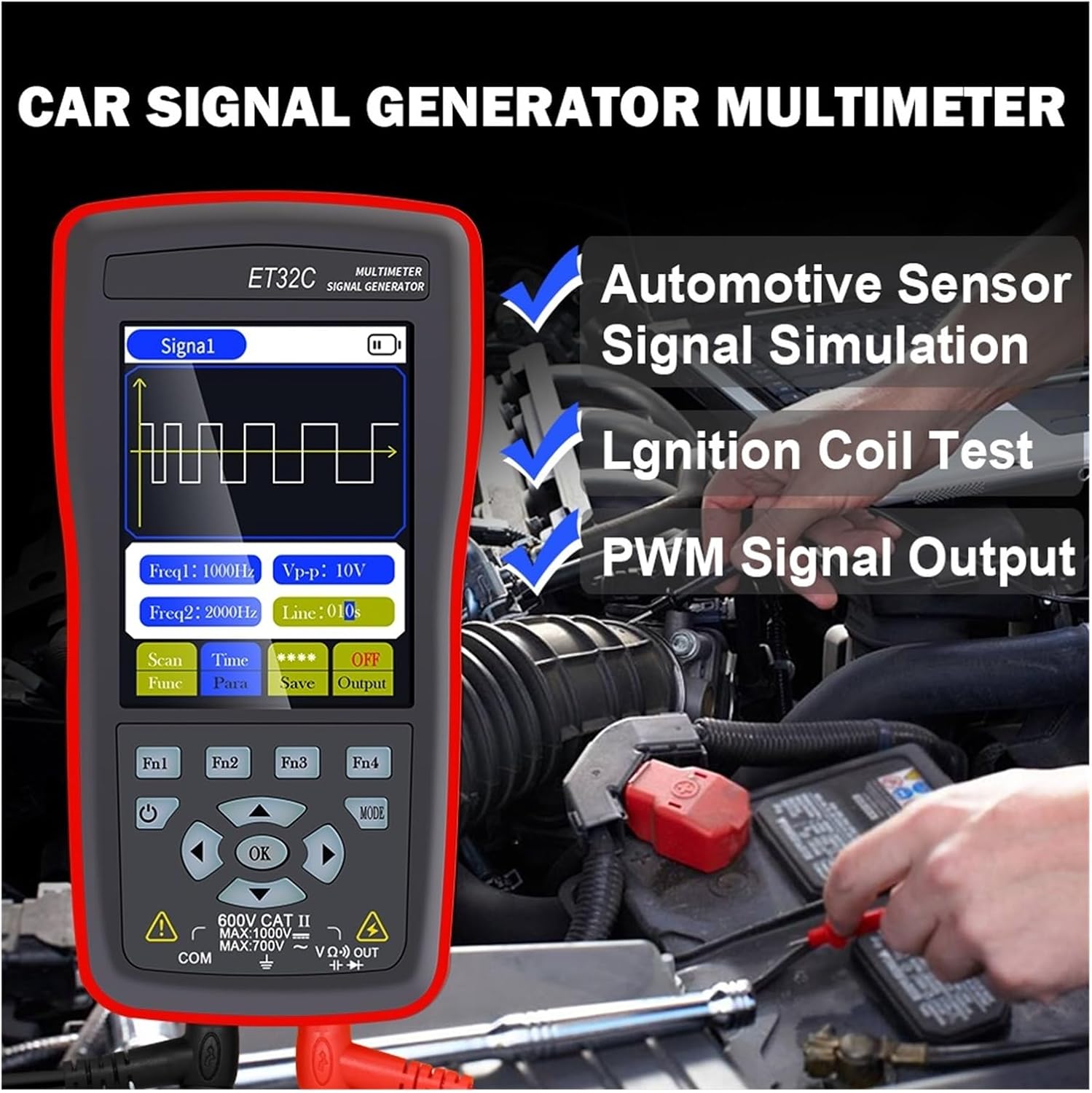
Figure 2: The device in use for automotive sensor signal simulation and ignition coil testing.
5.2 Signal Generator Functions
This mode allows you to generate various electrical signals for testing automotive components.
- Signal Types: Sine wave, Square wave, Combined wave (e.g., 58+2, 10+1 missing teeth), Scan wave, and DC wave.
- ఫ్రీక్వెన్సీ పరిధి: 1Hz to 9999Hz (adjustable in 1Hz steps).
- అవుట్పుట్ వాల్యూమ్tagఇ (పీక్-టు-పీక్): -12V to +12V (adjustable in 1V steps).
- Duty Cycle (for Square Wave): 1% నుండి 99%.
- Scan Wave: Simulates crankshaft/camshaft signal changes from low to high speed (scan time 1s to 999s).
- Combined Wave: Allows setting of missing teeth signals (e.g., 58+2, 10+1). Maximum combined wave combinations: 99+99.
- Waveform Storage: The instrument supports storing up to 50 sets of waveform parameters.

Figure 3: Display illustrating combined wave signal generation with missing teeth settings.

Figure 4: The device's waveform storage feature, allowing up to 50 sets of parameters to be saved.
5.2.1 Automotive Signal Simulation
The signal generator can simulate Hall-type and magneto-electric crankshaft and camshaft signals. This is useful for diagnosing engine management systems without needing to run the engine.
- Supports simulation for both gasoline and diesel vehicles.
- Simulate various sensor outputs to test ECU responses.

Figure 5: The device functioning as a vehicle maintenance signal source, simulating sensor outputs.
5.2.2 Ignition Coil Control
The device can control ignition coils, solenoid valves, and relays to test their functionality.
- Coil control power: Less than 30V/1A.
- Connect the output to the component to be tested and observe its operation.

Figure 6: Screen showing the ignition coil test function, used to verify normal operation of coils, solenoid valves, and relays.
5.3 మల్టీమీటర్ విధులు
In multimeter mode, the device performs standard electrical measurements.
- DC సంtage: Max 1000V.
- AC వాల్యూమ్tage: Max 750V.
- ప్రతిఘటన: Max 40MΩ.
- కెపాసిటెన్స్: Max 100uF.
- ఫ్రీక్వెన్సీ: Max 50KHz.
- డ్యూటీ సైకిల్: 0.1% నుండి 99.9%.
- డయోడ్ పరీక్ష: 0 వి నుండి 1.5 వి.
- కంటిన్యూటీ టెస్ట్: Resistance value for continuity detection: Max 30Ω.
- ప్రదర్శన: 4000 counts, updates 3 times per second.

Figure 7: The device's multimeter display showing a measurement, alongside details of the 2.8-inch screen with 320x480 resolution.
6. స్పెసిఫికేషన్లు
6.1 సాధారణ లక్షణాలు
- ప్రదర్శన: 2.8-inch, 320 * 480 resolution
- టచ్స్క్రీన్: మద్దతు లేదు
- USB ఇంటర్ఫేస్: టైప్-సి యుఎస్బి
- Battery (ET31C): 3 * 1.5V AAA batteries (not included)
- Battery (ET32C): అంతర్నిర్మిత 4.2V లిథియం బ్యాటరీ
- నిల్వ ఉష్ణోగ్రత: -20°C నుండి 60°C (-4°F నుండి 140°F)
- ఆపరేటింగ్ ఉష్ణోగ్రత: 0°C నుండి 50°C (32°F నుండి 122°F)
- తేమ: <85% RH (కాని ఘనీభవనం)
- ఉత్పత్తి కొలతలు (LxWxH): 134 mm * 69 mm * 25 mm
- ఉత్పత్తి బరువు: 125 g (excluding accessories)
6.2 సిగ్నల్ జనరేటర్ పారామితులు
- Sine Wave/Square Wave Frequency Range: 1Hz ~ 9999Hz
- Sine Wave/Square Wave Frequency Step: 1 Hz
- Sine Wave/Square Wave Peak Range: -12V ~ +12V
- Sine Wave/Square Wave Peak Step: 1V
- Scan Wave Scan Time Range: 1సె ~ 999సె
- Maximum Combined Wave Combinations: 99+99
- అవుట్పుట్ వాల్యూమ్tagఇ పరిధి: -12V ~ +12V
- అవుట్పుట్ వాల్యూమ్tagఇ దశ: 1V
- Coil Control Power: Less than 30V/1A
- Waveform Storage: 50 సెట్లు
- Duty Setting (for Square Wave only): 1% ~ 99%
6.3 మల్టీమీటర్ పారామితులు
- గరిష్ట DC ఇన్పుట్ వాల్యూమ్tage: 1000V
- గరిష్ట AC ఇన్పుట్ వాల్యూమ్tage: 750V
- Maximum Measured Resistance: 40MΩ
- Maximum Measured Capacitance: 100uF
- Maximum Frequency Measurement: 50 KHz
- Duty Cycle Measurement Range: 0.1% ~ 99.9%
- Diode Measurement Range: 0 వి ~ 1.5 వి
- Maximum Resistance for Continuity Detection: 30Ω
- ప్రదర్శన గణనలు: 4000 గణనలు
- నవీకరణ రేటు: సెకనుకు 3 సార్లు
7. నిర్వహణ
- శుభ్రపరచడం: పరికరాన్ని మృదువైన, డితో తుడవండిamp గుడ్డ. రాపిడి క్లీనర్లు లేదా ద్రావకాలు ఉపయోగించవద్దు.
- నిల్వ: Store the device in a cool, dry place away from direct sunlight and extreme temperatures. If storing for extended periods, remove AAA batteries from the ET31C model.
- Battery Care (ET32C): For optimal battery life, avoid fully discharging the battery frequently. Charge the device regularly if not in use for long periods.
- టెస్ట్ లీడ్స్: ప్రతి ఉపయోగం ముందు ఏదైనా నష్టం (కోతలు, పగుళ్లు) కోసం పరీక్ష లీడ్లను తనిఖీ చేయండి. దెబ్బతిన్న లీడ్లను వెంటనే భర్తీ చేయండి.
8. ట్రబుల్షూటింగ్
| సమస్య | సాధ్యమైన కారణం | పరిష్కారం |
|---|---|---|
| పరికరం పవర్ ఆన్ చేయదు. |
|
|
| Incorrect readings in Multimeter mode. |
|
|
| No signal output from Signal Generator. |
|
|
9. వారంటీ మరియు మద్దతు
For warranty information and technical support, please refer to the documentation provided with your purchase or contact WLLKIY customer service directly. Contact details can typically be found on the manufacturer's official webసైట్ లేదా ఉత్పత్తి ప్యాకేజింగ్లో.