
1. పరిచయం
The DSD TECH SH-AU20B is a high-quality USB to 6.35mm audio cable designed to connect musical instruments like electric guitars, pianos, or basses directly to your computer. This cable transforms your computer into a recording device, allowing you to capture and monitor your performances with high fidelity. It supports 96KHz/24Bit audio sampling, providing a detailed and clear sound capture experience.

Image: The DSD TECH SH-AU20B USB to 6.35mm Audio Cable, along with its packaging and user guide.
2. ఉత్పత్తి లక్షణాలు
- ప్లగ్-అండ్-ప్లే కనెక్టివిటీ: Connects electric guitars, pianos, or basses via the 6.35mm (1/4") TS jack directly to your computer's USB port for instant recording or amplifier setup without complex configuration.
- హై-రిజల్యూషన్ ఆడియో: Supports 96 kHz/24-bit audio, capturing richer details and a wider dynamic range compared to 48 kHz. This helps reduce signal loss, resulting in clean, low-noise, and high-fidelity recordings suitable for practice, streaming, and home studio work.
- మన్నికైన నిర్మాణం: Features an all-metal 1/4" TS connector for strength and durability. The PVC cable is designed to resist twisting and wear. The USB end includes an indicator light for quick status confirmation.
- విస్తృత సిస్టమ్ అనుకూలత: Compatible with Windows 7/8/10/11, macOS, and other major operating systems, ensuring easy integration with popular recording software and workflows.
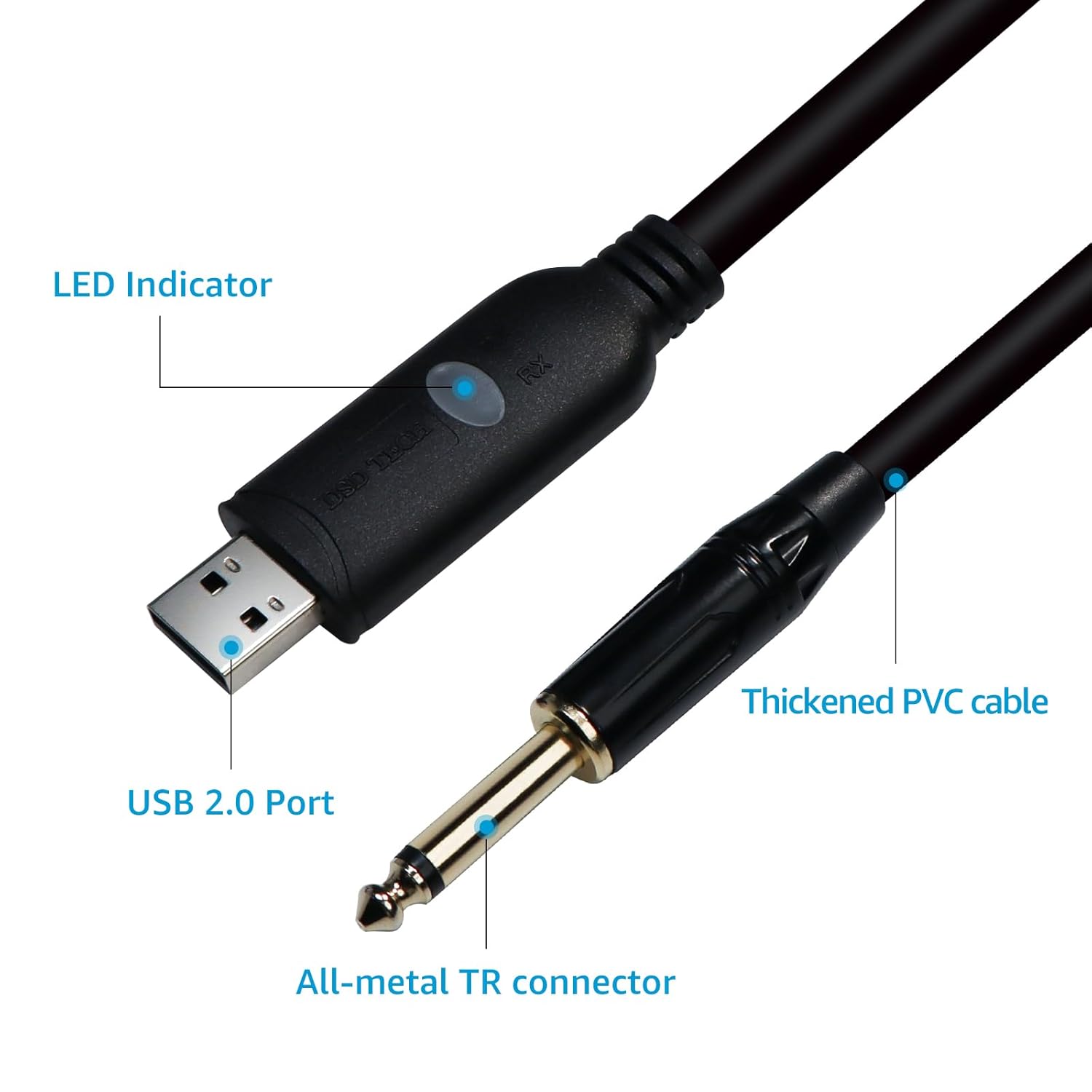
చిత్రం: వివరణాత్మక view of the DSD TECH SH-AU20B cable, highlighting the USB 2.0 port, LED indicator, thickened PVC cable, and all-metal TR connector.

Image: An electric guitar connected to an audio system, illustrating the 96KHz/24Bit high-fidelity audio capability of the DSD TECH SH-AU20B cable.
3. సెటప్ సూచనలు
- కనెక్ట్ పరికరం: Plug the 6.35mm (1/4") TS jack of the SH-AU20B cable into the output jack of your electric guitar, bass, or other compatible instrument.
- కంప్యూటర్కు కనెక్ట్ చేయండి: Insert the USB-A connector of the SH-AU20B cable into an available USB port on your computer (Windows PC or Mac).
- కనెక్షన్ని ధృవీకరించండి: The LED indicator on the USB end of the cable will illuminate, confirming a successful connection.
- సిస్టమ్ గుర్తింపు: Your computer should automatically detect the cable as a USB audio device. No additional drivers are typically required for Windows 7/8/10/11 or macOS.
- ఆడియో ఇన్పుట్ను ఎంచుకోండి: Open your preferred Digital Audio Workstation (DAW) software (e.g., Audacity, Guitar Combo, GuitarRig3, ReavalerMKIII, Amplitude) or system sound settings. Select the "USB Audio Device" or similar option as your audio input source.

Image: A user connecting their guitar to a laptop using the DSD TECH SH-AU20B USB cable, demonstrating the plug-and-play setup.
4. ఆపరేటింగ్ సూచనలు
- సాఫ్ట్వేర్ కాన్ఫిగరేషన్: After selecting the USB Audio Device as your input, configure your recording software's settings for optimal performance. Ensure the sampling rate is set to 96 kHz and bit depth to 24-bit for the highest quality recording.
- ఇన్పుట్ స్థాయిని సర్దుబాటు చేయండి: Adjust the input gain within your software to prevent clipping (distortion) while ensuring a strong signal.
- పర్యవేక్షణ: Most DAWs allow direct monitoring of your instrument through your computer's headphones or speakers. Adjust monitoring levels as needed.
- రికార్డింగ్: Initiate recording within your software. The cable will transmit your instrument's audio directly to your computer for digital capture.
- ప్లేబ్యాక్: After recording, you can play back your performance through your computer's audio output.

Image: A musician using the DSD TECH SH-AU20B cable to record their guitar performance on a laptop, highlighting the recording process.
5. అనుకూలత
The DSD TECH SH-AU20B cable offers broad compatibility with various operating systems and audio software:
- ఆపరేటింగ్ సిస్టమ్స్: Windows XP/VISTA/Win 7/Win 8/Win 10/Win 11, Mac OS X.
- అనుకూల సాఫ్ట్వేర్: GUITAR COMBO, Audacity, GTR3, GuitarRig3, ReavalerMKIII, Amplitude, and most other popular recording software.
- అననుకూల పరికరాలు: This cable is not applicable to PS2/PS3/PS4/WII/Xbox Rocksmith.

Image: The DSD TECH SH-AU20B cable connected to a laptop, with icons indicating compatibility with electric pianos, guitars, speakers, and basses.
6. స్పెసిఫికేషన్లు
| మోడల్ | SH-AU20B |
| ఇంటర్ఫేస్ | USB-A to 6.35mm (1/4") TS |
| కేబుల్ పొడవు | 1.8 మీటర్లు / 5.9 అడుగులు |
| ఆడియో నాణ్యత | 96 KHz / 24-bit |
| కనెక్టర్ రకం | USB Type A, 6.35mm TS (Male to Male) |
| ప్రత్యేక లక్షణాలు | Highly torsion-resistant, prevents signal loss, wider dynamic range, LED indicator |
| అనుకూల OS | Windows XP/VISTA/Win 7/Win 8/Win 10/Win 11, Mac OS X |
| సిఫార్సు ఉపయోగం | Guitar recording, instrument connection |
7. ట్రబుల్షూటింగ్
- సౌండ్ అవుట్పుట్/ఇన్పుట్ లేదు:
- Ensure the cable is securely plugged into both the instrument and the computer.
- Check if the LED indicator on the USB connector is lit. If not, try a different USB port.
- Verify that "USB Audio Device" is selected as the input device in your computer's sound settings and your recording software.
- Adjust the input/output volume levels in your software and operating system.
- Test with another instrument or computer to isolate the issue.
- వక్రీకరించిన ధ్వని:
- Reduce the input gain in your recording software. The signal might be too hot, causing clipping.
- Ensure your instrument's output volume is not excessively high.
- Check for any software effects or plugins that might be causing distortion.
- కేబుల్ గుర్తించబడలేదు:
- మీ కంప్యూటర్లోని వేరే USB పోర్ట్కి కేబుల్ను కనెక్ట్ చేయడానికి ప్రయత్నించండి.
- మీ కంప్యూటర్ని పునఃప్రారంభించండి.
- మీ ఆపరేటింగ్ సిస్టమ్ తాజాగా ఉందని నిర్ధారించుకోండి.
- USB హబ్ ఉపయోగిస్తుంటే, నేరుగా కంప్యూటర్కు కనెక్ట్ చేయడానికి ప్రయత్నించండి.
8. నిర్వహణ
- నిల్వ: ప్రత్యక్ష సూర్యకాంతి మరియు తీవ్రమైన ఉష్ణోగ్రతలకు దూరంగా చల్లని, పొడి ప్రదేశంలో కేబుల్ను నిల్వ చేయండి.
- నిర్వహణ: Avoid sharp bends, kinks, or excessive pulling on the cable. Always grasp the connectors when plugging or unplugging, not the cable itself.
- శుభ్రపరచడం: కేబుల్ మరియు కనెక్టర్లను శుభ్రం చేయడానికి మృదువైన, పొడి వస్త్రాన్ని ఉపయోగించండి. ద్రవ క్లీనర్లు లేదా ద్రావకాలను ఉపయోగించవద్దు.
- తనిఖీ: Periodically inspect the cable for any signs of damage, such as frayed insulation or bent connectors.
9. వారంటీ మరియు మద్దతు
DSD TECH provides a 1 సంవత్సరాల వారంటీ మరియు జీవితకాల సాంకేతిక మద్దతు for the SH-AU20B USB to 6.35mm Audio Cable. If you encounter any questions or issues, please contact DSD TECH customer service. They aim to resolve problems within 24 hours.
For support, please visit the official DSD TECH webసైట్ లేదా మీ ఉత్పత్తి ప్యాకేజింగ్తో అందించబడిన సంప్రదింపు సమాచారాన్ని చూడండి.