పరిచయం
This manual provides instructions for the operation and maintenance of your Generic replacement remote control. This remote is designed to be compatible with specific AC Air Conditioner models, including Tesla TTMY-09CHW, TTMY-12CHW, Klarstein Grandbreeze Eco 12K, and TCL TAC-07CPB/RS. Please ensure your original remote matches the appearance of this replacement remote for full compatibility.
Important Note: This is a replacement remote control and is not a universal remote. While it is designed to function with the listed models, some advanced or less common functions present on the original remote may not be available. No setup or coding is required; simply insert batteries for operation.
భద్రతా సమాచారం
- బ్యాటరీలను పిల్లలకు అందుబాటులో లేకుండా ఉంచండి.
- పాత మరియు కొత్త బ్యాటరీలు లేదా వివిధ రకాల బ్యాటరీలను కలపవద్దు.
- రిమోట్ కంట్రోల్ ఎక్కువ కాలం ఉపయోగించబడకపోతే బ్యాటరీలను తీసివేయండి.
- Avoid exposing the remote control to direct sunlight, heat sources, or moisture.
ఉత్పత్తి ముగిసిందిview
The remote control features a straightforward button layout for easy operation of your air conditioner. Below is an illustration of the remote's front panel and a description of its primary functions.

మూర్తి 1: ముందు view of the remote control, showing all buttons. The remote is black with clearly labeled icons for power, mode, temperature adjustment, fan speed, timer, and Celsius/Fahrenheit toggle.
బటన్ విధులు:
- పవర్ బటన్ (): ఎయిర్ కండిషనర్ను ఆన్ లేదా ఆఫ్ చేస్తుంది.
- మోడ్ బటన్ (): ఆపరేటింగ్ మోడ్ల ద్వారా చక్రాలు (ఉదా., కూల్, హీట్, ఫ్యాన్, డ్రై, ఆటో).
- ఉష్ణోగ్రత పెరుగుదల/తగ్గింపు బటన్లు (): కావలసిన ఉష్ణోగ్రత సెట్టింగ్ను సర్దుబాటు చేస్తుంది.
- ఫ్యాన్ స్పీడ్ బటన్ (): ఫ్యాన్ వేగాన్ని సర్దుబాటు చేస్తుంది (ఉదా., తక్కువ, మధ్యస్థం, ఎక్కువ, ఆటో).
- స్వింగ్ బటన్ (): Activates or deactivates the air swing function.
- టైమర్ బటన్ (): టైమర్ ఫంక్షన్ను సెట్ చేస్తుంది లేదా రద్దు చేస్తుంది.
- C/F బటన్ (): Toggles the temperature display between Celsius and Fahrenheit. Note: This remote may be Celsius only depending on the specific AC unit's capabilities.
సెటప్: బ్యాటరీ ఇన్స్టాలేషన్
రిమోట్ కంట్రోల్కు రెండు AAA బ్యాటరీలు అవసరం (చేర్చబడలేదు). వాటిని ఇన్స్టాల్ చేయడానికి ఈ దశలను అనుసరించండి:
- రిమోట్ కంట్రోల్ వెనుక బ్యాటరీ కంపార్ట్మెంట్ను గుర్తించండి.
- బ్యాటరీ కంపార్ట్మెంట్ కవర్ను తెరవడానికి దాన్ని క్రిందికి లేదా బయటికి జారండి.
- రెండు AAA బ్యాటరీలను చొప్పించండి, పాజిటివ్ (+) మరియు నెగటివ్ (-) టెర్మినల్స్ కంపార్ట్మెంట్ లోపల ఉన్న గుర్తులతో సరిగ్గా సమలేఖనం చేయబడ్డాయని నిర్ధారించుకోండి.
- బ్యాటరీ కంపార్ట్మెంట్ కవర్ సురక్షితంగా క్లిక్ అయ్యే వరకు దాన్ని తిరిగి స్థానంలోకి స్లైడ్ చేయండి.

మూర్తి 2: వెనుకకు view రిమోట్ కంట్రోల్ యొక్క, బ్యాటరీ కంపార్ట్మెంట్ కవర్ను చూపుతుంది.
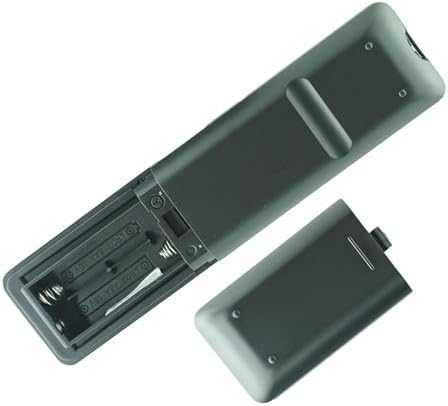
మూర్తి 3: Remote control with the battery cover removed, illustrating the correct orientation for AAA battery insertion.
The remote control is now ready for use. No further setup or programming is required.
ఆపరేటింగ్ సూచనలు
పనిచేస్తున్నప్పుడు రిమోట్ కంట్రోల్ను నేరుగా ఎయిర్ కండిషనర్ రిసీవర్ వైపు ఉంచండి. రిమోట్ మరియు యూనిట్ మధ్య ఎటువంటి అడ్డంకులు లేవని నిర్ధారించుకోండి.
- పవర్ ఆన్/ఆఫ్: నొక్కండి శక్తి button once to turn the unit on, and again to turn it off.
- మోడ్ని ఎంచుకోవడం: నొక్కండి మోడ్ button repeatedly to cycle through available operating modes (e.g., Cool, Heat, Fan, Dry, Auto). The current mode will typically be displayed on the air conditioner unit.
- సర్దుబాటు ఉష్ణోగ్రత: ఉపయోగించండి ఉష్ణోగ్రత పెరుగుతుంది () మరియు ఉష్ణోగ్రత తగ్గింది () buttons to set your desired room temperature.
- ఫ్యాన్ వేగాన్ని సెట్ చేస్తోంది: నొక్కండి ఫ్యాన్ వేగం button to adjust the fan's intensity. Options usually include Low, Medium, High, and Auto.
- Activating Swing: నొక్కండి స్వింగ్ button to start or stop the automatic louver movement, which helps distribute air evenly.
- టైమర్ని ఉపయోగించడం: నొక్కండి టైమర్ button to access timer settings. Refer to your air conditioner's main manual for specific timer programming details, as this remote provides the interface but the AC unit handles the logic.
- Changing Temperature Unit: నొక్కండి C / F button to switch the temperature display between Celsius and Fahrenheit. If your AC unit only supports one unit, this button may not function.
నిర్వహణ
బ్యాటరీ భర్తీ:
Replace batteries when the remote control's range decreases or if the air conditioner does not respond to commands. Follow the battery installation steps outlined in the Setup section.
శుభ్రపరచడం:
రిమోట్ కంట్రోల్ను మృదువైన, పొడి గుడ్డతో తుడవండి. లిక్విడ్ క్లీనర్లు, అబ్రాసివ్ క్లీనర్లు లేదా రసాయన ద్రావకాలను ఉపయోగించవద్దు, ఎందుకంటే ఇవి రిమోట్ ఉపరితలం లేదా అంతర్గత భాగాలను దెబ్బతీస్తాయి.
ట్రబుల్షూటింగ్
- రిమోట్ స్పందించడం లేదు:
- సరైన ధ్రువణతతో బ్యాటరీలు సరిగ్గా చొప్పించబడ్డాయో లేదో తనిఖీ చేయండి.
- పాత బ్యాటరీలను కొత్త AAA బ్యాటరీలతో భర్తీ చేయండి.
- రిమోట్ కంట్రోల్ మరియు ఎయిర్ కండిషనర్ రిసీవర్ మధ్య ఎటువంటి అడ్డంకులు లేవని నిర్ధారించుకోండి.
- రిమోట్ నేరుగా ఎయిర్ కండిషనర్ వైపు చూపించబడిందని నిర్ధారించుకోండి.
- పనిచేయని కొన్ని విధులు:
- This replacement remote may not support all functions of your original remote. Refer to the Product Overview section for supported functions.
- Ensure your air conditioner model is listed as compatible.
- Temperature unit (C/F) not changing:
- Some air conditioner models may only support one temperature unit (e.g., Celsius only). The remote sends the command, but the AC unit dictates the display.
స్పెసిఫికేషన్లు
| ఉత్పత్తి రకం | పున Rem స్థాపన రిమోట్ కంట్రోల్ |
| అనుకూల పరికరాలు | AC Air Conditioners (Tesla TTMY-09CHW, TTMY-12CHW, Klarstein Grandbreeze Eco 12K, TCL TAC-07CPB/RS) |
| శక్తి మూలం | 2 x AAA బ్యాటరీలు (చేర్చబడలేదు) |
| రంగు | నలుపు |
| ప్రత్యేక లక్షణాలు | Infrared (IR) communication, Cooling & Heating functions, Celsius/Fahrenheit toggle (unit dependent) |
వారంటీ మరియు మద్దతు
For any issues or questions regarding this replacement remote control, please contact the seller or retailer from whom you purchased the product. Specific warranty details, if any, are provided by the seller at the time of purchase.


