
typecase KB206130P
typecase Edge Keyboard Case User Manual
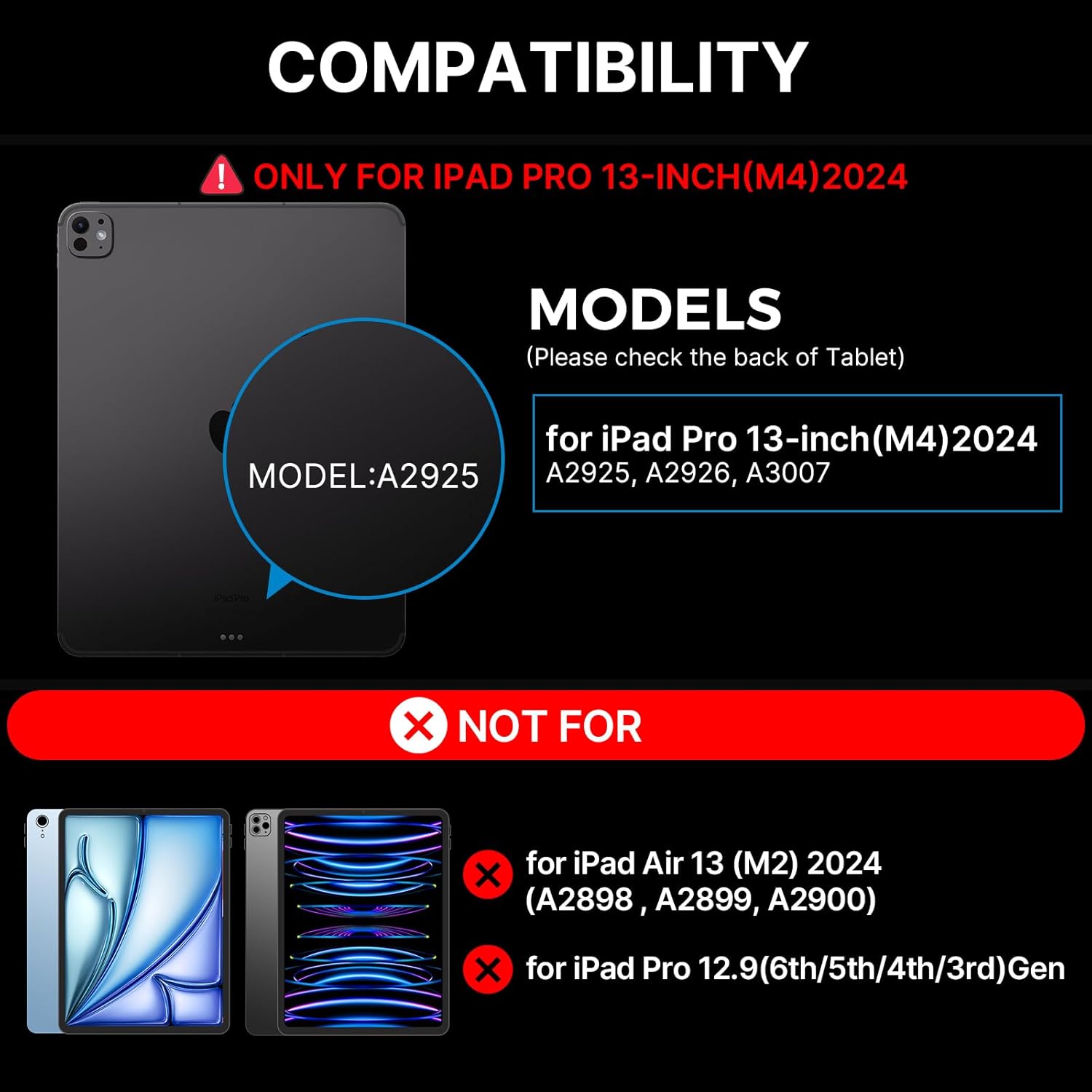
For iPad Pro 13-inch (M4) 2024
1. పరిచయం
The typecase Edge Keyboard Case is designed to enhance your iPad Pro 13-inch (M4) 2024 experience by transforming it into a versatile laptop-like device. It features a backlit wireless keyboard, a multi-touch trackpad, and a robust magnetic stand, offering comprehensive protection and improved productivity.
2. అనుకూలత
This keyboard case is specifically designed for the iPad Pro 13-inch (M4) 2024 models. Compatible iPad models include: A2925, A2926, A3007.
NOTE: This case is NOT compatible with iPad Air 13-inch (M2) 2024 (A2898, A2899, A2900) or iPad Pro 12.9-inch (6th/5th/4th/3rd Gen).
3. ఏమి చేర్చబడింది
మీ ప్యాకేజీని తెరిచినప్పుడు, దయచేసి ఈ క్రింది అన్ని అంశాలు ఉన్నాయని నిర్ధారించుకోండి:
- 1 x typecase Edge Magic Keyboard (Only for iPad Pro 13 inch 2024)
- 1 x USB కేబుల్ (ఛార్జింగ్ కోసం)
- 1 x వినియోగదారు మాన్యువల్

4. సెటప్
4.1 త్వరిత సంస్థాపన
- Place your iPad Pro 13-inch (M4) 2024 onto the magnetic surface of the keyboard case. Ensure proper alignment for a secure fit.
- Adjust the floating cantilever stand to your desired viewing angle. The magnetic grip will hold the iPad firmly in place.
- The keyboard will automatically connect to your iPad via Bluetooth. If not, proceed to Bluetooth Pairing.
4.2 బ్లూటూత్ జత చేయడం
To pair your typecase Edge Keyboard Case with your iPad:
- కీబోర్డ్ ఛార్జ్ అయ్యిందని నిర్ధారించుకోండి.
- Turn on the keyboard using the power switch (usually located on the side or back of the keyboard).
- మీ ఐప్యాడ్లో, ఇక్కడికి వెళ్లండి సెట్టింగ్లు > బ్లూటూత్.
- Look for "typecase Edge Keyboard" or a similar name in the list of available devices and tap to connect.
- Once connected, the keyboard is ready for use.
5. ఆపరేటింగ్ సూచనలు
5.1 బ్యాక్లైట్ నియంత్రణ
The keyboard features 11 backlight colors and 3 levels of brightness. You can adjust these settings using the dedicated backlight key on the keyboard.
- Press the backlight brightness key (often depicted with a sun icon) to cycle through high, medium, low brightness, or turn the backlight off.
- Press the backlight mode key (often depicted with a color palette icon) to change between the 11 available backlight colors.
5.2 Multi-Touch Trackpad
The integrated multi-touch trackpad allows for precise navigation and gesture control, similar to a laptop. Common gestures include:
- సింగిల్ ఫింగర్ ట్యాప్: Click/Select
- Two Finger Pinch: జూమ్ ఇన్/అవుట్ చేయండి
- రెండు వేళ్ల స్క్రోల్: పైకి/క్రిందికి లేదా ఎడమ/కుడికి స్క్రోల్ చేయండి
- మూడు వేళ్లతో పైకి స్వైప్ చేయండి: యాప్ స్విచ్చర్ను తెరవండి
- మూడు వేళ్లతో క్రిందికి స్వైప్ చేయండి: హోమ్ స్క్రీన్కి తిరిగి వెళ్ళు
- మూడు వేళ్లతో ఎడమ/కుడి స్వైప్ చేయండి: ఓపెన్ యాప్ల మధ్య మారండి
5.3 Magnetic Stand and Viewకోణాలు
The floating cantilever design allows for effortless adjustment of your iPad to various viewing angles, providing stability for typing, drawing, or media consumption. The strong magnetic clasp ensures your iPad is securely held and provides a dedicated spot for your Apple Pencil.

5.4 iPadOS Shortcuts
The keyboard includes handy iPadOS shortcuts for quick access to common functions, enhancing your productivity. Refer to the keyboard layout for specific shortcut keys.
5.5 Auto-Sleep/Wake Function
The typecase Edge Keyboard Case features an instant wake and sleep function. Your iPad's screen will automatically turn on when you open the case and turn off when you close it, conserving battery life.
6. నిర్వహణ
To ensure the longevity and optimal performance of your typecase Edge Keyboard Case, follow these maintenance guidelines:
- శుభ్రపరచడం: Use a soft, lint-free cloth to wipe down the keyboard and case. For stubborn spots, slightly dampen నీటితో వస్త్రం. కఠినమైన రసాయనాలు లేదా రాపిడి పదార్థాలను నివారించండి.
- నిల్వ: When not in use, keep the case closed to protect the keyboard and iPad screen. Store in a cool, dry place away from direct sunlight and extreme temperatures.
- ఛార్జింగ్: Charge the keyboard using the provided USB-C cable. Avoid overcharging or using damaged cables.
- నిర్వహణ: ఈ కేసు దృఢమైన రక్షణను అందిస్తున్నప్పటికీ, దానిని పడవేయడం లేదా అధిక బలానికి గురిచేయడం మానుకోండి.
7. ట్రబుల్షూటింగ్
If you encounter issues with your typecase Edge Keyboard Case, refer to the following common solutions:
- Keyboard not responding/connecting:
- కీబోర్డ్ ఆన్ చేయబడిందని మరియు పూర్తిగా ఛార్జ్ చేయబడిందని నిర్ధారించుకోండి.
- Check your iPad's Bluetooth settings to confirm the keyboard is paired and connected. Try unpairing and re-pairing the device.
- మీ ఐప్యాడ్ మరియు కీబోర్డ్ రెండింటినీ పునఃప్రారంభించండి.
- If the issue persists, a factory reset of the keyboard might be necessary (refer to specific instructions in the included user manual for your model).
- Backlight not staying on or not adjusting:
- కీబోర్డ్ తగినంత బ్యాటరీ ఛార్జ్ కలిగి ఉందని నిర్ధారించుకోండి.
- Press the backlight brightness key multiple times to cycle through all settings, including off, to ensure it's not just set to the lowest brightness.
- If the backlight functionality is inconsistent, try restarting the keyboard.
- iPad not securely attaching to the case:
- Ensure your iPad model is compatible with this specific case (iPad Pro 13-inch M4 2024).
- Verify that there are no obstructions (like debris or other accessories) between the iPad and the magnetic surface of the case.
For further assistance, please contact typecase customer support.
8. స్పెసిఫికేషన్లు
| ఫీచర్ | వివరాలు |
|---|---|
| మోడల్ సంఖ్య | KB206130P |
| ప్యాకేజీ కొలతలు | 12.36 x 11.57 x 1.46 అంగుళాలు |
| వస్తువు బరువు | 2 పౌండ్లు |
| తయారీదారు | టైప్కేస్ |
| కనెక్టివిటీ టెక్నాలజీ | వైర్లెస్ |
| కీబోర్డ్ వివరణ | బహుళ ఫంక్షనల్ |
| ప్రత్యేక లక్షణాలు | Portable, Lightweight, Backlit, Foldable, Trackpad |
| రంగు | నలుపు |
| కీల సంఖ్య | 78 |
| కీబోర్డ్ బ్యాక్లైటింగ్ కలర్ సపోర్ట్ | RGB (11 రంగులు) |
| బ్యాటరీలు | 1 లిథియం పాలిమర్ బ్యాటరీ (చేర్చబడింది) |
9. వారంటీ మరియు మద్దతు
Your typecase Edge Keyboard Case comes with a 1-సంవత్సరాల తయారీదారు వారంటీవారంటీ క్లెయిమ్ల కోసం దయచేసి మీ కొనుగోలు రుజువును ఉంచుకోండి.
For technical support, warranty inquiries, or any other questions, please contact typecase customer service through the vendor information provided at the point of purchase or visit the official typecase webసైట్.
Ask a question about this manual
Ask about setup, troubleshooting, compatibility, parts, safety, or missing instructions. Manuals+ will review the question and use this page’s manual context to help answer it.