
1. పరిచయం మరియు ఓవర్view
The Targa TID-AUT700 is a motorized in-dash Android media entertainment system designed for vehicle integration. This unit features a 7-inch touchscreen display that retracts and extends, offering a versatile interface for various media and connectivity options. It is equipped with Bluetooth for hands-free communication, multiple media inputs, and a powerful audio output.
ముఖ్య లక్షణాలు:
- Detachable Face for security
- Motorized 7-inch Touchscreen display
- 65W x 4 audio output
- AM/FM radio with RDS (Radio Data System)
- బ్లూటూత్ హ్యాండ్స్-ఫ్రీ కాలింగ్ మరియు ఆడియో స్ట్రీమింగ్
- Auxiliary (Aux), USB, and SD Card Input for media playback
- సౌకర్యవంతమైన ఆపరేషన్ కోసం రిమోట్ కంట్రోల్ని కలిగి ఉంటుంది
- Supports CarPlay and Android Auto functionality
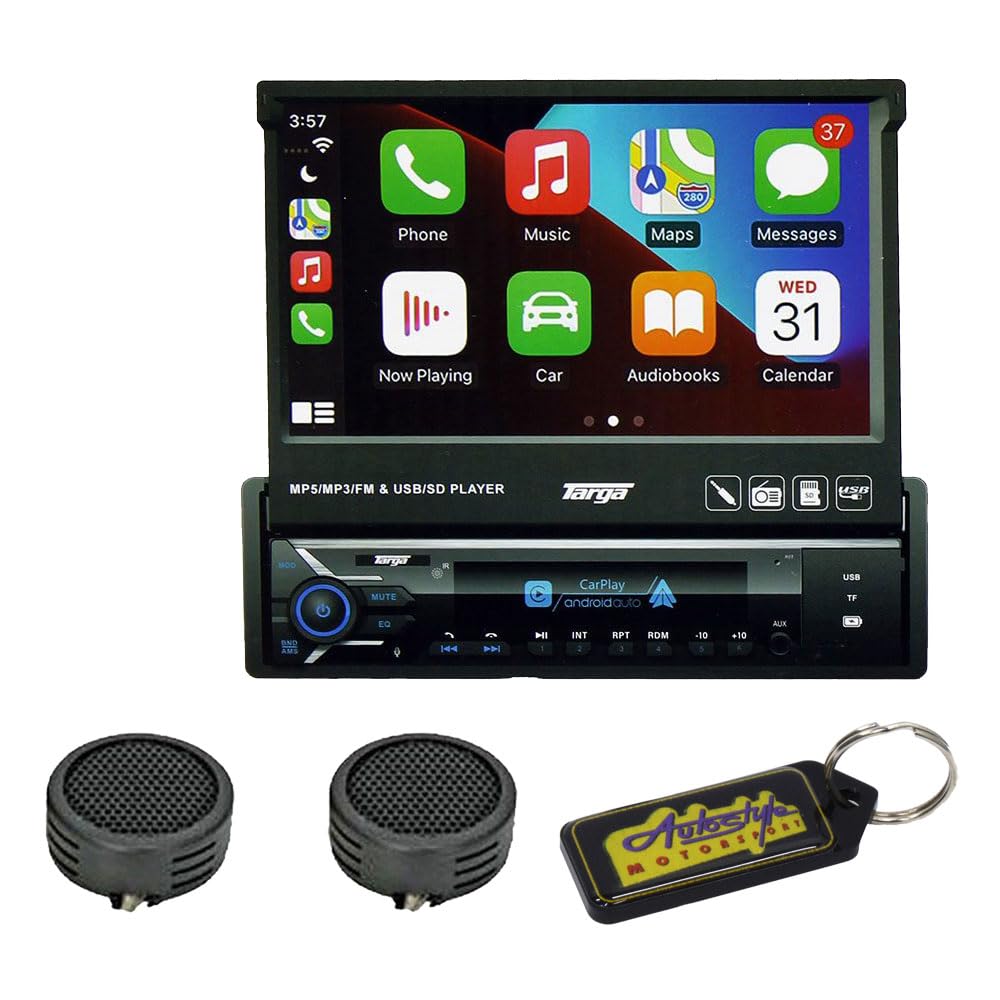
మూర్తి 1: Targa TID-AUT700 unit with its 7-inch motorized touchscreen extended. The screen displays a user interface with icons for Phone, Music, Maps, Messages, Now Playing, Car, Audiobooks, and Calendar. Below the screen, the main unit features control buttons, a volume knob, and ports for USB and SD cards.
2. సెటప్ మరియు ఇన్స్టాలేషన్
Proper installation is crucial for optimal performance and safety. It is highly recommended that a qualified professional install this unit. Incorrect wiring can cause damage to the unit or your vehicle.
2.1 వైరింగ్ కనెక్షన్లు
- శక్తి: Connect the yellow wire to a constant 12V power source, the red wire to an accessory 12V power source (switched with ignition), and the black wire to a chassis ground.
- స్పీకర్లు: Connect speaker wires to the corresponding vehicle speaker wires. Ensure correct polarity (+/-) for each speaker. The unit supports 4-channel output.
- యాంటెన్నా: Connect the vehicle's radio antenna to the unit's antenna input.
- Remote Control Wire: If applicable, connect the blue/white wire to the ampలైఫైయర్ రిమోట్ టర్న్-ఆన్ లీడ్.
- పార్కింగ్ బ్రేక్ వైర్: For safety, connect the parking brake wire to the vehicle's parking brake circuit. Video playback may be restricted unless the parking brake is engaged.
2.2 యూనిట్ మౌంట్
Install the unit into a standard single-DIN opening using the provided mounting sleeve and hardware. Secure the unit firmly to prevent movement during vehicle operation.
2.3 Detachable Face Installation
To attach the detachable face panel, align the panel with the main unit and gently push until it clicks into place. To remove, press the release button (if present) and pull the panel away from the unit. Store the detachable face in a protective case when not in use.
3. ఆపరేటింగ్ సూచనలు
3.1 పవర్ ఆన్/ఆఫ్
- పవర్ ఆన్: నొక్కండి PWR/MODE button or turn the ignition key to the ACC or ON position.
- పవర్ ఆఫ్: నొక్కండి మరియు పట్టుకోండి PWR/MODE button for a few seconds, or turn the ignition key to the OFF position.
3.2 Motorized Screen Operation
The 7-inch screen is motorized. Use the dedicated screen open/close buttons (often labeled with arrows or a screen icon) on the unit or remote control to extend or retract the display. Ensure no obstructions are in the screen's path.
3.3 టచ్స్క్రీన్ ఇంటర్ఫేస్
Navigate the unit's functions by touching the icons and menus on the 7-inch display. Swipe gestures may be used for scrolling through lists or pages. The interface is designed to be intuitive, similar to a smartphone or tablet.
3.4 Radio (AM/FM with RDS)
- రేడియో మోడ్ను ఎంచుకోండి: నొక్కండి మోడ్ button until 'Radio' or 'FM/AM' is displayed.
- ఆటో స్కాన్: నొక్కండి స్కాన్ button to automatically search and store strong stations.
- మాన్యువల్ ట్యూనింగ్: ఉపయోగించండి ట్యూన్ +/- ఫ్రీక్వెన్సీని మాన్యువల్గా సర్దుబాటు చేయడానికి బటన్లు.
- ప్రీసెట్లు: Touch and hold a preset number on the screen to save the current station.
3.5 Bluetooth Hands-Free
- జత చేయడం: On your mobile device, search for Bluetooth devices and select 'TID-AUT700' (or similar name). Enter the default PIN (usually '0000') if prompted.
- కాల్స్ చేయడం: Use the touchscreen dial pad or access your phone's contacts via the unit.
- కాల్లను స్వీకరించడం: నొక్కండి జవాబు button on the screen to accept an incoming call.
- ఆడియో స్ట్రీమింగ్: Once paired, you can stream audio from your device to the unit.
3.6 Media Playback (USB/SD/Aux)
- USB/SD: Insert a USB drive into the USB port or an SD card into the SD card slot. The unit should automatically switch to the corresponding mode or allow selection from the source menu.
- ఆక్స్ ఇన్పుట్: Connect an external audio device (e.g., MP3 player) to the 3.5mm Aux-in jack using an audio cable. Select 'AUX' from the source menu.
- File మద్దతు: The unit supports MP3, MP5, and other common audio/video formats.
3.7 సౌండ్ సెట్టింగ్లు
Access the audio settings menu on the touchscreen to adjust equalizer (EQ) presets, bass, treble, balance, and fader settings to customize your listening experience.
3.8 కార్ప్లే / ఆండ్రాయిడ్ ఆటో
Connect your compatible iPhone or Android smartphone via USB to enable CarPlay or Android Auto. This allows you to access navigation, music, messages, and other apps directly from the unit's touchscreen, providing a safer and more integrated driving experience.
4. నిర్వహణ
4.1 యూనిట్ శుభ్రపరచడం
- Use a soft, dry cloth to wipe the unit's surface.
- For the touchscreen, use a soft, lint-free cloth slightly dampస్క్రీన్ క్లీనర్ ద్రావణంతో పూత పూయబడింది. కఠినమైన రసాయనాలు లేదా రాపిడి పదార్థాలను నివారించండి.
- Ensure the unit is powered off before cleaning.
4.2 Detachable Face Care
When the face panel is detached, store it in its protective case to prevent scratches or damage. Avoid exposing it to direct sunlight or extreme temperatures.
5. ట్రబుల్షూటింగ్
If you encounter issues with your Targa TID-AUT700, refer to the following common problems and solutions:
| సమస్య | సాధ్యమైన కారణం | పరిష్కారం |
|---|---|---|
| యూనిట్కు పవర్ లేదు. | Incorrect wiring; blown fuse; ignition off. | Check power connections (yellow, red, black wires). Inspect vehicle's fuse box and unit's fuse. Ensure ignition is on. |
| స్పీకర్ల నుండి శబ్దం లేదు. | Speaker wires disconnected; volume too low; mute function active. | Verify speaker wire connections. Increase volume. Check if the unit is muted. |
| Bluetooth pairing failure. | పరికరం జత చేసే మోడ్లో లేదు; తప్పు పిన్; జోక్యం. | Ensure both devices are in pairing mode. Re-enter PIN '0000'. Move closer to the unit. Restart both devices. |
| Screen not extending/retracting. | Obstruction; motor malfunction; power issue. | Check for any physical obstructions. Ensure unit has stable power. If problem persists, contact support. |
| టచ్స్క్రీన్ స్పందించలేదు. | సాఫ్ట్వేర్ లోపం; స్క్రీన్ దెబ్బతినడం. | Perform a soft reset (refer to unit's reset button, usually a small pinhole). If damage is visible, contact support. |
ఈ పరిష్కారాలు సమస్యను పరిష్కరించకపోతే, దయచేసి కస్టమర్ మద్దతును సంప్రదించండి.
6. స్పెసిఫికేషన్లు
- మోడల్: TID-AUT700
- ప్రదర్శన: 7-inch Motorized Touchscreen
- ఫేస్ ప్యానెల్: వేరు చేయగలిగింది
- ఆడియో అవుట్పుట్: 65W x 4
- రేడియో ట్యూనర్: AM/FM with RDS
- కనెక్టివిటీ: Bluetooth Hands-free, Aux Input, USB Input, SD Card Input
- అనుకూలత: కార్ప్లే, ఆండ్రాయిడ్ ఆటో
- UPC: 745853662875
7. వారంటీ సమాచారం
This Targa TID-AUT700 unit comes with a 6 నెలల వారంటీ from the date of purchase. This warranty covers manufacturing defects under normal use. It does not cover damage caused by improper installation, accident, misuse, abuse, neglect, unauthorized modification, or normal wear and tear. Please retain your proof of purchase for warranty claims.
8. మద్దతు
For further assistance, technical support, or warranty inquiries, please contact your retailer or the manufacturer's customer service department. Have your model number (TID-AUT700) and proof of purchase ready when contacting support.